SQL-Engineering-Handbook
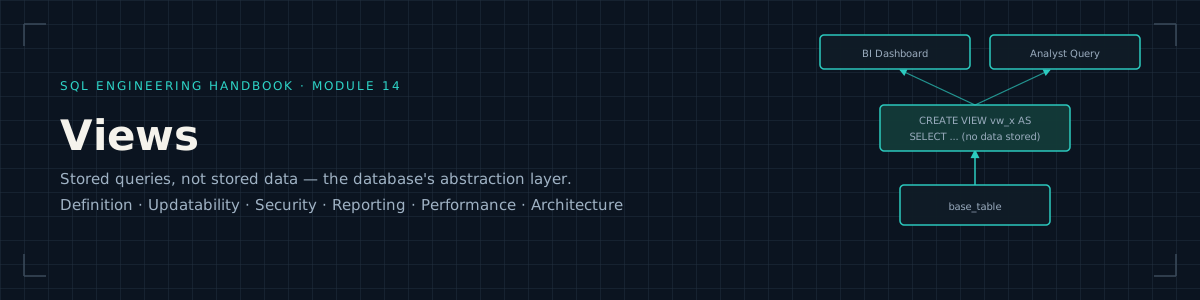






Part of the SQL Engineering Handbook
Track: SQL Engineering Handbook Prerequisite Module: 13 — Set Operators Next Module: 15 — Indexes Difficulty: Intermediate → Advanced Estimated Completion Time: 5–7 hours
Why Views Matter
Every query you’ve written in Modules 1–13 has been disposable — you write it,
run it, throw it away. Real analytics engineering doesn’t work that way.
Business logic gets reused across dashboards, reports, and downstream
pipelines, and if that logic lives only inside individual .sql files
scattered across a team’s laptops, it drifts. Two analysts compute “active
customer” differently. A finance report and a sales report disagree on
revenue by $40,000 because one excludes refunds and the other doesn’t, and
nobody can find where the discrepancy was introduced.
A View is SQL’s answer to this problem: a named, reusable, version-controllable definition of business logic that lives in the database itself, not in someone’s local script. This module is where the Handbook shifts from “writing queries” to “designing the data layer other people build on.” That shift — thinking about who consumes what you build, and how it can break — is the actual job of a Data Analyst or Analytics Engineer beyond the interview stage.
Views are also, not coincidentally, one of the most common whiteboard and take-home topics in Analytics Engineering interviews, because they test whether a candidate understands abstraction, not just syntax.
Learning Objectives
By the end of this module you will be able to:
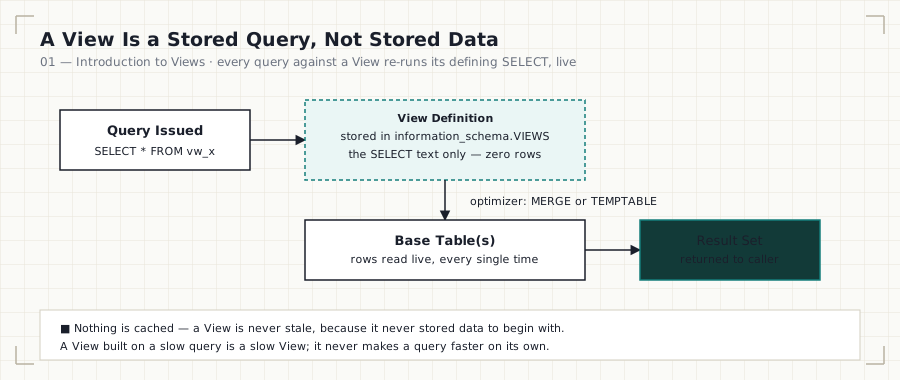
- Explain what a View is at the engine level (a stored query, not stored data) and why that distinction has real performance consequences
- Design Views as a logical abstraction layer over normalized schemas
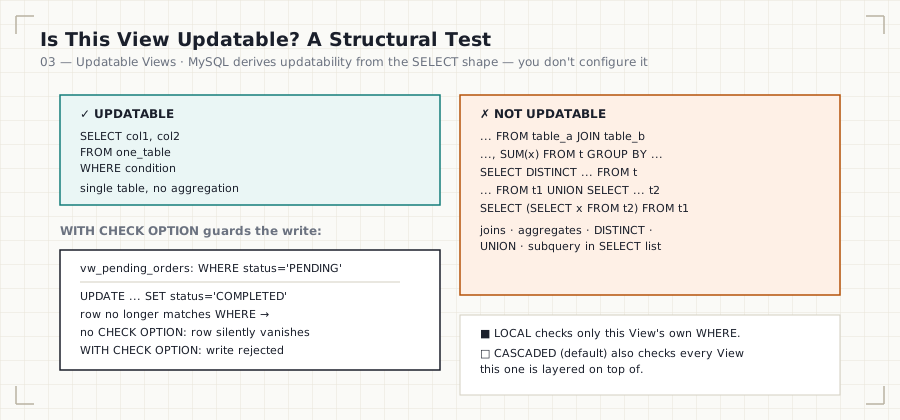
- Differentiate updatable vs. non-updatable Views and know exactly which SQL constructs disqualify updatability
- Use Views for column- and row-level security (restricting access without duplicating data)
- Apply
WITH CHECK OPTIONto prevent silent data integrity violations through updatable Views - Build nested Views and reason about dependency chains and their maintenance cost
- Diagnose View performance problems, including the “nested View” query-planner trap
- Compare Views conceptually to Materialized Views and understand where MySQL diverges from Postgres/Snowflake/BigQuery on this
- Recognize how Views map onto real BI/semantic-layer architecture (Looker, dbt, Power BI) used in production analytics teams
- Answer View-related interview questions with engineering depth, not textbook definitions
Prerequisites
This module assumes fluency with everything through Module 13:
SELECT fundamentals · Aggregations · Joins (all types) · CASE ·
Subqueries · CTEs · Window Functions · Date Functions · String Functions ·
NULL handling (COALESCE, IFNULL, NULLIF) · Advanced Aggregations
(ROLLUP, GROUPING SETS) · UNION / INTERSECT / EXCEPT
If any of the above feels shaky, Views will be frustrating rather than illuminating — a View is only ever as good as the query inside it. Go back before continuing.
Quick Start
This module runs against the shared practice schema defined in
00_Schema:
mysql -u root -p your_database < ../00_Schema/01_CREATE_TABLES.sql
mysql -u root -p your_database < ../00_Schema/02_INSERT_DATA.sql
mysql -u root -p your_database < 01_INTRODUCTION_TO_VIEWS.sql
Views are one of the few SQL topics where reading the syntax teaches you
almost nothing — open each .sql file in a MySQL 8.0+ client and actually
run every statement. You have to watch a View break to understand why the
rule exists.
What This Module Covers
| # | Chapter | Diagram | Lines | Size |
|---|---|---|---|---|
| 01 | Introduction to Views · .sql |
view-lifecycle.svg | 166 + 212 | 8.6 KB + 8.6 KB |
| 02 | Creating Views · .sql |
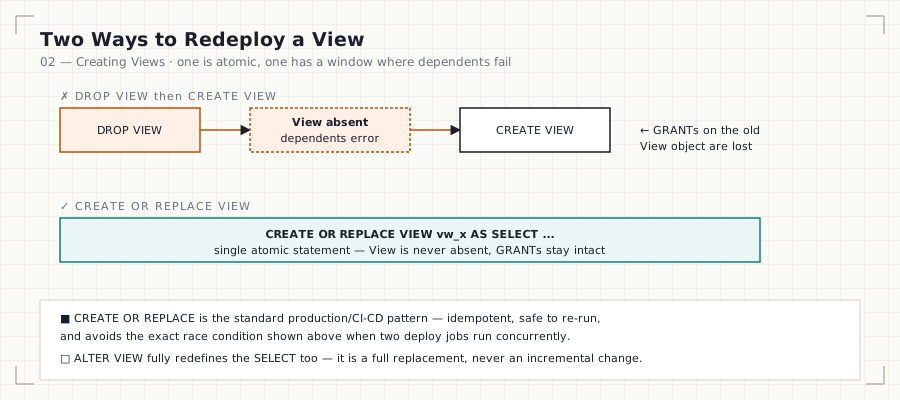
view-create-replace.svg | 124 + 102 | 5.8 KB + 3.7 KB |
| 03 | Updatable Views · .sql |
view-updatability-check.svg | 128 + 98 | 6.9 KB + 4.1 KB |
| 04 | View Security · .sql |
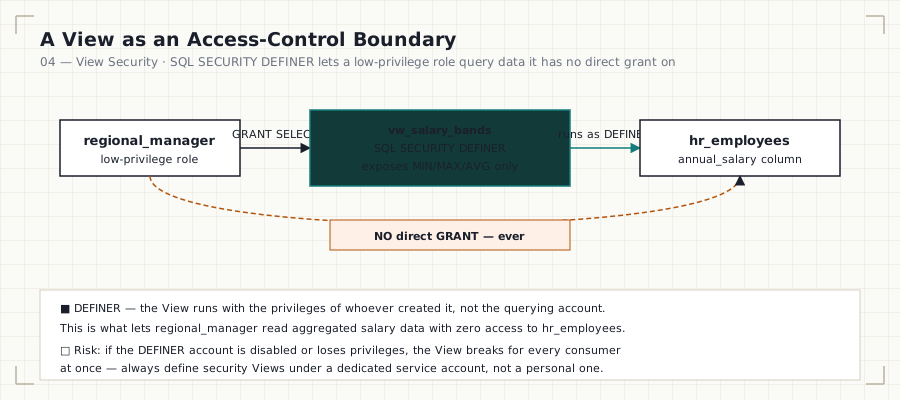
view-security-definer.svg | 131 + 101 | 7.2 KB + 4.3 KB |
| 05 | Business Reporting Views · .sql |
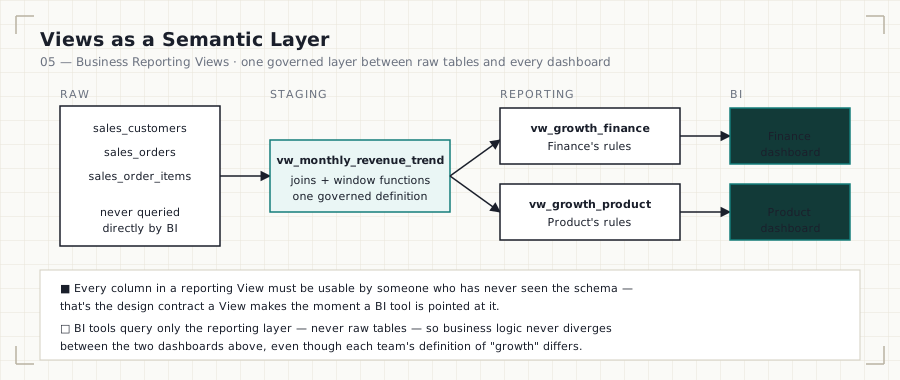
view-semantic-layer.svg | 127 + 125 | 7.6 KB + 5.3 KB |
| 06 | View Limitations · .sql |
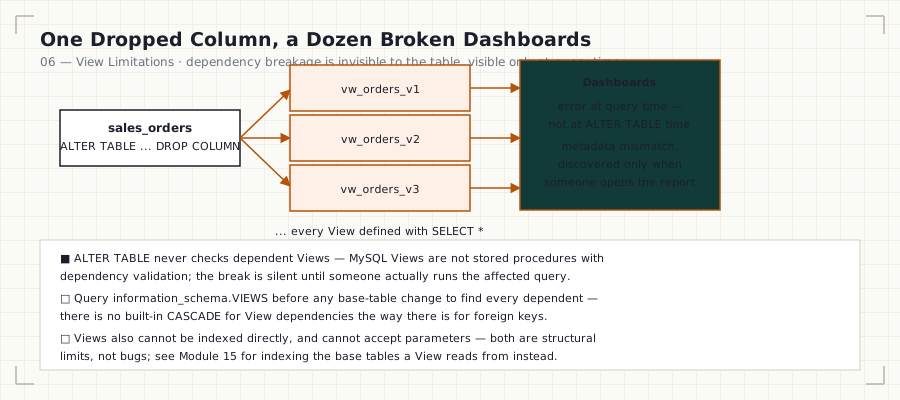
view-dependency-breakage.svg | 134 + 116 | 7.4 KB + 4.9 KB |
| 07 | View Performance · .sql |
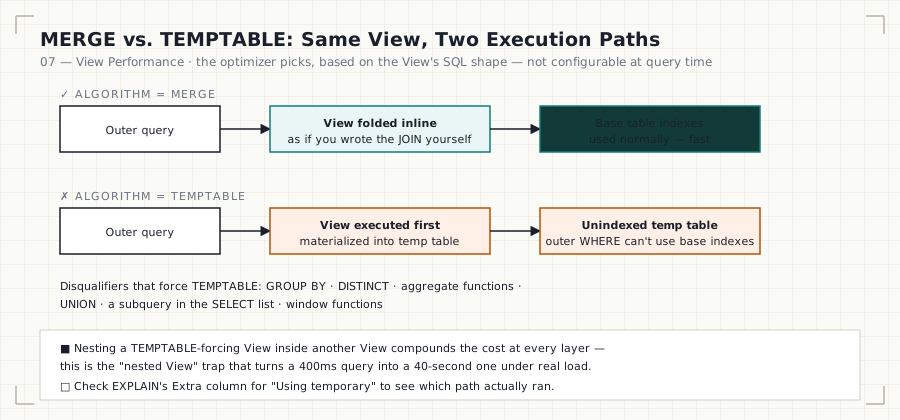
view-merge-temptable.svg | 120 + 105 | 7.6 KB + 5.2 KB |
| 08 | Real-World Case Studies · .sql |
view-production-stack.svg | 139 + 155 | 7.8 KB + 6.4 KB |
| 09 | Interview Guide | view-interview-tiers.svg | 96 | 6.1 KB |
| 10 | Practice Problems | view-practice-ladder.svg | 46 | 3.4 KB |
| 11 | Solutions | — | 193 | 7.4 KB |

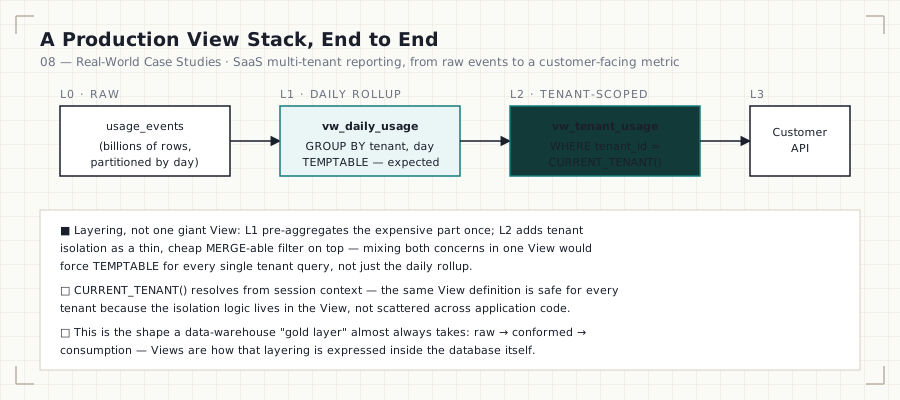
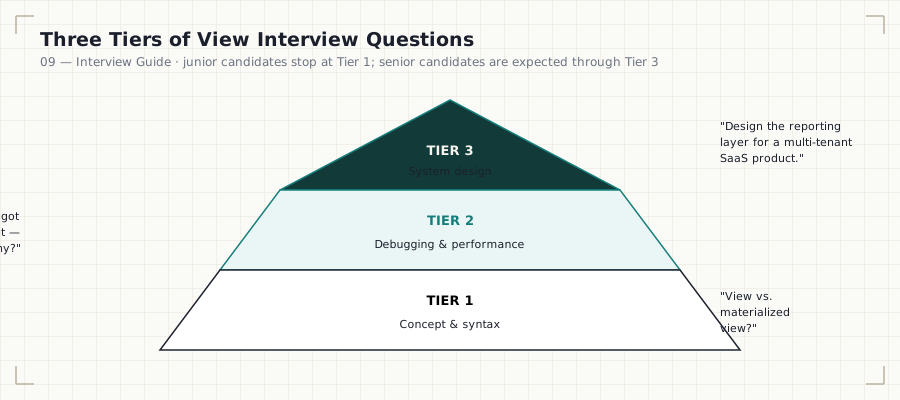
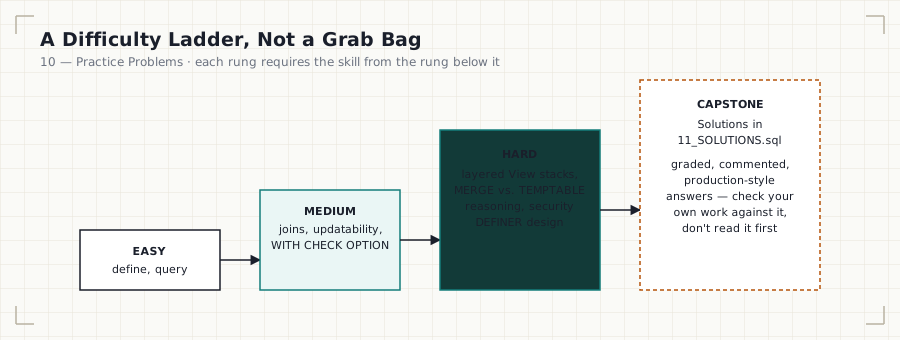
Totals: 10 .md files, 9 .sql files, 11 diagrams (10 topic diagrams +
1 banner) — 2,418 combined lines, ~118.2 KB of documentation and runnable
SQL.
The Diagrams
Every diagram in this module is a standalone SVG in
assets/diagrams/, embedded directly in its
corresponding chapter — no external image hosting, so they render correctly
on GitHub, cloned locally, or on GitHub Pages.




Folder Structure
14_VIEWS/
├── README.md                            → you are here
├── 01_INTRODUCTION_TO_VIEWS.md/.sql     → what a View is, engine-level mechanics
├── 02_CREATING_VIEWS.md/.sql            → CREATE/ALTER/DROP, syntax, options
├── 03_UPDATABLE_VIEWS.md/.sql           → updatability rules, WITH CHECK OPTION
├── 04_VIEW_SECURITY.md/.sql             → column/row security, SQL SECURITY clause
├── 05_BUSINESS_REPORTING_VIEWS.md/.sql  → semantic-layer style reporting Views
├── 06_VIEW_LIMITATIONS.md/.sql          → what Views can't do, common failure modes
├── 07_VIEW_PERFORMANCE.md/.sql          → EXPLAIN, view merging vs. temptable
├── 08_REAL_WORLD_CASE_STUDIES.md/.sql   → multi-View architecture + materialized view comparison
├── 09_INTERVIEW_GUIDE.md                → structured interview prep
├── 10_PRACTICE_PROBLEMS.md              → unsolved problems, by difficulty
├── 11_SOLUTIONS.sql                     → solutions to 10_PRACTICE_PROBLEMS.md
└── assets/
    ├── images/
    │   └── hero-banner.svg              → module banner
    └── diagrams/                        → one topic diagram per chapter (10 SVGs)
        ├── view-lifecycle.svg
        ├── view-create-replace.svg
        ├── view-updatability-check.svg
        ├── view-security-definer.svg
        ├── view-semantic-layer.svg
        ├── view-dependency-breakage.svg
        ├── view-merge-temptable.svg
        ├── view-production-stack.svg
        ├── view-interview-tiers.svg
        └── view-practice-ladder.svg
Learning Flow
Work through the files in numeric order. Each .md file introduces the
concept; the paired .sql file is the lab — open it in a MySQL 8.0+ client
and actually run every statement.
01 → 02 → 03 → 04 → 05 → 06 → 07 → 08 → 09 → 10 → 11
Concept  Build  Rules  Secure  Apply  Limits  Tune  Architect  Interview  Practice  Verify
Do not skip 06_VIEW_LIMITATIONS.md. It’s the file most learners are
tempted to rush past, and it’s the one that shows up as a trick question in
interviews.
Engineering Mindset
Treat every View you write in this module as if a BI tool (Tableau, Looker, Power BI) or a downstream analyst with no SQL background is going to query it tomorrow. Ask, for every View:
- If the base table’s schema changes, does this View silently return wrong data, or does it fail loudly?
- If someone runs
SELECT *against this View in a dashboard, is the result something you’d be comfortable putting in front of a VP? - Does this View’s name describe what business question it answers, not just what tables it touches?
This is the difference between a View as a syntax exercise and a View as a production artifact.
Business Motivation
Views exist because three problems recur in every company with more than one analyst:
- Duplication of logic. “Active customer,” “gross margin,” “churned subscriber” all require multi-table joins and business rules. Without a View, that logic gets copy-pasted into dozens of ad hoc queries, and each copy silently diverges over time.
- Access control without data duplication. HR needs payroll analysts to see salary bands, not individual salaries. Duplicating the table with masked columns is a maintenance nightmare; a View is not.
- Decoupling consumers from schema. BI tools and downstream pipelines should query a stable interface, not raw tables that get refactored as the warehouse evolves.
Architecture Overview
A View has no independent existence at the storage layer (with one
MySQL-specific exception you’ll meet in 07_VIEW_PERFORMANCE.md:
temptable algorithm materialization). Every time it’s queried, MySQL
substitutes the View’s stored SELECT into the outer query and optimizes
the whole thing together, or in some cases executes the View first into a
temporary table. Understanding which of these happens is the single
highest-leverage piece of View knowledge for a working analyst — see
Module 07.
Production Applications
- BI semantic layers — Looker’s LookML and dbt’s
models/marts/layer are conceptually Views (or View-like) sitting between raw warehouse tables and dashboards. - Row/column-level security — restricting a
payroll_viewso regional managers only see their own region, without duplicating thehr_salariestable. - API/report stability — a reporting team can rebuild
sales_ordersinternals without breakingvw_monthly_revenue, as long as the View’s output contract stays stable. - Legacy system abstraction — Views sit in front of denormalized or legacy schemas so new tooling can query a clean interface.

Performance Considerations
MySQL Views can execute via two algorithms — MERGE or TEMPTABLE — and
the choice is made by the optimizer, not fully controllable by you, though
ALGORITHM can be hinted. MERGE folds the View into the outer query
(fast, uses base-table indexes normally). TEMPTABLE materializes the
View’s result into a throwaway temp table first (can defeat indexing,
especially disastrous when a View containing GROUP BY, DISTINCT,
aggregate functions, or a subquery in the SELECT list gets nested inside
another View or joined at scale). This is covered in depth, with EXPLAIN
walkthroughs, in 07_VIEW_PERFORMANCE.md.
Common Mistakes
- Treating a View as a performance optimization. It isn’t — it’s an abstraction, and can be a performance liability if nested carelessly.
- Using
SELECT *inside a View definition — any schema change to the base table silently changes the View’s output columns. - Assuming all Views are updatable. Most Views involving joins,
aggregation,
DISTINCT,UNION, or subqueries in theSELECTlist are not. - Nesting Views 3+ levels deep “because it works,” without checking
EXPLAINfor aTEMPTABLEcascade. - Forgetting
WITH CHECK OPTIONon an updatable, filtered View — allowing inserts that immediately vanish from the View’s own result set.
Interview Preparation
09_INTERVIEW_GUIDE.md is structured as conceptual questions,
scenario/design questions, and a “spot the bug” set using real View
definitions. Analytics Engineering interviews test Views far more than
junior Data Analyst interviews do — if you’re targeting AE roles, do not
skip this file.
Practice Workflow
- Read the
.mdfile fully before touching SQL. - Run every statement in the paired
.sqlfile against your own MySQL instance — don’t just read it. - Attempt
10_PRACTICE_PROBLEMS.mdclosed-book. - Check
11_SOLUTIONS.sqlonly after attempting, and diff your approach against the alternative solutions provided.
Module Checklist
- 01 — Can explain what a View is at the engine level, unprompted
- 02 — Can create, alter, and drop a View with correct syntax
- 03 — Can predict whether a given View is updatable without running it
- 04 — Can design a security View using
SQL SECURITYcorrectly - 05 — Can build a business-reporting View that would survive a BI tool pointing at it
- 06 — Can list View limitations from memory
- 07 — Can read
EXPLAINoutput and identifyMERGEvsTEMPTABLE - 08 — Can design a multi-View reporting architecture
- 09 — Can answer all interview guide questions without notes
- 10/11 — All practice problems solved and verified
Related Modules
- 11 — NULL Handling & Data Cleaning — Views are a common place to centralize cleaning logic
- 15 — Indexes — directly extends the performance
discussion in
07_VIEW_PERFORMANCE.md
Further Reading
- MySQL 8.0 Reference Manual — CREATE VIEW Syntax
- MySQL 8.0 Reference Manual — View Processing Algorithms
- dbt Documentation — Views vs. Tables in the modeling layer
Handbook Navigation
This module is one part of the full SQL Engineering Handbook — a
16-module, progressively-built curriculum sharing a single practice schema
(00_Schema) end to end.
| # | Module | Contents | Status |
|---|---|---|---|
| — | Resources | Books, blogs, docs, certifications, communities, datasets | ✅ |
| 00 | Schema | Practice database DDL, seed data, and ERD used by every later module | ✅ |
| 01 | Fundamentals | SELECT, WHERE, ORDER BY, LIMIT, aliasing |
✅ |
| 02 | Aggregations | COUNT, SUM, AVG, MIN/MAX, GROUP BY, HAVING |
✅ |
| 03 | Joins | Inner, left, right, full, cross, self joins + performance audit | ✅ |
| 04 | Subqueries | Scalar, correlated, EXISTS, derived tables, subquery-to-join rewrites |
✅ |
| 05 | CASE WHEN | Conditional logic and business-rule encoding | ✅ |
| 06 | CTEs | Common Table Expressions, staged pipelines, business classification | ✅ |
| 07 | Window Functions | ROW_NUMBER, RANK, LAG/LEAD, PARTITION BY |
✅ |
| 08 | Window Business Cases | HR, Sales, E-Commerce, Banking, and Finance window-function case studies | ✅ |
| 09 | Date Functions | Date arithmetic, formatting, range queries | ✅ |
| 10 | String Functions | String manipulation and data cleaning | ✅ |
| 11 | NULL Handling & Data Cleaning | COALESCE, NULLIF, data-quality patterns |
✅ |
| 12 | Advanced Aggregations | Conditional and multi-level aggregation | ✅ |
| 13 | Set Operators | UNION, INTERSECT, EXCEPT, reconciliation queries |
✅ |
| 14 | Views (this module) | Definition, updatability, security, reporting, limitations, performance, architecture | ✅ |
| 15 | Indexes | B-Tree, composite, covering indexes, reading EXPLAIN |
✅ |