SQL-Engineering-Handbook
06 — View Limitations
Module: 14 — Views Previous: 05 — Business Reporting Views · Next: 07 — View Performance
Learning Objectives
- List the hard structural limitations of MySQL Views
- Understand dependency-breakage failure modes
- Recognize why Views cannot take parameters and what the workarounds are
- Know what
information_schemaqueries to run before modifying a base table
Concept Overview
Views are powerful, but they are not tables, not stored procedures, and not a general-purpose abstraction layer. This file exists specifically because these limitations are where production incidents and interview trick questions both concentrate.
Why This Exists
Every engineer eventually reaches for a View to solve a problem it isn’t designed for — a parameterized report, an indexable derived dataset, a way to enforce a constraint. Knowing the boundary in advance prevents both wasted engineering time and production breakage.
Business Context
An analyst tries to build vw_orders_by_date_range intending to pass a date range at query time the way a stored procedure parameter would work. Views don’t support parameters — the correct pattern is a View with WHERE applied at the calling query, or a stored procedure/function instead. A team that doesn’t know this loses a sprint discovering it the hard way.
Where Companies Use It — Where Teams Hit the Wall
- Reporting teams discover a “parameterized View” isn’t possible and switch to filtering the underlying View at query time, or use a stored procedure.
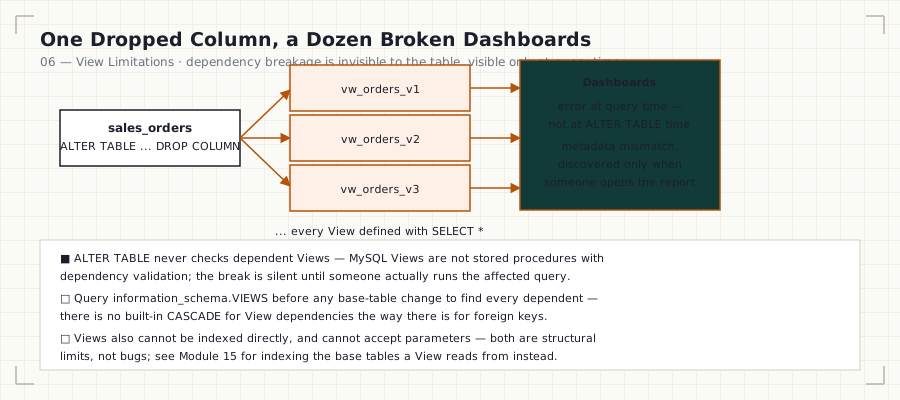
- Platform teams discover that dropping a base table column breaks every View built on
SELECT *— sometimes across a dozen dependent Views discovered only when dashboards start erroring. - Data platform teams discover indexes cannot be created directly on a View — only on base tables — which drives the transition conversation into Module 15 (Indexes) and Module 08’s materialized-view discussion.
Real Business Examples
-- This does NOT work — Views cannot accept parameters:
-- CREATE VIEW vw_orders_by_range(p_start DATE, p_end DATE) AS ...  ❌ invalid syntax

-- Correct pattern: filter the View at query time
SELECT * FROM vw_completed_order_revenue
WHERE region = 'APAC';   -- filtering happens outside the View definition
Syntax — What’s Disallowed
CREATE VIEW view_name AS
SELECT ... FROM t
ORDER BY col          -- allowed, but ignored unless the View has no
                       -- outer ORDER BY, and is not merged into a larger query
LIMIT 10;              -- allowed inside a View, but rarely useful — LIMIT
                       -- applies to the View's own result set, not filtered
                       -- input, unless paired carefully with subqueries
Visual Explanation
CAN a View do this?
  ✅ Filter/aggregate/join base tables
  ✅ Expose a subset of columns
  ✅ Be queried like a table
  ✅ Be nested inside other Views

  ❌ Accept parameters like a function/procedure
  ❌ Be directly indexed (only base tables can be indexed)
  ❌ Enforce constraints (NOT NULL, UNIQUE) beyond what the base table already enforces
  ❌ Guarantee performance improvement over its underlying query
  ❌ Survive a base-table column rename/drop without breaking (if referenced)
Step-by-Step Walkthrough — Dependency Auditing Before a Schema Change
- Before altering or dropping a column, query
information_schema.VIEWSfor any View definition text referencing that table/column. - There is no native
CASCADEdependency tracking for Views in MySQL the way foreign keys haveON DELETE CASCADE— you must search definition text yourself. - Test every dependent View after the base table change, in a staging environment, before deploying to production.
SELECT TABLE_NAME, VIEW_DEFINITION
FROM information_schema.VIEWS
WHERE TABLE_SCHEMA = DATABASE()
  AND VIEW_DEFINITION LIKE '%annual_salary%';
Engineering Notes
MySQL does track View-to-table dependency for the purpose of blocking a DROP TABLE in some configurations, but it does not block a column-level ALTER TABLE ... DROP COLUMN or RENAME COLUMN even when Views depend on that exact column — the failure surfaces later, at View query time, not at ALTER TABLE time. This asymmetry is the single most common source of “the report broke in production but the migration passed CI” incidents in teams that lean heavily on Views.
Production Considerations
Maintain a lightweight internal registry (even a simple query against information_schema.VIEWS, run in CI before any migration touching a table with dependent Views) — treat View dependency auditing as a required migration-review step, the same way foreign key impact is reviewed.
Performance Notes
A View never improves query performance versus running the equivalent SQL directly — a common misconception. Any performance difference comes from how the View is written (e.g., an analyst using a well-optimized View instead of writing a naive ad hoc join), not from the View mechanism itself.
Edge Cases
ORDER BYinside a View definition is honored only when the View is queried without further transformation that would reorder results (e.g., an outerJOINorUNION) — don’t rely on a View’s internalORDER BYfor guaranteed output order in a complex consuming query.- Views cannot reference session variables in a way that’s safely reusable across different sessions with different variable values — this breaks the “one definition, many consumers” model Views are built for.
- Recursive View definitions (a View referencing itself) are not supported.
Best Practices
- Never use
SELECT *inside a View — this alone prevents the most common breakage mode. - Run a dependency search against
information_schema.VIEWSbefore every schema migration. - For anything requiring parameters, use a stored procedure, a parameterized query at the application layer, or a table-valued approach — not a View.
Common Mistakes
| Mistake | Consequence |
|---|---|
Assuming DROP TABLE protection extends to ALTER TABLE ... DROP COLUMN |
Silent View breakage at query time |
| Trying to parameterize a View | Invalid syntax; wasted engineering time |
| Expecting a View to be indexable | Not possible; must index the base table |
Interview Questions
- “Can you pass a parameter into a View?” — No; Views are fixed queries. Use a stored procedure or filter at the calling query.
- “If you drop a column a View depends on, when does it break?” — At the View’s next query execution, not at the
ALTER TABLEstep. - “Can you put an index on a View?” — No, indexes exist only on base tables; a View inherits whatever indexing the base tables have.
Summary
Views are not parameterizable, not directly indexable, and do not natively track column-level dependency the way foreign keys do. Understanding these boundaries prevents both wasted design effort and unplanned production breakage.
Practice Challenges
- Write the
information_schemaquery you’d run before renamingsales_order_items.unit_price, and list every View in this module it would find. - Propose two alternative approaches to a “parameterized View” requirement, and state the tradeoff of each.
Further Reading
- MySQL 8.0 Reference Manual — Restrictions on Views