SQL-Engineering-Handbook
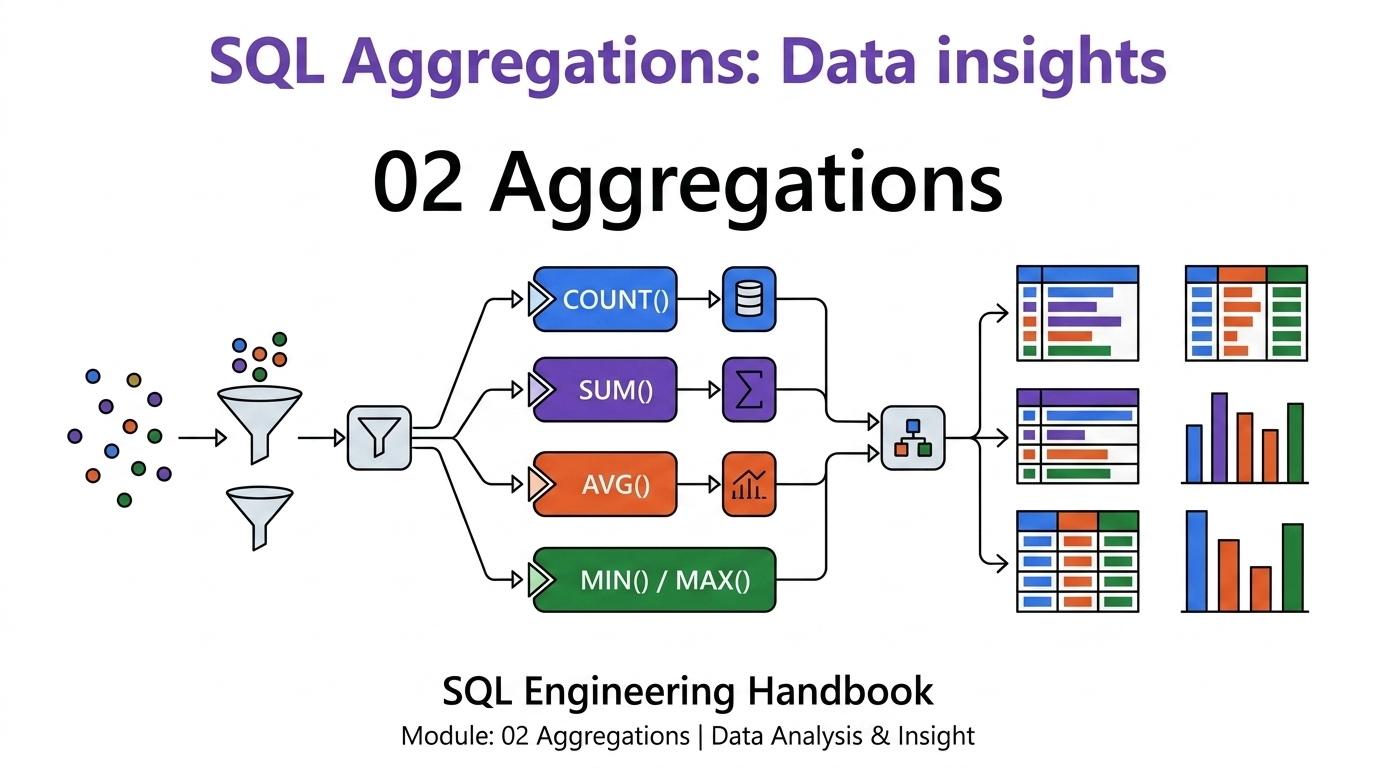
📚 Module Navigation
| Lesson | Topic | Open |
|---|---|---|
| 01 | COUNT() | 01_COUNT.md |
| 02 | SUM() | 02_SUM.md |
| 03 | AVG() | 03_AVG.md |
| 04 | MIN() & MAX() | 04_MIN_MAX.md |
| 05 | GROUP BY | 05_GROUP_BY.md |
| 06 | HAVING | 06_HAVING.md |
| 07 | Conditional Aggregation | 07_CONDITIONAL_AGGREGATION.md |
| 08 | Business Cases | 08_BUSINESS_CASES.md |
Module 02 — Aggregations
Introduction
Aggregation is where SQL stops answering “what are the rows” and starts answering “what do the rows mean.” Every dashboard tile, every KPI, every executive summary in every company that uses a relational database is, underneath, an aggregation query. This module builds that skill from COUNT(*) up to full multi-clause business reports.
Why Aggregations Matter
Raw rows are not insight. “Here are 50,000 order records” tells a business nothing actionable. “Total revenue this month is $2.4M, up 12% from last month, driven mainly by the Nagpur region” — that sentence is entirely the output of SUM, GROUP BY, and comparison logic. Aggregation is the layer that turns data into decisions.
Business Motivation
Every function in this module maps directly to a question a real business asks daily:
| Business Question | SQL Concept |
|---|---|
| “How many customers do we have?” | COUNT() |
| “What’s our total revenue?” | SUM() |
| “What’s our average order value?” | AVG() |
| “What was our biggest sale? Our smallest?” | MIN() / MAX() |
| “Break that down by region.” | GROUP BY |
| “Only show regions above $1M.” | HAVING |
| “Show active vs. inactive counts side by side.” | Conditional Aggregation |
Learning Objectives
By the end of this module, you will be able to:
- Choose correctly between
COUNT(*),COUNT(column), andCOUNT(DISTINCT column) - Compute totals and averages while correctly reasoning about
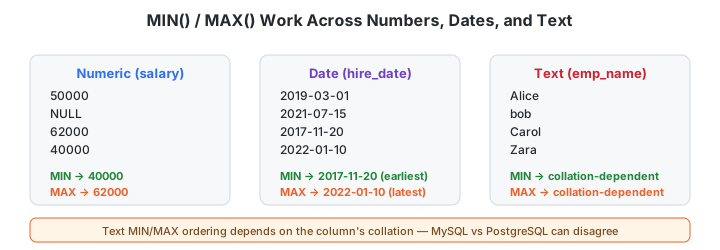
NULLbehavior - Find extremes (
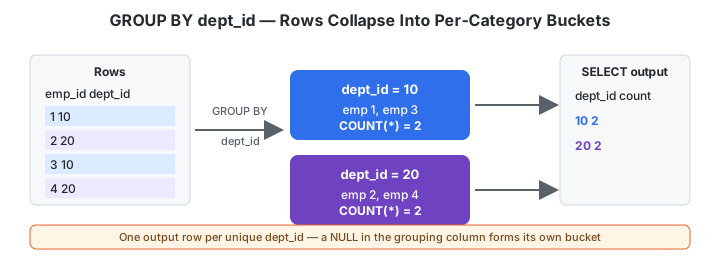
MIN/MAX) across numeric, date, and text columns - Collapse row-level data into per-category summaries with
GROUP BY - Filter those summaries with
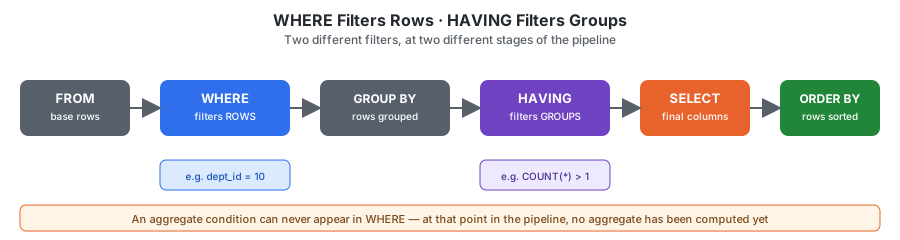
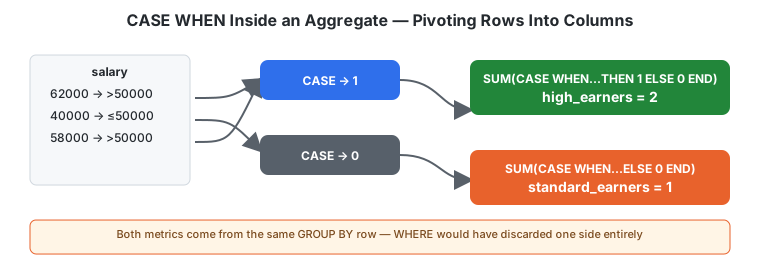
HAVING, and know precisely when to useHAVINGvs.WHERE - Pivot category values into side-by-side metrics using conditional aggregation
- Compose all of the above into realistic, multi-clause business reports
Prerequisites
Completion of Module 01 — Fundamentals (SELECT, WHERE, ORDER BY, JOIN basics) and familiarity with the module’s schema (below). No prior aggregation knowledge assumed.
Module Structure
| # | File | Covers |
|---|---|---|
| 01 | COUNT() | Row counting, DISTINCT, NULL behavior |
| 02 | SUM() | Totals, NULL handling, empty-group behavior |
| 03 | AVG() | Means, the “average of averages” trap |
| 04 | MIN() & MAX() | Extremes across numeric/date/text |
| 05 | GROUP BY | Per-category aggregation, the GROUP BY rule |
| 06 | HAVING | Group-level filtering, WHERE vs. HAVING |
| 07 | Conditional Aggregation | CASE WHEN inside aggregates, FILTER |
| 08 | Business Cases | Full multi-clause reports across 5 domains |
Each .md file has a matching .sql file with fully worked, business-scenario queries, expected output, and engineering notes.
Functions Covered
COUNT() · COUNT(DISTINCT) · SUM() · AVG() · MIN() · MAX() · GROUP BY (single- and multi-column) · HAVING · CASE WHEN inside aggregates · PostgreSQL FILTER (WHERE ...)
Schema Used Throughout This Module
employes                    departments               locations
┌─────────────┐             ┌─────────────┐           ┌──────────────┐
│ emp_id (PK) │             │ dept_id (PK)│           │ location_id  │
│ emp_name    │             │ dept_name   │           │      (PK)    │
│ dept_id (FK)│────────────▶│ location_id │──────────▶│ city         │
│ manager_id  │             │      (FK)   │           └──────────────┘
│ salary      │
└─────────────┘
(Note: the employes spelling is used consistently across this repository’s seed data and is preserved here rather than “corrected,” to avoid breaking cross-references to existing queries.)
Learning Roadmap
COUNT ──▶ SUM ──▶ AVG ──▶ MIN/MAX ──▶ GROUP BY ──▶ HAVING ──▶ Conditional Aggregation ──▶ Business Cases
  │                                        │                                                    │
  └── single-value aggregates ─────────────┘                                                    │
                                  per-category aggregates + filtering                            │
                                                                              full realistic reports
Aggregation Pipeline (Execution Order)
This is the single most important diagram in the module — internalize it before moving on:
FROM   → the base table(s) and JOINs
WHERE  → filter individual ROWS (before any grouping happens)
GROUP BY → collapse rows into per-category groups
HAVING → filter GROUPS, based on aggregated values
SELECT → compute and return final columns
ORDER BY → sort the final result set
A condition on a raw column (dept_id = 10) belongs in WHERE. A condition on an aggregate result (COUNT(*) > 5) belongs in HAVING. Mixing these up is the most common aggregation bug in production SQL.
Business Domains Covered
HR (headcount, payroll) · Workforce Planning (city/site capacity) · Compensation (pay-band analysis) · Org Design (manager span of control) · Executive Reporting (single-row KPI summaries) — see 08_BUSINESS_CASES.md for full worked examples in each.
Engineering Workflow
- Confirm the base
SELECT ... FROM ... JOINreturns the correct rows before adding any aggregate function. - Decide what one output row should represent (e.g. “one row per department”) — this determines your
GROUP BYcolumns. - Add aggregates to the
SELECTlist, aliasing every one with a business-meaningful name. - Add
WHEREfor row-level filters,HAVINGfor group-level filters — never mix the two up. ORDER BYfor the audience reading the output.
Performance Considerations
- Prefer
WHEREoverHAVINGwhenever a condition can be expressed on raw columns — filtering rows early reduces how much data needs to be grouped and aggregated. MIN()/MAX()with noGROUP BYon an indexed column can often be answered via a single index seek rather than a full scan.COUNT(*)is not slower thanCOUNT(1)in any mainstream engine — this is a persistent myth. Use whichever is clearer; this repository standardizes onCOUNT(*).- Grouping on high-cardinality columns (e.g. a primary key) produces one group per row — usually a sign the query shouldn’t be using
GROUP BYat all.
Common Mistakes (Module-Wide)
- Confusing
COUNT(column)(skipsNULL) withCOUNT(*)(counts every row). - Forgetting that
SUM()/AVG()/MIN()/MAX()all returnNULL— not0— on an empty or all-NULLgroup. - Averaging pre-aggregated averages across groups of unequal size instead of recomputing from raw rows.
- Writing an aggregate function inside
WHEREinstead ofHAVING. - Using
WHEREto filter to one category when the goal is to compute multiple category metrics side by side (that’s a job for conditional aggregation).
Best Practices
- Always alias aggregate columns for their business meaning.
- Surface
COUNT(*)alongside anyAVG()so readers can judge statistical weight. - Treat
HAVINGthresholds andCASE WHENboundaries as business parameters, not hardcoded literals, once a query leaves exploratory work. - Know the execution order (
FROM → WHERE → GROUP BY → HAVING → SELECT → ORDER BY) well enough to place every condition in the right clause without guessing.
Interview Preparation
This module’s .md files each end with a targeted interview-question set. The three most frequently asked aggregation interview questions, module-wide:
- “What’s the difference between
WHEREandHAVING?” — Covered in depth in06_HAVING.md. - “Why does
COUNT(*)return 0 on an empty table, butSUM()returnsNULL?” — Covered in01_COUNT.mdand02_SUM.md. - “How would you get counts for two different conditions in one query row?” — Covered in
07_CONDITIONAL_AGGREGATION.md.
Career Relevance
Aggregation queries are asked in nearly every SQL technical screen, regardless of company or seniority level, because they test both syntax knowledge and the ability to translate a business question into precise, correctly-ordered SQL clauses — exactly the skill this module is built around.
Estimated Time
4–6 hours for a first pass through all 8 files, including practice challenges.
Difficulty
Beginner → Intermediate (Files 01–06: Beginner. Files 07–08: Intermediate, and the natural bridge into Module 12’s advanced aggregation techniques.)
Previous Module
Next Module
(Also see Module 12 — Advanced Aggregations for ROLLUP, CUBE, and GROUPING SETS, which build directly on the GROUP BY/HAVING foundation from this module, and Module 11 — NULL Handling and Data Cleaning for a deeper treatment of NULL beyond the aggregate-specific behavior covered here.)
Visual Learning
Every diagram used across this module’s lessons, in one place:
| Diagram | Used In |
|---|---|
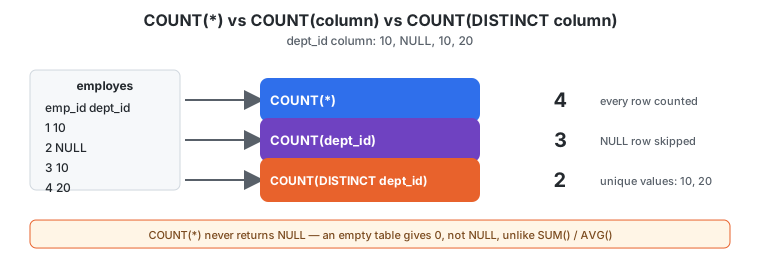 |
01_COUNT.md |
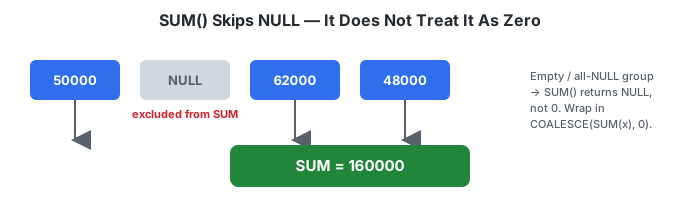 |
02_SUM.md |
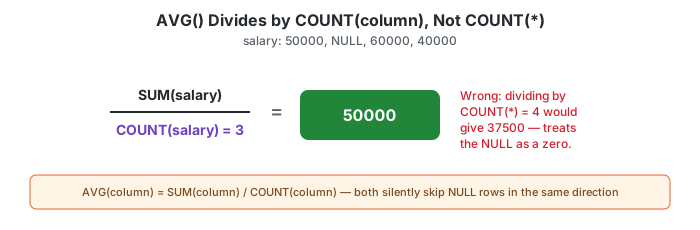 |
03_AVG.md |
 |
04_MIN_MAX.md |
 |
05_GROUP_BY.md |
 |
06_HAVING.md |
 |
07_CONDITIONAL_AGGREGATION.md |
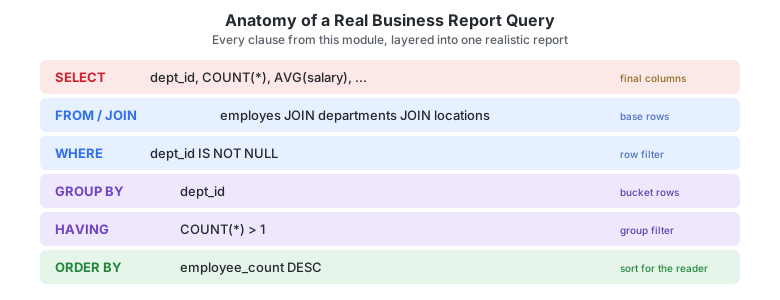 |
08_BUSINESS_CASES.md |