SQL-Engineering-Handbook
Business Cases
Introduction
Every prior file in this module taught one concept in isolation. Real reporting work never asks for just one — it asks for a full KPI report combining several aggregates at once, across a real business domain. This file closes the module by walking through complete, realistic reporting scenarios end to end.
Learning Objectives
- Combine
COUNT,SUM,AVG,MIN,MAX,GROUP BY,HAVING, and conditional aggregation in single, realistic queries - Read a business question and translate it directly into the correct combination of clauses
- Recognize the shape of the queries that sit behind real BI dashboards
Concept Overview
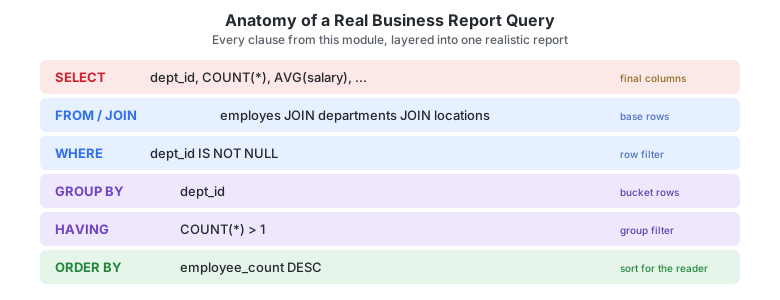
A single well-formed business report query typically layers:
SELECT   <grouping column(s)>, <aggregate 1>, <aggregate 2>, ...
FROM     <base table>
JOIN     <related tables as needed>
WHERE    <row-level filters, applied before grouping>
GROUP BY <grouping column(s)>
HAVING   <group-level filters, applied after aggregation>
ORDER BY <most useful sort for the audience>
This file works through that shape across five business domains, using the schema already established in this module.
Schema Used
Same as the rest of the module: employes(emp_id, emp_name, dept_id, manager_id, salary), departments(dept_id, dept_name, location_id), locations(location_id, city).
Business Domain: HR — Department Scorecard
Business question: “For each department with more than one employee, show headcount, average salary, salary range, and the split between employees earning above and below $50,000 — sorted by headcount, largest first.”
This single question requires COUNT, AVG, MIN, MAX, GROUP BY, HAVING, and conditional aggregation together — see 08_BUSINESS_CASES.sql Q1 for the full query.
Business Domain: Workforce Planning — City Capacity Report
Business question: “How many employees work in each city, and what’s the average salary there? Only show cities with at least 2 employees, since smaller sites don’t need a dedicated facilities review.”
This is the canonical “3-table join + GROUP BY + HAVING” pattern established across the module, now applied as a real deliverable. See 08_BUSINESS_CASES.sql Q2.
Business Domain: Compensation — Pay Equity Check
Business question: “Which departments have a pay-band spread (max minus min salary) greater than $15,000? This might indicate inconsistent role scoping that needs review before the next compensation cycle.”
See 08_BUSINESS_CASES.sql Q3 — this reuses the MAX() - MIN() derived-aggregate pattern from 04_MIN_MAX.sql, filtered with HAVING.
Business Domain: Org Design — Manager Span of Control
Business question: “Which managers have more than one direct report, and what’s the average salary of their team?”
See 08_BUSINESS_CASES.sql Q4 — this reuses the multi-column GROUP BY dept_id, manager_id pattern from 05_GROUP_BY.sql, generalized to span-of-control analysis.
Business Domain: Executive Summary — Single-Row Company KPIs
Business question: “Give me one row: total headcount, total payroll, average salary, and the highest single salary in the company — for the executive dashboard header.”
See 08_BUSINESS_CASES.sql Q5 — a no-GROUP BY query, the entire table treated as one implicit group, demonstrating that everything learned in this module works even without an explicit grouping column.
Engineering Notes
- Real business questions rarely name the SQL clause they need — “show me departments with more than one employee” is a
HAVINGclause in disguise; “only for Nagpur” is aWHEREclause in disguise. Translating business language into the row-filter-vs-group-filter distinction is the actual skill this module builds. - Always order the final result set for the audience that will read it — an executive wants the biggest numbers first; an operations team scanning for problems wants the worst outliers first.
- When a report combines many aggregates, add a raw
COUNT(*)alongside averages so the reader can judge how much weight to give each row (a department average over 1 person carries far less signal than one over 50).
Best Practices
- Build these queries incrementally: start with the
SELECT ... FROM ... JOINskeleton and confirm the row-level data looks right before addingGROUP BY. Debugging a wrong aggregate on top of a wrong join is much harder than debugging either alone. - Name every aggregate column for its business meaning (
avg_department_salary), never leave it as the literal function call in output meant for a report or API response. - When a
HAVINGthreshold is a business rule (e.g., “$50,000”, “more than 1 employee”), treat it as a parameter, not a hardcoded literal, the moment this query leaves an exploratory notebook and enters production code.
Interview Questions
- Given the plain-English request “show me cities with more than 2 employees and their average salary,” identify every SQL clause you’d need, in order.
- Why might a report need
COUNT(*)alongsideAVG()even if the business only asked for the average? - Design (in words, no SQL required) the query shape for: “top 3 departments by total payroll, among departments with at least 3 employees.”
Summary
Real reporting work is rarely a single aggregate function in isolation — it’s COUNT, SUM, AVG, MIN/MAX, GROUP BY, HAVING, and conditional aggregation composed together to answer one specific business question. This file is the bridge between “I know what SUM() does” and “I can write the query behind an actual dashboard.”
Practice Challenges
- Build the HR Department Scorecard query yourself before checking
08_BUSINESS_CASES.sqlQ1. - Extend the City Capacity Report to also show the highest single salary per city.
- Write the query for: “departments where the average salary exceeds the company-wide average salary” (hint: this needs a subquery — a preview of Module 04).
Further Reading
- Module 05 — Subqueries (needed for cross-group comparisons like Practice Challenge 3)
- Module 12 — Advanced Aggregations (ROLLUP, CUBE, GROUPING SETS — the natural next step after this module)
Related Topics: GROUP BY · HAVING · Conditional Aggregation
| ← Previous Lesson | ↑ Module README | Next Module → |