SQL-Engineering-Handbook
GROUP BY
Introduction
GROUP BY is the pivot point of this entire module. Everything before it (COUNT, SUM, AVG, MIN, MAX) computed a single value across the whole table. GROUP BY lets you compute those same aggregates per category — per department, per city, per month — which is what turns a single number into an actual report.
Learning Objectives
- Collapse rows into groups based on shared column values
- Combine
GROUP BYwith any aggregate function - Understand the SQL rule for which columns are allowed in
SELECTalongsideGROUP BY - Group by multiple columns simultaneously
Concept Overview
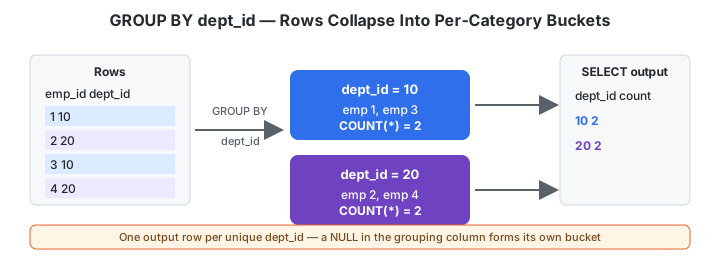
GROUP BY splits the result set into buckets based on one or more columns, then applies any aggregate functions in the SELECT list separately within each bucket.
Business Context
Almost no real business report is “one number for the whole company.” It’s “one number per department,” “one number per month,” “one number per region.” GROUP BY is what makes that possible in a single query instead of running the same query manually for every category.
Schema Used
employes
| Column | Description |
|---|---|
| emp_id | Employee ID |
| emp_name | Employee Name |
| dept_id | Department ID |
| manager_id | Manager ID |
| salary | Employee salary |
departments
| Column | Description |
|---|---|
| dept_id | Department ID |
| dept_name | Department Name |
| location_id | Location ID |
locations
| Column | Description |
|---|---|
| location_id | Location ID |
| city | City name |
Syntax
SELECT column_name, aggregate_function(column_name)
FROM table_name
GROUP BY column_name;
Execution Flow
FROM employes
   │
   ▼
WHERE (filters ROWS, before grouping)
   │
   ▼
GROUP BY dept_id      -- collapse rows sharing dept_id into one bucket per value
   │
   ▼
HAVING (filters GROUPS, after aggregation — see 06_HAVING.md)
   │
   ▼
SELECT dept_id, COUNT(*)   -- one output row per group
Step-by-Step Walkthrough
Before GROUP BY:                  After GROUP BY dept_id:
emp_id  dept_id                   dept_id  employee_count
  1        10                        10          2
  2        20         ──────►        20          2
  3        10
  4        20
Engineering Notes
- The GROUP BY rule: every column in the
SELECTlist must either (a) appear in theGROUP BYclause, or (b) be wrapped inside an aggregate function. MySQL will silently allow violations of this rule in non-strict SQL mode and return an arbitrary row’s value — this is a well-known footgun. PostgreSQL enforces the rule strictly and will refuse to run the query. Always write GROUP BY queries as if strict mode is on, regardless of which engine you’re targeting. GROUP BYexecutes conceptually afterWHEREand beforeHAVING/SELECT— see the execution flow above. This ordering is why you cannot reference aSELECT-list alias inside aWHEREclause in most engines (the alias doesn’t exist yet whenWHEREruns), but you generally can reference it insideGROUP BY/HAVING/ORDER BYin PostgreSQL and MySQL.- Grouping by multiple columns creates one group per unique combination of those columns, not one group per column:
GROUP BY dept_id, manager_idgroups by (dept, manager) pairs.
PostgreSQL Notes
PostgreSQL supports GROUP BY ALL in newer versions of some compatible engines, but in standard PostgreSQL you must list every non-aggregated column explicitly, or use GROUP BY 1, 2 (ordinal position) as shorthand.
MySQL Notes
Avoid relying on MySQL’s permissive ONLY_FULL_GROUP_BY being disabled — production MySQL instances (8.0+) enable it by default, so non-aggregated, non-grouped columns will raise an error just like PostgreSQL.
Edge Cases
- A
NULLvalue in theGROUP BYcolumn forms its own group (allNULLs group together) — it is not silently dropped. - Grouping on a column with very high cardinality (e.g.,
emp_iditself) produces one group per row, which is usually a sign the query should not be usingGROUP BYat all.
Common Mistakes
Wrong:
SELECT emp_name, COUNT(*)
FROM employes
GROUP BY dept_id;
emp_name is neither aggregated nor part of GROUP BY — invalid under strict SQL, and undefined/arbitrary under lenient MySQL settings.
Correct:
SELECT dept_id, COUNT(*)
FROM employes
GROUP BY dept_id;
Interview Questions
- What’s the rule governing which columns can appear in
SELECTalongsideGROUP BY? - In what order do
WHERE,GROUP BY,HAVING, andSELECTconceptually execute? - If you
GROUP BY dept_id, manager_id, how many groups do you get for 3 departments each with 2 distinct managers? - Why does MySQL sometimes “allow” invalid GROUP BY queries that PostgreSQL rejects, and why is relying on that behavior dangerous?
Business Use Cases
- Workforce planning (headcount per department)
- Department size and pay-band analysis
- Team distribution and city-level facilities reporting
- HR analytics rollups feeding into BI dashboards
Best Practices
- Always know, before writing the query, what one output row is supposed to represent — “one row per department,” “one row per city per month.”
- Alias every aggregate column (
AS employee_count), never leave bareCOUNT(*)in output meant for humans or downstream tools. - When grouping across joined tables, decide deliberately between
INNER JOIN(drops unmatched rows before grouping) andLEFT JOIN(keeps them, usually producing aNULLgroup).
Summary
GROUP BY collapses rows sharing common column values into buckets, letting aggregate functions operate per-category instead of over the whole table. Every non-aggregated SELECT column must be in the GROUP BY list — treat this as a hard rule regardless of engine leniency.
Practice Challenges
- Write a query for department name and average salary, for departments located in Nagpur only.
- Write a query grouping employees by both
dept_idandmanager_idsimultaneously, counting employees in each pair.
Further Reading
Related Topics: COUNT() · HAVING · SUM() · Conditional Aggregation
| ← Previous Lesson | ↑ Module README | Next Lesson → |