SQL-Engineering-Handbook
Table of Contents
- Overview
- Why String Functions Matter
- Learning Objectives
- Skills Gained
- Prerequisites
- Folder Structure
- Module Contents
- Topic Walkthrough
- Function Reference
- Data Cleaning Pipeline
- Learning Workflow
- Performance Tips
- Best Practices
- Common Mistakes
- Interview Preparation
- Career Relevance
- Difficulty & Time
- Full Handbook Map
- Further Reading
- Navigation
Overview
Text is the least structured data type SQL routinely has to work with, and the most error-prone. Names arrive mixed-case, addresses arrive with inconsistent whitespace, phone numbers arrive in a dozen formats, and product codes arrive concatenated when they should be split. This module is about writing SQL that turns that mess into something a report, a dashboard, or a downstream system can trust.
This module does not teach string function syntax as a list of definitions to memorize. It teaches the engineering judgment behind when a given transformation belongs in the query layer versus the application layer, what it costs in performance, and how it fails silently if you’re not careful.
Why String Functions Matter
Almost every production database has text columns that were never validated at the point of entry — free-text form fields, third-party imports, legacy migrations, manual data entry. String functions are the primary tool for:
- Making inconsistent data comparable (
UPPER,TRIM,REPLACE) - Deriving structured fields from unstructured ones (
SUBSTRING,LEFT,RIGHT,LOCATE) - Building human-readable output for reports and exports (
CONCAT,CONCAT_WS,LPAD) - Enforcing data quality rules before data reaches analytics or downstream systems
Get this wrong and you get double-counted customers, broken joins on “the same” value stored two different ways, and reports that silently drop rows because a WHERE clause assumed clean data that never existed.
Learning Objectives
By the end of this module, you will be able to:
- Select the correct string function for a given cleaning, extraction, or formatting task
- Reason about the performance cost of string operations in
WHERE,JOIN, andGROUP BYclauses - Identify when string logic belongs in SQL versus the application/ETL layer
- Write string transformations that are correct on edge cases (NULLs, empty strings, multi-byte characters, leading/trailing whitespace)
- Recognize and avoid the most common string-handling mistakes seen in code review
Skills Gained
- Text cleaning and standardization for analytics-ready data
- Parsing and extracting structured values from unstructured text
- Building derived identifiers (usernames, SKUs, reference codes) from source columns
- Writing string-safe
WHEREclauses that don’t silently break on dirty data - Diagnosing why a string comparison or join “should match but doesn’t”
Prerequisites
This module assumes completion of:
| Module | Why it’s needed here |
|---|---|
01–07 |
SELECT, filtering, sorting, aggregation, joins, CASE, subqueries/CTEs — string logic is written inside these constructs, not instead of them |
08_WINDOW_BUSINESS_CASES |
Window functions applied to business problems |
09_Date_Functions |
Temporal data handling |
String functions are typically combined with all of the above in production queries, so this module leans on that foundation rather than re-explaining it.
Folder Structure
10_STRING_FUNCTIONS/
├── README.md                                 ← you are here
├── assets/                                    ← diagrams used in this README
│   ├── banner.svg
│   ├── 01_basic_string_functions.svg
│   ├── 02_string_search_and_extraction.svg
│   ├── 03_string_transformation.svg
│   ├── 04_string_cleaning_and_validation.svg
│   └── 05_business_string_analytics.svg
├── 01_BASIC_STRING_FUNCTIONS.md
├── 01_BASIC_STRING_FUNCTIONS.sql
├── 02_STRING_SEARCH_AND_EXTRACTION.md
├── 02_STRING_SEARCH_AND_EXTRACTION.sql
├── 03_STRING_TRANSFORMATION.md
├── 03_STRING_TRANSFORMATION.sql
├── 04_STRING_CLEANING_AND_VALIDATION.md
├── 04_STRING_CLEANING_AND_VALIDATION.sql
├── 05_BUSINESS_STRING_ANALYTICS.md
└── 05_BUSINESS_STRING_ANALYTICS.sql
📋 Module Contents
Every file in this module, its role, and its size — so you know what you’re committing to before you open it.
| # | Topic (.md) |
New Functions | .md lines |
.sql lines |
Combined size | Difficulty |
|---|---|---|---|---|---|---|
| 01 | Basic String Functions · .sql |
11 | 162 | 296 | 22.5 KB | 🟢 Foundational |
| 02 | String Search & Extraction · .sql |
6 | 145 | 202 | 16.8 KB | 🟡 Intermediate |
| 03 | String Transformation · .sql |
7 | 143 | 196 | 16.6 KB | 🟡 Intermediate |
| 04 | String Cleaning & Validation · .sql |
0 (synthesis) | 136 | 207 | 18.2 KB | 🟠 Applied |
| 05 | Business String Analytics · .sql |
0 (synthesis) | 136 | 193 | 16.4 KB | 🔴 Applied+ |
| — | Total | 26 unique | 722 | 1,094 | ~90.5 KB | — |
Every
.mdfile follows the same 20-section anatomy — Introduction → Concept Overview → Business Motivation → Functions Covered → Syntax → Parameters → Return Values → ASCII Visual Explanation → Step-by-Step Examples → Production Considerations → Performance Notes → Edge Cases → Common Mistakes → Best Practices → Interview Questions → Practice Challenges → Summary → Further Reading — so once you know the shape of one file, you know the shape of all five.
🧭 Topic Walkthrough
01 — Basic String Functions
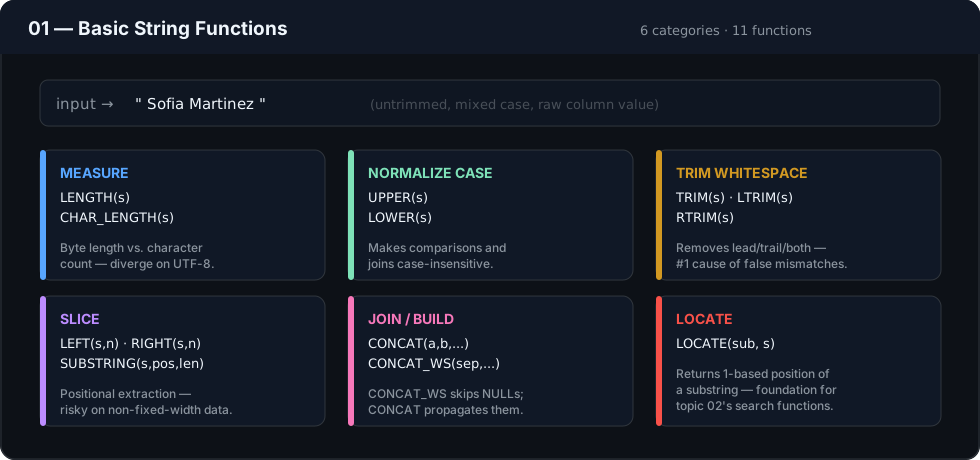
The entry point: six function families — measure, normalize case, trim, slice, join, and locate — that every later topic in this module builds on. Covers LENGTH(), CHAR_LENGTH(), UPPER(), LOWER(), LEFT(), RIGHT(), SUBSTRING()/MID(), CONCAT(), CONCAT_WS(), TRIM()/LTRIM()/RTRIM(), and LOCATE().
📄 01_BASIC_STRING_FUNCTIONS.md · 🗄️ 01_BASIC_STRING_FUNCTIONS.sql
02 — String Search & Extraction
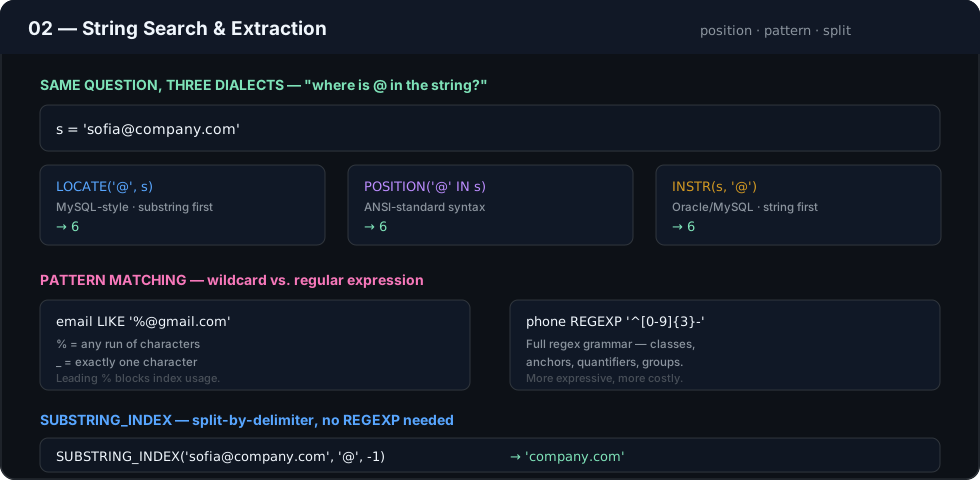
The same question — “where is this substring?” — answered three different ways across SQL dialects (LOCATE, POSITION, INSTR), followed by pattern matching with LIKE/REGEXP and delimiter-based splitting with SUBSTRING_INDEX().
📄 02_STRING_SEARCH_AND_EXTRACTION.md · 🗄️ 02_STRING_SEARCH_AND_EXTRACTION.sql
03 — String Transformation

Non-destructive, input-to-output transformations: REPLACE(), REVERSE(), REPEAT(), SPACE(), INSERT(), and the fixed-width formatting workhorses LPAD()/RPAD() — the standard way to build zero-padded IDs and invoice numbers.
📄 03_STRING_TRANSFORMATION.md · 🗄️ 03_STRING_TRANSFORMATION.sql
04 — String Cleaning & Validation
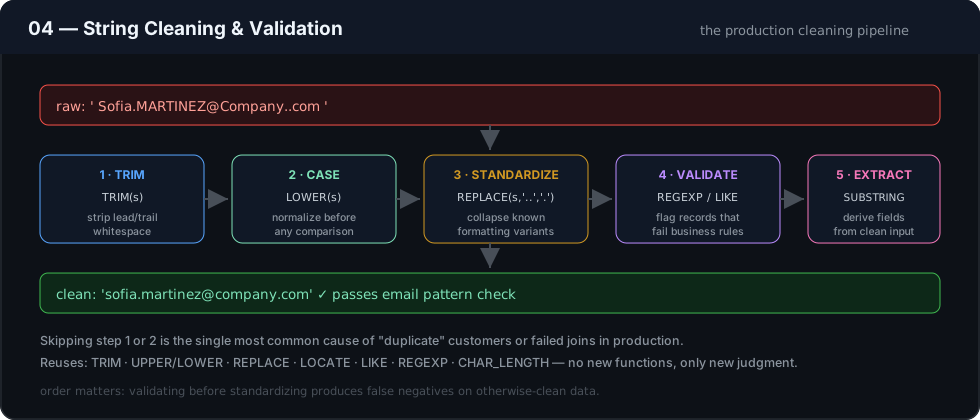
Introduces no new functions — this topic is where TRIM, case normalization, REPLACE, LOCATE, LIKE, and REGEXP are assembled into the five-stage production cleaning pipeline: trim → normalize case → standardize → validate → extract.
📄 04_STRING_CLEANING_AND_VALIDATION.md · 🗄️ 04_STRING_CLEANING_AND_VALIDATION.sql
05 — Business String Analytics
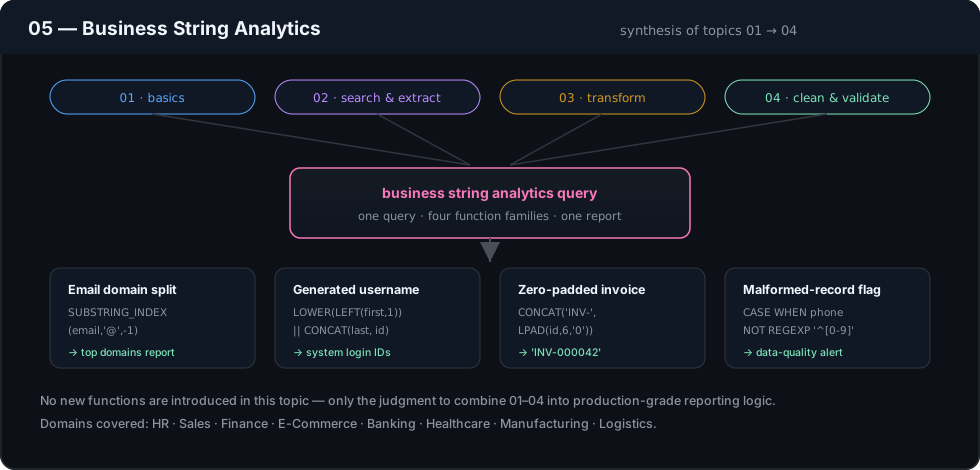
The capstone: topics 01–04 converge into real reporting logic — deriving email domains for a marketing report, generating usernames, formatting zero-padded invoice numbers, and flagging malformed records for a data-quality dashboard — across HR, Sales, Finance, E-Commerce, Banking, Healthcare, Manufacturing, and Logistics scenarios.
📄 05_BUSINESS_STRING_ANALYTICS.md · 🗄️ 05_BUSINESS_STRING_ANALYTICS.sql
🔤 Function Reference
Every function taught in this module, grouped by what it does rather than the order it appears in.
Measure · Case · Trim · Slice · Join (Topic 01)
| Function | Purpose | |---|---| | `LENGTH()` | Byte length of a string | | `CHAR_LENGTH()` | Character count (safe for multi-byte text) | | `UPPER()` / `LOWER()` | Case conversion | | `LEFT()` / `RIGHT()` | Leftmost / rightmost N characters | | `SUBSTRING()` / `MID()` | Substring from a given position | | `CONCAT()` | Joins strings (NULL-propagating) | | `CONCAT_WS()` | Joins with a separator, NULL-safe | | `TRIM()` / `LTRIM()` / `RTRIM()` | Removes leading/trailing/both whitespace | | `LOCATE()` | Position of a substring |Search & Pattern Match (Topic 02)
| Function | Purpose | |---|---| | `POSITION()` | ANSI-standard position search | | `INSTR()` | Position search (Oracle/MySQL-style) | | `LIKE` | Wildcard pattern match (`%`, `_`) | | `REGEXP` | Regular-expression pattern match | | `SUBSTRING_INDEX()` | Substring before/after the Nth delimiter occurrence |Transform & Format (Topic 03)
| Function | Purpose | |---|---| | `REPLACE()` | Replace all occurrences of a substring | | `REVERSE()` | Reverse character order | | `REPEAT()` | Repeat a string N times | | `SPACE()` | Return N spaces | | `INSERT()` | Insert a substring at a position | | `LPAD()` / `RPAD()` | Pad to a target length, left or right |Topics 04 and 05 introduce no new functions — they are entirely about combining the functions above correctly. See Data Cleaning Pipeline below.
Data Cleaning Pipeline
A typical production cleaning sequence, in order:
- Trim — remove leading/trailing whitespace introduced by manual entry or CSV imports
- Case-normalize — apply
UPPER/LOWERconsistently before comparison or joining - Standardize — collapse known formatting variants (e.g., phone separators) via
REPLACE - Validate — apply pattern checks (
LIKE/REGEXP) to flag records that fail business rules - Extract/derive — build downstream fields (usernames, initials, codes) only after the above steps guarantee clean input
Skipping step 1 or 2 is the single most common cause of “duplicate” customers or failed joins in production systems. See the Topic 04 diagram above for the full before/after walkthrough.
Learning Workflow
- Read the topic’s Markdown file in full before opening the
.sqlfile — the business context explains why the query is written the way it is. - Run each scenario’s query against the sample schema and compare your output to the documented Expected Output.
- Read the Engineering Notes and Performance Notes even if your query already produced the right result — correctness and production-readiness are different bars.
- Attempt the Practice Challenges at the end of each Markdown file before moving to the next topic.
flowchart LR
    A[09 Date Functions] --> B[01 Basic String Functions]
    B --> C[02 Search & Extraction]
    C --> D[03 Transformation]
    D --> E[04 Cleaning & Validation]
    E --> F[05 Business String Analytics]
    F --> G[11 NULL Handling & Data Cleaning]
Performance Tips
- Applying a function to a column in a
WHEREclause (WHERE UPPER(email) = 'X') typically prevents the query planner from using a standard index on that column. Prefer storing normalized data or using a functional/expression index if your database supports one. LIKE '%value%'(leading wildcard) cannot use a standard B-tree index and forces a full scan on large tables. Trailing-wildcard patterns ('value%') can.- String concatenation inside a
JOINcondition should be avoided where possible — join on raw keys and format for display afterward. REGEXPis powerful but generally more expensive thanLIKEorLOCATEfor simple pattern checks; reserve it for genuinely variable patterns.
Best Practices
- Normalize once, upstream, rather than repeating the same
TRIM(UPPER(...))in every query that touches a column. - Always account for
NULLin string logic — most string functions returnNULLif any input isNULL, which silently drops rows from concatenated output. - Prefer
CONCAT_WS()overCONCAT()with manual separators — it skipsNULLvalues gracefully and reduces separator bugs. - Document any business rule embedded in a string transformation (e.g., “usernames are first 3 letters + employee ID”) directly in the query as a comment — these rules are rarely obvious from the SQL alone.
Common Mistakes
- Assuming
LENGTH()andCHAR_LENGTH()are interchangeable — they diverge on multi-byte (e.g., UTF-8) characters. - Forgetting that
CONCAT('a', NULL, 'b')returnsNULLin most engines, not'ab'. - Using
SUBSTRING/LEFT/RIGHTwith hard-coded positions on data whose format isn’t guaranteed to be fixed-width. - Comparing strings without normalizing case or whitespace, then blaming the join or filter logic instead of the data.
Interview Preparation
Interviewers commonly test string functions through data-cleaning scenarios rather than syntax recall: parsing a full name into first/last, extracting a domain from an email, formatting a phone number, or identifying malformed records with LIKE/REGEXP. Each topic file in this module ends with an Interview Questions section modeled on exactly these patterns.
Career Relevance
String cleaning is one of the most frequently performed tasks by Data Analysts, Analytics Engineers, and BI Engineers — often described informally as “the 80% of the job that isn’t modeling.” Fluency here signals production readiness to interviewers far more reliably than advanced window function tricks.
Difficulty & Time
| Level | Intermediate — assumes comfort with joins and CTEs; introduces no new relational concepts, only a new function family and the judgment to apply it correctly |
| Estimated time | 6–9 hours across all five sub-modules, including practice challenges |
| Business domains used | HR, Sales, Finance, E-Commerce, Banking, Healthcare, Manufacturing, Logistics |
Production applications:
- ETL pipelines standardizing incoming data before it lands in a warehouse
- Customer Data Platforms deduplicating records with inconsistent formatting
- Reporting layers producing human-readable labels from normalized source data
- Data quality monitors flagging malformed emails, phone numbers, or codes
🗂️ Full Handbook Map
Where this module sits in the complete SQL Engineering Handbook:
| # | Module | Contents | Status |
|---|---|---|---|
| 00 | Schema | Practice database DDL, seed data, and ERD used by every later module | ✅ |
| 01 | Fundamentals | SELECT, WHERE, ORDER BY, LIMIT, aliasing |
✅ |
| 02 | Aggregations | COUNT, SUM, AVG, MIN/MAX, GROUP BY, HAVING |
✅ |
| 03 | Joins | Inner, left, right, full, cross, self joins + performance audit | ✅ |
| 04 | Subqueries | Scalar, correlated, EXISTS, derived tables, subquery-to-join rewrites |
✅ |
| 05 | CASE WHEN | Conditional logic and business-rule encoding | ✅ |
| 06 | CTEs | Common Table Expressions, recursive CTEs | ✅ |
| 07 | Window Functions | ROW_NUMBER, RANK, LAG/LEAD, PARTITION BY |
✅ |
| 08 | Window Business Cases | Applied window-function scenarios (running totals, cohorts, rankings) | ✅ |
| 09 | Date Functions | Date arithmetic, formatting, range queries | ✅ |
| 10 | String Functions (this module) | String manipulation and data cleaning | ✅ |
| 11 | NULL Handling & Data Cleaning | COALESCE, NULLIF, data-quality patterns |
✅ |
| 12 | Advanced Aggregations | Conditional and multi-level aggregation | ✅ |
| 13 | Set Operators | UNION, INTERSECT, EXCEPT, reconciliation queries |
✅ |
| 14 | Views | Views, security, updatable views, performance | ✅ |
| 15 | Indexes | B-Tree, composite, covering indexes, reading EXPLAIN |
✅ |
| 16 | Query Optimization | Execution plans, rewrite patterns, anti-patterns | ✅ |
| 17 | SQL Interview Questions | Curated question bank with worked answers | 📋 |
| 18 | SQL Business Case Studies | End-to-end analytics scenarios across domains | 📋 |
| 19 | SQL Projects | Portfolio-ready guided projects | 📋 |
| 20 | SQL Cheatsheet | One-page syntax and pattern reference | 📋 |
✅ Complete · 📋 Planned — live status always lives in ROADMAP.md.
Further Reading
- PostgreSQL String Functions and Operators
- MySQL String Functions Reference
- Microsoft Learn — String Functions (Transact-SQL)