SQL-Engineering-Handbook
01 — Basic String Functions
🏠 Module Home · 🗂️ Handbook Home · Next → 02 String Search & Extraction
Introduction
Every string-heavy query in this handbook builds on a small set of foundational operations: measuring text, changing its case, slicing it, joining it together, and finding a character’s position within it. This topic covers that foundation using an HR schema — employee names, department assignments, and derived usernames — the same category of problem you’ll meet in almost any production system with a users or employees table.
Concept Overview
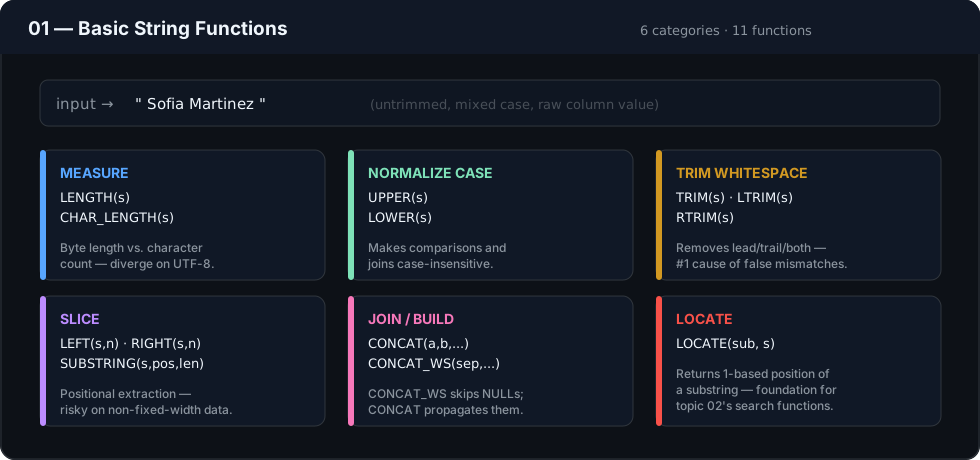
Basic string functions fall into four families:
- Measurement —
LENGTH(),CHAR_LENGTH() - Case conversion —
UPPER(),LOWER() - Slicing —
LEFT(),RIGHT(),SUBSTRING()/MID() - Assembly & cleanup —
CONCAT(),CONCAT_WS(),TRIM(),LTRIM(),RTRIM()
Positional search (LOCATE()) is included here as the simplest form of string search, with the fuller search/extraction toolkit (POSITION, INSTR, LIKE, REGEXP) reserved for Topic 02.
Business Motivation
Raw employee, customer, or product name fields are rarely used as-is downstream. Reports need consistent casing. Systems need derived identifiers (usernames, initials, short codes) built from existing fields. Data entered by hand needs its whitespace and formatting normalized before it can be trusted in a JOIN or GROUP BY. Basic string functions are the tools that make all of this possible without leaving the database layer.
Why These Functions Exist
Relational databases store text as opaque byte/character sequences — there is no built-in concept of “first name” versus “last name” within a single VARCHAR column, no automatic case normalization, and no automatic whitespace handling. Basic string functions exist to give SQL the same text-manipulation primitives available in any general-purpose programming language, so that formatting and parsing logic doesn’t have to be pushed into the application layer for simple cases.
Real Company Use Cases
- HR systems generating standardized employee usernames or email prefixes from full names
- Sales reporting normalizing salesperson or product names before aggregating revenue by name
- Customer support tooling displaying “Agent: John D.” style labels built from full names
- Data warehouses enforcing consistent casing on dimension tables so joins don’t silently miss rows due to
'Sales'vs'SALES'
Functions Covered
| Function | Purpose |
|---|---|
LENGTH() |
Byte length of a string |
CHAR_LENGTH() |
Character count of a string (safe for multi-byte text) |
UPPER() |
Converts text to uppercase |
LOWER() |
Converts text to lowercase |
LEFT() |
Returns the leftmost N characters |
RIGHT() |
Returns the rightmost N characters |
SUBSTRING() / MID() |
Returns a substring starting at a given position |
CONCAT() |
Joins two or more strings |
CONCAT_WS() |
Joins strings with a separator, skipping NULLs |
TRIM() / LTRIM() / RTRIM() |
Removes leading/trailing/both whitespace |
LOCATE() |
Returns the position of a substring within a string |
Syntax
LENGTH(str)
CHAR_LENGTH(str)
UPPER(str)
LOWER(str)
LEFT(str, n)
RIGHT(str, n)
SUBSTRING(str, start [, length])
CONCAT(str1, str2, ...)
CONCAT_WS(separator, str1, str2, ...)
TRIM([BOTH | LEADING | TRAILING] [chars FROM] str)
LOCATE(substr, str [, start_position])
Parameters
str— the source text expression (a column, literal, or expression evaluating to text)n/length— the number of characters to return, always a positive integerstart— the 1-indexed starting position forSUBSTRING/LOCATEseparator— the delimiter string used between arguments inCONCAT_WSchars— an optional explicit character (or character set) forTRIMto strip; defaults to whitespace
Return Values
LENGTH()/CHAR_LENGTH()return an integer.NULLinput returnsNULL, not0.UPPER(),LOWER(),TRIM(),LEFT(),RIGHT(),SUBSTRING()return a string of the same character type as the input, orNULLif the input isNULL.CONCAT()returnsNULLthe moment any argument isNULL(engine-dependent — see Edge Cases).CONCAT_WS()instead skipsNULLarguments entirely.LOCATE()returns the 1-indexed position of the first match, or0if not found. It never returnsNULLunless one of its inputs isNULL.
ASCII Visual Explanation
emp_name = "SARAH CONNOR"

LEFT(emp_name, 3)              →  "SAR"
                                     ^^^
                                     positions 1-3

RIGHT(emp_name, 2)             →  "OR"
                                          ^^
                                    last 2 characters

LOCATE('a', emp_name)          →  position of first lowercase/uppercase 'a'...
                                    NOTE: case sensitivity is engine-dependent (see Edge Cases)
Step-by-Step Examples
Goal: Build a login username from an employee’s name and ID.
SELECT
    emp_name,
    emp_id,
    CONCAT(UPPER(LEFT(emp_name, 3)), emp_id) AS username
FROM employees;
Reasoning: LEFT(emp_name, 3) isolates the first three characters, UPPER() guarantees consistent casing regardless of how the name was entered, and CONCAT() appends the numeric ID to guarantee uniqueness even when two employees share the same first three letters.
Production Considerations
- Never build a unique identifier (username, account code) from name fragments alone — collisions are inevitable at scale. Always anchor it to a guaranteed-unique column like an ID, as in the example above.
TRIM()should be applied at the point of data entry or ETL ingestion whenever possible, not repeatedly at query time — repeating it in every downstream query is a sign the source data needs a one-time cleanup pass instead.- Case-normalize consistently across a schema. Mixing
UPPER()-normalized codes in one table with unnormalized text in another is a recurring source of join bugs.
Performance Notes
LENGTH(),LEFT(),RIGHT(),UPPER(),LOWER()are computed per-row and are cheap at typical row counts, but become relevant at scale when applied inside aWHEREclause — see the note on sargability below.- Applying any function to a column in a
WHEREclause (e.g.WHERE UPPER(emp_name) = 'SARAH CONNOR') generally prevents the database from using a standard index onemp_name, forcing a full table scan. If this filter pattern is common, consider a computed/generated column, a functional index, or normalizing the stored data instead. CONCAT()on a small number of columns is inexpensive; concatenating across a very wide column list in a hot query path is a minor but real cost worth flagging in code review on high-throughput systems.
Edge Cases
- NULL propagation:
CONCAT('Hello', NULL)returnsNULLin SQL Server and Oracle, but MySQL (default, non-ANSImode) coalesces silently in older versions — behavior has since aligned closer to standard NULL propagation in current MySQL. Always verify on your specific engine, and preferCONCAT_WS()when NULLs are expected. - Case sensitivity in
LOCATE/LIKE: whether matching is case-sensitive depends on the column’s collation, not the function itself.LOCATE('a', 'CONNOR')may or may not match depending on collation settings. LEFT/RIGHTwithnlonger than the string: returns the full string without error — no exception is raised.- Multi-byte characters:
LENGTH()counts bytes; a string with accented or non-Latin characters can report a byte length larger than its visible character count. UseCHAR_LENGTH()when you need the actual character count.
Common Mistakes
- Using
LENGTH()to validate character-count business rules (e.g., “name must be under 50 characters”) on multi-byte text — this silently over-rejects valid data. UseCHAR_LENGTH(). - Concatenating with
CONCAT()when any source column can beNULL, then being surprised the entire derived field disappears. UseCONCAT_WS()or wrap NULL-prone columns inCOALESCE(). - Hard-coding
LEFT(col, 3)/RIGHT(col, 3)assumptions about field width when the underlying data format isn’t actually guaranteed to be fixed-width (e.g., assuming all product codes are exactly 8 characters).
Best Practices
- Default to
CONCAT_WS()for building multi-part display strings (full names, addresses) — it eliminates the double-separator and leading/trailing-separator bugs that manualCONCAT()with literal separators tends to produce. - Apply
TRIM()immediately after reading any manually entered or externally sourced text field, before any comparison or storage. - Prefer
CHAR_LENGTH()overLENGTH()by default unless you specifically need byte length (e.g., for storage-size calculations).
Interview Questions
- What’s the difference between
LENGTH()andCHAR_LENGTH(), and when would they return different values? - Why might
CONCAT(first_name, ' ', last_name)returnNULLfor some rows, and how would you fix it? - Given a column of freeform names, write a query to generate a
firstname.lastnamestyle username in lowercase, assuming names are guaranteed to have exactly one space. - Why does filtering with
WHERE UPPER(col) = 'X'often hurt query performance on large tables, and what are two ways to avoid the problem?
Practice Challenges
- Write a query that returns each employee’s initials (first letter of each word in
emp_name), assuming names may have two or three words. - Using
CONCAT_WS(), build a single “mailing label” style string fromemp_name,dept_name, andcity, gracefully handling any of the three beingNULL. - Identify which employee names in the table exceed 20 characters using
CHAR_LENGTH(), and explain whyLENGTH()would be the wrong choice if the names contained accented characters.
Summary
Basic string functions — measurement, case conversion, slicing, assembly, and trimming — are the primitives every later topic in this module builds on. The recurring theme across all of them is defensive handling of NULL, whitespace, and encoding assumptions; the functions themselves are simple, but production-safe usage requires anticipating how real data breaks those assumptions.