SQL-Engineering-Handbook
02 — String Search & Extraction
🏠 Module Home · 🗂️ Handbook Home · ← 01 Basic String Functions · Next → 03 String Transformation
Introduction
Once text is cleaned and normalized, the next recurring need is finding things inside it: does this email contain a domain you recognize, does this product code match a known prefix pattern, what comes after the third delimiter in this pipe-separated reference number. This topic covers SQL’s search and extraction toolkit using an e-commerce schema — customer emails, order reference codes, and product SKUs.
Concept Overview
Search and extraction split into two concerns:
- Search — does a pattern exist, and where:
LOCATE(),POSITION(),INSTR(),LIKE,REGEXP - Extraction — pull out a specific piece based on a delimiter or position:
SUBSTRING_INDEX(), combined withLOCATE()/POSITION()
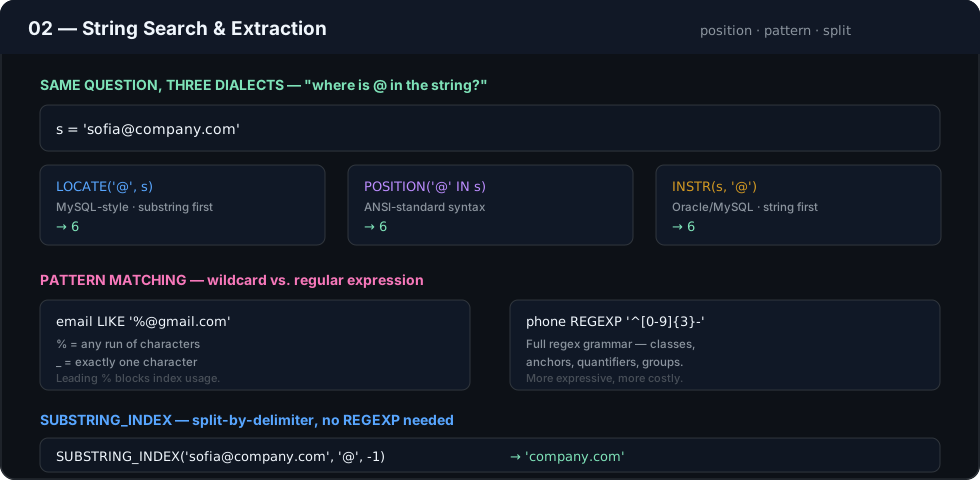
LOCATE()/POSITION()/INSTR() are functionally overlapping but engine-specific in syntax; this topic treats them as a family and calls out the differences explicitly.
Business Motivation
Structured-looking text — emails, SKUs, order references, tracking numbers — is often the only place certain business information lives. A product’s category might only exist as a prefix in its SKU. A customer’s email domain might be the only signal for identifying corporate versus personal accounts. Extracting these values in SQL avoids exporting raw data to a scripting language just to parse it.
Why These Functions Exist
Fixed-position slicing (LEFT/RIGHT/SUBSTRING with hard-coded offsets, from Topic 01) breaks the moment a field’s format isn’t perfectly consistent. Search and extraction functions exist to make slicing relative to content — “everything after the @ symbol,” “everything before the second dash” — rather than relative to a fixed character position, which is far more robust against real-world formatting drift.
Real Company Use Cases
- E-commerce platforms extracting a product category code from a structured SKU (e.g.,
ELEC-TV-4521→ categoryELEC) - Marketing systems classifying leads by email domain to detect corporate vs. free-email signups
- Logistics providers parsing carrier codes out of composite tracking numbers
- Customer support searching ticket descriptions for known keywords using
LIKE/REGEXPto auto-tag issue categories
Functions Covered
| Function | Purpose |
|---|---|
LOCATE() |
Position of a substring (MySQL-style, args: substring first) |
POSITION() |
ANSI-standard position search: POSITION(substr IN str) |
INSTR() |
Position search (Oracle/MySQL-style, args: string first) |
LIKE |
Pattern match using % and _ wildcards |
REGEXP |
Pattern match using full regular expressions |
SUBSTRING_INDEX() |
Returns the substring before/after the Nth occurrence of a delimiter (MySQL) |
Syntax
LOCATE(substr, str [, start_pos])
POSITION(substr IN str)
INSTR(str, substr)
str LIKE pattern
str REGEXP pattern
SUBSTRING_INDEX(str, delimiter, count)
Parameters
substr— the text being searched forstr— the text being searched withinpattern— forLIKE:%matches any sequence,_matches a single character; forREGEXP: a POSIX-style regular expressiondelimiter— the character(s)SUBSTRING_INDEXsplits oncount— positive: return everything before the Nth delimiter; negative: return everything after the Nth-from-end delimiter
Return Values
LOCATE(),POSITION(),INSTR()return the 1-indexed position of the first match, or0if not found (neverNULLunless an input isNULL).LIKE/REGEXPreturn a boolean, used directly inWHEREorCASE.SUBSTRING_INDEX()returns a string; if the delimiter appears fewer times thancount, it returns the entire original string.
ASCII Visual Explanation
email = "j.martinez@globalretailcorp.com"

SUBSTRING_INDEX(email, '@', -1)
        →  "globalretailcorp.com"
                          ^^^^^^^^^^^^^^^^^^^^^ everything after the LAST '@'

SUBSTRING_INDEX(email, '@', 1)
        →  "j.martinez"
             ^^^^^^^^^^ everything before the FIRST '@'
Step-by-Step Examples
Goal: Classify customer accounts as corporate or personal based on email domain.
SELECT
    customer_email,
    SUBSTRING_INDEX(customer_email, '@', -1) AS email_domain,
    CASE
        WHEN customer_email LIKE '%@gmail.com'
          OR customer_email LIKE '%@yahoo.com'
          OR customer_email LIKE '%@outlook.com'
            THEN 'Personal'
        ELSE 'Likely Corporate'
    END AS account_classification
FROM customers;
Reasoning: SUBSTRING_INDEX(..., -1) isolates everything after the last @, which correctly handles the (rare but valid) case of a local part containing @ inside quotes. LIKE with trailing-anchored patterns then checks against known free-email providers.
Production Considerations
SUBSTRING_INDEX()is MySQL-specific; PostgreSQL and SQL Server requireSPLIT_PART()orSTRING_SPLIT()/PARSENAME()respectively for equivalent behavior — flag this explicitly in any cross-engine codebase.- Domain classification via a hard-coded
LIKElist (as above) is a starting point, not a complete solution — it must be maintained as new free-email providers emerge, and should ideally be backed by a reference table rather than inline literals for anything beyond a handful of domains. REGEXPsupport and syntax (POSIX vs. Perl-compatible) varies significantly by engine — always verify against your specific database’s documentation before assuming a pattern is portable.
Performance Notes
- Leading-wildcard
LIKE '%value%'and anyREGEXPcannot use a standard B-tree index and force a full scan — acceptable for small dimension tables, costly on large fact tables. - Trailing-wildcard
LIKE 'value%'can use a standard index in most engines, since it matches a contiguous prefix range. SUBSTRING_INDEX()used inside aWHEREclause has the same sargability problem as any function applied to a column — see Topic 01’s performance notes on functional indexes.
Edge Cases
- If the delimiter doesn’t exist in the string,
SUBSTRING_INDEX()returns the original string unchanged rather thanNULLor an empty string — code that assumes extraction always “worked” will silently pass through malformed data. LOCATE()/INSTR()argument order is reversed between MySQL-family functions and each other — a frequent source of bugs when porting queries between engines or even betweenLOCATEandINSTRin the same codebase.- Case sensitivity of
LIKEandREGEXPdepends on column collation, not the operator itself.
Common Mistakes
- Using
SUBSTRING_INDEX(email, '@', 1)to get the domain instead of-1— this returns the local part, not the domain, and is a common off-by-argument error. - Writing
LIKE '%@gmail.com%'(wildcard on both sides) instead ofLIKE '%@gmail.com'— the trailing wildcard is unnecessary and defeats any possibility of index usage without adding correctness. - Reaching for
REGEXPfor a simple prefix/suffix check thatLIKEhandles more cheaply and just as correctly.
Interview Questions
- What’s the difference between
LOCATE(),POSITION(), andINSTR(), and why do three functions doing roughly the same thing exist across SQL engines? - Given an email column, write a query to extract just the domain, and explain why you chose
-1vs1as theSUBSTRING_INDEXcount. - Why is
LIKE '%value%'generally slower thanLIKE 'value%'on a large indexed table? - When would you choose
REGEXPoverLIKE, and what’s the performance trade-off?
Practice Challenges
- Given a
tracking_numbercolumn formatted asCARRIER-REGION-SEQUENCE(e.g.,FEDX-EU-88213), extract just the carrier code. - Write a query flagging any customer email that does not contain an
@symbol at all, as a basic validity check. - Using
SUBSTRING_INDEX()twice, extract the middle segment (REGION) from the tracking number format above.
Summary
Search and extraction functions make string parsing robust to content rather than dependent on fixed positions. LOCATE/POSITION/INSTR answer “where,” LIKE/REGEXP answer “does this match,” and SUBSTRING_INDEX answers “give me the piece before/after a delimiter” — together they cover the majority of real-world text-parsing needs without leaving SQL.