SQL-Engineering-Handbook
13 · Set Operators
Part of the SQL Engineering Handbook Difficulty: Beginner → Advanced · Estimated study time: 3–3.5 hours
Table of Contents
- Module Files
- Module Overview
- Why Set Operators Matter
- Learning Objectives
- Module Roadmap
- Folder Structure
- Repository Footprint
- Visual Guide
- SQL Operators Covered
- Business Applications
- Production Use Cases
- Analytics Engineering Perspective
- Common Data Integration Problems
- Best Practices
- Common Mistakes
- Performance Notes
- Difficulty & Prerequisites
- Interview Preparation
- Career Relevance
- Related Modules
- Contributor Guide
- Key Takeaway
Module Files
| # | Lesson | Concept | Lines (.md) | SQL Lab |
|---|---|---|---|---|
| 01 | Introduction to Set Operators | Set theory foundation, shape/type compatibility rules | 165 | .sql |
| 02 | UNION and UNION ALL | Deduplication vs stacking, cost implications | 144 | .sql |
| 03 | INTERSECT and EXCEPT | Overlap and difference, operand order, MINUS (Oracle) | 197 | .sql |
| 04 | Business Data Integration | Multi-source fan-in with discriminator columns | 146 | .sql |
| 05 | Data Reconciliation | Proving two datasets match, locating divergence | 164 | .sql |
| 06 | Performance and Optimization | Execution plans, JOIN/EXISTS rewrites, when to avoid native operators | 212 | .sql |
| 07 | Real-World Case Study | Capstone: GlobalMart × UrbanCart merger consolidation | 159 | .sql |
Module Overview
Every query in the modules before this one answered one question against one logical result set. This module introduces a different kind of question: how do two or more result sets relate to each other? Set operators — UNION, UNION ALL, INTERSECT, and EXCEPT — are the answer, and they show up constantly in real analytics work: merging regional reports into one global view, proving a data migration didn’t drop rows, reconciling two systems that are supposed to agree, and consolidating datasets after a company merger.
This module builds from the mechanics (what each operator does, and why UNION and UNION ALL are opposites despite looking nearly identical) through to a full production-shaped capstone that uses every operator together against one continuous business scenario.
Why Set Operators Matter
Choosing UNION when you meant UNION ALL — or the reverse — is one of the most common and most consequential mistakes in production SQL. Silently deduplicating real business data (like legitimately duplicate transactions) can make a revenue report wrong in a way that’s hard to notice. Silently keeping duplicates when you meant to dedupe can double-count. And beyond UNION, INTERSECT and EXCEPT are the backbone of reconciliation work — the queries that answer “did we lose any data?” during a migration, or “do these two systems agree?” during an audit. These are not academic set-theory exercises; they are asked for by name in real data engineering tickets.
Learning Objectives
By completing this module, you will be able to:
- Explain the column-count and data-type compatibility rules that every set operator requires
- Choose correctly between
UNIONandUNION ALLbased on whether duplicates are meaningful data or noise - Use
INTERSECTandEXCEPT(orMINUSin Oracle) to find overlap and one-sided differences between two datasets - Build multi-source integration queries that combine several tables into one reporting view with a source discriminator
- Write reconciliation queries that prove two datasets match, or pinpoint exactly where they diverge
- Read an execution plan to understand why
UNIONcosts more thanUNION ALL, and when aJOIN,EXISTS, orNOT EXISTSrewrite outperforms a native set operator - Combine every operator in this module into a single realistic data consolidation project
Module Roadmap
flowchart TD
    A[01 Introduction to Set Operators<br/>set theory, shape rules] --> B[02 UNION and UNION ALL<br/>dedup vs stack]
    B --> C[03 INTERSECT and EXCEPT<br/>overlap and difference]
    C --> D[04 Business Data Integration<br/>multi-source fan-in]
    D --> E[05 Data Reconciliation<br/>prove datasets match]
    E --> F[06 Performance and Optimization<br/>execution plans, rewrites]
    F --> G[07 Real-World Case Study<br/>merger consolidation capstone]
Folder Structure
13_SET_OPERATORS/
├── README.md                                     You are here
├── 01_INTRODUCTION_TO_SET_OPERATORS.md / .sql     Set theory foundation
├── 02_UNION_AND_UNION_ALL.md / .sql               Dedup vs stacking
├── 03_INTERSECT_AND_EXCEPT.md / .sql              Overlap and difference
├── 04_BUSINESS_DATA_INTEGRATION.md / .sql         Multi-source fan-in
├── 05_DATA_RECONCILIATION.md / .sql               Prove datasets match
├── 06_PERFORMANCE_AND_OPTIMIZATION.md / .sql      Execution plans, rewrites
├── 07_REAL_WORLD_CASE_STUDY.md / .sql             Merger consolidation capstone
└── assets/                                        Banner + per-lesson SVG diagrams
    ├── banner.svg
    ├── 01_set_operators_overview.svg
    ├── 02_union_vs_union_all.svg
    ├── 03_intersect_except.svg
    ├── 04_business_integration.svg
    ├── 05_reconciliation_flow.svg
    ├── 06_performance_paths.svg
    └── 07_capstone_merger.svg
Repository Footprint
Every file in this module, with size and length — useful for estimating study time or auditing content depth at a glance.
| File | Type | Lines | Size |
|---|---|---|---|
| 01_INTRODUCTION_TO_SET_OPERATORS.md | Lesson | 165 | 12 KB |
| 01_INTRODUCTION_TO_SET_OPERATORS.sql | SQL Lab | 161 | 8 KB |
| 02_UNION_AND_UNION_ALL.md | Lesson | 144 | 12 KB |
| 02_UNION_AND_UNION_ALL.sql | SQL Lab | 493 | 20 KB |
| 03_INTERSECT_AND_EXCEPT.md | Lesson | 197 | 12 KB |
| 03_INTERSECT_AND_EXCEPT.sql | SQL Lab | 260 | 12 KB |
| 04_BUSINESS_DATA_INTEGRATION.md | Lesson | 146 | 12 KB |
| 04_BUSINESS_DATA_INTEGRATION.sql | SQL Lab | 331 | 12 KB |
| 05_DATA_RECONCILIATION.md | Lesson | 164 | 12 KB |
| 05_DATA_RECONCILIATION.sql | SQL Lab | 251 | 12 KB |
| 06_PERFORMANCE_AND_OPTIMIZATION.md | Lesson | 212 | 20 KB |
| 06_PERFORMANCE_AND_OPTIMIZATION.sql | SQL Lab | 389 | 16 KB |
| 07_REAL_WORLD_CASE_STUDY.md | Lesson | 159 | 12 KB |
| 07_REAL_WORLD_CASE_STUDY.sql | SQL Lab | 366 | 16 KB |
| Total | 7 lessons + 7 labs | 3,438 | ~176 KB |
Visual Guide
Each lesson has a companion diagram in assets/ built to the same visual language as the rest of the handbook — muted slate/blue/teal tones, no neon, designed to read cleanly in both light and dark GitHub themes.
01 — Four Operators, One Shape Requirement
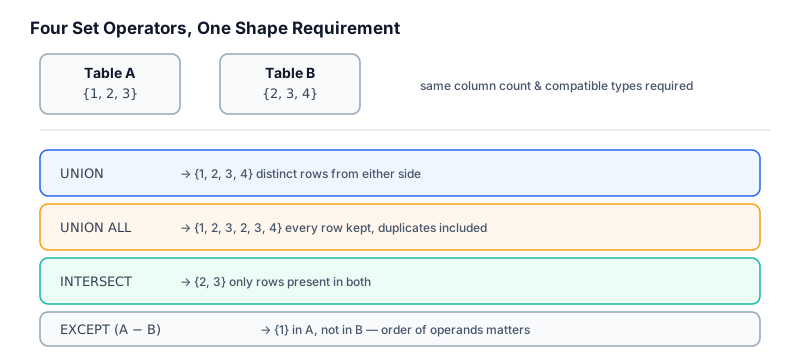 All four operators require the same column count and compatible types — what differs is purely how they combine matching rows.
02 — UNION vs UNION ALL
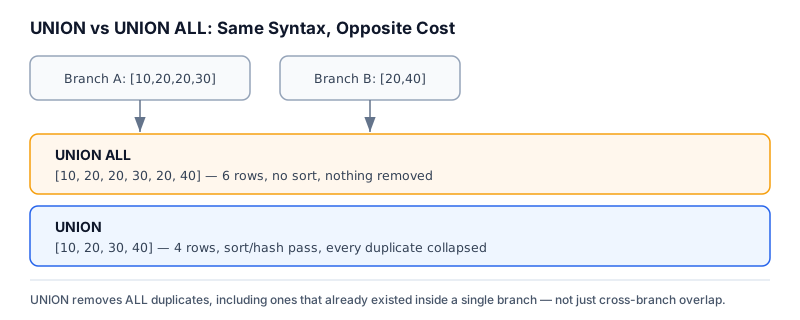 Same syntax, opposite cost:
 UNION ALL just concatenates; UNION adds a full sort/hash pass to remove every duplicate, including ones that already existed inside a single branch.
03 — INTERSECT & EXCEPT
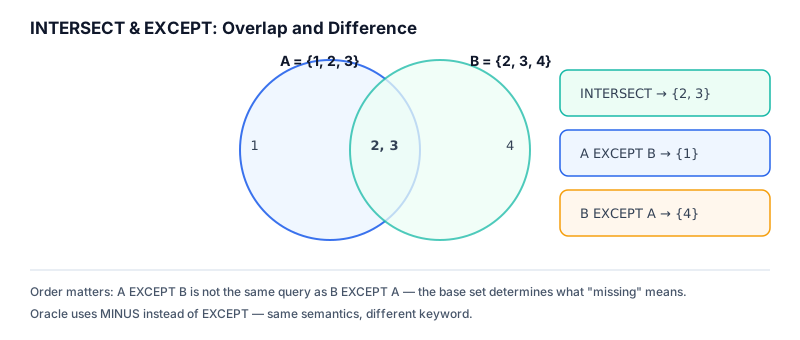
INTERSECT finds the overlap; EXCEPT finds what’s missing from one side — and operand order changes the answer.
04 — Business Data Integration
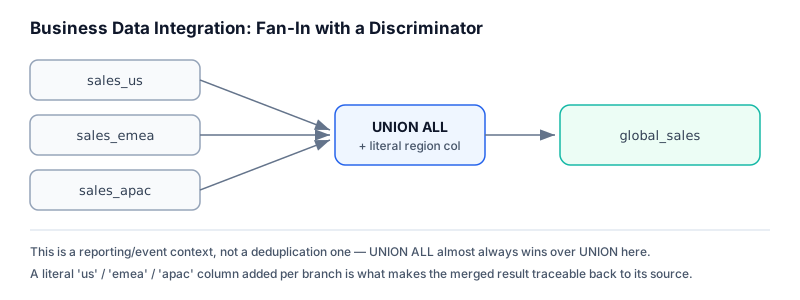 Three regional tables fan into one
 global_sales result via UNION ALL, with a literal discriminator column tracing every row back to its source.
05 — Reconciliation Flow
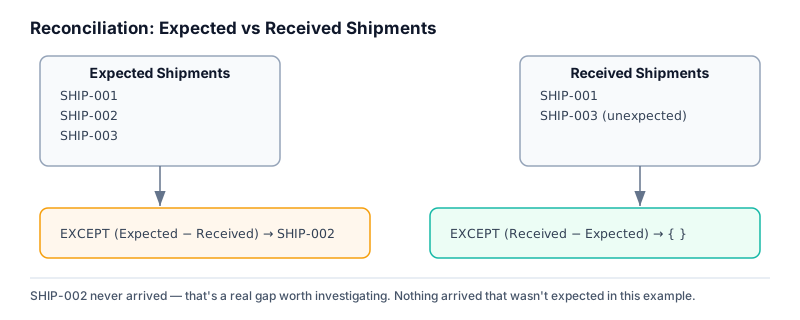 Two
Two EXCEPT queries, run in both directions, turn “do these match?” into an exact, actionable list of what’s missing and what’s unexpected.
06 — Performance Ladder
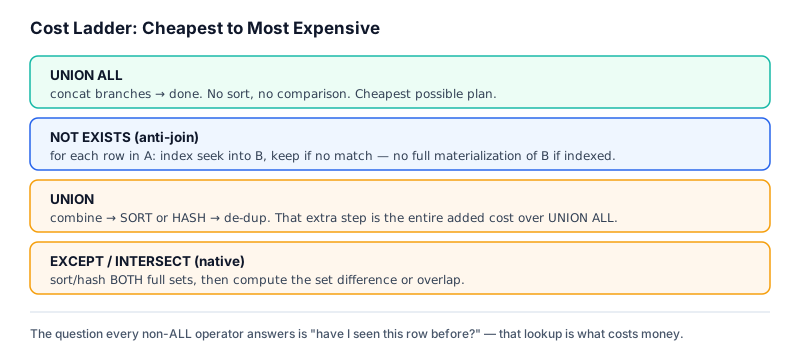 Every non-
ALL operator has to answer “have I seen this row before?” — that lookup, not the syntax, is what determines the real cost.
07 — Capstone: Merger Consolidation
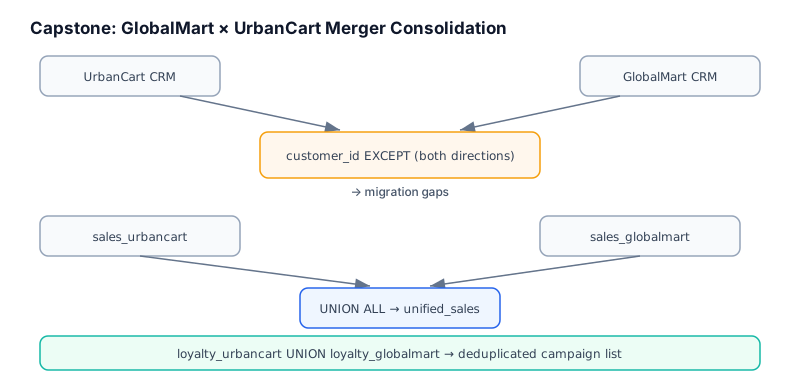 A full acquisition scenario resolved with the same four operators from Topics 01–06, applied together against a continuous business problem.
SQL Operators Covered
| Operator | Behavior | Dialect Notes |
|---|---|---|
UNION |
Combine rows from two+ queries, remove duplicates | ANSI standard, all major engines |
UNION ALL |
Combine rows from two+ queries, keep duplicates | ANSI standard, all major engines |
INTERSECT |
Return rows present in both queries | ANSI standard; not in older MySQL versions |
EXCEPT |
Return rows from the first query not present in the second | ANSI standard / PostgreSQL / SQL Server |
MINUS |
Same as EXCEPT |
Oracle-specific keyword |
Business Applications
| Domain | Where this module applies |
|---|---|
| Retail / E-commerce | Merging regional sales tables into one global reporting view |
| Finance | Reconciling two independently computed totals or ledgers |
| HR | Comparing headcount snapshots across systems after a data migration |
| Healthcare | Auditing that patient records migrated between systems without loss |
| SaaS | Combining product usage events from multiple regions or environments |
| Marketing | Deduplicating campaign or loyalty lists pulled from multiple sources |
| Mergers & Acquisitions | Consolidating two companies’ customer, sales, and loyalty data |
Production Use Cases
- Post-migration validation: proving row counts and specific keys match between old and new systems
- Multi-region or multi-tenant reporting rollups with a source/region discriminator column
- Deduplicating lead or contact lists gathered from multiple campaign channels
- Anti-join patterns (
NOT EXISTS) used as a performant substitute forEXCEPTon large indexed tables - Merger and acquisition data consolidation projects
Analytics Engineering Perspective
Set operators are often the first tool reached for when combining “the same kind of thing from different places” — but in a mature analytics stack, that fan-in pattern usually lives in a dedicated staging or intermediate model (a dbt model, a scheduled view, a materialized table) rather than being recomputed ad hoc in every downstream query. Reconciliation queries built on EXCEPT/INTERSECT are equally valuable as scheduled data-quality checks, not just one-off investigations — the same query that answers “do these match today?” can run daily and alert when they stop matching.
Common Data Integration Problems
- Column order or type mismatches between branches that produce wrong results without throwing an error
- Using
UNIONby default out of habit, paying a needless sort cost whenUNION ALLwas correct - Forgetting that
ORDER BYcan only appear once, at the end of the combined statement, not per branch - Missing a source discriminator column, making a merged result impossible to trace back to origin
- Running
EXCEPTin only one direction during reconciliation and missing rows that exist only on the other side
Best Practices
- Default to
UNION ALLunless you have a specific reason to deduplicate — it’s cheaper and more explicit about intent - Always add a literal discriminator column (region, source system, branch) when fanning multiple tables into one result
- Run reconciliation
EXCEPTqueries in both directions —A EXCEPT BandB EXCEPT Aanswer different questions - Check execution plans before assuming a native set operator is the fastest option on large tables
- Keep column lists and aliases explicit and identical across every branch of a set operation for readability
Common Mistakes
- Using
UNIONwhenUNION ALLwas correct, silently and expensively removing legitimate duplicate rows - Assuming
INTERSECT/EXCEPTare available in every MySQL version without checking (older versions lack them) - Applying
ORDER BYto an individual branch instead of the final combined result - Trusting a single-direction
EXCEPTas proof that two datasets fully match - Forgetting
EXCEPT/INTERSECTde-duplicate their output just likeUNIONdoes
Performance Notes
UNION ALLnever sorts or compares rows — it is always at least as fast asUNIONon the same inputsUNION,INTERSECT, and nativeEXCEPTtypically require materializing and sorting or hashing both full result sets- On large, well-indexed tables, a
NOT EXISTSanti-join often outperformsEXCEPTbecause it can use an index seek per row instead of materializing both sides - Always verify assumptions with
EXPLAIN— the “faster” rewrite is not universal and depends on table size, indexing, and selectivity
Difficulty & Prerequisites
- Prerequisites: comfort with
SELECT, joins, subqueries/CTEs, and basic execution-plan reading — see03_Joins,04_Subqueries, and06_CTEs - Difficulty curve: Lessons 01–03 (Beginner/Intermediate — core operator mechanics) → 04–05 (Intermediate — applied integration and reconciliation) → 06 (Advanced — execution plans and rewrites) → 07 (Advanced — full capstone)
If any prerequisite feels shaky, revisit the earlier modules before continuing — reconciliation and integration patterns assume you’re already comfortable combining and filtering data with joins and subqueries.
Interview Preparation
Expect questions like:
- “What’s the difference between
UNIONandUNION ALL, and when would you choose each?” - “How would you find records that exist in one table but not another?”
- “Write a query to reconcile two datasets and report exactly where they differ.”
- “When would you rewrite an
EXCEPTquery as aNOT EXISTSanti-join, and why?”
This module is designed so that after completing it, these questions become straightforward rather than something to memorize answers for.
Career Relevance
Reconciliation and data integration work shows up constantly in Data Analyst and Analytics Engineer roles — migrations, mergers, multi-system audits, and multi-region reporting all lean on exactly the patterns in this module. Being able to write and explain a reconciliation query fluently is a concrete, interview-ready skill that maps directly onto real job responsibilities.
Related Modules
01_Fundamentals ·
02_Aggregations ·
03_Joins ·
04_Subqueries ·
05_CASE_WHEN ·
06_CTEs ·
07_Window_Functions ·
08_WINDOW_BUSINESS_CASES ·
09_Date_Functions ·
10_STRING_FUNCTIONS ·
11_NULL_HANDLING_AND_DATA_CLEANING ·
12_ADVANCED_AGGREGATIONS ·
14_VIEWS ·
15_INDEXES ·
16_QUERY_OPTIMIZATION ·
17_SQL_INTERVIEW_QUESTIONS ·
18_SQL_BUSINESS_CASE_STUDIES ·
19_SQL_PROJECTS ·
20_SQL_CHEATSHEET
Contributor Guide
Contributions welcome — this module intentionally keeps every lesson to a consistent structure (Introduction → Concept Overview → Why This Exists → Business Context → Real Company Examples → Production Use Cases → Visual Explanation → SQL reference → Business Examples → Production Workflow → Performance Notes → Best Practices → Common Mistakes → Interview Questions) so new lessons stay consistent.
To add a new lesson:
- Follow the existing
NN_TOPIC_NAME.md/.sqlnaming pattern - Reuse the schema and seed data already established in this module’s
.sqlfiles rather than introducing a new schema, unless the lesson genuinely needs new tables - Add a matching SVG to
assets/in the same muted slate/blue/teal palette as the rest of the module — no neon, no oversaturated fills — and link it from the Visual Guide section - Update the Module Files and Repository Footprint tables with the new file’s line count and size
- Prefer a real, demonstrable production scenario over an invented one when illustrating a common mistake
Key Takeaway
Set operators turn “combine or compare two result sets” from a manual, error-prone exercise into a single declarative statement — but the four operators are not interchangeable, and picking the wrong one is a common, costly mistake. The real skill in this module isn’t memorizing syntax; it’s recognizing which business question you’re actually being asked — merge, dedupe, find overlap, or find difference — and reaching for the operator built for exactly that question.
Further Reading
Previous Module: 12 — Advanced Aggregations Next Module: 14 — Views