SQL-Engineering-Handbook
01 — Introduction to Set Operators
Introduction
Up to this point, every query you’ve written has answered one question against one logical result set. This file introduces a different kind of question: “How do two or more result sets relate to each other?” That is the question set operators answer.
Concept Overview
A set operator takes two (or more) SELECT statements that produce the same shape of result — same number of columns, compatible data types — and combines them according to set theory:
| Operator | Meaning | Analogy |
|---|---|---|
UNION |
Rows in A, or in B, or in both — no duplicates | Merge two mailing lists, dedup |
UNION ALL |
Rows in A, then rows in B — duplicates kept | Stack two mailing lists |
INTERSECT |
Rows in both A and B | Find the overlap |
EXCEPT / MINUS |
Rows in A that are not in B | Find what’s missing |
Each SELECT in the combination is called a branch. The database evaluates each branch independently, then applies the set operation across the combined output.
Why This Exists
SQL was designed around the relational model, and the relational model is built on set theory — a table is a set of rows. It follows naturally that the language needs operators for the fundamental set operations: union, intersection, and difference. Without them, comparing two tables would require awkward, error-prone workarounds involving temporary tables and procedural loops. Set operators let you express “combine,” “overlap,” and “difference” directly, in one statement, in a way the query optimizer can plan efficiently.
Business Context
Businesses rarely keep all their data in one table. A national retailer has regional sales tables. A company that just completed a merger has two HR systems. A finance team keeps last year’s numbers in an archive table and this year’s in a live one. Any time the business is structured as “the same kind of data, split across multiple places,” a set operator is likely the correct tool — not a JOIN, which combines different kinds of data side-by-side.
Real Company Examples
- A telecom combines postpaid and prepaid customer tables into one
all_customersview usingUNION ALL. - A hospital network compares patient IDs in the
intake_2024andintake_2025systems to find continuing patients (INTERSECT). - A logistics company compares
expected_shipmentsagainstreceived_shipmentsto find what never arrived (EXCEPT).
Production Use Cases
- Building a single reporting view from multiple regional or yearly source tables.
- Validating that a migration moved every row (
EXCEPTboth directions should return zero rows). - Detecting overlap between two populations (e.g., customers who are also employees, for fraud policy).
- Quantifying duplicate data before deciding on a deduplication strategy.
Visual Explanation
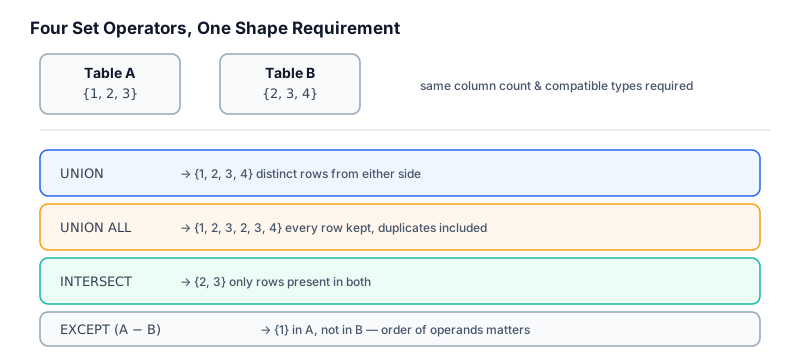
   Table A                Table B
 ┌─────────┐            ┌─────────┐
 │  1  2   │            │   2  3  │
 │    3    │            │         │
 └─────────┘            └─────────┘

 UNION        → { 1, 2, 3 }              (distinct, combined)
 UNION ALL    → { 1, 2, 3, 2, 3 }        (all rows, combined)
 INTERSECT    → { 2, 3 }                 (in both)
 EXCEPT (A-B) → { 1 }                    (in A, not in B)
 EXCEPT (B-A) → { }                      (in B, not in A — B ⊆ A here)
Syntax
-- General shape
SELECT column_list FROM table_a WHERE ...
UNION | UNION ALL | INTERSECT | EXCEPT
SELECT column_list FROM table_b WHERE ...
[ORDER BY column_name];   -- applies to the FINAL combined result only
Detailed Explanation
Three rules govern every set operator, regardless of vendor:
- Column count must match. Both branches must return the same number of columns.
- Data types must be compatible. Column 1 of branch A must be comparable to column 1 of branch B (implicit conversions like
INTtoDECIMALare usually fine;VARCHARtoDATEtypically is not, or is dangerously silent). - Output column names come from the first branch. If branch A’s first column is aliased
emp_nameand branch B’s is aliaseddept_name, the combined result set is namedemp_name— a common source of confusion for reviewers.
Positional matching — not name matching — governs which columns line up. SELECT a, b FROM x UNION SELECT c, d FROM y matches a with c and b with d, regardless of what they’re called.
Business Examples
-- One combined list of every city where the company has either an office or a warehouse
SELECT city FROM office_locations
UNION
SELECT city FROM warehouse_locations;
-- Every ID currently in use across two identifier pools, deduplicated
SELECT employee_id AS company_id FROM employees
UNION
SELECT contractor_id AS company_id FROM contractors;
Production Workflow
- Confirm both branches return the same number of columns, in an order that makes business sense when stacked.
- Alias every column explicitly in the first branch — that name becomes the contract for downstream consumers.
- Choose
UNIONvsUNION ALLdeliberately (covered fully in02_UNION_AND_UNION_ALL.md). - Add a literal “source” column when combining data that originated from different systems, so provenance is traceable.
- Apply
ORDER BYonce, at the very end.
Engineering Considerations
- Set operators execute each branch as an independent subquery internally; indexes that help one branch don’t automatically help the other — tune each branch as if it were a standalone query.
- Combining more than two branches (
A UNION B UNION C) is valid and common; the operator is left-associative but functionally behaves the same as repeated pairwise combination. - Mixing operators in one statement (
A UNION B EXCEPT C) follows operator precedence rules that vary slightly by vendor — use parentheses to make intent explicit rather than relying on default precedence.
Performance Notes
UNION, INTERSECT, and EXCEPT all require the engine to detect duplicates, which typically means a sort or hash-based deduplication step over the full combined result. UNION ALL skips this entirely and is materially cheaper on large datasets. This single fact is the most important performance lesson in this module and is expanded fully in 06_PERFORMANCE_AND_OPTIMIZATION.md.
Database Compatibility
| Feature | MySQL | PostgreSQL | SQL Server | Oracle |
|---|---|---|---|---|
UNION / UNION ALL |
✅ | ✅ | ✅ | ✅ |
INTERSECT |
8.0.31+ | ✅ | ✅ | ✅ |
EXCEPT |
8.0.31+ | ✅ | ✅ | MINUS |
| Parentheses around branches | ✅ | ✅ | ✅ | ✅ |
Best Practices
- Treat set operators as a deliberate design decision, not a default way to “stack two queries.”
- Always inventory columns and types before writing the operator — don’t discover a mismatch from an error message.
- Alias columns explicitly and consistently across every branch.
Common Mistakes
- Assuming column names need to match — they don’t; position does.
- Forgetting that
ORDER BYcan only appear once, at the end of the whole statement. - Combining columns of incompatible types and relying on implicit, vendor-specific coercion.
Edge Cases
NULLvalues are treated as equal to each other for deduplication purposes inUNION/INTERSECT/EXCEPT— twoNULLrows are considered duplicates and collapsed, which differs fromNULL’s usual “unknown, never equal” behavior inWHEREclauses.- Combining a branch with more columns than the other is a hard error in every vendor — there is no implicit padding.
Interview Questions
- (Foundational) What’s the difference between
UNIONandUNION ALL? - (Intermediate) Why do column names in a
UNIONresult come from the firstSELECT? - (Intermediate) How does
NULLbehave differently inUNIONdeduplication versus aWHEREclause comparison? - (Advanced) How would you combine three regional sales tables into one report while preserving which region each row came from?
- (Staff-level) Why might a query using
UNIONon a large table pass code review but fail a production performance SLA?
Summary
Set operators combine result sets of the same shape using the logic of set theory: union, intersection, and difference. The rules — matching column counts, compatible types, and first-branch naming — are simple, but the engineering judgment about which operator and at what cost is where real skill shows.
Practice Problems
- Write a query producing one combined, deduplicated list of every
dept_nameindepartmentsand everycityinlocations. - Write a query producing one list of all
emp_idvalues and allmanager_idvalues fromemployees, without duplicates. - Explain, in a comment, why
SELECT emp_name FROM employees UNION SELECT dept_id FROM departmentswould fail or behave incorrectly. - Draw the ASCII set diagram for two tables of your choice, illustrating all four operators.
Further Reading
- PostgreSQL Docs — Combining Queries
- Microsoft Learn — Set Operators (Transact-SQL)
- Oracle SQL Language Reference —
UNION,INTERSECT,MINUS