SQL-Engineering-Handbook
**Module 7 of the [SQL Engineering Handbook](../)** · Authored & maintained by [**Mohammad Ammar**](https://github.com/theammarngp-makes) Part of an open-source effort to build the most rigorous, production-grade SQL reference on GitHub — corrections and additions genuinely welcome.
📚 Module Navigation
| # | Lesson | Function(s) | Open |
|---|---|---|---|
| 01 | ROW_NUMBER | ROW_NUMBER() |
.md · .sql |
| 02 | RANK | RANK() |
.md · .sql |
| 03 | DENSE_RANK | DENSE_RANK() |
.md · .sql |
| 04 | PARTITION BY | PARTITION BY |
.md · .sql |
| 05 | LAG / LEAD | LAG() / LEAD() |
.md · .sql |
| 06 | FIRST/LAST/NTILE | FIRST_VALUE() / LAST_VALUE() / NTILE() |
.md · .sql |
| 07 | Running Totals | SUM() OVER() / AVG() OVER() |
.md · .sql |
📑 Table of Contents
- Introduction
- What Is a Window Function?
- Why Learn Window Functions?
- Syntax Overview
- Folder Structure
- Business Scenarios Covered
- Learning Objectives
- Visual Learning
- Practice Checklist
- Common Mistakes
- Interview Questions
- Resources
- Prerequisites
- About the Author
💡 Introduction
Window functions let you perform calculations across a set of rows that are
related to the current row, without collapsing the result set the way
GROUP BY does. They are the single most important tool for turning a
raw SQL developer into someone who can answer real analytics questions:
rankings, leaderboards, running totals, period-over-period comparisons, and
department-wise breakdowns — all in one query.
❓ What Is a Window Function?
A window function operates over a “window” of rows defined by an OVER()
clause. Unlike aggregate functions used with GROUP BY, window functions
do not reduce the number of rows returned. Each row keeps its identity
while also gaining access to a calculation performed across its window.
<function_name>(<arguments>) OVER (
    [PARTITION BY <column_list>]
    [ORDER BY <column_list>]
    [<frame_clause>]
)
💡 Why Learn Window Functions?
- They are asked in almost every mid-to-senior Data Analyst / Data Engineer interview.
- They replace fragile, slow correlated subqueries with a single readable pass over the data.
- They are the backbone of real business reporting: leaderboards, cohort analysis, growth rates, running balances, and top-N-per-group queries.
⚖️ Syntax Overview
SELECT
    column_a,
    column_b,
    WINDOW_FUNCTION() OVER (
        PARTITION BY grouping_column
        ORDER BY sort_column
    ) AS result_column
FROM table_name;
📁 Folder Structure
07_Window_Functions/
│
├── README.md
│
├── 01_ROW_NUMBER.md          01_ROW_NUMBER.sql
├── 02_RANK.md                02_RANK.sql
├── 03_DENSE_RANK.md          03_DENSE_RANK.sql
├── 04_PARTITION_BY.md        04_PARTITION_BY.sql
├── 05_LAG_LEAD.md            05_LAG_LEAD.sql
├── 06_FIRST_LAST_NTILE.md    06_FIRST_LAST_NTILE.sql
├── 07_RUNNING_TOTALS.md      07_RUNNING_TOTALS.sql
│
└── assets/
    └── diagrams/
        ├── window-execution-order.svg
        ├── row-number-assignment.svg
        ├── rank-gaps.svg
        ├── dense-rank-no-gaps.svg
        ├── partition-by-split.svg
        ├── lag-lead-offset.svg
        ├── first-last-ntile.svg
        └── running-totals-accumulation.svg
📎 Every lesson file embeds its own diagram inline, right at the top of the file, not just here in the README.
💼 Business Scenarios Covered
| Domain | Use Case |
|---|---|
| HR | Employee seniority ranking, department leaderboards |
| Finance | Running balances, month-over-month growth |
| Retail | Top-N products per category |
| Banking | Rolling averages for risk monitoring |
| E-commerce | Customer order sequencing, cohort tiers |
🎯 Learning Objectives
By the end of this module you will be able to:
- Explain the difference between
ROW_NUMBER(),RANK(), andDENSE_RANK(). - Use
PARTITION BYto compute per-group metrics withoutGROUP BY. - Retrieve previous/next row values using
LAG()/LEAD(). - Retrieve boundary values with
FIRST_VALUE()/LAST_VALUE(). - Bucket rows into equal groups using
NTILE(). - Build running totals and running averages with frame clauses.
- Know why
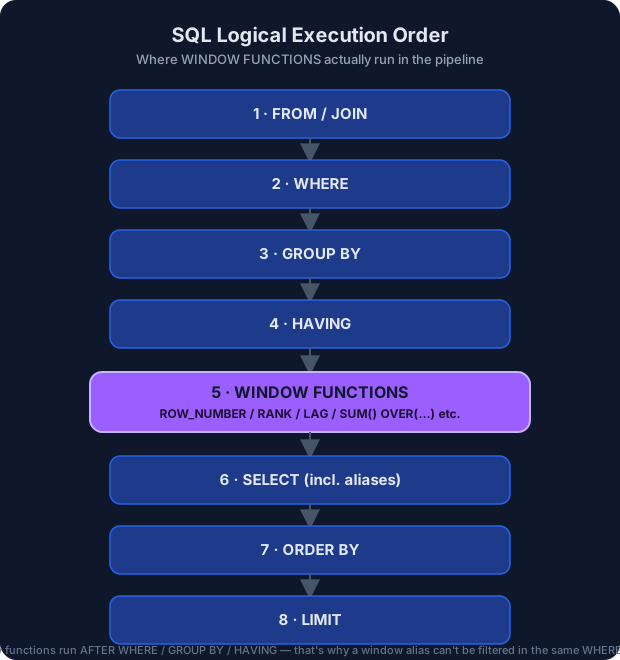
WHEREcannot filter directly on a window function result, and how to work around it with a CTE or subquery.
👁️ Visual Learning
| Diagram | Concept |
|---|---|
|
SQL logical execution order — where window functions run in the pipeline |
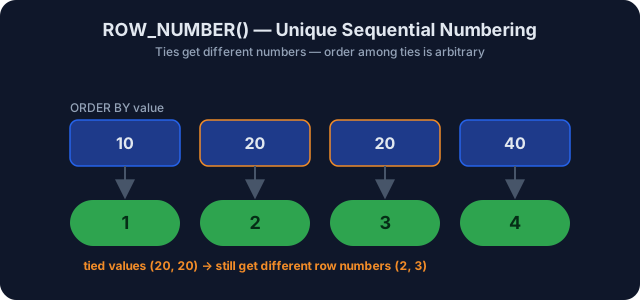 |
ROW_NUMBER() — unique sequential numbering |
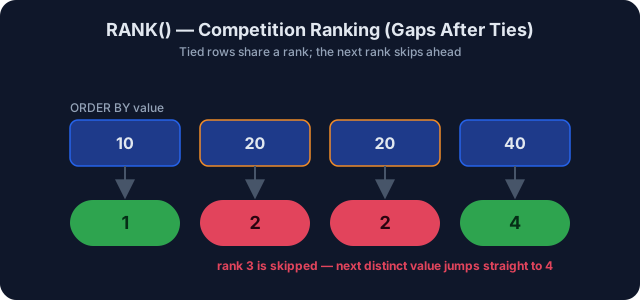 |
RANK() — competition ranking with gaps after ties |
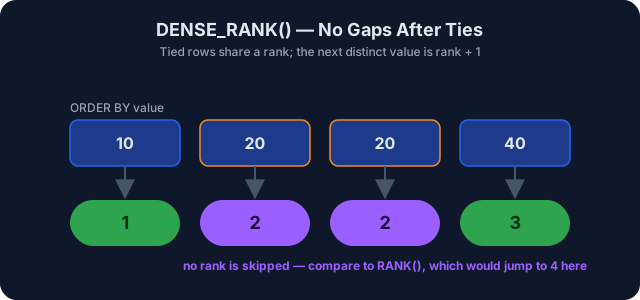 |
DENSE_RANK() — no gaps after ties |
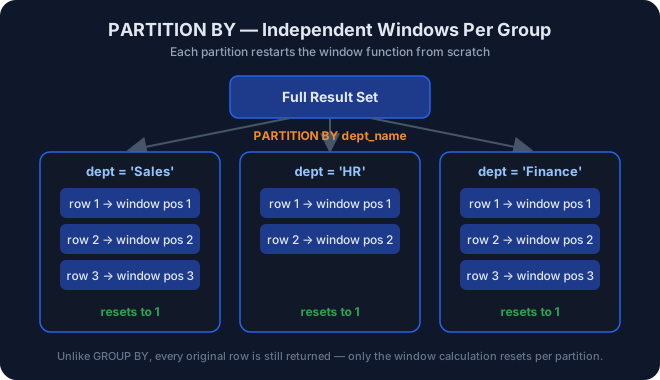 |
PARTITION BY — independent windows per group |
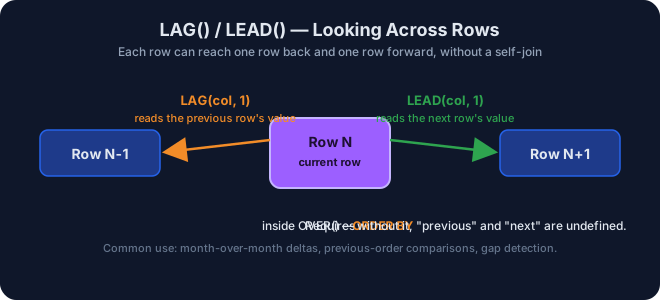 |
LAG() / LEAD() — looking across rows |
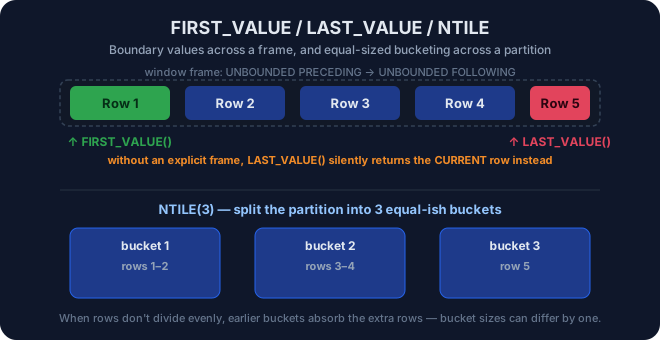 |
FIRST_VALUE() / LAST_VALUE() / NTILE() — boundaries and bucketing |
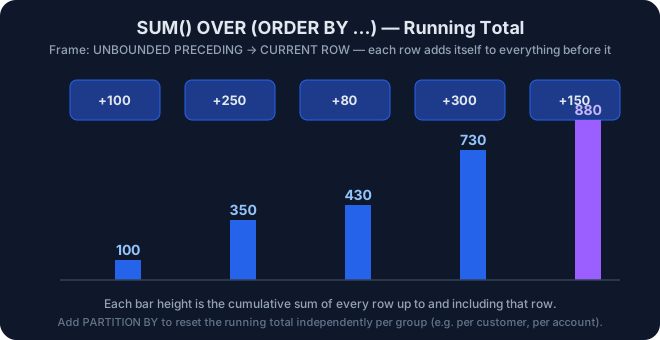 |
SUM() OVER() — running total accumulation |
✅ Practice Checklist
- I can write
ROW_NUMBER()with and withoutPARTITION BY. - I can explain the ranking gap behavior of
RANK()vsDENSE_RANK(). - I can filter window function output using a CTE.
- I can compute a running total with
SUM() OVER (ORDER BY ...). - I can compute month-over-month style deltas using
LAG().
⚠️ Common Mistakes
- Trying to reference a window function alias directly in
WHERE(illegal — window functions are evaluated afterWHERE, so wrap in a CTE/subquery). - Forgetting
ORDER BYinsideOVER()when usingLAG()/LEAD(), which makes row order (and therefore the result) undefined. - Using
LAST_VALUE()without an explicit frame clause (ROWS BETWEEN UNBOUNDED PRECEDING AND UNBOUNDED FOLLOWING), which silently returns the current row instead of the true last row. - Confusing
RANK()(leaves gaps) withDENSE_RANK()(no gaps).
🎤 Interview Questions
- What is the difference between a window function and a
GROUP BYaggregate? - Why can’t you filter directly on a window function alias in
WHERE? - Walk through
ROW_NUMBER(),RANK(), andDENSE_RANK()on a tied dataset. - How would you find the second-highest salary per department?
- How would you calculate a 3-month moving average in SQL?
📚 Resources
🎯 Prerequisites
06_CTEs(Common Table Expressions)03_Joins02_Aggregations
✅️ About the Author
 |
Mohammad Ammar — Co-Founder @ Apex Analyticx, Data Analytics Engineer, author of the SQL Engineering Handbook (20+ modules). Based in Nagpur, India. |




⭐ If this module helped you, consider starring the repo — it helps other engineers find it.