SQL-Engineering-Handbook
LAG() and LEAD()
Overview
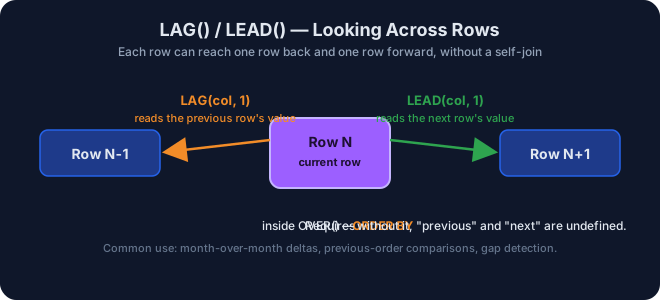
LAG() looks backward to a previous row; LEAD() looks forward
to a following row – both relative to the current row’s position in the
window’s ORDER BY sequence. They are the foundation of every
period-over-period comparison in analytics SQL.
Learning Objectives
- Retrieve the previous and next row’s value using
LAG()/LEAD(). - Compute row-over-row differences (e.g., month-over-month growth).
- Use the optional offset argument to look back/forward more than one row.
Prerequisites
01_ROW_NUMBER04_PARTITION_BY
Syntax
SELECT
    column_a,
    LAG(column_b, offset, default_value)  OVER (ORDER BY sort_column) AS prev_value,
    LEAD(column_b, offset, default_value) OVER (ORDER BY sort_column) AS next_value
FROM table_name;
offset defaults to 1 (one row back/forward); default_value defaults
to NULL for rows with no previous/next row.
Dataset Used
employes
Examples
See 05_lag_lead.sql.
Real World Applications
- Month-over-Month growth calculations.
- Previous-day sales comparisons.
- Stock price change tracking.
- Detecting inactivity gaps in customer activity logs.
Business Use Cases
| Domain | Scenario |
|---|---|
| Finance | Month-over-month revenue growth |
| Retail | Previous day’s sales for a trend chart |
| Banking | Stock/asset price change tracking |
| Marketing | Customer activity gap detection |
Common Mistakes
- Omitting
ORDER BYinsideOVER(), which makes “previous” and “next” meaningless / non-deterministic. - Forgetting that the first row has no
LAG()value (NULL) and the last row has noLEAD()value (NULL) unless a default is supplied. - Using
LAG()/LEAD()across partition boundaries unintentionally – always addPARTITION BYwhen “previous” should mean “previous within this group” (e.g., previous month for this customer).
Best Practices
- Always specify a
default_value(third argument) whenNULLwould break downstream arithmetic (e.g., default to0for growth deltas). - Pair
LAG()/LEAD()withPARTITION BYwhenever the comparison should stay within a customer, account, or store rather than the whole table.
Engineering Notes
LAG()/LEAD() are evaluated in the same single sorted pass as other
window functions – no self-join is required, which is significantly
faster and more readable than the older JOIN table AS t1 ON t1.id = t2.id - 1
pattern.
Practice Questions
- Show the previous employee id using
LAG(). - Show the next employee id using
LEAD(). - Show the current employee and the previous employee’s name.
- Show the current employee and the next employee’s name.
- Show the difference between the current
emp_idand the previousemp_id(and repeat using a 2-row offset).
Difficulty
Intermediate
Estimated Time
25 minutes
Learning Outcomes
- Write
LAG()/LEAD()confidently, including the offset and default arguments. - Explain, in an interview, how to compute month-over-month growth
using only
LAG().
Related Topics
Next Topic
Lesson Navigation
← Previous: 04_PARTITION_BY
↑ Module README
→ Next: 06_FIRST_LAST_NTILE