SQL-Engineering-Handbook
PARTITION BY
Overview
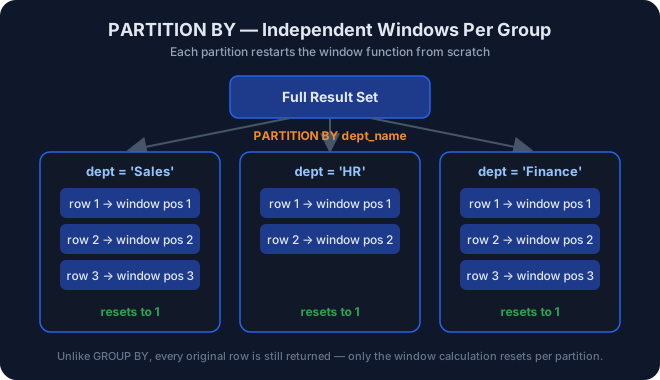
PARTITION BY splits the result set into independent groups (partitions)
before a window function is applied. The window function then resets
and recalculates separately within each partition – similar in spirit to
GROUP BY, but without collapsing rows.
Learning Objectives
- Combine
PARTITION BYwithROW_NUMBER(),RANK(),DENSE_RANK(), and aggregate window functions. - Compute per-group metrics (counts, top-N per group) without losing row-level detail.
- Understand that
PARTITION BYresets the window function at every partition boundary.
Prerequisites
01_ROW_NUMBER,02_RANK,03_DENSE_RANK03_Joins(this module joinsemployestodepartments)
Syntax
SELECT
    column_a,
    grouping_column,
    WINDOW_FUNCTION() OVER (
        PARTITION BY grouping_column
        ORDER BY sort_column
    ) AS result_column
FROM table_name;
Dataset Used
employes joined to departments on dept_id
Examples
See 04_partition_by.sql.
Real World Applications
- Top-N products per category.
- First transaction per customer.
- Department-wise employee leaderboards.
Business Use Cases
| Domain | Scenario |
|---|---|
| HR | Rank employees within their own department |
| Retail | Rank products within their own category |
| Banking | Rank transactions within their own account |
Common Mistakes
- Forgetting
PARTITION BYand accidentally computing a global rank instead of a per-group rank. - Assuming
PARTITION BYfilters rows – it does not; it only changes how the window function’s calculation is scoped. - Joining tables incorrectly and silently duplicating rows before the partition is applied, which corrupts every downstream ranking.
Best Practices
- Always validate the join first (
SELECT * ...sanity check) before layering window functions on top – a bad join silently poisons every rank, count, and running total built afterward. - Name partition-scoped aliases clearly (
dept_seq, notseq) so readers instantly know the calculation is per-department.
Engineering Notes
PARTITION BY does not require a separate index from ORDER BY, but
query planners benefit significantly from a composite index on
(partition_column, order_column) for large tables, since it avoids a
full sort per partition.
Practice Questions
- Assign row numbers within each department.
- Assign ranks within each department.
- Count employees in each department using a window function.
- Show the first employee from every department.
- Build a full department leaderboard combining
ROW_NUMBER(),RANK(), andDENSE_RANK().
Difficulty
Intermediate
Estimated Time
25–30 minutes
Learning Outcomes
- Confidently combine
JOIN+PARTITION BY+ORDER BYin one query. - Explain, in an interview, how
PARTITION BYdiffers fromGROUP BY.
Related Topics
Next Topic
Lesson Navigation
← Previous: 03_DENSE_RANK
↑ Module README
→ Next: 05_LAG_LEAD