SQL-Engineering-Handbook
Running Totals and Running Averages
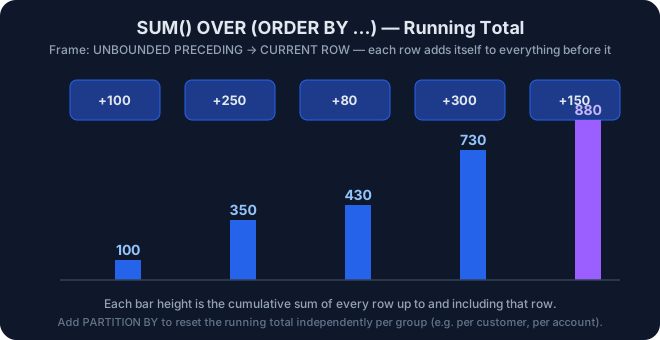
Overview
Aggregate functions (SUM(), AVG(), COUNT(), MIN(), MAX()) can
be used as window functions by adding an OVER() clause with
ORDER BY. This produces a cumulative (running) calculation instead
of a single collapsed value.
Learning Objectives
- Build a running total using
SUM() OVER (ORDER BY ...). - Build a running average using
AVG() OVER (ORDER BY ...). - Understand the default frame (
RANGE BETWEEN UNBOUNDED PRECEDING AND
CURRENT ROW
) that makes cumulative calculations work. - Combine running totals with
PARTITION BYfor per-group cumulative metrics.
Prerequisites
01_ROW_NUMBER04_PARTITION_BY05_LAG_LEAD
Syntax
SUM(column) OVER (ORDER BY sort_column) AS running_total

AVG(column) OVER (
    PARTITION BY group_column
    ORDER BY sort_column
) AS running_average_per_group
Dataset Used
employes joined to departments
Examples
Real World Applications
- Running account balances in a bank statement.
- Cumulative revenue-to-date for a fiscal year.
- Rolling/moving averages for trend smoothing on noisy metrics.
Business Use Cases
| Domain | Scenario |
|---|---|
| Banking | Running account balance after each transaction |
| Finance | Cumulative revenue-to-date, YTD tracking |
| Retail | Rolling 7-day average sales for demand forecasting |
| Logistics | Cumulative distance travelled per route |
Common Mistakes
- Assuming
SUM() OVER (ORDER BY x)always produces a running total – it does, but only because of the default frame; explicitly writing the frame clause makes intent clear to future readers. - Forgetting
PARTITION BYwhen the running total should restart per group (e.g., per account, per department) rather than run across the entire table. - Confusing a running total (
ORDER BYpresent) with a full-table total (ORDER BYabsent) – omittingORDER BYturns the “running” calculation back into one grand total repeated on every row.
Best Practices
- Be explicit with the frame clause in production code:
ROWS BETWEEN UNBOUNDED PRECEDING AND CURRENT ROWeven though it matches the default – explicit code survives refactors better than code relying on implicit defaults. - Always sanity-check a running total’s final row against
SUM(column)computed with a plainGROUP BY– they must match.
Engineering Notes
Running totals computed this way are O(n) per partition after the
initial sort, versus the O(n²) cost of the classic self-join/correlated
subquery pattern (SUM(...) WHERE b.id <= a.id). This is one of the
clearest performance wins window functions offer over pre-window-function
SQL patterns.
Practice Questions
- Create a running total of
emp_idusingSUM() OVER(). - Create a running average of
emp_idusingAVG() OVER(). - (Bonus) Restart the running total per department using
PARTITION BY. - (Bonus) Compute each employee’s contribution to the running total as a percentage of the final cumulative value.
Difficulty
Intermediate
Estimated Time
25–30 minutes
Learning Outcomes
- Build correct running totals and running averages from scratch.
- Explain, in an interview, why
ORDER BYis what turns an aggregate window function into a “running” calculation.
Related Topics
Next Topic
08_Subqueries_Advanced (or the next module in your handbook sequence)
Lesson Navigation
← Previous: 06_FIRST_LAST_NTILE
↑ Module README
→ Next: This is the final lesson in this module — see the Module README for the full roadmap.