SQL-Engineering-Handbook
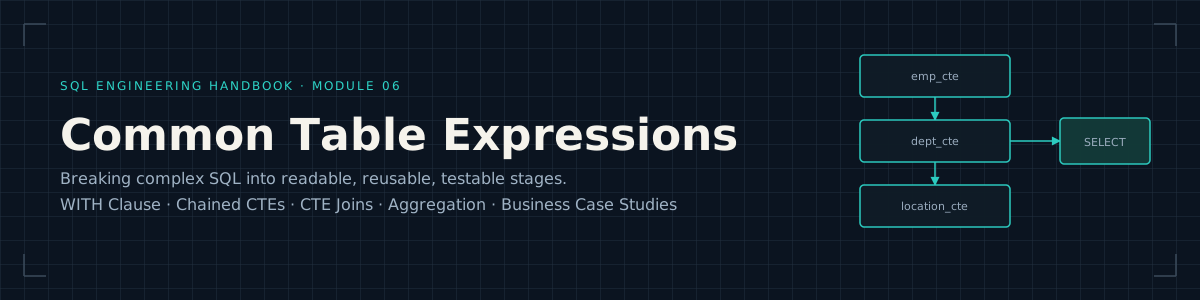






Part of the SQL Engineering Handbook
Why This Module Exists
Every prior module in this handbook teaches SQL that runs against one flat
shape — a single SELECT, a single JOIN, a single aggregation. Real
analytical work rarely fits that shape. It fits the shape of a pipeline:
prepare this dataset, then that one, then combine them, then aggregate, then
classify. Common Table Expressions are how SQL expresses that pipeline
without leaving the language — no temp tables to clean up, no procedural
code, just a WITH clause that turns one unreadable nested query into a
sequence of named, individually verifiable steps.
This module exists to build that instinct: given a business question, break it into CTE-sized stages before writing a single line of the final query.
Who This Is For
Learners who’ve completed 05_CASE_WHEN and are
comfortable with JOIN (03_Joins) and GROUP BY /
HAVING (02_Aggregations). No prior CTE or
subquery experience is assumed — this module builds the concept from a
single-CTE WITH clause up to a five-stage business pipeline.
Quick Start
This module runs against the shared practice schema defined in
00_Schema:
mysql -u root -p your_database < ../00_Schema/01_CREATE_TABLES.sql
mysql -u root -p your_database < ../00_Schema/02_INSERT_DATA.sql
mysql -u root -p your_database < 01_Basic_CTE.sql
Each .sql file below runs independently against that schema — no
additional setup required between files.
What This Module Covers
| # | File | Focus | Diagram | Lines | Size |
|---|---|---|---|---|---|
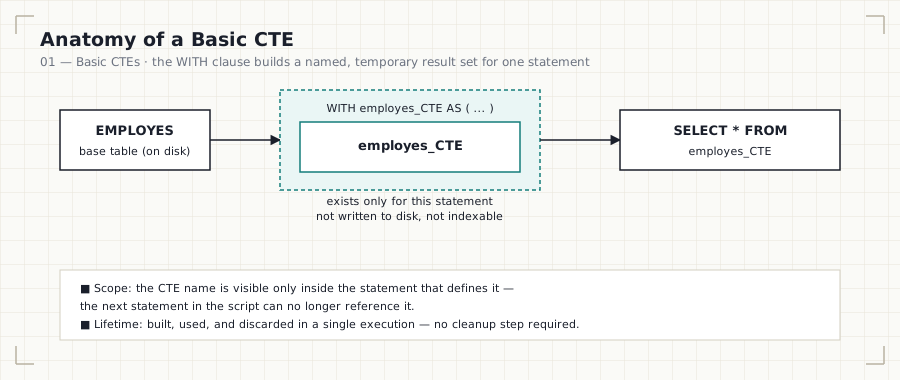
| 01 | Basic CTEs · .sql |
The WITH clause, CTE scope & lifetime, CTE vs. subquery vs. view |
basic-cte-flow.svg | 128 | 4.8 KB |
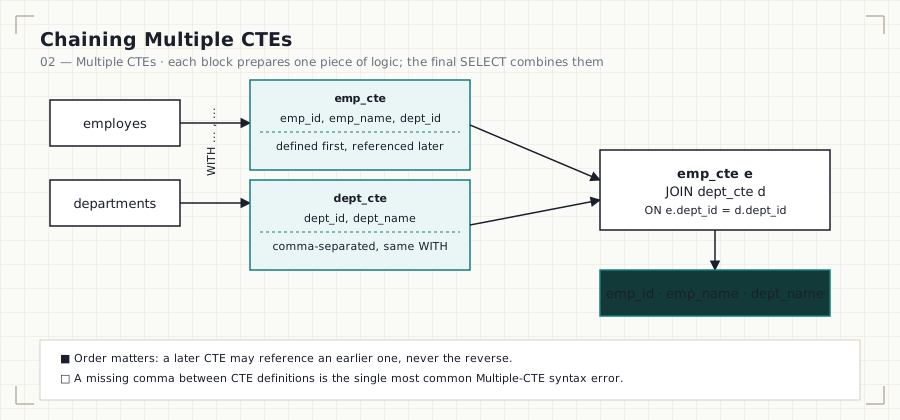
| 02 | Multiple CTEs · .sql |
Chaining CTEs in one WITH, ordering rules, first join across two CTEs |
chained-ctes.svg | 117 | 3.9 KB |
| 03 | CTEs With Joins · .sql |
Three-way CTE join chain (employee → department → location) | cte-join-flow.svg | 119 | 4.3 KB |
| 04 | CTE Aggregations · .sql |
GROUP BY, COUNT, HAVING vs. WHERE on top of a CTE join |
cte-aggregation-pipeline.svg | 109 | 4.0 KB |
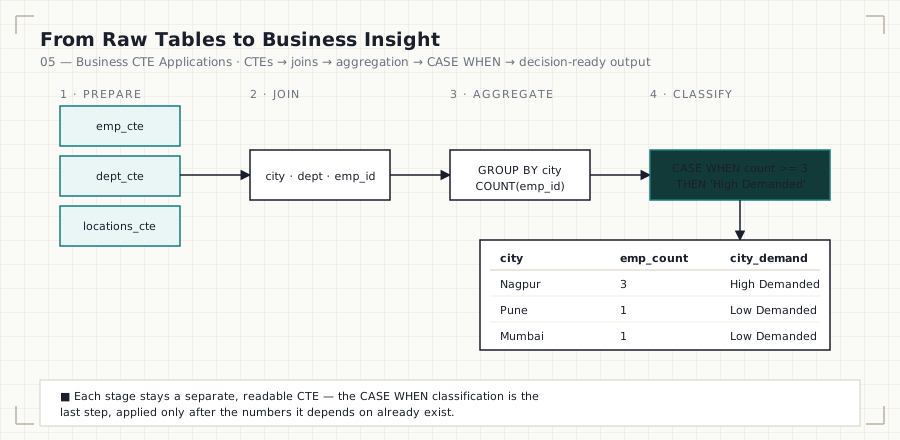
| 05 | Business CTE Applications · .sql |
CASE WHEN classification, LEFT JOIN correctness, five workforce-planning case studies |
business-cte-pipeline.svg | 141 | 5.2 KB |
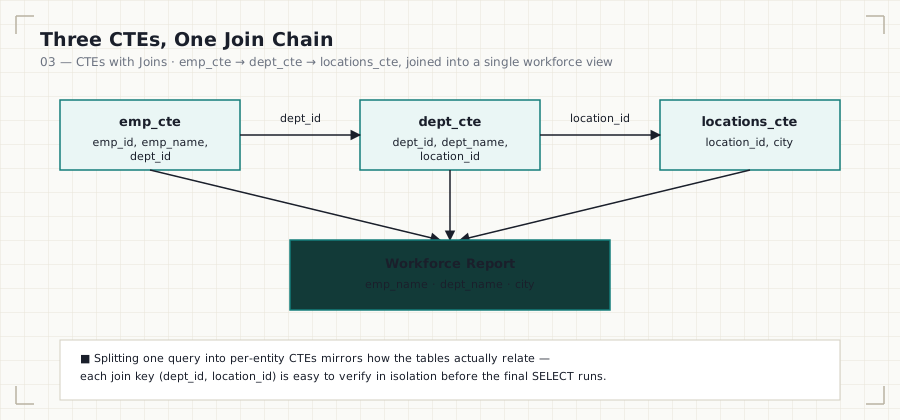
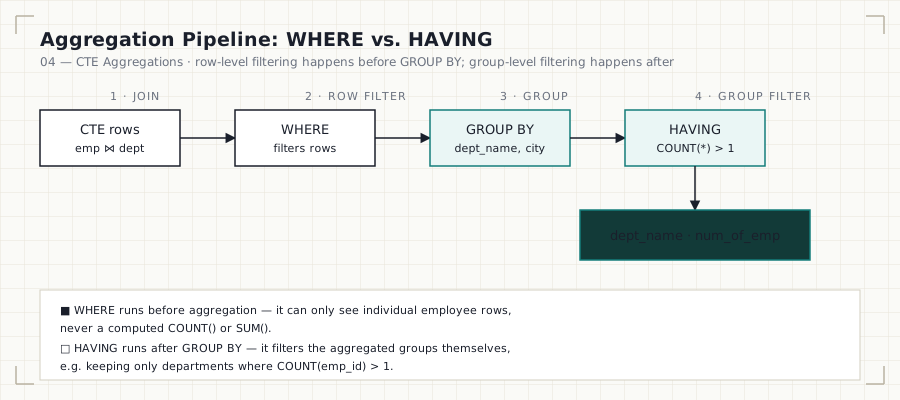

Totals: 5 .md files, 5 .sql files, 5 diagrams — 1,337 combined lines,
~32.8 KB of documentation and runnable SQL.
Each .md file is paired with a .sql file containing the runnable,
commented queries referenced in the text. SQL is written against MySQL
8.0+ syntax, with PostgreSQL, SQL Server, and Oracle notes called out
wherever CTE behavior diverges (see File 01’s optimization-fence note in
particular).
The Diagrams
Every diagram in this module is rendered as a standalone SVG in
assets/diagrams/ and embedded directly in its
corresponding file — no external image hosting, so they render correctly on
GitHub, cloned locally, or in any markdown viewer (including GitHub Pages).




Business Questions Solved
This module answers practical business questions such as:
- Which department has the highest workforce?
- Which city has the largest employee base?
- Which departments are active or inactive?
- Which cities have high workforce demand?
- How can multiple datasets be combined into reusable analytical pipelines?
Learning Objectives
After completing this module you should be able to:
- Create a basic Common Table Expression and explain its scope and lifetime.
- Chain multiple CTEs together inside a single
WITHclause. - Join CTEs to each other, not just to base tables.
- Aggregate data prepared by CTEs using
GROUP BY,COUNT, andHAVING. - Correctly choose
LEFT JOINvs.INNER JOINwhen a business question depends on rows with no match existing. - Classify aggregated results into business-readable tiers with
CASE WHEN. - Explain the difference between a CTE, a subquery, and a view.
SQL Concepts Covered
WITH · Multiple CTEs · INNER JOIN · LEFT JOIN · GROUP BY ·
HAVING · CASE WHEN · ORDER BY · LIMIT · COUNT()
Business Insights Generated
Using CTEs, this module’s queries surface insights such as:
- Workforce distribution by city
- Department size analysis
- High-demand operational locations
- Department activity monitoring (active vs. inactive)
- Organizational and workforce planning reports
Common Mistakes (Module-Wide)
- Forgetting the
WITHkeyword, or the CTE’sASalias. - Referencing a CTE from a later, separate statement — its scope ends with the statement that defines it.
- Missing a comma between multiple CTE definitions.
- Selecting a column that isn’t exposed by the CTE it’s pulled from.
- Filtering aggregates with
WHEREinstead ofHAVING. - Using
INNER JOINwhere the business question specifically requiresLEFT JOINto keep unmatched rows (see File 05). - Treating a CTE as a permanent, cached object rather than a statement-scoped, potentially-inlined query.
Interview Tips (Module-Wide)
Be prepared to answer:
- What is a Common Table Expression?
- CTE vs. subquery — what’s actually different, and what isn’t?
- CTE vs. temporary table — scope, persistence, and performance.
- What are the advantages of using CTEs over deeply nested subqueries?
- When should CTEs be avoided in favor of a simpler query?
- Can a CTE reference another CTE defined earlier in the same
WITHclause? - What is a recursive CTE, and how does it differ from the CTEs in this module? (Recursive CTEs are covered as their own topic beyond this module — see the Roadmap note below.)
WHEREvs.HAVING— which runs first, and why does it matter?
Best Practices
- Use meaningful CTE names (
active_departments, notcte1). - Keep each CTE focused on one table or one piece of logic.
- Avoid unnecessary nesting — if a CTE just wraps a table with no transformation, ask whether it earns its place.
- Break complex reports into logical stages, and verify each stage in isolation before trusting the composed result.
- Write readable SQL first; only reach for
MATERIALIZED/ optimizer hints onceEXPLAINshows an actual problem. - Document business thresholds (
>= 3,> 1) as named rules, not unexplained magic numbers inside aCASEexpression.
Practice Challenges
Try solving these without looking at previous queries:
- Find the department with the highest employee count.
- Identify cities with more than two departments.
- Rank departments by workforce size.
- Build a reusable CTE for employee reporting.
- Create department performance categories using
CASE WHEN. - Find employees working in the largest department.
- Build a complete workforce summary report combining all five files’ techniques.
Module Checklist
- Every
.sqlfile runs cleanly against the shared00_Schemasetup - Every
.mdfile follows the same documentation template: Business Question → SQL Solution → Explanation → Finding → Common Mistakes → Interview Tips → Practice Questions - Every file has a matching, embedded SVG diagram in
assets/diagrams/— not just linked, rendered - Cross-engine notes present where CTE behavior genuinely diverges (PostgreSQL materialization, in particular)
WHEREvs.HAVINGandINNER JOINvs.LEFT JOINtreated as first-class correctness topics, not footnotes
Key Takeaways
After completing this module, you should be comfortable using CTEs to organize SQL queries into reusable, verifiable analytical pipelines — and, just as importantly, able to explain why a CTE was the right tool versus a subquery or a view.
This knowledge is the foundation for:
- Window Functions (
07_Window_Functions) — ranking, running totals, and cohort analysis, often built on top of a CTE. - Recursive CTEs — hierarchical and graph-shaped queries (org charts,
bill-of-materials), a natural extension of the
WITHclause covered here. - Query Optimization (
15_INDEXES) — understanding when a CTE is inlined vs. materialized directly affects execution plans. - Analytical Reporting & BI Dashboards — the CTE pipeline pattern in File 05 is the standard shape of a production reporting query.
Handbook Navigation
This module is one part of the full SQL Engineering Handbook — a
16-module, progressively-built curriculum sharing a single practice schema
(00_Schema) end to end.
| # | Module | Contents | Status |
|---|---|---|---|
| — | Resources | Books, blogs, docs, certifications, communities, datasets | ✅ |
| 00 | Schema | Practice database DDL, seed data, and ERD used by every later module | ✅ |
| 01 | Fundamentals | SELECT, WHERE, ORDER BY, LIMIT, aliasing |
✅ |
| 02 | Aggregations | COUNT, SUM, AVG, MIN/MAX, GROUP BY, HAVING |
✅ |
| 03 | Joins | Inner, left, right, full, cross, self joins + performance audit | ✅ |
| 04 | Subqueries | Scalar, correlated, EXISTS, derived tables, subquery-to-join rewrites |
✅ |
| 05 | CASE WHEN | Conditional logic and business-rule encoding | ✅ |
| 06 | CTEs (this module) | Common Table Expressions, staged pipelines, business classification | ✅ |
| 07 | Window Functions | ROW_NUMBER, RANK, LAG/LEAD, PARTITION BY |
✅ |
| 08 | Window Business Cases | Applied window-function scenarios (running totals, cohorts, rankings) | ✅ |
| 09 | Date Functions | Date arithmetic, formatting, range queries | ✅ |
| 10 | String Functions | String manipulation and data cleaning | ✅ |
| 11 | NULL Handling & Data Cleaning | COALESCE, NULLIF, data-quality patterns |
✅ |
| 12 | Advanced Aggregations | Conditional and multi-level aggregation | ✅ |
| 13 | Set Operators | UNION, INTERSECT, EXCEPT, reconciliation queries |
✅ |
| 14 | Views | Views, security, updatable views, performance | ✅ |
| 15 | Indexes | B-Tree, composite, covering indexes, reading EXPLAIN |
✅ |
How to Use This Module
- Read File 01 first, even if you’ve used CTEs before — the CTE-vs-subquery-vs-view table and the PostgreSQL materialization note correct a common misconception about CTE performance.
- Work through Files 02–04 in order — each one adds exactly one new idea (chaining, joining, aggregating) on top of the last.
- Attempt each file’s Practice Questions before moving to the next file; File 02’s third question directly previews File 03’s content.
- Finish with File 05, then try rebuilding its five
business answers from scratch, from memory, before checking your SQL
against
05_Buisness_CTEs.sql. - Continue to
07_Window_Functions— several of its running-total and ranking patterns are commonly written as a CTE feeding a window function.