SQL-Engineering-Handbook
05 — Business CTE Applications
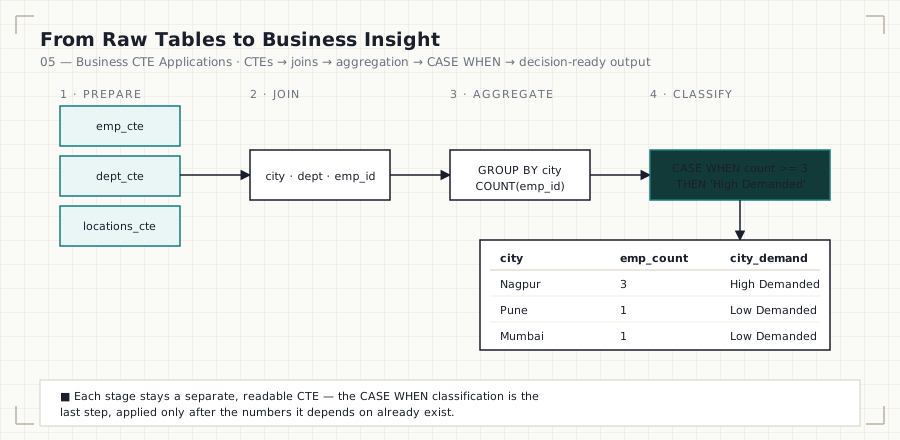
In this file: the capstone of the module — combining everything from Files 01–04 (CTEs, chaining, joins, aggregation) with
CASE WHENandLEFT JOINto answer five real workforce-planning questions.
Business Question
How can CTEs be used to support workforce planning and resource allocation decisions — not just report numbers, but classify and prioritize them?
Why This Matters
Every technique in this module exists to produce this file. A dashboard or
executive report rarely stops at “here are the counts” — it needs to say
“here is what’s high-priority, here is what’s inactive, here is what to act
on.” That’s the job of CASE WHEN layered on top of aggregation: turning a
raw number into a label a non-technical stakeholder can act on immediately.
SQL Solution
See 05_Buisness_CTEs.sql for all five business
case queries.
WITH emp_cte AS (
    SELECT emp_id, emp_name, dept_id
    FROM employes
),
dept_cte AS (
    SELECT dept_id, dept_name, location_id
    FROM departments
),
locations_cte AS (
    SELECT city, location_id
    FROM locations
)
SELECT
    l.city,
    COUNT(e.emp_id) AS emp_count,
    CASE
        WHEN COUNT(e.emp_id) >= 3 THEN 'High Demanded'
        ELSE 'Low Demanded'
    END AS city_demand
FROM emp_cte e
JOIN dept_cte d ON e.dept_id = d.dept_id
JOIN locations_cte l ON d.location_id = l.location_id
GROUP BY l.city;
Explanation
Five business questions, five query shapes, one consistent pipeline:
- High Demand City Analysis — join, group by city, then
CASE WHENclassifies each city as'High Demanded'or'Low Demanded'based on a headcount threshold. - Active vs. Inactive Departments — uses a
LEFT JOINdeliberately, so departments with zero employees still appear in the result with a count of0, and can be labeled'Inactive'. AnINNER JOINhere would silently drop exactly the departments this question is trying to find. - Employees in a Specific City — reuses the File 03 join-and-filter pattern to answer a location-specific staffing question.
- Department With the Highest Headcount —
ORDER BY COUNT(...) DESC
LIMIT 1
turns an aggregate report into a single, board-ready answer. - City With the Highest Headcount — the same ranking pattern, applied at the city grain instead of the department grain.
Finding
The analysis identified:
- High demand cities: Nagpur
- Active departments: Data Analytics, Engineering, and Marketing (all currently active)
- Largest department: Data Analytics
- Largest employee concentration by city: Nagpur, with 3 employees
These are exactly the kind of outputs a workforce-planning or hiring team would use directly — not raw counts, but labeled, ranked, decision-ready findings.
Why LEFT JOIN Matters Here Specifically
The Active/Inactive query is the one place in this module where join type changes the correctness of the answer, not just the row count:
FROM emp_cte e
LEFT JOIN dept_cte d ON e.dept_id = d.dept_id
Using INNER JOIN instead would exclude any department with no matching
employee rows from the result entirely — which means a department that
should be labeled 'Inactive' would never appear in the report at all.
LEFT JOIN guarantees every department is represented, with COUNT safely
returning 0 for the ones with no employees.
Common Mistakes
- Using
INNER JOINwhere the question requiresLEFT JOIN(see above) — the query still runs without error, it just silently produces an incomplete answer. - Applying a
CASE WHENclassification before the aggregation it depends on has been computed. - Picking an arbitrary threshold (
>= 3) without stating it as a named, documented business rule — thresholds like this belong in a comment or a configuration value, not a magic number buried in aCASEexpression. - Reporting only the “top 1” result (
ORDER BY ... LIMIT 1) without checking for ties — a real dataset may have two departments tied for the highest headcount.
Interview Tips
Business-oriented CTE questions are extremely common in Data Analyst
interviews specifically because they test two skills at once: correct SQL
and the analytical judgment to translate a vague ask (“which departments
need attention?”) into a precise, defensible query. Be ready to explain
why you chose LEFT JOIN over INNER JOIN, or why a threshold was set
where it was — the SQL is only half the answer.
Practice Questions
- Find the second most populated city (hint:
LIMIT 1 OFFSET 1, or a window function once you reach Module 07). - Find departments contributing more than 25% of total employees.
- Create a
'Medium Demand'category, so cities are classified into three tiers instead of two.
Previous: 04_CTE_Aggregations.md · Next
module: 07_Window_Functions — ROW_NUMBER(),
RANK(), LAG()/LEAD(), and other analytical functions that go beyond
what GROUP BY alone can express.