SQL-Engineering-Handbook
01 — Basic CTEs
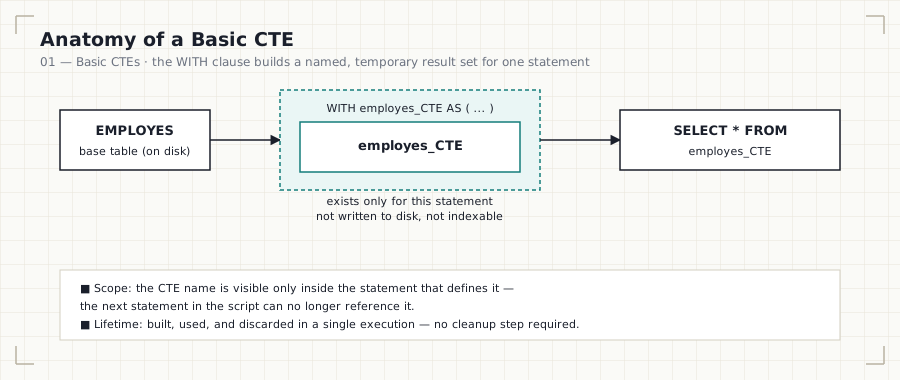
In this file: what a CTE actually is, how the
WITHclause works, its scope and lifetime, and the three foundational CTEs (employes_CTE,dept_CTE,location_CTE) every later file in this module builds on.
Business Question
How can we create a temporary, reusable, named result set — one we can
SELECT from just like a table — without creating a physical table on
disk?
Why This Matters
Every analyst eventually writes a query that’s correct but unreadable: five
levels of nested subqueries, or a nine-way join with column names that no
longer map cleanly to a business concept. A CTE is the fix. It lets you name
an intermediate step — employes_CTE, active_departments,
high_value_customers — so the final query reads like the sentence a
stakeholder would use to describe it, not like a wall of parentheses.
SQL Solution
See 01_Basic_CTE.sql for the runnable version of every
query below.
WITH employes_CTE AS (
    SELECT
        emp_id,
        emp_name,
        dept_id,
        manager_id
    FROM
        EMPLOYES
)
SELECT
    *
FROM
    employes_CTE;
Explanation
A CTE is introduced with the WITH keyword, given a name, and defined by a
query in parentheses. That name then behaves like a table for the
single statement that follows it:
WITH <name> AS ( <query> )— define the temporary result set.- The very next statement can
SELECT,JOIN, or filter against<name>exactly as it would against a real table. - Once that statement finishes executing,
<name>no longer exists — there is nothing left to clean up, and nothing was ever written to disk.
This file builds three such CTEs — one per source table:
| CTE | Wraps | Columns exposed |
|---|---|---|
employes_CTE |
EMPLOYES |
emp_id, emp_name, dept_id, manager_id |
dept_CTE |
departments |
dept_id, dept_name, location_id |
location_CTE |
locations |
location_id, city |
Finding
employes_CTE returned every row from EMPLOYES unchanged — a CTE doesn’t
filter or transform data on its own; it simply gives a query a name you can
reuse. The underlying EMPLOYES table was never modified, and nothing
persisted after the statement completed. This is the core trade CTEs make:
zero storage cost, in exchange for a scope that ends the moment the query
does.
CTE vs. Subquery vs. View — At a Glance
| CTE | Subquery | View | |
|---|---|---|---|
| Named | Yes | No (anonymous) | Yes |
| Reusable within the same query | Yes | No — must be repeated | Yes, across queries |
| Persisted to disk | No | No | Yes (metadata) |
| Scope | One statement | The clause it’s nested in | Permanent, until dropped |
| Typical use | Readability, staged logic | One-off inline filtering | Shared, long-lived logic |
Common Mistakes
- Forgetting the
WITHkeyword entirely and writing a bare subquery instead. - Missing the CTE alias —
AS employes_CTE, not just(...). - Trying to reference a CTE from a later, separate statement — its scope ends with the statement that defines it.
- Assuming a CTE is materialized once and cached; most engines may re-evaluate it if referenced multiple times (see the Interview Tips below).
Interview Tips
- “Does a CTE store data permanently?” No — it’s a named, in-memory result set scoped to a single statement. It improves readability, not storage.
- “Is a CTE always faster than a subquery?” Not necessarily. On most engines a CTE is a readability construct, not an automatic performance optimization — the optimizer may inline it exactly like a subquery. PostgreSQL specifically has changed this behavior across versions (see the cross-engine note below), so “CTEs are an optimization fence” is not universally true anymore.
Cross-engine note: In PostgreSQL 12+, a non-recursive CTE is inlined into the outer query by default (like a subquery) unless it’s referenced more than once, is recursive, or has side effects — you can force the old “always materialize” behavior with
MATERIALIZED. MySQL 8.0+ and SQL Server generally treat CTEs as inlined views for the optimizer’s purposes. Don’t assume a CTE guarantees a performance win over an equivalent subquery — verify withEXPLAIN.
Practice Questions
- Create a CTE for managers only (employees who appear as a
manager_idfor someone else). - Create a CTE containing employees from one specific department.
- Rewrite the
employes_CTEquery as a plain subquery — confirm the result is identical.
Next: 02_Multiple_CTEs.md — chaining more than
one CTE together in a single WITH clause.