SQL-Engineering-Handbook
03 — CTEs With Joins
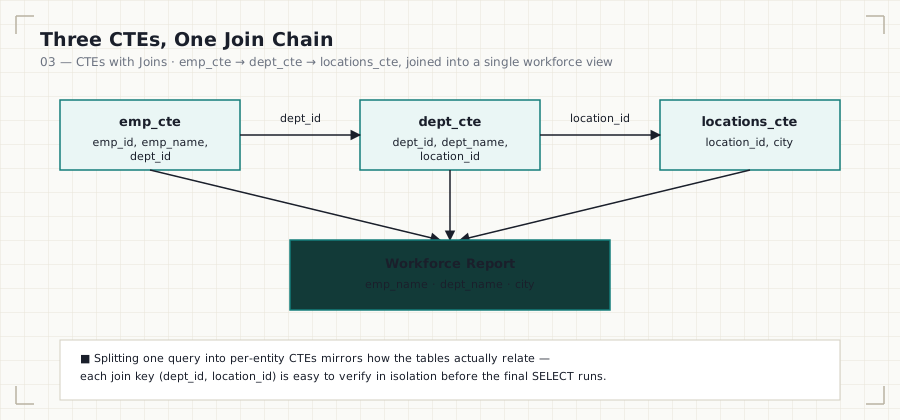
In this file: joining three independent CTEs — employees, departments, and locations — into a single workforce report, plus filtering that report on a joined column.
Business Question
How can employee, department, and location data — three separate tables — be combined into one report using reusable query blocks, instead of one large multi-join query?
Why This Matters
This is the pattern almost every real business report follows: a
transactional entity (employes) joined through one or more lookup/dimension
tables (departments, locations) to produce something a stakeholder can
read directly — names and cities, not foreign keys. Structuring it as three
named CTEs, each matching one table, makes the join chain self-documenting:
emp_cte joins to dept_cte on dept_id, which joins to locations_cte on
location_id. Anyone reading the final SELECT can see the relationship
without tracing raw table names through the whole query.
SQL Solution
See 03_CTE_Joins.sql for all three queries in full.
WITH emp_cte AS (
    SELECT emp_id, emp_name, dept_id
    FROM employes
),
dept_cte AS (
    SELECT dept_id, dept_name, location_id
    FROM departments
),
locations_cte AS (
    SELECT city, location_id
    FROM locations
)
SELECT
    e.emp_name,
    d.dept_name,
    l.city
FROM emp_cte e
JOIN dept_cte d ON e.dept_id = d.dept_id
JOIN locations_cte l ON d.location_id = l.location_id;
Explanation
Each CTE wraps exactly one source table, exposing only the columns the join
chain and final report actually need — emp_cte doesn’t carry
manager_id, dept_cte doesn’t carry anything beyond what’s needed to
reach locations_cte. The final SELECT then walks the join chain in the
same order the business relationship actually flows: an employee belongs to
a department, and a department is based in a city.
The third query narrows this same report to a single city:
...
WHERE l.city = 'Nagpur';
Note that the filter is applied in the outer query, against a column
that only exists after the join — l.city isn’t visible until
locations_cte has been joined in.
Finding
The query produced a complete workforce view — employee names, department
names, and cities — in three columns pulled from three different source
tables. Filtering that report to Nagpur required no change to any CTE
definition, only a WHERE clause on the final joined result. This is one of
the clearest wins CTE-based joins offer over one large nested query: the
filter logic and the join logic live in visibly separate places.
Common Mistakes
- Joining on the wrong key — e.g., joining
emp_ctetolocations_ctedirectly onlocation_id, when employees don’t carry alocation_idthemselves; the relationship only exists throughdept_cte. - Missing the second join (
locations_cte) and wondering whycityis unavailable in theSELECTlist. - Ambiguous column names — once two CTEs both expose
dept_idorlocation_id, every reference to that column must be qualified with its table alias (e.dept_id, not justdept_id). - Filtering on a joined column (
l.city) before confirming the join that produces it is correct — verify the unfiltered three-way join first.
Interview Tips
CTEs are frequently used before a complex join specifically to make the
join readable: naming each side of the join (emp_cte, dept_cte,
locations_cte) turns an anonymous multi-table JOIN into something that
reads like a sentence. Interviewers often ask you to trace exactly which key
connects two specific CTEs — be ready to state the join column, not just
that “they’re joined.”
Practice Questions
- Show employees from Pune only.
- Count employees per city (this is exactly what
04_CTE_Aggregations.mddoes next). - Rewrite the join order — start from
locations_cteand join backward toemp_cte. Confirm the result set is identical regardless of join order.
Previous: 02_Multiple_CTEs.md · Next:
04_CTE_Aggregations.md — adding GROUP BY,
COUNT, and HAVING on top of this same join chain.