SQL-Engineering-Handbook
04 — String Cleaning & Validation
🏠 Module Home · 🗂️ Handbook Home · ← 03 String Transformation · Next → 05 Business String Analytics
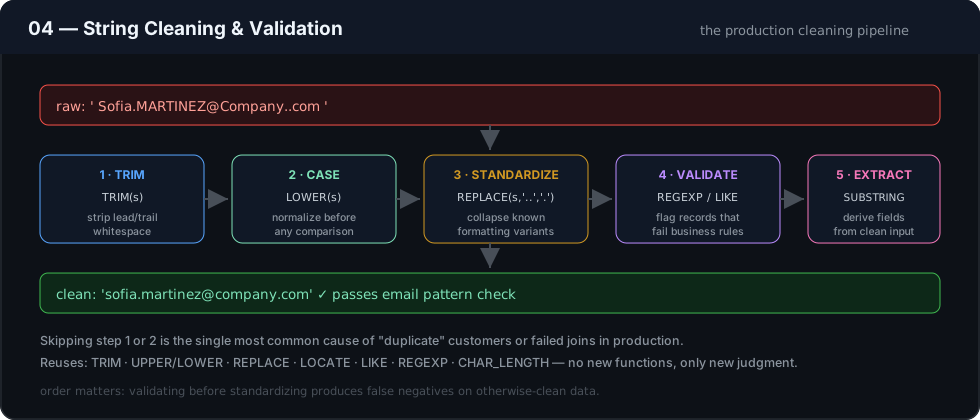
Introduction
Topics 01–03 gave you the primitives: measure, slice, search, transform. This topic is about combining them into repeatable cleaning and validation routines — the kind that run in an ETL pipeline before dirty data ever reaches a report. Using a healthcare intake schema (patient records, contact details), this topic covers whitespace normalization, structural validation of emails and phone numbers, and standardization rules for names and addresses.
Concept Overview
This topic introduces no new functions — it is a synthesis topic, applying TRIM, UPPER/LOWER, REPLACE, LOCATE, LIKE, and REGEXP together as validation and cleaning patterns rather than isolated function calls. The shift here is from “what does this function do” to “what sequence of functions constitutes a defensible cleaning rule.”
Business Motivation
Data quality failures compound: a phone number stored with inconsistent formatting causes a failed SMS notification; an email stored with leading whitespace fails a downstream API’s strict validation; a patient name stored inconsistently across two systems causes a failed record match during a care transition. In regulated domains like healthcare, these aren’t just inconvenient — they’re compliance and patient-safety issues. Cleaning and validation exist to catch these problems at the query layer, before they propagate.
Why These Patterns Exist
No single string function validates “is this a real email” or “is this phone number usable” — validation is inherently a composition of several checks (structural pattern, length bounds, absence of known-bad values). This topic exists to show that composition explicitly, rather than leaving it as an implicit skill assumed by later topics.
Real Company Use Cases
- Healthcare intake systems validating patient contact fields before a record is marked “ready for outreach”
- E-commerce checkout rejecting malformed shipping addresses before an order is confirmed
- CRM data quality jobs flagging records that fail multiple validation rules for manual review queues
- Compliance reporting proving that a required field (e.g., consent contact info) passes a minimum quality bar before a regulatory submission
Functions Covered
This topic combines, rather than introduces: TRIM(), UPPER()/LOWER(), REPLACE(), LOCATE(), LIKE, REGEXP, CHAR_LENGTH().
Syntax
No new syntax — see Topics 01–03 for individual function signatures. This topic’s syntax is compositional, e.g.:
TRIM(REPLACE(LOWER(email), ' ', ''))
Parameters
N/A — parameters are as documented in Topics 01–03 for each underlying function.
Return Values
N/A at the individual-function level. Validation queries in this topic typically return a boolean (via CASE/WHERE) summarizing whether a value passes a composed rule.
ASCII Visual Explanation
Cleaning pipeline for a patient contact phone number:

  raw_phone
     │
     ▼
  TRIM()                 — remove leading/trailing whitespace
     │
     ▼
  REPLACE(., '.', '-')    — normalize separator characters
  REPLACE(., ' ', '-')
     │
     ▼
  LIKE pattern check      — validate final structure
     │
     ▼
  clean_phone  (or flagged as invalid)
Step-by-Step Examples
Goal: Validate that a patient email has a minimally plausible structure before it’s marked eligible for automated appointment reminders.
SELECT
    patient_id,
    patient_email,
    CASE
        WHEN patient_email IS NULL THEN 'Missing'
        WHEN TRIM(patient_email) = '' THEN 'Empty'
        WHEN LOCATE('@', TRIM(patient_email)) = 0 THEN 'Missing @'
        WHEN LOCATE('.', SUBSTRING_INDEX(TRIM(patient_email), '@', -1)) = 0 THEN 'Missing domain dot'
        ELSE 'Passes basic structure check'
    END AS email_validation_status
FROM patients;
Reasoning: Each WHEN clause checks one specific, named failure mode in order of severity (missing entirely, empty after trimming, missing @, missing a . in the domain portion), producing an actionable status rather than a bare TRUE/FALSE that would require re-deriving why a record failed.
Production Considerations
- This kind of structural check is not full email validation (it cannot catch every RFC violation) — its purpose is catching the common, high-volume failure modes cheaply in SQL, with a real validation library used at the application layer for anything requiring full correctness (e.g., before charging a payment method tied to that email).
- Validation status should be a stored/computed column refreshed on write in any system where it gates a business process (e.g., “eligible for outreach”), not recomputed on every query.
- In regulated domains, document the exact validation rules applied (and their known limitations) alongside the code — auditors will ask what “valid” meant.
Performance Notes
- Composed validation checks using
LOCATE/LIKEon every row are the same cost profile as their individual components (Topics 01–02) — the concern is cumulative: five function calls per row per validation check adds up on very large tables and should be considered for materialization if run frequently. CASEexpressions with orderedWHENclauses short-circuit — the first matching condition wins, so ordering the cheapest/most-common failure checks first modestly reduces average work per row.
Edge Cases
TRIM()alone does not catch internal whitespace (e.g.,"jo hn@example.com") — that requires an explicitREPLACE(., ' ', '')step, and only where whitespace is genuinely never valid in the field (it usually isn’t, in emails and phone numbers, but often is in names and addresses).- A
NULLvalue skips everyLIKE/REGEXPcheck silently (the whole expression evaluates toNULL, notFALSE) — always checkIS NULLexplicitly first in a validationCASE, as shown in the example above. - Locale-specific formatting (phone country codes, address conventions) means a single hard-coded validation pattern is rarely correct across an international patient/customer base — scope validation rules explicitly to the locales you actually support.
Common Mistakes
- Writing a single all-or-nothing
WHERE email LIKE '%_@_%._%'check and calling it “validated,” without handlingNULL, empty string, or internal whitespace separately — this produces both false positives and unhelpful failure diagnostics. - Cleaning data in a
SELECTfor a report without ever writing the cleaned value back — meaning every future query has to repeat the same cleaning logic, with increasing risk of the logic drifting between queries over time. - Applying
UPPER()/LOWER()inconsistently across a system’s validation and storage layers, causing “valid” records at write time to fail comparison checks at read time.
Best Practices
- Compose validation as a
CASEexpression with named, ordered failure reasons — this turns a data-quality query into a self-documenting audit trail, not just a pass/fail flag. - Push confirmed cleaning rules (trim, normalize case, standardize separators) upstream into ETL or application-layer validation once they’re proven, rather than leaving them as query-time patches indefinitely.
- Keep validation rules version-documented in regulated domains — a rule that was correct last year may need updating, and downstream consumers need to know which rule version produced a given “valid” flag.
Interview Questions
- Why is
WHERE email LIKE '%@%.%'insufficient as a complete email validation strategy, and what would you add? - How do you handle
NULLcorrectly inside aCASE-based validation expression, and what happens if you don’t? - Design a
CASEexpression that reports why a phone number failed validation, not just that it failed. - When should data cleaning happen in SQL versus in an application/ETL layer?
Practice Challenges
- Write a validation query for
patient_phonethat flags records asMissing,Too Short, orValid, based onCHAR_LENGTH()after removing all non-digit separator characters. - Build a cleaning query that trims whitespace, collapses double spaces to single spaces, and title-cases a
patient_namefield (title-casing may require combining functions creatively, since most engines lack a nativeINITCAP()-equivalent — note where your engine does provide one). - Write a query identifying patients whose
emailandphoneare both missing or invalid, as a worklist for manual outreach follow-up.
Summary
Cleaning and validation are compositions of the functions from Topics 01–03, applied with a specific goal: catching bad data before it propagates, and doing so in a way that reports why a record failed, not just that it did. This topic is the bridge between knowing individual string functions and using them as a production data-quality practice.