SQL-Engineering-Handbook
01 — Introduction to Views
Module: 14 — Views Previous: README · Next: 02 — Creating Views
Learning Objectives
- Define a View at the SQL-standard level and at the MySQL storage-engine level
- Explain why a View is not a copy of data
- Understand the difference between a View, a table, a CTE, and a derived table
- Recognize the business problems Views solve
Concept Overview
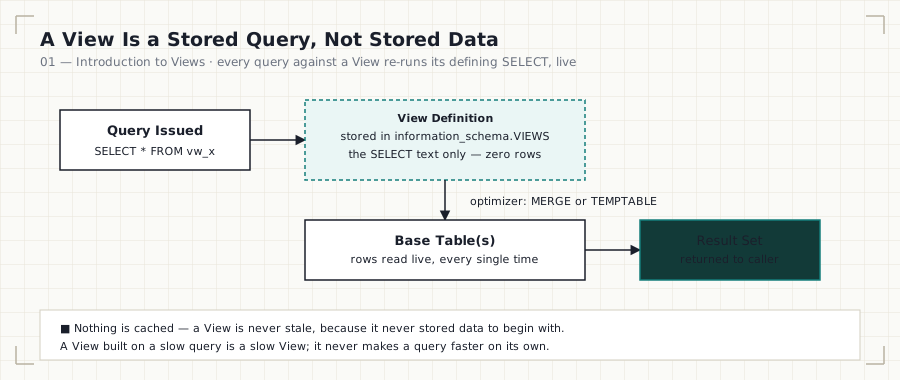
A View is a named, stored SELECT statement that behaves like a table for querying purposes. It has a schema (column names and types, inherited from its defining query) and can be queried, joined, and filtered like a table — but it stores no rows of its own. Every time you query a View, MySQL re-runs (or expands) the underlying SELECT against the current state of the base tables.
CREATE VIEW vw_name AS
SELECT ...
FROM base_table;

SELECT * FROM vw_name;   -- always reflects current base_table data
Why This Exists
SQL databases are built around normalized schemas — data is split across many tables to avoid duplication and preserve integrity. That’s excellent for write correctness and terrible for readability. A single “what were our top customers by revenue last quarter” question might require joining five tables with several CASE expressions and NULL handling baked in. Without a View, every analyst who needs that answer re-derives that join from scratch, and re-derivations drift.
A View freezes that derivation into a single named object. The complexity is paid once, by whoever writes the View; every consumer after that just does SELECT * FROM vw_top_customers.
Business Context
Consider a Sales analytics team. The raw schema:
sales_customers   (customer_id, customer_name, region, signup_date)
sales_orders      (order_id, customer_id, order_date, status)
sales_order_items (order_item_id, order_id, product_id, quantity, unit_price)
“Revenue” is not a column anywhere — it’s quantity * unit_price, summed across sales_order_items, joined back to orders and customers, filtered to status = 'COMPLETED' because cancelled and refunded orders shouldn’t count. Every analyst on the team needs to know all four of those rules just to answer “what’s our revenue by customer” correctly. A View encodes the rules once.
Where Companies Use It
- E-commerce (Sales/Finance): a
vw_completed_order_revenueView standardizes what “revenue” means across every downstream report, so Finance and Sales never reconcile two different numbers. - HR: a
vw_headcount_by_departmentView exposes department-level headcount without giving report consumers direct access to the underlyinghr_employeestable (which contains salary and SSN-equivalent identifiers). - Banking: a
vw_customer_account_summaryView aggregates transaction history into balances without exposing raw transaction-level PII to every consuming application. - SaaS: a
vw_active_subscriptionsView encodes the (frequently changing) business definition of “active” — trialing, paid, and grace-period subscriptions are all “active” for churn calculations but not for revenue calculations — in one governed place.
Real Business Example
CREATE VIEW vw_completed_order_revenue AS
SELECT
    c.customer_id,
    c.customer_name,
    c.region,
    SUM(oi.quantity * oi.unit_price) AS total_revenue
FROM sales_customers AS c
INNER JOIN sales_orders AS o
    ON o.customer_id = c.customer_id
INNER JOIN sales_order_items AS oi
    ON oi.order_id = o.order_id
WHERE o.status = 'COMPLETED'
GROUP BY c.customer_id, c.customer_name, c.region;
Any analyst can now write SELECT * FROM vw_completed_order_revenue WHERE region = 'APAC'; without knowing the join logic exists.
Syntax
CREATE [OR REPLACE] VIEW view_name [(column_list)] AS
SELECT ...
[WITH [CASCADED | LOCAL] CHECK OPTION];
Minimal form:
CREATE VIEW view_name AS SELECT ... ;
Visual Explanation
┌─────────────────────┐
│   Query issued by    │
│  analyst / BI tool    │
│ SELECT * FROM vw_x    │
└──────────┬───────────┘
           │
           ▼
┌───────────────────────────┐
│   View definition (SQL)    │  ← stored in information_schema,
│   SELECT ... FROM base_t   │     NOT as data
└──────────┬─────────────────┘
           │  expanded/merged by optimizer
           ▼
┌───────────────────────────┐
│      Base table(s)         │  ← actual rows live here
│  sales_orders, etc.         │
└─────────────────────────────┘
Step-by-Step Walkthrough
- MySQL parses
CREATE VIEWand stores the definition text (theSELECT) ininformation_schema.VIEWS, not any data. - When a query references the View, the optimizer either merges the View’s
SELECTinto the outer query as if you’d written it inline (ALGORITHM = MERGE), or materializes it into an internal temporary table first (ALGORITHM = TEMPTABLE). - The base tables are read fresh on every execution — a View is never stale, because it never stored data to begin with.
Engineering Notes
- A View is metadata, not storage. This is the single most important mental model correction for someone coming from spreadsheet or BI-tool thinking, where a “view” often implies a cached snapshot.
- Because a View re-executes its defining query every time, a View built on a slow query is a slow View — Views do not make queries faster. See
07_VIEW_PERFORMANCE.md. - A View is not the same as a CTE. A CTE exists only for the duration of one query; a View is a permanent, named, catalog-registered object usable across sessions and by other users/applications.
Production Considerations
Views become part of your schema’s public contract the moment another team or tool starts querying them. Dropping or restructuring a View without checking information_schema for dependents is a common cause of production incidents — covered in 06_VIEW_LIMITATIONS.md.
Performance Notes
A View adds zero storage overhead and zero write overhead (nothing to keep in sync). Its entire cost is at read time, and that cost is identical to running the underlying query directly — the View is not “compiled” or cached in MySQL.
Edge Cases
- Querying a View while its base table is mid-
ALTERcan produce a metadata lock wait, since the View’s definition depends on the base table’s current structure. - If a View was defined with
SELECT *and a column is later dropped from the base table, the View breaks at query time with a metadata mismatch error, not atALTER TABLEtime.
Best Practices
- Always name Views with a consistent prefix (
vw_) so they’re instantly distinguishable from tables in a shared schema. - Never use
SELECT *in a View definition — always name columns explicitly. - Document, in a comment above every
CREATE VIEWstatement, the business rule the View encodes (e.g., “completed = status IN (‘COMPLETED’)”).
Common Mistakes
| Mistake | Consequence |
|---|---|
| Assuming a View caches results | Stale-data bugs never happen, but performance assumptions are wrong |
Using SELECT * |
Silent column drift when base table changes |
| Treating a View as a performance tool | Slow base query → slow View, always |
Interview Questions
- “What is a View, and what does it store?” — Expected answer: it stores the query definition, not data; it’s metadata.
- “Does querying a View always return live data?” — Yes, because the underlying query re-executes every time (unless refreshed via materialized-view-style patterns, which MySQL doesn’t natively support — see Module 08).
- “Why would you use a View instead of just writing the join every time?” — Reusability, consistency of business logic, and access control.
Summary
A View is a stored SELECT statement with a name, not a copy of data. It exists to centralize business logic, provide a stable query interface, and enable access control — at zero storage cost and read-time cost identical to the underlying query.
Practice Challenges
- Without running any SQL, predict what happens if you
DROPa column fromsales_ordersthat a View references withSELECT *. Then verify. - Write (on paper) a View definition for “active SaaS subscriptions” using the business rule:
status IN ('TRIALING','ACTIVE','GRACE_PERIOD').
Further Reading
- MySQL 8.0 Reference Manual — Views