SQL-Engineering-Handbook
03 — Updatable Views
Module: 14 — Views Previous: 02 — Creating Views · Next: 04 — View Security
Learning Objectives
- Determine, from a View’s definition alone, whether it’s updatable
- Perform
INSERT/UPDATE/DELETEthrough a View correctly - Use
WITH CHECK OPTIONto prevent silent data-integrity violations - Explain the difference between
CASCADEDandLOCALcheck options
Concept Overview
Some Views can be written through — an UPDATE, INSERT, or DELETE against the View propagates to the underlying base table. MySQL determines updatability structurally, based on the View’s defining query, not based on any flag you set.
Why This Exists
Updatable Views let applications and analysts modify data through a restricted or filtered interface without needing direct table access — e.g., a support tool that can only update rows in a filtered View of open tickets, never touching closed ones or other columns.
Business Context
A customer support platform exposes vw_open_tickets (status = 'OPEN') to its agent tooling. Agents update ticket notes and status through the View. The base support_tickets table also has internal-only columns (SLA breach flags, escalation metadata) that the View excludes and that remain untouched by agent updates.
Where Companies Use It
- Retail:
vw_pending_ordersallows a fulfillment tool to updatestatuson pending orders only, without giving it access to completed/cancelled order history. - Banking:
vw_active_accountsrestricts an account-servicing tool to updating only non-closed accounts. - HR:
vw_current_employees(termination_date IS NULL) lets an HR tool update active employee records without ever touching historical/terminated rows.
Real Business Example
CREATE OR REPLACE VIEW vw_pending_orders AS
SELECT order_id, customer_id, order_date, status
FROM sales_orders
WHERE status = 'PENDING'
WITH CHECK OPTION;

-- This succeeds and updates the base table:
UPDATE vw_pending_orders SET status = 'COMPLETED' WHERE order_id = 106;
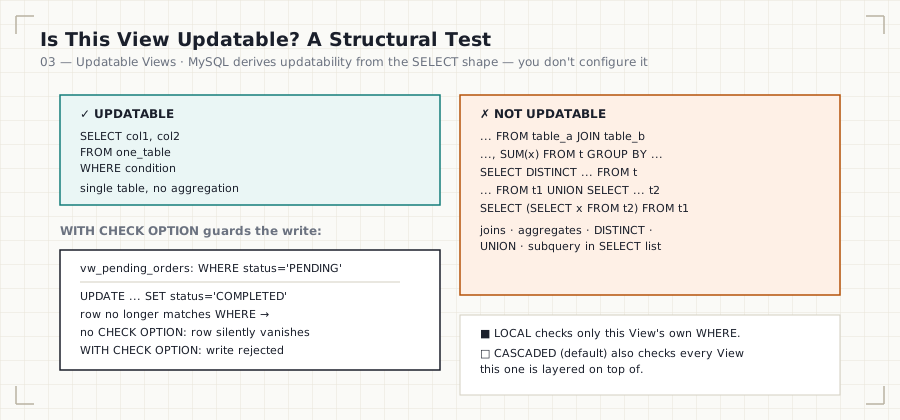
Wait — that example is exactly what WITH CHECK OPTION is designed to prevent, and it’s worth sitting with why: after this UPDATE runs, the row no longer satisfies status = 'PENDING', so it vanishes from vw_pending_orders’s own result set. Without WITH CHECK OPTION, MySQL allows this silently. With it, the UPDATE is rejected outright, because the resulting row would no longer be visible through the View that performed the write.
Syntax
CREATE VIEW view_name AS
SELECT ...
FROM single_table
WHERE condition
WITH [CASCADED | LOCAL] CHECK OPTION;
Visual Explanation
UPDATABLE, structurally:
  SELECT col1, col2 FROM one_table WHERE ...      ✅ single table, no aggregation

NOT UPDATABLE:
  SELECT ... FROM table_a JOIN table_b ...          ❌ multi-table join
  SELECT ..., SUM(x) FROM t GROUP BY ...             ❌ aggregate function
  SELECT DISTINCT ... FROM t                         ❌ DISTINCT
  SELECT ... FROM t1 UNION SELECT ... FROM t2         ❌ set operation
  SELECT (SELECT x FROM t2) AS y FROM t1              ❌ subquery in SELECT list
Step-by-Step Walkthrough
- MySQL determines updatability by inspecting the View’s
SELECT: it must reference exactly one base table (no joins, no derived tables, no other Views that themselves aren’t updatable), and must not useDISTINCT,GROUP BY,HAVING,UNION, aggregate functions, or subqueries in the select list. - If updatable,
INSERT/UPDATE/DELETEagainst the View translate directly to the same operation on the base table, restricted to the columns exposed by the View. WITH CHECK OPTIONadds a validation step: after the write, MySQL re-checks the View’sWHEREclause against the new row. If it no longer matches, the write is rejected.LOCALchecks only the immediate View’sWHEREclause;CASCADED(the default) also checks theWHEREclauses of any View this one is built on top of.
Engineering Notes
Multi-table updatable Views exist in MySQL under narrow conditions (the join must not duplicate rows, and you can only update columns from one table per statement) — but treat multi-table Views as read-only by default; the edge cases are not worth the operational risk.
Production Considerations
An application relying on an updatable View should have an automated test asserting the View remains updatable after every schema migration — a well-intentioned JOIN added to “enrich” the View silently breaks writes for every consumer.
Performance Notes
Writes through an updatable View cost the same as writing directly to the base table — MySQL is not adding any intermediate materialization for MERGE-eligible updatable Views.
Edge Cases
- Inserting through a View that doesn’t expose all
NOT NULLcolumns of the base table fails unless those columns have defaults. WITH CHECK OPTIONonly guards against the write making the row invisible to this View — it says nothing about other constraints on the base table.
Best Practices
- Add
WITH CHECK OPTIONto every filtered, updatable View that an application writes through. - Keep updatable Views single-table and column-explicit.
- Never expose primary/foreign key columns as writable in a View meant to prevent re-parenting rows across entities.
Common Mistakes
| Mistake | Consequence |
|---|---|
Omitting WITH CHECK OPTION on a filtered updatable View |
Rows silently “disappear” from the View after a legal-looking update |
| Assuming a joined View is updatable | UPDATE/INSERT fails at runtime with an “is not updatable” error |
Confusing LOCAL and CASCADED |
A nested View’s filter is bypassed unexpectedly with LOCAL |
Interview Questions
- “What structurally makes a View non-updatable?” — joins, aggregates,
DISTINCT,GROUP BY,UNION, subqueries in the select list. - “What does
WITH CHECK OPTIONactually check?” — that a written row still satisfies the View’sWHEREclause after the write. - “Difference between
LOCALandCASCADEDcheck option?” — scope of which nested Views’WHEREclauses get re-validated.
Summary
Updatability is structural, not configurable — MySQL derives it from the View’s SELECT. WITH CHECK OPTION is the guardrail that prevents updates from silently orphaning rows outside the View’s own filter.
Practice Challenges
- Given
vw_pending_orderswithWITH CASCADED CHECK OPTION, predict the result ofUPDATE vw_pending_orders SET status = 'COMPLETED' WHERE order_id = 106;and verify. - Determine, without running SQL, whether
vw_completed_order_revenuefrom Module 01 is updatable, and justify why.
Further Reading
- MySQL 8.0 Reference Manual — Updatable and Insertable Views
- MySQL 8.0 Reference Manual — The View WITH CHECK OPTION Clause