SQL-Engineering-Handbook
04 — View Security
Module: 14 — Views Previous: 03 — Updatable Views · Next: 05 — Business Reporting Views
Learning Objectives
- Use Views for column-level and row-level access restriction
- Understand
SQL SECURITY DEFINERvsSQL SECURITY INVOKER - Grant privileges on a View independently of the base table
- Recognize the limits of View-based security
Concept Overview
Because a View can expose a subset of columns and rows without granting access to the underlying table at all, it’s one of the simplest and most widely used access-control mechanisms in production databases — no separate masked table to keep in sync, no application-layer filtering to maintain.
Why This Exists
Direct table grants are all-or-nothing per column visibility (MySQL does support column-level GRANT, but it’s clumsy to maintain at scale). A View lets you define exactly what a role can see — specific columns, specific rows — as a single reusable object, and grant access to that, never to the base table.
Business Context
hr_employees contains annual_salary. Regional managers should see aggregate compensation data for benchmarking, not individual salaries. Payroll analysts need full detail. Both groups query the same base table through different Views with different privilege grants.
Where Companies Use It
- HR/Payroll:
vw_salary_bandsexposes department + role + salary range, never individual salary, to general managers. - Banking:
vw_customer_account_summaryexposes balances to relationship managers without exposing raw transaction-level detail to anyone outside compliance. - Healthcare: a
vw_patient_visit_summaryView exposes non-PHI visit metadata to scheduling staff whileSQL SECURITY DEFINERlets the View itself read the protected base table under a privileged account, without granting scheduling staff direct table access. - SaaS: multi-tenant applications use row-restricted Views (
WHERE tenant_id = current_tenant()) as a defense-in-depth layer alongside application-level tenant isolation.
Real Business Example
CREATE OR REPLACE
    SQL SECURITY DEFINER
    VIEW vw_salary_bands AS
SELECT
    d.department_name,
    e.job_title,
    MIN(e.annual_salary) AS min_salary,
    MAX(e.annual_salary) AS max_salary,
    ROUND(AVG(e.annual_salary), 2) AS avg_salary
FROM hr_employees AS e
INNER JOIN hr_departments AS d ON d.department_id = e.department_id
GROUP BY d.department_name, e.job_title;

GRANT SELECT ON vw_salary_bands TO 'regional_manager'@'%';
-- regional_manager is never granted SELECT on hr_employees directly.
Syntax
CREATE
    [SQL SECURITY {DEFINER | INVOKER}]
    VIEW view_name AS select_statement;

GRANT SELECT ON view_name TO 'role_or_user';
REVOKE SELECT ON view_name FROM 'role_or_user';
Visual Explanation
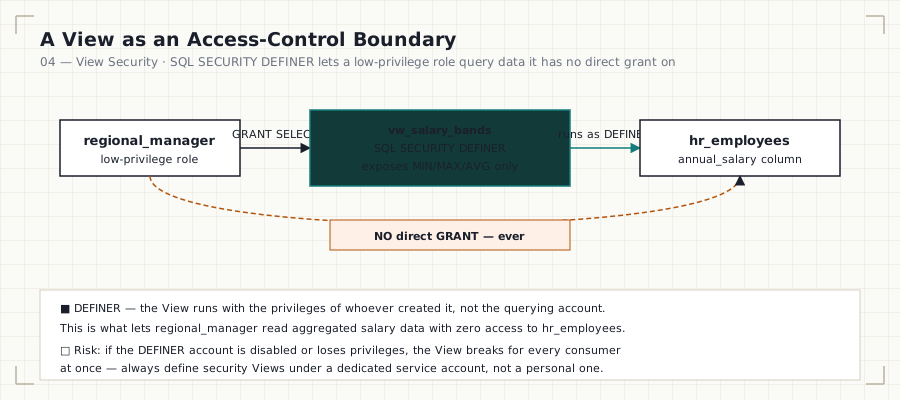
regional_manager ──SELECT──► vw_salary_bands ──(runs as DEFINER)──► hr_employees
        ▲                                                                │
        └── NO direct GRANT here ───────────────────────────────────────┘
Step-by-Step Walkthrough
SQL SECURITY DEFINER(the default) means the View executes with the privileges of the account that created it, not the account querying it. This is what allows a low-privilege role to query a View that reads a table they have no direct access to.SQL SECURITY INVOKERmeans the View executes with the querying account’s own privileges — they’d need direct table access anyway, defeating most security use cases, but useful when you want the View to enforce row-level security policies that vary correctly per invoking user (e.g.,WHERE created_by = CURRENT_USER()).- Grant
SELECTon the View, not the base table, to the restricted role. - Never grant the restricted role any privilege on the base table directly — the View is the only sanctioned path.
Engineering Notes
SQL SECURITY DEFINER Views silently break if the defining user’s account is dropped or has its privileges revoked — the View then fails for every consumer, not just one. Production teams typically define security Views under a dedicated service account, never a named individual’s account.
Production Considerations
View-based security is a real control, but it is not a substitute for row-level security at the storage engine or application layer for regulated data (PCI, HIPAA). Treat it as one layer in defense-in-depth, not the only layer.
Performance Notes
Security Views cost the same as their underlying query — no additional overhead from the SQL SECURITY clause itself.
Edge Cases
- A
DEFINERView referencing a table the definer account later loses access to will fail for all consumers simultaneously — a common cause of “the dashboard broke and nobody touched anything” incidents traced back to an unrelated privilege change. - Views cannot enforce security if a user has direct
SELECTon the base table through another grant — audit both paths.
Best Practices
- Create security-sensitive Views under a dedicated, monitored service account, not a personal account.
- Document which columns a security View intentionally excludes, and why, in a comment.
- Periodically audit
information_schema.TABLE_PRIVILEGESto confirm restricted roles have no direct base-table grants.
Common Mistakes
| Mistake | Consequence |
|---|---|
| Granting the role SELECT on both the View and the base table | Security View is pointless — role has full access anyway |
Using a personal account as DEFINER |
View breaks org-wide when that person’s account is disabled |
| Assuming View security replaces row-level security entirely | Compliance gap for regulated data |
Interview Questions
- “How would you restrict a role to see only aggregate salary data, not individual salaries?” — a
DEFINERView exposing only aggregated columns, granted instead of the base table. - “What’s the difference between
SQL SECURITY DEFINERandINVOKER?” — whose privileges the View executes under. - “What happens to a DEFINER View if the definer account is deleted?” — it breaks for every consumer.
Summary
Views enforce access control by exposing a restricted column/row surface and, via SQL SECURITY DEFINER, allowing low-privilege roles to query data they have no direct grant on. This is a real, widely used production pattern — with real operational risks around definer account lifecycle.
Practice Challenges
- Design a
vw_customer_account_summaryView forfinance_accounts/finance_transactionsthat exposes running balance per account but never individual transaction amounts, and grant it to arelationship_managerrole. - Explain what breaks, and why, if the
DEFINERaccount of a production security View is deleted during an offboarding process.
Further Reading
- MySQL 8.0 Reference Manual — View SQL Security
- MySQL 8.0 Reference Manual — GRANT Syntax