SQL-Engineering-Handbook
Query Optimization Engineering Guide
Module 16 · Query Optimization · Reference Library Home · Lessons · Performance Lab · Cheatsheet · Troubleshooting
This document is the architectural spine of Module 16. Read it once before diving into individual lessons; return to it when you need to orient a team, onboard a new engineer, or decide which lesson applies to a production incident.
What This Module Teaches
Query optimization is the discipline of making SQL fast, predictable, and explainable at production scale. It is not about memorizing syntax tricks — it is about understanding how a cost-based optimizer (CBO) transforms logical SQL into a physical execution plan, and how to influence that transformation without fighting the engine.
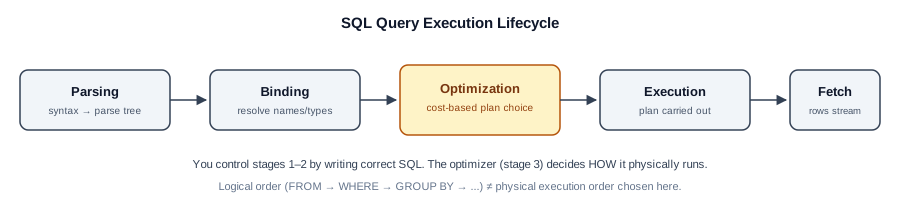
Every lesson in this module maps to one stage of that mental model:
| Stage | Lesson | Core Question |
|---|---|---|
| Lifecycle | 01 — Query Execution Lifecycle | What happens between “Run” and rows returned? |
| Diagnosis | 02 — EXPLAIN & Execution Plans | How do I see what the engine actually did? |
| Indexing | 03 — SARGability & Index Usage | Why does my index exist but never get used? |
| Joins | 04 — Join Optimization | How does the optimizer choose nested loop vs. hash vs. merge? |
| Rewrites | 05 — Subquery & CTE Optimization | When does EXISTS beat IN, and when does a CTE hurt? |
| Prevention | 06 — Anti-Patterns | What recurring mistakes wreck production performance? |
| Process | 07 — Query Tuning Workflow | How do I tune systematically instead of guessing? |
The Engineering Mindset
flowchart LR
    A[Slow Query Reported] --> B[Measure with EXPLAIN ANALYZE]
    B --> C[Read Plan Bottom-Up]
    C --> D[Form One Hypothesis]
    D --> E[Change One Thing]
    E --> F{Improved?}
    F -->|Yes| G[Document & Ship]
    F -->|No| H[Revert Change]
    H --> D
Three principles govern every decision in this module:
-
Measure before you change.
EXPLAIN ANALYZEis the only evidence that counts. Intuition about “this should be faster” is how databases accumulate 40 redundant indexes and queries that are still slow. -
Change one thing at a time. If you add an index and rewrite a subquery and refresh statistics in the same commit, you cannot attribute the result — and you cannot build a reliable mental model for the next incident.
-
The optimizer is usually right. When a query scans a table sequentially on a 50-row dev dataset, the optimizer is correct — a sequential scan is cheaper than an index lookup at that scale. Performance problems appear when data volume crosses thresholds the optimizer’s statistics describe accurately.
Production Architecture Context
┌─────────────────────────────────────────────────────────────────┐
│                        Application Layer                         │
│   ORM / BI Tool / Dashboard / Batch Job / API Endpoint          │
└────────────────────────────┬────────────────────────────────────┘
                             │ SQL text + bind parameters
                             ▼
┌─────────────────────────────────────────────────────────────────┐
│                     Connection Pool / Proxy                        │
│   PgBouncer · RDS Proxy · SQL Server Connection Pooler          │
└────────────────────────────┬────────────────────────────────────┘
                             │
                             ▼
┌─────────────────────────────────────────────────────────────────┐
│                    Query Processing Pipeline                     │
│  ┌─────────┐  ┌─────────┐  ┌──────────────┐  ┌───────────┐     │
│  │ Parsing │→ │ Binding │→ │ Optimization │→ │ Execution │     │
│  └─────────┘  └─────────┘  └──────────────┘  └───────────┘     │
│                                    ↑                             │
│                          Statistics / Catalog                    │
│                          Index Metadata / Hints                  │
└────────────────────────────┬────────────────────────────────────┘
                             │
                             ▼
┌─────────────────────────────────────────────────────────────────┐
│                      Storage Engine                              │
│   B-tree Indexes · Heap/Clustered Pages · Buffer Pool / Cache   │
└─────────────────────────────────────────────────────────────────┘
Your SQL text enters at the top. The Optimization stage (Lesson 01) is where every technique in this module operates. The Storage Engine is where indexes (Lesson 03) and join algorithms (Lesson 04) actually execute.
When to Use Which Reference Document
| Situation | Document |
|---|---|
| Active slow-query incident | TROUBLESHOOTING_GUIDE.md |
| Pre-release PR review | PERFORMANCE_CHECKLIST.md |
| Rewriting a known-bad pattern | REWRITE_COOKBOOK.md |
| Spotting code smells in review | PERFORMANCE_SMELLS.md |
| Learning from real outages | PRODUCTION_INCIDENTS.md |
| Cross-engine behavior differences | CROSS_DATABASE_ENGINEERING.md |
| Quick lookup during tuning | CHEATSHEET.md |
| Benchmarking a rewrite | BENCHMARK_GUIDE.md + Performance_lab/ |
| Onboarding a new contributor | CONTRIBUTOR_ENGINEERING_NOTES.md |
Assumed Production Scale
This module uses a shared employes / departments / locations schema, provided locally as 00_Schema.sql (the CI benchmark and all labs seed against this file directly). Every performance claim assumes the following production volumes unless stated otherwise:
| Table | Production Rows | Why It Matters |
|---|---|---|
employes |
5–50 million | Primary fact table; index and join decisions visible here |
departments |
40–500 | Small dimension; predicate pushdown shrinks join input |
locations |
12–200 | Tiny lookup; often fully cached in memory |
At local sample sizes (dozens of rows), the optimizer correctly ignores indexes and chooses sequential scans. Always reason about plans at production scale, then verify with EXPLAIN against the largest dataset available.
Version Compatibility
| Engine | Minimum Version for Module Examples | Notes |
|---|---|---|
| PostgreSQL | 12+ | CTE inlining default changed in PG 12 |
| MySQL | 8.0.18+ | EXPLAIN ANALYZE and hash joins require 8.0.18+ |
| SQL Server | 2017+ | Query Store available; graph plans in SSMS |
| Oracle | 19c+ | DBMS_XPLAN.DISPLAY_CURSOR for actual plans |
| SQLite | 3.35+ | Limited optimizer; nested loop only |
| DuckDB | 0.9+ | Vectorized execution; different cost model |
See CROSS_DATABASE_ENGINEERING.md for per-engine optimizer, statistics, and hint differences.
Related Handbook Modules
03_Joins— join syntax this module optimizes04_Subqueries— subquery patterns rewritten in Lesson 0506_CTEs— CTE materialization behavior in Lesson 0507_Window_Functions— preferred rewrite for correlated subqueries15_INDEXES— dedicated indexes module (planned; Lesson 03 covers essentials)
Continue Learning
After completing this module’s seven lessons and practice problems:
- Work through the Performance_lab/ benchmark exercises
- Study all entries in REWRITE_COOKBOOK.md
- Read PRODUCTION_INCIDENTS.md and map each incident to a lesson
- Complete the PERFORMANCE_CHECKLIST.md against a query from your own codebase