SQL-Engineering-Handbook
EXPLAIN and Execution Plans
Module 16 · Query Optimization Home · Engineering Guide · Cheatsheet · Troubleshooting
Lesson 02 of 12 · ← Lifecycle · Next: SARGability → · SQL Lab
Introduction
EXPLAIN is how you ask the query optimizer to show its work. It is the
single most important tool in this entire module — every other lesson
assumes you can run EXPLAIN, read its output, and identify the expensive
step.
Learning Objectives
- Distinguish
EXPLAIN(estimated plan) fromEXPLAIN ANALYZE(actual, executed plan) - Read a plan tree bottom-up and identify access methods (scan vs. index)
- Identify the gap between estimated and actual row counts, and explain why that gap matters
- Recognize the highest-cost node in a plan
Why This Exists
Without EXPLAIN, query tuning is guesswork — changing things and hoping
they helped. With it, tuning becomes a measurement discipline: form a
hypothesis about what’s slow, confirm it in the plan, make one change,
re-measure.
Business Motivation
A retail analytics team runs this nightly to feed a dashboard:
SELECT d.dept_name, l.city, COUNT(*) AS staff_count
FROM employes e
JOIN departments d ON e.dept_id = d.dept_id
JOIN locations l ON d.location_id = l.location_id
WHERE l.country = 'India'
GROUP BY d.dept_name, l.city;
When this report’s runtime jumps from 4 seconds to 90 seconds after a data
migration, EXPLAIN ANALYZE — not intuition — is how you find out whether
the cause is a missing index, stale statistics, or a changed join strategy.
Estimated vs. Actual: EXPLAIN vs. EXPLAIN ANALYZE
EXPLAINshows the plan the optimizer would use and its estimated cost and row counts — based on statistics, without running the query.EXPLAIN ANALYZEactually executes the query and shows actual elapsed time and row counts alongside the estimates.
EXPLAIN
SELECT * FROM employes WHERE dept_id = 4;

EXPLAIN ANALYZE
SELECT * FROM employes WHERE dept_id = 4;
The gap between estimated and actual rows is one of the most useful signals in query tuning: a large gap means the optimizer’s statistics are stale or its cardinality estimate for a filter/join is wrong — and it may be picking a plan that made sense for the estimated data, not the actual data.
Reading a Plan Tree
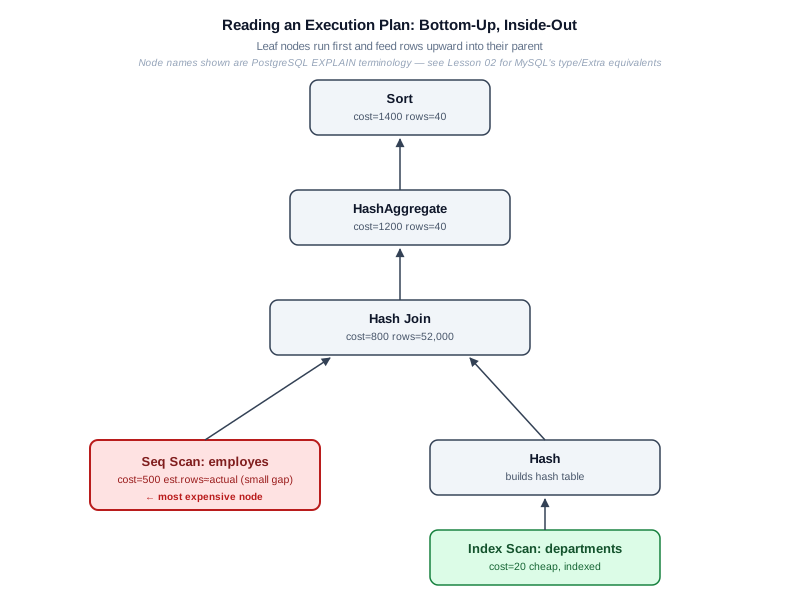
Diagram note: the linked diagram uses
Seq Scan/Index Scanlabels, which are PostgreSQL’sEXPLAINterminology. The text below reads the same plan shape using MySQL’sEXPLAINoutput first, since MySQL is this module’s primary baseline, with the PostgreSQL equivalent labeled alongside it.
Plans are trees, read bottom-up, inside-out: the innermost/lowest nodes run first and feed rows upward into their parent node.
MySQL: Classic Tabular EXPLAIN
MySQL’s default EXPLAIN output is a table, one row per operation, not a
nested tree of cost numbers:
+----+-------------+-------+--------+---------------+------+---------+------+---------+-------------+
| id | select_type | table | type   | possible_keys | key  | key_len | ref  | rows    | Extra       |
+----+-------------+-------+--------+---------------+------+---------+------+---------+-------------+
|  1 | SIMPLE      | e     | ALL    | idx_dept_id   | NULL | NULL    | NULL | 500000  | Using temp  |
|  1 | SIMPLE      | d     | eq_ref | PRIMARY       | PRIMARY | 4    | e.dept_id | 1   | Using where |
+----+-------------+-------+--------+---------------+------+---------+------+---------+-------------+
The type column is the access method, ordered roughly worst-to-best:
ALL (full table scan) is the one to hunt for on a large table — here,
employes (aliased e) shows type: ALL with possible_keys:
idx_dept_id but key: NULL, meaning the index exists but wasn’t chosen.
That row is your starting hypothesis: employes is doing a full scan
instead of using its index for this query’s filter or join column.
MySQL 8.0.18+ also supports a tree-shaped view via
EXPLAIN FORMAT=TREE (or EXPLAIN ANALYZE, which adds actual timing):
-> Sort  (cost=1400 rows=1000)
    -> Table scan on <temporary>  (cost=1200 rows=1000)
        -> Aggregate using temporary table
            -> Nested loop inner join  (cost=800 rows=500000)
                -> Table scan on e  (cost=500 rows=500000)   <- expensive
                -> Index lookup on d using PRIMARY (dept_id=e.dept_id)  (cost=0.25 rows=1)
Here, Table scan on e (the employes table) is the most expensive leaf —
in MySQL’s classic tabular format this is the row where type: ALL.
PostgreSQL-specific terminology (cross-database comparison)
The same query, planned by PostgreSQL, reports the equivalent nodes with different names:
flowchart BT
    A[Sort — cost=1400] --> B[HashAggregate — cost=1200]
    B --> C[Hash Join — cost=800]
    C --> D["Seq Scan on employes — cost=500 (PostgreSQL)"]
    C --> E["Index Scan on departments — cost=20 (PostgreSQL)"]
    style D fill:#fee2e2,stroke:#b91c1c
Sort (cost=1400)                                    -- PostgreSQL EXPLAIN
  └── HashAggregate (cost=1200)
        └── Hash Join (cost=800)
              ├── Seq Scan on employes (cost=500)   <- expensive
              └── Hash
                    └── Index Scan on departments (cost=20)
Seq Scan on employes here is PostgreSQL’s name for the same “full table
scan” MySQL reports as type: ALL — don’t expect MySQL’s EXPLAIN to
literally print Seq Scan; it won’t.
Access Methods You’ll See
MySQL EXPLAIN’s type column, worst-to-best (the ones you’ll use most):
MySQL type |
Meaning |
|---|---|
ALL |
Full table scan — reads every row. Expensive on large tables |
index |
Scans the whole index (not the table) — better than ALL, still not selective |
range |
Uses an index to scan a range of rows (e.g. BETWEEN, >, IN) |
ref |
Uses a non-unique index to look up rows matching a value |
eq_ref |
Uses a unique/primary-key index — at most one matching row per outer row |
const |
At most one matching row, resolved during query planning |
Extra: Using index |
Covering index — answers the query entirely from the index, no row lookup needed (see “covering index,” Lesson 03) |
PostgreSQL-specific terminology (cross-database comparison)
| PostgreSQL node | Roughly equivalent MySQL type / Extra |
|---|---|
| Seq Scan | type: ALL |
| Index Scan | type: ref / range |
| Index Only Scan | Extra: Using index |
| Bitmap Heap Scan | No exact MySQL equivalent; closest is type: range with Extra: Using index condition |
Do not expect MySQL’s EXPLAIN to output Seq Scan, Index Scan,
Index Only Scan, or Bitmap Heap Scan literally — those strings are
PostgreSQL’s plan-node names, shown here only for cross-database
comparison.
Engineering Notes
- Cost numbers are unitless and relative, not milliseconds — they’re only meaningful for comparing plans against each other on the same engine.
- Always prefer
EXPLAIN ANALYZE(or your engine’s equivalent) overEXPLAINalone when diagnosing an already-slow query — estimates can lie, actual execution can’t. - Running
EXPLAIN ANALYZEon a write query (UPDATE/DELETE) actually executes it — use a transaction you roll back, or your engine’s dry-run equivalent, when analyzing writes.
MySQL / PostgreSQL / SQL Server Notes
- PostgreSQL:
EXPLAIN (ANALYZE, BUFFERS)additionally reports actual disk/cache reads — essential for diagnosing I/O-bound queries. - MySQL:
EXPLAIN ANALYZEis available from 8.0.18+; earlier versions only support estimatedEXPLAIN. - SQL Server: use
SET STATISTICS IO, TIME ONalongside the graphical or text execution plan for the closest equivalent toEXPLAIN ANALYZE.
Common Mistakes
- Reading a plan top-down instead of bottom-up
- Trusting
EXPLAINestimates on a query that’s already slow, instead of usingEXPLAIN ANALYZEto see what actually happened - Ignoring the estimated-vs-actual row gap, which is often the real story
Interview Questions
- “What’s the difference between EXPLAIN and EXPLAIN ANALYZE, and when would a large estimate-vs-actual gap mislead the optimizer?”
- “Given this plan, which node would you investigate first, and why?”
Edge Cases
EXPLAINon a query with bind parameters may show a generic plan optimized for typical values, not the specific plan that will be chosen for the actual parameter value at call time — always prefer testing with representative real values.- A query that looks cheap in
EXPLAIN ANALYZEright after a benchmark run can be slow in production due to a cold buffer cache — the benchmark benefited from data already being in memory.
Troubleshooting Guidance
- Plan “looks correct” but the query is still slow in production → check
BUFFERS/IO stats (PostgreSQL:EXPLAIN (ANALYZE, BUFFERS)) to rule out disk I/O rather than assuming the plan shape itself is wrong. EXPLAINoutput differs between staging and production for identical SQL → almost always a statistics or data-volume difference between environments, not a query problem.
Scalability Considerations
Running EXPLAIN ANALYZE on write queries or very expensive reads in
production has real cost — it executes the query. At scale, prefer
running it against a production-like replica, or during low-traffic windows,
rather than directly against a live primary for anything beyond a quick,
cheap SELECT.
Additional Dialect Notes
- Oracle:
EXPLAIN PLANcombined withDBMS_XPLAN.DISPLAYgives the most detailed output;DBMS_XPLAN.DISPLAY_CURSORshows the actual plan used for a statement that already ran. - SQLite:
EXPLAIN QUERY PLANgives a simplified, high-level plan summary rather than a full cost-based breakdown, consistent with its simpler planner. - DuckDB:
EXPLAIN ANALYZEshows a pipeline-based breakdown reflecting its vectorized execution model, with per-operator timing.
Summary
EXPLAIN and EXPLAIN ANALYZE turn “this query feels slow” into “this
specific node in this specific plan is expensive” — every optimization
technique in the rest of this module exists to fix a specific pattern you
learn to recognize here.
Practice Challenges
- Run
EXPLAIN ANALYZEon any JOIN query from Module 03 against a sufficiently large copy of the schema and identify the most expensive node. - Find a query in your own work where estimated and actual row counts diverge by more than 10x, and explain a plausible cause.
Real Company Usage
- Uber: Driver earnings dashboard outage diagnosed via SubPlan
loops=5000000in EXPLAIN ANALYZE — correlated subquery in SELECT list (Incident #3). - Netflix: Recommendation feed regression identified by comparing estimated vs. actual row counts after schema migration.
- GitHub: Admin panel pagination degradation visible as growing
Sortnode cost in EXPLAIN at increasing OFFSET values.
Production Applications
These scenarios are illustrative case studies inspired by common production failure modes; specific figures are illustrative unless an external source is cited in PRODUCTION_INCIDENTS.md. See its disclaimer for the full explanation.
- First tool used in every query performance incident
- Required in PR review for any query touching tables > 100K rows
- Baseline measurement in the five-step tuning workflow (Lesson 07)
Performance Notes
EXPLAIN ANALYZEon write queries actually executes them — use transactions with ROLLBACK- Cold buffer cache can make a well-planned query appear slow on first run — warm up before benchmarking
- Cost numbers are unitless and engine-specific — only compare plans on the same engine
Optimization Notes
- Always start with
EXPLAIN ANALYZE, not plainEXPLAIN— estimated costs lie when statistics are stale; actual timings reveal the truth. - Find the most expensive node first (highest actual time or loops × per-loop cost). Optimizing a cheap node while an expensive full table scan (
Seq Scanin PostgreSQL,type: ALLin MySQL) orSortdominates is wasted effort. - When estimated rows diverge from actual rows by >10×, fix statistics before rewriting SQL — no rewrite helps if the optimizer is choosing plans based on wrong cardinality estimates.
Interview Insight
“Walk me through this EXPLAIN output” is a staple senior-level question. Interviewers want you to: (1) identify the most expensive node, (2) explain what access method it uses and why, (3) propose one targeted fix. Saying “a full table scan (type: ALL in MySQL, Seq Scan in PostgreSQL) on 8M rows with a filter that could use an index” beats vague answers like “it needs optimization.” Bonus points for noting estimated-vs-actual row mismatches and attributing them to stale statistics.
Further Experiments
- Run
EXPLAIN ANALYZEon a three-table JOIN from Module 03 and annotate each node with its actual time — practice reading bottom-up. - Deliberately write a non-SARGable predicate, confirm a full table scan (
type: ALLin MySQL’sEXPLAIN,Seq Scanin PostgreSQL’s) in the plan, rewrite it, and re-run — compare the plan output side by side. - Use
EXPLAIN (BUFFERS, ANALYZE)on PostgreSQL to see whether slowness is I/O-bound (high shared read blocks) or CPU-bound (low I/O, high execution time).
Continue Learning
- Next: Lesson 03 — SARGability & Index Usage
- Lab: Performance_lab/ — benchmark exercises
- Reference: BENCHMARK_GUIDE.md — measurement methodology
Related Modules
01_Query Execution Lifecycle · 03_SARGability · 07_Query Tuning Workflow
Further Reading
- PostgreSQL: “Using EXPLAIN” documentation chapter
- MySQL: “Optimizing Queries with EXPLAIN”
- TROUBLESHOOTING_GUIDE.md — diagnostic flowchart