SQL-Engineering-Handbook
Troubleshooting Atlas — Query Optimization
Module 16 · Query Optimization · Reference Library Home · Playbook · Decision Trees · Incidents · Lesson 07
This document is the symptom-first diagnostic tool for active slow-query incidents and pre-release reviews. For narrative post-mortems of specific outages, see PRODUCTION_INCIDENTS.md.
Master Diagnostic Flowchart
flowchart TD
    A[Query Slow or Timing Out?] --> B[Run EXPLAIN ANALYZE]
    B --> C{Most Expensive Node?}

    C -->|Full scan on large table: Seq Scan/type ALL| D[Index Missing or Non-SARGable Predicate]
    C -->|Large est vs actual row gap| E[Stale Statistics]
    C -->|Nested Loop, no inner index| F[Missing Join-Column Index]
    C -->|Hash Join with Batches > 1| G[work_mem Exhaustion / Spill to Disk]
    C -->|Sort before LIMIT| H[Missing Index on ORDER BY Column]
    C -->|SubPlan with loops > 1| I[Correlated Subquery Not Rewritten]
    C -->|Plan looks fine, still slow| J[Lock Contention / I/O / Cache Cold]

    D --> D1{Function on column in WHERE?}
    D1 -->|Yes| D2[Rewrite to SARGable — Lesson 03]
    D1 -->|No| D3[CREATE INDEX on filter/join column]

    E --> E1[ANALYZE / UPDATE STATISTICS]
    E --> E2[Check for recent bulk load or DELETE]

    F --> F1[CREATE INDEX on join key]

    G --> G1[Raise work_mem for session]
    G --> G2[Reduce build-side row count via predicate pushdown]

    H --> H1[Composite index matching WHERE + ORDER BY]

    I --> I1[Rewrite to JOIN / EXISTS / Window Function — Lesson 05]

    J --> J1[Check pg_locks / sys.dm_tran_locks]
    J --> J2[EXPLAIN ANALYZE, BUFFERS — disk vs cache reads]
    J --> J3[Compare warm vs cold cache timing]
Symptom → Cause → Fix Quick Reference
| Symptom | Likely Cause | First Fix | Lesson |
|---|---|---|---|
| Full table scan on filtered column | Non-SARGable predicate | Rewrite bare-column comparison | 03 |
| Full table scan, predicate looks fine | Missing index | CREATE INDEX on filter column |
03 |
| Plan changed, no code change | Stale statistics or data growth | ANALYZE (MySQL/PostgreSQL) / UPDATE STATISTICS (SQL Server) |
01, 02 |
| Fast for some params, slow for others | Parameter sniffing / plan cache (SQL Server-specific mechanism; PostgreSQL has a related custom/generic-plan behavior) | SQL Server: OPTION (RECOMPILE) or plan guide |
01 |
| Query fast in dev, slow in prod | Data volume difference | Test against production-scale replica | 07 |
| OFFSET pagination gets slower over time | Engine must skip all prior rows | Keyset pagination | 06 |
| NOT IN returns zero rows unexpectedly | NULL in subquery column | Rewrite to NOT EXISTS | 05 |
| Join produces billions of rows | Missing join condition (cartesian) | Add explicit ON clause | 06 |
| CPU spike, many identical queries | N+1 / RBAR pattern in application | Batch into single set-based query | 06 |
| Hash join suddenly slow | Build side exceeded work_mem | Increase work_mem or filter earlier | 04 |
| Index exists but plan ignores it | Low selectivity or wrong column order | Check composite index leftmost prefix | 03 |
| CTE referenced twice, slow | Unexpected re-execution | Force MATERIALIZED (PG 12+) | 05 |
Step-by-Step Incident Response
Phase 1: Triage (0–5 minutes)
- Confirm the query text — is it the same SQL that was fast before?
- Check
pg_stat_activity/sys.dm_exec_requestsfor lock waits - Note current connection count vs. pool limit
- Identify whether slowness is intermittent or consistent
Phase 2: Measure (5–15 minutes)
-- PostgreSQL
EXPLAIN (ANALYZE, BUFFERS, FORMAT TEXT)
SELECT ... ;

-- MySQL 8.0.18+
EXPLAIN ANALYZE
SELECT ... ;

-- SQL Server
SET STATISTICS IO, TIME ON;
-- then run query and inspect actual execution plan
Record: total actual time, most expensive node, estimated vs. actual rows on that node.
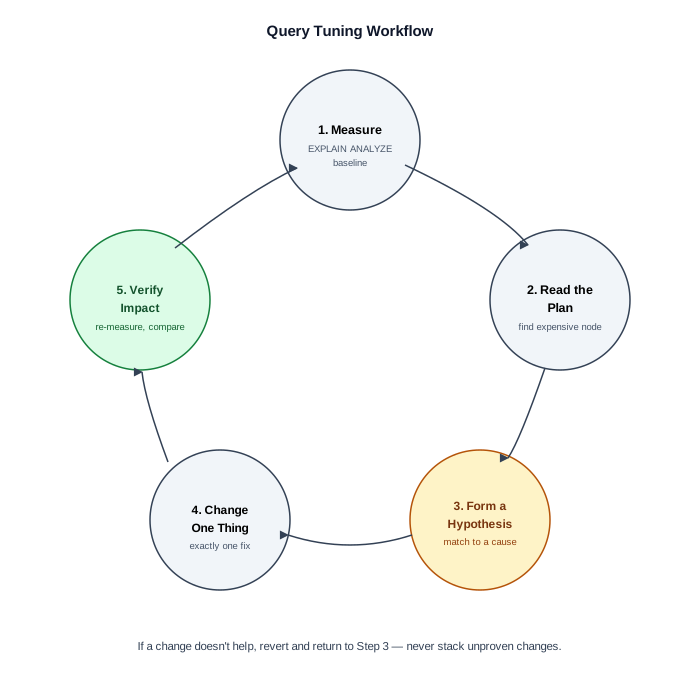
Phase 3: Hypothesize (15–20 minutes)
Match the expensive node against the flowchart above. Write down one hypothesis before changing anything.
Phase 4: Fix (20–60 minutes)
Apply exactly one change. Re-run EXPLAIN ANALYZE. Compare against Phase 2 baseline.
Phase 5: Verify & Document
- Confirm improvement under production-like load
- Check whether the fix regresses other queries (new index slows writes?)
- Document the before/after plan in the incident ticket
Pre-Production Checklists
Before Merge (PR Review)
- No
SELECT *in production queries - No functions wrapping indexed columns in WHERE or JOIN predicates
- No
NOT INagainst nullable subquery columns - No large
OFFSETpagination without keyset alternative documented - No implicit cross joins (comma syntax without ON)
EXPLAIN ANALYZEreviewed for queries touching tables > 100K rows- Assumed production data volume stated in PR description
Before Deployment
ANALYZE/ statistics refresh scheduled post-migration- New indexes created with
CONCURRENTLY(PostgreSQL) orONLINE(SQL Server) lock_timeoutset for DDL in production- Slow query log threshold configured
- Rollback plan documented (drop index, revert query text)
Before On-Call Handoff
- Top 10 slow queries from
pg_stat_statementsreviewed this week - Any plan regressions from recent statistics refresh flagged
- Index bloat check scheduled for high-write tables
Environment Comparison Checklist
When a query is fast in staging and slow in production:
| Check | Staging | Production |
|---|---|---|
| Row count on largest table | ? | ? |
| Statistics last refreshed | ? | ? |
| Index set identical | ? | ? |
| Parameter values representative | ? | ? |
| Buffer cache warm | ? | ? |
| Concurrent query load | ? | ? |
Further Reading
- OPTIMIZATION_PLAYBOOK.md — structured tuning sequences
- DECISION_TREE.md — rewrite and index decision trees
- PRODUCTION_INCIDENTS.md — real outage narratives
- PERFORMANCE_CHECKLIST.md — comprehensive review checklist
- CHEATSHEET.md — one-page symptom → fix reference