SQL-Engineering-Handbook
Query Tuning Workflow
Module 16 · Query Optimization Home · Engineering Guide · Troubleshooting · Playbook
Lesson 07 of 12 · ← Anti-Patterns · Next: Cost-Based Optimizer → · Performance Lab
Introduction
Every technique in this module is a tool. This lesson is the process that tells you which tool to reach for, in what order, so tuning becomes repeatable instead of improvised.
Learning Objectives
- Follow a five-step, repeatable query tuning workflow
- Know what to check first, second, and last when a query is reported slow
- Understand how to monitor for slow queries proactively, not just reactively
The Workflow
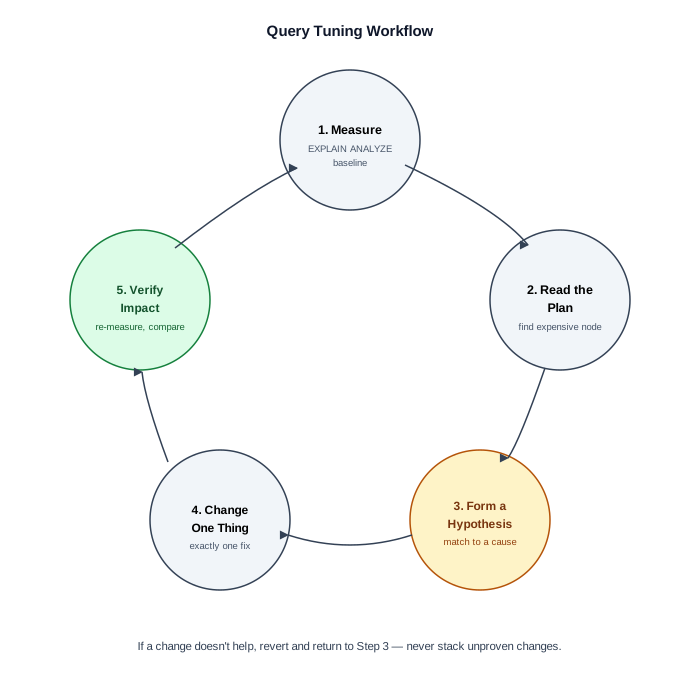
1. MEASURE        →  2. READ THE PLAN  →  3. FORM A HYPOTHESIS
                                                    ↓
5. VERIFY IMPACT  ←  4. CHANGE ONE THING
flowchart LR
    A[1. Measure] --> B[2. Read Plan]
    B --> C[3. Hypothesize]
    C --> D[4. Change One Thing]
    D --> E[5. Verify Impact]
    E -->|Not improved| C
    E -->|Improved| F[Document & Ship]
1. Measure
Get an actual baseline — EXPLAIN ANALYZE, not a guess, not “it feels
slow.” Note actual elapsed time, not just estimated cost.
2. Read the Plan
Find the single most expensive node (Lesson 02). Resist the urge to “fix”
something before you’ve identified the actual bottleneck — a common mistake
is optimizing a JOIN when the real cost is a downstream Sort for
ORDER BY.
3. Form a Hypothesis
Match the expensive node to a known cause:
| Symptom in plan | Likely cause | Relevant lesson |
|---|---|---|
Full table scan (Seq Scan — PostgreSQL; type: ALL — MySQL) on a large, filtered table |
Missing index, or non-SARGable predicate | 03 |
| Large gap between estimated and actual rows | Stale statistics | 01, 02 |
Nested Loop with no index on the inner side |
Missing join-column index | 04 |
Unexpectedly expensive Hash/build step |
Join order or missing predicate pushdown | 04 |
Sort before a LIMIT/ORDER BY |
Missing index matching the sort order | 03, 06 |
| Subquery/correlated-subquery node with high cost | Rewrite as JOIN/EXISTS/window function | 05 |
4. Change One Thing
Make exactly one change — add one index, rewrite one predicate, restructure one subquery. Changing multiple things at once means you can’t attribute the improvement (or regression) to a specific cause, and you lose the ability to build a reliable mental model for next time.
5. Verify Impact
Re-run EXPLAIN ANALYZE and compare directly against your Step 1 baseline.
If it didn’t help, revert the change and return to Step 3 with a new
hypothesis — don’t stack unproven changes on top of each other.
Proactive Monitoring (Enterprise Workflow)
Waiting for a user complaint is the slowest possible way to find a slow query. Production teams typically:
- Enable slow query logging (MySQL’s
slow_query_log, PostgreSQL’slog_min_duration_statement) to capture anything over a threshold automatically - Track query plan changes over time for the same SQL text (SQL
Server’s Query Store, or
pg_stat_statementson PostgreSQL) to catch a plan that silently got worse after a statistics change or data growth - Run
ANALYZE/UPDATE STATISTICSon a schedule so the optimizer’s cost estimates stay accurate as tables grow
Engineering Notes
- Most production performance regressions are not “the query changed” — they’re “the data changed” (grew, or its distribution shifted) and the execution plan silently followed. This is why plan-change monitoring matters as much as query-text review.
- A tuning change that helps one query can hurt another (a new index speeds up reads but slows down writes elsewhere) — always consider the whole workload, not just the query in front of you.
Common Mistakes
- Changing multiple things at once and being unable to explain which change actually helped
- Tuning based on estimated cost from
EXPLAINalone on an already-slow query, instead ofEXPLAIN ANALYZE’s actual numbers - Adding an index without checking whether an equivalent one already exists
Interview Questions
- “Walk me through how you’d approach a report that ‘used to be fast and now isn’t,’ with no code changes in the interim.”
- “Why is changing one thing at a time important in query tuning?”
Edge Cases
- Intermittent slowness: a query that’s fast 95% of the time and slow 5% of the time is often not a plan problem at all — check for lock contention, connection pool exhaustion, or resource contention from other concurrent workloads before assuming the execution plan itself is unstable.
- Can’t reproduce locally: a query that’s slow only in production and fast locally almost always reflects a data-volume or data-distribution difference — pull real production statistics (row counts, value distributions) rather than trying to “guess” a representative local dataset.
Troubleshooting Guidance
- Before assuming a query-tuning problem, rule out: lock contention, connection saturation, and resource contention from concurrent queries — all of which look like “slow query” symptoms but need different fixes than anything in this module.
Scalability Considerations
Tuning a single query is workload-unaware by design — Lesson 07’s
five-step loop optimizes one query at a time. At the workload level, teams
also need to watch for the aggregate effect of many “individually fine”
queries competing for the same resources (connection pool limits, cache
contention, I/O bandwidth) — a class of problem query-level EXPLAIN
tuning alone won’t surface.
Summary
Query tuning is a loop, not a single action: measure, read the plan, form a hypothesis grounded in the patterns from this module, change one thing, verify. This workflow is what turns Lessons 01–06 from a list of trivia into an applied engineering skill.
Practice Challenges
- Take any query from an earlier module, add
EXPLAIN ANALYZE, and walk through all five workflow steps even if the query is already fast — practice the process on a low-stakes example first. - Describe how you’d set up proactive slow-query monitoring for a small analytics team with no dedicated DBA.
Illustrative Applications
The examples below are illustrative composites showing how the five-step workflow applies at scale — they are not sourced claims about these specific companies’ internal practices. For a sourced, cited example, see the Cloud Cost lesson’s Shopify BigQuery case, which links a real Shopify Engineering blog post.
- Large monitoring/observability platform: Query performance monitoring integrated into the five-step workflow — top-N slow queries reviewed weekly (via
pg_stat_statementson PostgreSQL or the slow query log on MySQL), plan regressions flagged automatically. - High-traffic e-commerce platform during a peak sales event: Pre-event
ANALYZEon all order tables and baselineEXPLAIN ANALYZEsnapshots for the top 20 queries, as part of a load-event runbook. - Payments platform: Every query touching a large table (order of a million rows or more) requires an
EXPLAIN ANALYZEsnapshot in the PR description before merge.
Production Applications
- Standard operating procedure for every query performance incident
- Pre-deployment checklist item for analytics and backend teams
- Onboarding exercise: new engineers walk through the five steps on a known-slow query in staging
Performance Notes
- The workflow is deliberately single-query focused — at the workload level, also monitor aggregate connection pool usage and cache hit ratios
- Document every tuning change with before/after
EXPLAIN ANALYZEoutput — future you (or the next engineer) needs the baseline
Optimization Notes
- Step 1 (Measure) must use
EXPLAIN ANALYZE, not developer intuition — “feels slow” is not a baseline. - Step 4 (Change One Thing) is the most violated rule in practice — resist the urge to add an index and rewrite a subquery simultaneously.
- After fixing, add the query to proactive monitoring (
pg_stat_statements, slow query log) so the next regression is caught before users complain.
Interview Insight
“Walk me through how you’d tune a slow query” is the capstone interview question for this module. Strong candidates follow the five steps in order, mention checking for lock contention before assuming a plan problem, and emphasize changing one thing at a time. Mentioning proactive monitoring (pg_stat_statements, Query Store) signals you’ve operated in production, not just studied theory.
Further Experiments
- Pick the slowest query in your current project and walk through all five workflow steps — document each step’s output even if the query is already fast.
- Enable
pg_stat_statements(PostgreSQL) or slow query log (MySQL) on a dev instance and identify the top 5 queries by total time. - Save an
EXPLAIN ANALYZEbaseline today; after your next bulk data import, re-run and check whether the plan changed without any SQL modification.
Continue Learning
- Reference: TROUBLESHOOTING_GUIDE.md — symptom-first diagnostic flowchart
- Reference: OPTIMIZATION_PLAYBOOK.md — structured tuning sequences
- Reference: PERFORMANCE_CHECKLIST.md — pre-merge checklist
Related Modules
01_Query Execution Lifecycle · 02_EXPLAIN · 06_Anti-Patterns
Further Reading
- PostgreSQL documentation:
pg_stat_statementsextension - MySQL documentation: “The Slow Query Log”