SQL-Engineering-Handbook
Join Optimization
Module 16 · Query Optimization Home · Engineering Guide · Cheatsheet · Decision Trees
Lesson 04 of 12 · ← SARGability · Next: Subqueries → · SQL Lab
Introduction
You already know how to write a JOIN. This lesson covers what the
optimizer does with it — which of three join algorithms it picks, why,
and when you can influence that choice.
Learning Objectives
- Describe nested loop, hash, and merge join algorithms and when each is chosen
- Explain predicate pushdown and join elimination
- Predict which join algorithm the optimizer will likely choose for a given table-size scenario
Why This Exists
JOIN syntax is one line of SQL, but the optimizer’s choice of how to
execute it can be the single biggest factor in a query’s runtime — the same
join written the same way can run a hundred times faster or slower purely
based on table sizes and indexes, with no SQL changes at all.
Business Motivation
An e-commerce reporting query joins orders (200M rows) against a small
promotions lookup table (40 rows) to tag which orders used a promo code.
The optimizer’s choice here — probably a hash join or even a broadcast-style
join of the tiny table — is completely different from joining two
similarly-huge tables, where a merge or hash join on indexed/sorted keys
dominates. Understanding why the optimizer picks differently for these
two shapes is what separates “I can write a JOIN” from “I understand joins.”
The Three Join Algorithms
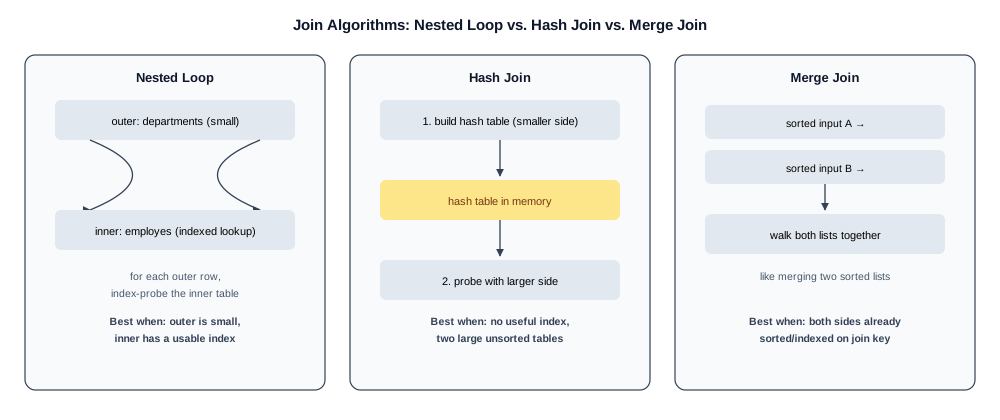
Nested Loop Join
for each row in outer_table:
    for each matching row in inner_table (often via an index):
        emit joined row
Efficient when the outer table is small and the inner table has a usable
index on the join column — the classic case of joining a small departments
table against a large employes table filtered down to a small subset.
Becomes very expensive if the outer table is large and there’s no index to
speed up the inner lookup, since it degrades toward comparing every row
against every row.
Hash Join
1. Build a hash table from the smaller input, keyed on the join column
2. Probe the hash table with each row of the larger input
The default choice for joining two large tables with no useful index on the join column — no ordering or index required, and it scales well as long as the smaller (build) side fits comfortably in memory.
Merge Join
1. Ensure both inputs are sorted on the join column (via index or explicit sort)
2. Walk both sorted inputs together, like merging two sorted lists
Very efficient when both inputs are already sorted on the join column — typically because both have an index on it — since it avoids building any in-memory structure. Expensive if the engine has to sort one or both sides first just to enable the merge.
How the Optimizer Chooses
flowchart TD
    A[Join Required] --> B{Outer table small<br/>+ index on inner join column?}
    B -->|Yes| C[Nested Loop Join]
    B -->|No| D{Both inputs large<br/>+ no useful index?}
    D -->|Yes| E[Hash Join]
    D -->|No| F{Both inputs sorted<br/>on join column?}
    F -->|Yes| G[Merge Join]
    F -->|No| H[Optimizer cost model<br/>chooses cheapest]
    H --> C
    H --> E
    H --> G
The optimizer estimates the cost of each algorithm for the specific tables, sizes, and available indexes involved, and picks the lowest estimated cost. This is why the same JOIN syntax in your query can compile to different physical algorithms depending on: table sizes, whether either join column is indexed, and current statistics.
Predicate Pushdown (recap in a join context)
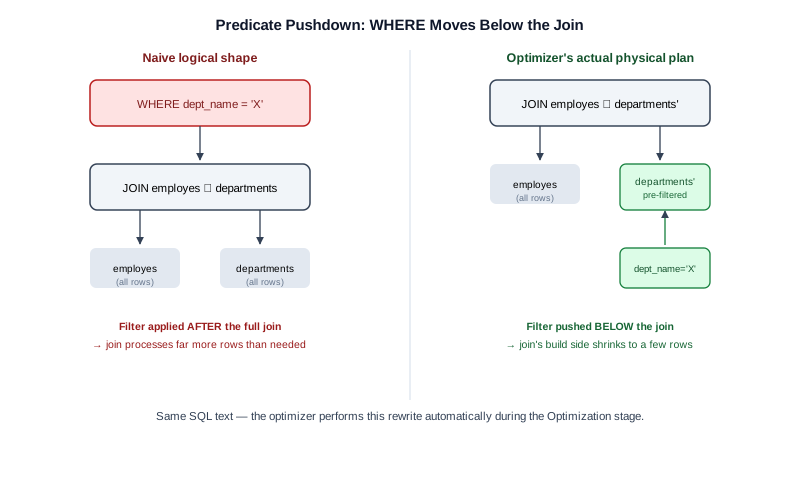
SELECT e.emp_name, d.dept_name
FROM employes e
JOIN departments d ON e.dept_id = d.dept_id
WHERE d.location_id = 3;
The optimizer typically filters departments down to location_id = 3
before performing the join — pushing the WHERE predicate down past
the join boundary — rather than joining everything first and filtering
after. This dramatically shrinks the join’s build/probe side.
Join Elimination
If a query joins a table but never actually references any of its columns
in SELECT, WHERE, or elsewhere, and a foreign key guarantees the join
can’t change the row count or filter anything, a sufficiently smart
optimizer can eliminate the join entirely. This mostly benefits
auto-generated ORM SQL that joins defensively; it’s worth knowing this
exists so you don’t manually “optimize away” a join the optimizer would
have removed anyway.
Engineering Notes
- Join order in your SQL text does not dictate join execution order — the optimizer is free to reorder joins (subject to correctness) to minimize intermediate result sizes.
- The join algorithm choice is visible directly in
EXPLAINoutput asNested Loop,Hash Join, orMerge Join(PostgreSQL naming; other engines use similar labels).
MySQL / PostgreSQL / SQL Server Notes
- MySQL historically leaned heavily on nested loop joins (its “Block Nested Loop” variant); native hash join support was added in 8.0.18+.
- PostgreSQL freely chooses among all three algorithms based on cost.
- SQL Server exposes join type directly in its execution plan icons (Nested Loops, Hash Match, Merge Join).
Common Mistakes
- Assuming
JOINorder in the SQL text controls execution order - Adding an index and expecting the optimizer to switch to a merge join when the data volumes still favor a hash join
- Joining tables you don’t need (no columns selected or filtered from them) purely out of ORM habit
Anti-patterns
- Joining on a non-indexed, non-SARGable expression (e.g.,
ON UPPER(e.dept_code) = UPPER(d.code)), which forces a nested loop with no usable index on either side - Joining a huge fact table to another huge fact table with neither side indexed on the join key, forcing an expensive hash join with a large build side
Interview Questions
- “Explain the difference between a hash join and a merge join, and when each is preferred.”
- “Why doesn’t the order you write JOINs in SQL determine execution order?”
Edge Cases
- Join order explosion: queries joining many tables (8+) can exceed
the optimizer’s ability to exhaustively evaluate every possible join
order within a reasonable planning time — most engines fall back to
heuristics or genetic-algorithm-style search beyond a threshold
(PostgreSQL’s
join_collapse_limit/geqo_threshold), which can produce a suboptimal plan for very wide joins. - Hash join spilling to disk: if the build side of a hash join is
larger than available working memory, the engine spills to disk,
turning an expected in-memory operation into an I/O-bound one — visible
in
EXPLAIN ANALYZEas a sudden jump in actual time relative to estimated cost.
Troubleshooting Guidance
- A join that was fast suddenly spills/slows down → check whether the
build-side table grew past available working memory (
work_memin PostgreSQL) rather than assuming the join algorithm choice itself is wrong. - Many-table join taking a long time just to plan (not execute) → check join-order search limits/heuristics for your engine.
Scalability Considerations
In distributed/MPP engines (Redshift, Snowflake, BigQuery), join cost includes a data shuffle step to co-locate matching rows across nodes — a dimension that doesn’t exist in single-node engines. Joining on a poorly-distributed key can dominate query time even when the same join would be trivial on a single-node database.
Additional Dialect Notes
- Oracle: supports explicit join-method hints (
USE_NL,USE_HASH,USE_MERGE) for cases where the optimizer’s default choice needs manual override. - SQLite: only implements nested loop joins — there’s no hash or merge join to choose between, which matters when reasoning about its performance characteristics on large joins.
- DuckDB: implements a vectorized hash join as its primary join strategy, well-suited to its analytical, columnar workload profile.
Summary
The optimizer picks a join algorithm based on table sizes, available indexes, and estimated cost — not based on how you wrote the SQL. Your job is to give it good indexes and accurate statistics; its job is to pick nested loop, hash, or merge accordingly.
Practice Challenges
- For a join between a 50-row
locationstable and a 40-million-rowemployes-derived table, predict the likely join algorithm and explain why. - Find a query in Module 03 that joins three tables and predict, before
running
EXPLAIN, which join is likely to be the most expensive.
Real Company Usage
- Amazon: 10-table warehouse inventory join exceeded planning time budget — join order explosion required staged CTEs (Incident #8).
- Uber: Hash join spill to disk when build side exceeded work_mem during peak driver earnings computation.
- Airbnb: BitmapOr merge of two index scans for OR-across-columns search — 8 seconds vs. 45ms with UNION ALL rewrite.
Production Applications
These scenarios are illustrative case studies inspired by common production failure modes; specific figures are illustrative unless an external source is cited in PRODUCTION_INCIDENTS.md. See its disclaimer for the full explanation.
- Predicting join algorithm before running EXPLAIN (interview skill)
- Diagnosing hash join spills visible as
Batches > 1in PostgreSQL - Predicate pushdown verification for multi-table queries
Performance Notes
- Join order in SQL text does not control execution order
- Hash join spilling to disk is a common cause of sudden 10× slowdown after data growth
- Distributed engines (Snowflake, BigQuery) add data shuffle cost not present in single-node engines
Optimization Notes
- Ensure an index exists on the inner side of nested loop joins — without it, nested loop degrades toward O(n²).
- Watch for
Hash JoinwithBatches > 1in PostgreSQL — this means the build side exceededwork_memand spilled to disk; increasework_memor reduce build-side rows via predicate pushdown. - Push filters into JOIN conditions (
ON e.dept_id = d.dept_id AND d.dept_name = 'Engineering') so the optimizer applies them before the join, not after.
Interview Insight
“Which join algorithm would you expect here?” is a classic systems-design question. Interviewers give table sizes and index availability, then expect you to predict nested loop (small outer + indexed inner), hash join (two large unindexed tables), or merge join (both sides pre-sorted). Mentioning hash join spill-to-disk and predicate pushdown separates senior candidates from those who only know the three names.
Further Experiments
- Join
departments(small) toemployes(large) with and without an index onemployes.dept_id— compare nested loop vs. hash join inEXPLAIN ANALYZE. - Create a multi-table query joining three tables and predict join order before running
EXPLAIN— check whether the optimizer’s order matches your prediction. - Add a restrictive
WHEREclause and observe whether the optimizer pushes it below the join node (predicate pushdown) in the plan tree.
Continue Learning
- Next: Lesson 05 — Subquery & CTE Optimization
- Reference: DECISION_TREE.md — Tree 4: Join Algorithm
- Practice: PRACTICE_PROBLEMS.md — Problem 4
Related Modules
03_SARGability · 05_Subquery Optimization · 03_Joins
Further Reading
- PostgreSQL documentation: “Nested Loop, Hash, and Merge Join” chapters
- CROSS_DATABASE_ENGINEERING.md — join support by engine