SQL-Engineering-Handbook
05 · Business KPI Reports
🏠 Module Home · 🗂️ Handbook Home · ← 04 ROLLUP, CUBE & GROUPING SETS · Next → 06 Executive Dashboards
Module: 02 — Advanced Aggregations Domain used in this file: SaaS (
customers,subscriptions,plans,billing_events) Companion file:05_BUSINESS_KPI_REPORTS.sql
Introduction
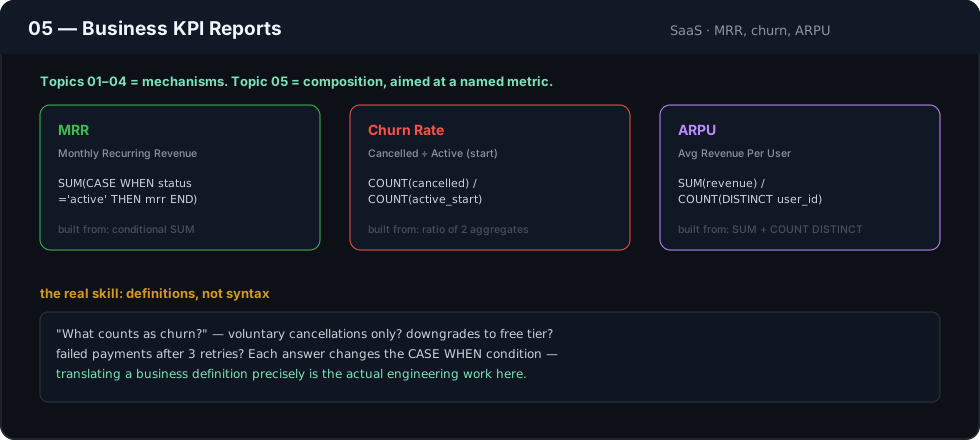
Topics 01–04 covered the mechanisms: multi-column grouping, multiple metrics, conditional aggregation, and hierarchical totals. This topic is about composition — combining those mechanisms deliberately to answer the specific, named metrics a business actually tracks: MRR, churn rate, ARPU, conversion rate. A KPI report is not a bigger query; it’s the same tools, aimed precisely at a number leadership already has a name for.
Concept Overview
A KPI (Key Performance Indicator) report is a GROUP BY query — usually by time period — where every column is a well-defined, named business metric, typically built from conditional aggregation (Topic 03) and sometimes ratios of two aggregates. The engineering skill is less about new syntax and more about correctly translating a business definition (“what counts as churn?”) into a precise SQL condition.
Business Motivation
A SaaS CFO wants one monthly table: new MRR, expansion MRR, contraction MRR, and churned MRR — the standard “MRR waterfall” every SaaS board deck contains. Every one of those four numbers is a SUM(CASE WHEN ...) over the same billing_events table, differing only in the condition. Getting the condition definitions exactly right — and keeping them consistent every month — is the actual job; the aggregation syntax is the easy part.
Why This Feature Exists
Businesses don’t ask SQL questions in database terms — they ask for named metrics with specific, sometimes contested definitions (“does a downgrade within the trial period count as churn?”). KPI reporting is where a data professional’s job shifts from “can I write this query” to “do I understand this metric precisely enough to compute it correctly and defend the number in a leadership meeting.”
Real Company Examples
- SaaS companies — MRR/ARR waterfalls, logo churn vs. revenue churn, net revenue retention (NRR).
- E-commerce — conversion rate (orders ÷ sessions), average order value, repeat purchase rate.
- Marketplaces — take rate, GMV (gross merchandise value) by category, buyer/seller liquidity metrics.
Business Problems Solved
- Recurring board-deck and investor-update metrics (MRR, churn, NRR)
- Department-level scorecards (sales conversion rate, support first-response SLA)
- Any metric with a precise, sometimes company-specific business definition that needs to be computed consistently every reporting period
Visual Explanation
billing_events (tall, one row per event)              MRR waterfall (wide KPI table, one row per month)
┌──────────┬────────────┬────────┐                    ┌────────┬─────────┬──────────────┬────────────────┬───────────┐
│ month     │ event_type │ amount │                    │ month   │ new_mrr │ expansion_mrr│ contraction_mrr │ churned_mrr│
├──────────┼────────────┼────────┤   conditional      ├────────┼─────────┼──────────────┼────────────────┼───────────┤
│ 2026-06   │ NEW         │ 500    │───┐  aggregation   │ 2026-06 │ 1,200    │ 340           │ -180             │ -420        │
│ 2026-06   │ EXPANSION   │ 200    │───┼──────────────▶ └────────┴─────────┴──────────────┴────────────────┴───────────┘
│ 2026-06   │ CHURN       │ -420   │───┘
└──────────┴────────────┴────────┘
Syntax
The syntax here is a direct composition of earlier topics — nothing new is introduced:
SELECT
    DATE_TRUNC('month', event_date)                              AS billing_month,  -- PostgreSQL
    -- or DATE_FORMAT(event_date, '%Y-%m-01')                    for MySQL
    SUM(CASE WHEN event_type = 'NEW'         THEN amount ELSE 0 END) AS new_mrr,
    SUM(CASE WHEN event_type = 'EXPANSION'   THEN amount ELSE 0 END) AS expansion_mrr,
    SUM(CASE WHEN event_type = 'CONTRACTION' THEN amount ELSE 0 END) AS contraction_mrr,
    SUM(CASE WHEN event_type = 'CHURN'       THEN amount ELSE 0 END) AS churned_mrr
FROM billing_events
GROUP BY DATE_TRUNC('month', event_date)
ORDER BY billing_month;
Detailed Walkthrough
SELECT
    DATE_TRUNC('month', be.event_date)                            AS billing_month,
    COUNT(DISTINCT CASE WHEN be.event_type = 'NEW'
                        THEN be.customer_id END)                   AS new_customers,
    SUM(CASE WHEN be.event_type = 'NEW'   THEN be.amount ELSE 0 END) AS new_mrr,
    SUM(CASE WHEN be.event_type = 'CHURN' THEN be.amount ELSE 0 END) AS churned_mrr,
    ROUND(100.0 * SUM(CASE WHEN be.event_type = 'CHURN'
                           THEN -be.amount ELSE 0 END)
          / NULLIF(SUM(CASE WHEN be.event_type IN ('NEW','EXPANSION','CONTRACTION')
                             THEN be.amount ELSE 0 END), 0), 2)      AS churn_rate_pct
FROM billing_events AS be
GROUP BY DATE_TRUNC('month', be.event_date)
ORDER BY billing_month;
- Time-bucketing (
DATE_TRUNC) sets the grain to one row per month — the near-universal grain for KPI reports. - Each metric is a conditional aggregate (Topic 03), one per named business metric.
churn_rate_pctcomposes two conditionalSUM()s into a single ratio — this is where KPI definitions get precise: is churn measured against starting MRR, or against total MRR added that month? The denominator choice here is a business decision, not a SQL one, and must be confirmed with finance before shipping the report.
Production Workflow
KPI reports are almost always scheduled — computed nightly or monthly, materialized into a summary table, and consumed by a BI dashboard or an automated Slack/email digest sent to leadership. Because these numbers get quoted in board meetings, they typically go through a documented, reviewed definition (often in a company’s internal metrics glossary or a dbt model with a description) rather than being redefined ad hoc in every report.
Analytics Engineering Perspective
- A KPI’s SQL definition is a contract. Once a metric like “churn rate” is quoted to leadership, its underlying
CASElogic should be centralized (a view, adbtmodel) and versioned — silently changing the definition later without communicating it is one of the fastest ways to lose stakeholder trust in a data team. - Confirm the denominator, not just the numerator. Most KPI disagreements between data teams and finance come down to a mismatched denominator (churn against starting MRR vs. total MRR), not a mismatched numerator.
- Time-bucketing choice matters.
DATE_TRUNC('month', ...)groups by calendar month; some finance teams use fiscal months or ISO weeks — confirm which one before building the report.
Performance Considerations
- KPI reports over long history benefit from materializing a monthly summary table once, rather than re-aggregating raw event-level data on every dashboard load.
- Index the date column used for time-bucketing (
billing_events(event_date)), since nearly every KPI query filters or groups on it. - Ratio-based KPIs (like
churn_rate_pct) are cheap to compute once the underlying conditional sums are already being calculated — no extra table scan is needed.
Edge Cases
- Division by zero in ratio KPIs — a month with zero starting MRR (e.g., the company’s first month) must be guarded with
NULLIF, or the query errors instead of returningNULL. - Partial months. The current, still-in-progress month will always look artificially low compared to completed months — clearly flag partial-period rows in any KPI report rather than letting them be misread as a trend.
- Timezone boundaries on time-bucketing —
DATE_TRUNCbehavior depends on the session/column timezone; a customer’s “churn month” can shift by a day near a month boundary if timezones aren’t handled consistently.
Common Mistakes
- Redefining a KPI’s underlying condition slightly differently in a new report, causing the same-named metric to disagree between dashboards.
- Computing a rate KPI (like churn rate) with the wrong denominator, producing a number that looks plausible but doesn’t match finance’s figure.
- Leaving an in-progress current period in a trend report without flagging it as partial.
- Forgetting
NULLIFon a ratio’s denominator and causing the whole report to fail on an edge-case month.
Best Practices
- Store every KPI’s business definition, not just its SQL, somewhere durable and discoverable (a metrics glossary, model documentation).
- Always guard ratio denominators with
NULLIF. - Flag partial/in-progress time periods explicitly in the output (a boolean column or a note in the report), rather than letting the reader assume every row is a complete period.
- Reuse the same conditional-aggregation building blocks across related KPI reports rather than re-deriving similar logic independently.
Interview Questions
- What distinguishes a “KPI report” from a general aggregation query, technically?
Nothing new syntactically — it’s the same
GROUP BY/conditional-aggregation toolkit, applied with precise business-metric definitions and typically time-bucketed. - Why do data teams and finance teams sometimes disagree on a churn rate number even when both queries “look correct”?
The most common cause is a mismatched denominator (starting MRR vs. total MRR), not an error in the
CASElogic itself. - Why guard a KPI ratio’s denominator with
NULLIF? To avoid a division-by-zero error on an edge-case period (e.g., a company’s very first month) and returnNULLgracefully instead. - What risk does an in-progress current period create in a monthly KPI trend report? It will appear artificially low relative to completed periods and can be misread as a real decline if not explicitly flagged as partial.
- Where should a KPI’s business definition live, beyond the SQL query itself? In a durable, discoverable location — a metrics glossary or model documentation — so the definition doesn’t drift silently across different reports.
Summary
Business KPI reports are Topics 01–04 aimed deliberately at named, board-level metrics. The SQL mechanism is rarely new; what matters is precisely translating a business definition into a condition, guarding ratio denominators, and centralizing that definition so the same KPI means the same thing everywhere it’s reported.
Practice Challenges
- Extend the walkthrough query to also compute
net_new_mrr(new + expansion + contraction + churn, all summed together in one expression). - Build a “logo churn rate” KPI (percentage of customers, not revenue, who churned in a month) using
COUNT(DISTINCT CASE WHEN ...)instead ofSUM(CASE WHEN ...). - Add a
is_partial_periodflag to the walkthrough query that marks the current, still-in-progress month. - Design a KPI report answering “average revenue per account” (ARPU) per month, guarding correctly against a zero-account month.
- Explain, in writing, two different valid ways to define “churn rate” and what business question each definition actually answers.
Further Reading
- PostgreSQL Documentation — Date/Time Functions (DATE_TRUNC)
- MySQL 8.0 Reference Manual — Date and Time Functions
- Microsoft Learn — Aggregate Functions and Business Reporting Patterns
◀ Previous: 04_ROLLUP_CUBE_GROUPING_SETS.md · Next ▶ 06_EXECUTIVE_DASHBOARDS.md