SQL-Engineering-Handbook
03 · Conditional Aggregation
🏠 Module Home · 🗂️ Handbook Home · ← 02 Multiple Aggregations · Next → 04 ROLLUP, CUBE & GROUPING SETS
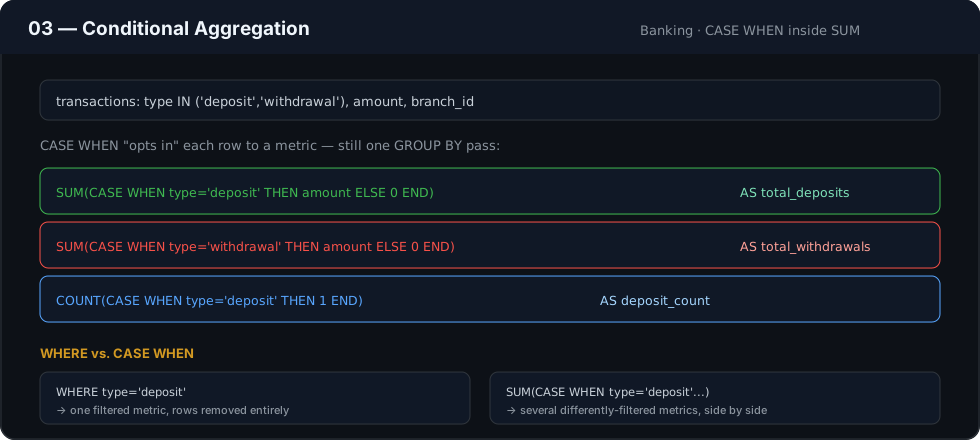
Module: 02 — Advanced Aggregations Domain used in this file: Banking / Finance (
accounts,transactions,branches) Companion file:03_CONDITIONAL_AGGREGATION.sql
Introduction
WHERE filters rows before aggregation — one condition, applied to the whole query. Conditional aggregation puts the condition inside the aggregate function itself, so a single query can compute several differently filtered metrics side by side. This is the technique behind almost every “breakdown by status” report you have ever seen: new vs. returning, deposits vs. withdrawals, on-time vs. late.
Concept Overview
Wrapping a CASE WHEN expression inside COUNT(), SUM(), or AVG() lets each row “opt in” to a specific metric based on a condition, while still being aggregated in the same GROUP BY pass as every other metric in the query.
COUNT(CASE WHEN condition THEN 1 END)          -- counts only matching rows
SUM(CASE WHEN condition THEN amount ELSE 0 END) -- sums only matching rows
AVG(CASE WHEN condition THEN amount END)         -- averages only matching rows
The CASE expression returns NULL for rows that don’t match — and COUNT(), SUM(), and AVG() all ignore NULLs by design, which is exactly the behavior this pattern relies on.
Business Motivation
A branch operations manager wants, per branch, in one row: number of deposit transactions, number of withdrawal transactions, total deposit amount, and total withdrawal amount. Running four separately filtered queries means four table scans and four result sets to merge by hand — and a real risk that the underlying data changes slightly between queries, making the four numbers technically inconsistent. Conditional aggregation computes all four from a single grouped scan, guaranteed consistent.
Why This Feature Exists
GROUP BY alone can only slice a metric by a column already present in the group. It cannot, by itself, produce two differently-filtered metrics inside the same group. CASE inside an aggregate function is the bridge — it lets you define an arbitrary business condition (not just a raw column value) and turn it into its own metric, without changing the grouping or issuing a second query.
Real Company Examples
- Banks — deposit vs. withdrawal volume, per branch per day, in one operational report.
- SaaS billing — MRR broken into new, expansion, contraction, and churned revenue, all from the same subscription-events table.
- E-commerce — orders shipped on time vs. late, per warehouse, per week, for logistics SLAs.
Business Problems Solved
- Side-by-side status breakdowns (deposit/withdrawal, paid/unpaid, active/inactive) without multiple queries
- Conditional KPIs feeding directly into pivot-style, dashboard-ready tables
- Business-defined segments (e.g., “high-value transaction”) computed inline, without a separate flag column
- Risk and compliance metrics (e.g., flagged vs. normal transaction volume) computed alongside operational totals
Visual Explanation
Detail rows (transactions)                Conditional aggregation, grouped by branch
┌─────────┬────────┬────────┐             ┌────────┬───────────┬──────────────┬───────────────┬──────────────────┐
│ branch  │ type   │ amount │             │ branch │ deposits  │ deposit_amt   │ withdrawals    │ withdrawal_amt    │
├─────────┼────────┼────────┤   GROUP BY  ├────────┼───────────┼──────────────┼───────────────┼──────────────────┤
│ B1      │ DEPOSIT│  500   │──┐  branch   │ B1     │ 2         │ 800           │ 1              │ 150                │
│ B1      │ DEPOSIT│  300   │──┤ ────────▶ └────────┴───────────┴──────────────┴───────────────┴──────────────────┘
│ B1      │ WITHDRW│  150   │──┘
└─────────┴────────┴────────┘
deposits and deposit_amt only “count” the rows where type = 'DEPOSIT'; withdrawals and withdrawal_amt only count type = 'WITHDRAWAL' rows — computed together, from the same grouped rows, in one query.
Syntax
SELECT
    group_col,
    COUNT(CASE WHEN condition_a THEN 1 END)                    AS count_a,
    SUM(CASE WHEN condition_a THEN amount_col ELSE 0 END)       AS sum_a,
    AVG(CASE WHEN condition_b THEN amount_col END)               AS avg_b
FROM table_name
GROUP BY group_col;
Note the ELSE difference: COUNT(CASE WHEN ... THEN 1 END) deliberately omits ELSE, so non-matching rows become NULL and are excluded from the count. SUM(CASE WHEN ... THEN amount ELSE 0 END) commonly does include ELSE 0 — mathematically equivalent to omitting it for SUM(), since SUM() also ignores NULL, but explicit ELSE 0 is a common house-style convention for readability.
Detailed Walkthrough
SELECT
    br.branch_name,
    COUNT(CASE WHEN t.transaction_type = 'DEPOSIT' THEN 1 END)     AS deposit_count,
    SUM(CASE WHEN t.transaction_type = 'DEPOSIT'
             THEN t.amount ELSE 0 END)                             AS deposit_total,
    COUNT(CASE WHEN t.transaction_type = 'WITHDRAWAL' THEN 1 END)   AS withdrawal_count,
    SUM(CASE WHEN t.transaction_type = 'WITHDRAWAL'
             THEN t.amount ELSE 0 END)                              AS withdrawal_total
FROM transactions AS t
JOIN accounts      AS a  ON t.account_id = a.account_id
JOIN branches       AS br ON a.branch_id  = br.branch_id
GROUP BY br.branch_name;
- The joins produce one row per transaction, tagged with its branch.
GROUP BY br.branch_namesets the grain to one row per branch.- Each
CASE-wrapped aggregate independently evaluates every row in the group against its own condition, contributing to only the metric it matches. - All four metrics are guaranteed to come from the exact same underlying transaction rows.
Production Workflow
Conditional aggregation queries like this typically power operational dashboards refreshed intraday (branch operations, fraud monitoring) or nightly (finance close reports), and are frequently the SQL behind a scheduled email report sent to branch managers.
Analytics Engineering Perspective
- Centralize the condition, not just the pattern. If “high-value transaction” is defined as
amount > 10000in one report, that exact threshold should live in one documented place (a view, adbtmacro, a constant) — not be re-typed slightly differently across a dozen conditional-aggregation queries. - Conditional aggregation is a lightweight alternative to a
PIVOT. Most SQL dialects in this handbook’s scope (MySQL, PostgreSQL) have no nativePIVOToperator; this pattern is the idiomatic way to produce a wide, pivot-style report from tall transactional data. - Keep the number of conditional branches readable. Once a query needs eight or ten conditional metrics, consider whether the report is really asking for a
GROUP BYon a status column instead (turning conditions back into groups), which is often clearer than an ever-widerSELECTlist.
Performance Considerations
- Conditional aggregation scans the grouped rows once, regardless of how many
CASE-wrapped metrics are added — always cheaper than one query per condition. - The condition inside
CASEshould reference indexed columns where possible (e.g.,transaction_type), so the engine can use those indexes for the underlying join/filter even though the conditional logic itself happens after grouping begins. - For very wide conditional reports (many conditions), verify the query plan isn’t re-evaluating the same joined row-set multiple times — it shouldn’t need to, but always confirm with
EXPLAIN.
Edge Cases
NULLtransaction types. A row withtransaction_type = NULLmatches neitherWHEN 'DEPOSIT'norWHEN 'WITHDRAWAL', silently falling through toNULLin every conditional metric — verify whether that’s the intended behavior or whether it needs its own explicit bucket.- Case sensitivity.
transaction_type = 'deposit'vs'DEPOSIT'may or may not match depending on the database’s collation settings — confirm case sensitivity behavior for the specific database before relying on string equality insideCASE. - Overlapping conditions. If two
WHENconditions in the sameCASEcould both be true for a row, only the first matching branch is used — order conditions from most to least specific.
Common Mistakes
- Adding
ELSE 0to aCOUNT(CASE WHEN ... THEN 1 ELSE 0 END)— this counts every row (since0is notNULL), silently breaking the intended conditional count. OmitELSEfor conditionalCOUNT(). - Forgetting that unmatched rows in
AVG(CASE WHEN ...)areNULL, not0— usingELSE 0here would incorrectly pull the average toward zero by including non-matching rows as zeros. - Repeating a business condition’s exact logic slightly differently across several reports, causing the same-named metric to disagree between dashboards.
Best Practices
- Never add
ELSE 0to aCOUNT(CASE WHEN ...)pattern — let non-matching rows becomeNULLso they’re correctly excluded. - Use
ELSE 0(not omitted) forSUM(CASE WHEN ...)when the convention at your company favors explicit zero-handling for readability — both are mathematically equivalent. - Never add
ELSE 0toAVG(CASE WHEN ...)— it will corrupt the average. - Document the business definition behind every condition directly above the query, especially thresholds like “high-value” or “at-risk.”
Interview Questions
- Why does
COUNT(CASE WHEN condition THEN 1 END)correctly count only matching rows, with noELSEneeded?COUNT()ignoresNULLvalues, and theCASEexpression returnsNULLfor any row where the condition is false, since there’s noELSEbranch. - What happens if you add
ELSE 0to a conditionalCOUNT()? It breaks the pattern —0is notNULL, soCOUNT()now counts every row regardless of the condition. - Why is
ELSE 0dangerous insideAVG(CASE WHEN ...)but safe insideSUM(CASE WHEN ...)?SUM()treats0andNULL(which is ignored) identically for a sum’s result.AVG()divides by the count of included values — including zeros in that count for non-matching rows pulls the average down incorrectly. - How would you build a pivot-style report (one column per status value) without a native
PIVOToperator? Conditional aggregation — oneCASE-wrapped aggregate per status value, all inside the sameGROUP BYquery. - What happens to a row whose value doesn’t match any
WHENbranch and has noELSE? TheCASEexpression evaluates toNULLfor that row, and it is excluded from that particular conditional aggregate.
Summary
Conditional aggregation moves a business condition from WHERE (which filters the whole query) into a CASE expression inside an aggregate function (which filters just that one metric). This is the core technique for building pivot-style, multi-status reports in SQL dialects without a native PIVOT, and it depends entirely on correctly understanding how NULL interacts with COUNT(), SUM(), and AVG().
Practice Challenges
- Add a third conditional metric to the walkthrough query: count and total amount of
'TRANSFER'transactions per branch. - Explain, without running it, what would go wrong if
ELSE 0were added to thedeposit_countexpression in the walkthrough. - Build a per-branch report showing average deposit amount and average withdrawal amount side by side, using
AVG(CASE WHEN ...)correctly (noELSE 0). - Design a conditional KPI for “high-value transaction rate” (percentage of transactions over a defined threshold) per branch, using
COUNT(CASE WHEN ...)divided byCOUNT(*). - Rewrite one of this file’s scenarios in the companion
.sqlfile as aGROUP BY transaction_typequery instead, and explain when that alternative shape would be preferable to conditional aggregation.
Further Reading
- PostgreSQL Documentation — CASE Expressions
- MySQL 8.0 Reference Manual — Control Flow Functions (CASE)
- Microsoft Learn — CASE (Transact-SQL)
◀ Previous: 02_MULTIPLE_AGGREGATIONS.md · Next ▶ 04_ROLLUP_CUBE_GROUPING_SETS.md