SQL-Engineering-Handbook
02 · Multiple Aggregations
🏠 Module Home · 🗂️ Handbook Home · ← 01 Advanced GROUP BY · Next → 03 Conditional Aggregation
Module: 02 — Advanced Aggregations Domain used in this file: E-commerce (
customers,orders,order_items,products) Companion file:02_MULTIPLE_AGGREGATIONS.sql
Introduction
Most real reports need more than one number per group. “Orders per customer” is rarely the whole ask — it’s usually “orders per customer, total spend per customer, and average order value per customer,” together, in one table. This file covers combining COUNT(), COUNT(DISTINCT), SUM(), AVG(), MIN(), and MAX() in a single GROUP BY query.
Concept Overview
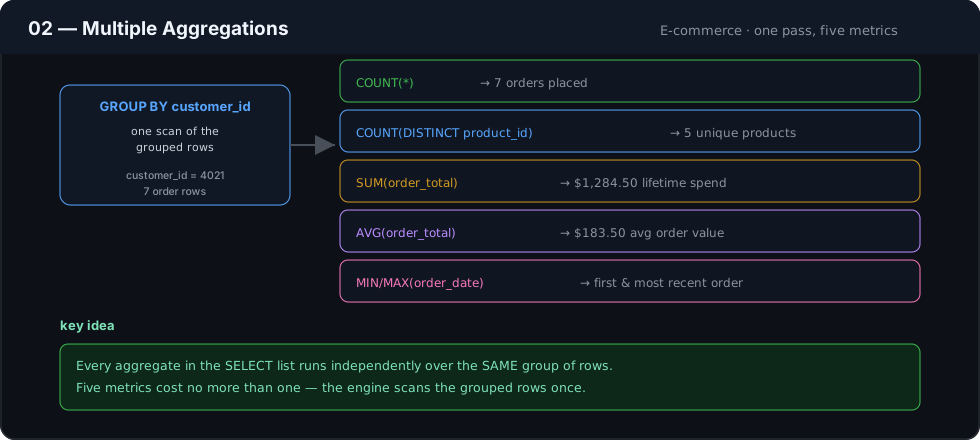
Every aggregate function in a SELECT list operates independently over the same group of rows defined by GROUP BY. There is no extra cost or extra clause needed to compute five metrics instead of one — the engine scans the grouped rows once and evaluates every aggregate expression against that one pass.
Business Motivation
A retention analyst needs, per customer: total number of orders, total distinct products purchased, lifetime spend, average order value, and the date of their most recent order. Computing each of these with a separate query means five round trips to the database and five result sets to reconcile by hand. One query with five aggregate expressions in the SELECT list returns exactly one row per customer, with all five numbers guaranteed to be computed from the same underlying rows.
Why This Feature Exists
SQL’s aggregate functions are designed to be composable specifically so that a single grouped scan can answer a multi-metric business question. This avoids redundant table scans, keeps metrics numerically consistent with each other (no risk of two separately-run queries seeing different data due to concurrent writes), and produces a report shape that maps directly onto a single row in a BI table or a CRM record.
Real Company Examples
- E-commerce platforms (Shopify-style merchant dashboards) — per-customer order count, spend, and average order value shown together on a single customer profile screen.
- SaaS billing systems — per-account total invoices, total paid, total overdue, and largest single invoice, computed together for a billing health summary.
- Airlines / loyalty programs — per-member flight count, total miles, and most recent flight date combined into one loyalty-tier eligibility check.
Business Problems Solved
- Customer lifetime value (LTV) summaries
- Multi-metric product performance tables (units sold, revenue, average price, distinct buyers)
- Account health scorecards combining volume and recency in one row
- Any “profile summary” screen that shows several numbers about one entity at once
Visual Explanation
Detail rows (order_items, one row per line item)
┌───────────┬────────┬─────────┐
│ customer  │ amount │ product │
├───────────┼────────┼─────────┤
│ C1        │  40    │ P1      │──┐
│ C1        │  25    │ P2      │──┤  GROUP BY customer
│ C1        │  40    │ P1      │──┘
│ C2        │  90    │ P3      │──┐
└───────────┴────────┴─────────┘  │
                                    ▼
        ┌───────────┬─────────────┬───────────┬─────────────┬───────────┐
        │ customer  │ order_count │ total_spend│ avg_spend   │ distinct_products │
        ├───────────┼─────────────┼───────────┼─────────────┼───────────┤
        │ C1        │ 3           │ 105        │ 35.00       │ 2                  │
        │ C2        │ 1           │ 90         │ 90.00       │ 1                  │
        └───────────┴─────────────┴───────────┴─────────────┴───────────┘
All five columns come from one grouped pass over the detail rows.
Syntax
SELECT
    group_col,
    COUNT(*)                    AS row_count,
    COUNT(DISTINCT some_col)    AS distinct_count,
    SUM(amount_col)             AS total_amount,
    AVG(amount_col)             AS average_amount,
    MIN(date_col)               AS earliest,
    MAX(date_col)               AS latest
FROM table_name
GROUP BY group_col;
Detailed Walkthrough
SELECT
    c.customer_id,
    COUNT(o.order_id)                      AS total_orders,
    COUNT(DISTINCT oi.product_id)          AS distinct_products_bought,
    SUM(oi.quantity * oi.unit_price)       AS lifetime_spend,
    AVG(oi.quantity * oi.unit_price)       AS avg_line_value,
    MAX(o.order_date)                      AS most_recent_order
FROM customers   AS c
JOIN orders      AS o  ON c.customer_id = o.customer_id
JOIN order_items AS oi ON o.order_id     = oi.order_id
GROUP BY c.customer_id;
- The joins build one row per order line item, tagged with its customer.
GROUP BY c.customer_idsets the grain to one row per customer.- Five independent aggregate expressions each summarize the same grouped rows in a different way — count, distinct count, sum, average, and max — computed in a single pass.
Caution: COUNT(o.order_id) here counts order line items per customer once the order_items join fans a single order out into multiple rows — it does not equal the number of distinct orders. COUNT(DISTINCT o.order_id) would be needed for a true order count. This exact trap is covered under Edge Cases below.
Production Workflow
Multi-metric grouped queries like this are frequently the exact query behind a “customer 360” or “account summary” table refreshed nightly and served to CRM tools, support dashboards, or marketing segmentation systems.
Analytics Engineering Perspective
- Watch join fan-out before trusting any
COUNT(). Every join in this query multiplies rows; decide, for each metric, whether you needCOUNT(DISTINCT ...)or a pre-aggregated subquery to avoid inflated numbers. - Group unrelated metrics from different grains carefully. Mixing an order-grain metric (order count) and a line-item-grain metric (product count) in one query, over a joined table, is exactly where the fan-out trap above appears — it’s often safer to pre-aggregate each grain in its own CTE and join the summaries together.
- Name every metric for its consumer, not for the SQL that produced it —
lifetime_spend, notsum_amt.
Performance Considerations
- Multi-metric aggregation over a joined table is still a single scan — cheap relative to running five separate queries — but the join itself (especially to a large
order_itemstable) is usually the dominant cost. - Consider aggregating
order_itemsdown to the order grain first (in a CTE or subquery) before joining tocustomers, when line-item-level fan-out isn’t needed for any of the requested metrics. - Index foreign keys used in
JOINandGROUP BY(orders.customer_id,order_items.order_id).
Edge Cases
- Fan-out miscounts, as shown in the walkthrough — always verify whether
COUNT()needsDISTINCTafter a one-to-many join. NULLvalues are silently excluded fromSUM(),AVG(),MIN(),MAX()but not fromCOUNT(*). A customer with an order that has aNULLamount will still be counted inCOUNT(*)but excluded fromSUM()’s contribution.AVG()overNULL-containing columns divides by the count of non-NULLvalues, not the total row count — verify this matches the business definition of “average” expected by the stakeholder.
Common Mistakes
- Using plain
COUNT(order_id)after a fan-out join and reporting it as “number of orders” when it’s really “number of order lines.” - Forgetting that
AVG()ignoresNULLs, leading to an average that looks “too high” compared to a naive total-divided-by-row-count calculation. - Computing metrics at mismatched grains in the same
SELECTwithout realizing the join has already distorted one of them.
Best Practices
- Default to
COUNT(DISTINCT primary_key)for entity counts any time more than one join is present. - Pre-aggregate to the coarsest needed grain in a CTE before joining to finer-grained detail tables, when metrics span multiple grains.
- Comment each aggregate expression with the grain it’s actually operating at, especially in queries with more than two joins.
- Alias every metric clearly enough that a non-SQL stakeholder could read the column header and understand it.
Interview Questions
- Why can
COUNT(order_id)return a larger number than the true number of orders in a joined query? A join to a one-to-many related table (likeorder_items) multiplies each order into several rows before aggregation. - Does
AVG()includeNULLvalues in its denominator? No —AVG(), likeSUM(),MIN(), andMAX(), ignoresNULLvalues entirely; onlyCOUNT(*)counts every row regardless ofNULLs. - What’s the performance advantage of computing five metrics in one query versus five separate queries? A single grouped scan instead of five, and guaranteed consistency across metrics computed from the same underlying data snapshot.
- When would you pre-aggregate in a CTE before joining, rather than aggregating directly over the joined result? When metrics operate at different grains (e.g., order count vs. product count) and a direct join would fan out one of them incorrectly.
- What’s the difference between
COUNT(*)andCOUNT(column_name)?COUNT(*)counts all rows regardless ofNULLs;COUNT(column_name)counts only rows where that specific column is non-NULL.
Summary
Combining multiple aggregate functions in one GROUP BY query is nearly free from a syntax standpoint — the real skill is recognizing when a join has changed the grain underneath one of your metrics, and choosing DISTINCT, pre-aggregation, or separate CTEs to keep every number in the report correct and mutually consistent.
Practice Challenges
- Add
MIN(o.order_date)(first order date) to the walkthrough query and explain what it tells a retention team thatMAX()doesn’t. - Rewrite the walkthrough query so
total_ordersis a true distinct order count, not a line-item count. - Build a product-level report: units sold, number of distinct customers who bought it, total revenue, and average unit price — in one query.
- Identify, using this file’s dataset shape, a scenario where pre-aggregating
order_itemsin a CTE before joining tocustomersproduces a different (correct) result than joining directly. - Explain, in your own words, why
SUM()andCOUNT(*)can disagree about how many rows “matter” for a given metric.
Further Reading
- PostgreSQL Documentation — Aggregate Functions
- MySQL 8.0 Reference Manual — Aggregate Function Descriptions
- Microsoft Learn — COUNT (Transact-SQL)
◀ Previous: 01_ADVANCED_GROUP_BY.md · Next ▶ 03_CONDITIONAL_AGGREGATION.md