SQL-Engineering-Handbook
02 · Department Categorization
Difficulty: Intermediate · Estimated time: 20 min Schema:
00_Sample_Schema.sql
Introduction
This lesson wraps CASE around an aggregate function — the first
place most learners get tripped up, because CASE now runs after
GROUP BY collapses rows, not per raw row.
Learning Objectives
- Combine
CASEwithCOUNT(),GROUP BY, andHAVING - Understand SQL’s logical execution order and why it matters for CASE
- Build a multi-tier classification (3+ branches) correctly ordered
Business Context
Workforce planning teams don’t think in raw headcounts — they think in “large / medium / small” department tiers to decide where to hire, freeze, or restructure. This is the same shape of logic behind inventory tiers, revenue bands, and risk buckets you’ll see later in this module.
Syntax
SELECT
    group_column,
    CASE
        WHEN AGG(...) > threshold_high THEN 'Large'
        WHEN AGG(...) > threshold_low  THEN 'Medium'
        ELSE 'Small'
    END AS tier
FROM ...
GROUP BY group_column;
Engineering Notes
- Logical order matters. SQL conceptually executes
FROM → JOIN → WHERE → GROUP BY → HAVING → SELECT → ORDER BY. BecauseCASEhere lives inSELECT, it only runs after grouping — it sees the aggregatedCOUNT(), not individual rows. This is whyCASEcan referenceCOUNT(DISTINCT e.emp_id)directly. - Branch order defines the boundaries.
> 2then= 2thenELSEis equivalent to> 2/> 1/ELSE— but the explicit= 2is more self-documenting for a 3-tier system. For continuous ranges (revenue, age, tenure) prefer strict inequalities in descending order so there’s no ambiguity about boundary rows. HAVINGvsCASEinSELECT:HAVINGfilters grouped rows out of the result;CASEinSELECTlabels every grouped row without removing any. Don’t reach forHAVINGwhen the actual need is a label — you’d lose the “Small” departments from the report entirely.
Visual Explanation
flowchart LR
    A[employees rows] --> B[JOIN departments]
    B --> C[GROUP BY dept_name]
    C --> D[COUNT DISTINCT emp_id]
    D --> E{CASE on count}
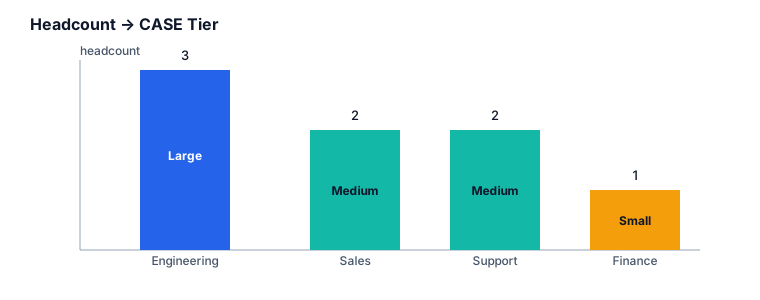
    E -->|"> 2"| F[Large]
    E -->|"= 2"| G[Medium]
    E -->|else| H[Small]
Production Applications
- Headcount-tier dashboards for finance/HR planning
- The identical pattern classifies order volume per store, ticket volume per support queue, or transaction count per merchant
Best Practices
- Extract repeated aggregate expressions into a CTE first so
CASEreads cleanly, especially once you have 4+ tiers:
WITH dept_counts AS (
    SELECT d.dept_name, COUNT(DISTINCT e.emp_id) AS headcount
    FROM departments d
    JOIN employees e ON d.dept_id = e.dept_id
    GROUP BY d.dept_name
)
SELECT dept_name,
       CASE
           WHEN headcount > 2 THEN 'Large'
           WHEN headcount = 2 THEN 'Medium'
           ELSE 'Small'
       END AS department_status
FROM dept_counts;
Common Mistakes
| Mistake | Consequence |
|---|---|
Referencing an aggregate alias inside the same SELECT’s CASE (CASE WHEN headcount > 2 ... where headcount was just aliased in the same list) |
Most dialects reject this — aliases aren’t visible to sibling expressions in the same SELECT. Use a subquery/CTE instead. |
| Departments with zero employees | An INNER JOIN silently drops them from the report entirely — use LEFT JOIN if empty departments should still show as “Small” |
Boundary confusion (>= 2 vs > 2) |
Off-by-one tier assignment — always write down the exact boundary rule before coding it |
Dialect Differences
All major dialects support CASE over aggregates identically. BigQuery
and Snowflake additionally support QUALIFY for post-aggregate
filtering, which can sometimes replace a HAVING + CASE combo.
Interview Questions
- Can a
CASEexpression inSELECTreference an aggregate that was aliased earlier in the sameSELECTlist? - What’s the difference between using
HAVINGand usingCASEto express a threshold? - Why would
INNER JOINsilently under-report department counts here?
Answers
1. No — sibling `SELECT`-list aliases aren't visible to each other in standard SQL; use a CTE or subquery. 2. `HAVING` removes grouped rows from the result; `CASE` keeps every row and labels it. 3. Departments with no matching employee rows are excluded entirely by an inner join, so they never appear to be labeled at all — not even as "Small."Summary
Aggregating before classifying is a two-step mental model: first
compute the number, then label the number. Keeping those steps
separate (via a CTE) is what keeps multi-tier CASE logic readable.
Cross References
- Previous:
01_Basic_CASE_WHEN.md - Next:
03_City_Analysis.md 03_Aggregations·06_CTEs