SQL-Engineering-Handbook
01 · Basic CASE WHEN
Difficulty: Beginner · Estimated time: 15 min Schema:
00_Sample_Schema.sql
Introduction
CASE WHEN is SQL’s conditional expression. It lets a query return a
different value depending on data, without leaving SQL for
application code. Every dashboard filter, every “status” column you’ve
ever seen in a BI tool, and most feature-engineering pipelines lean on
this one expression.
Learning Objectives
By the end of this lesson you will be able to:
- Write both the simple and searched forms of
CASE - Explain the difference between them and when to use each
- Predict what happens when no
WHENmatches andELSEis omitted - Use
CASEinside a plainSELECTto derive a business-readable column
Business Context
Raw data is rarely how business users think. A manager_id column is
a database implementation detail; “Has Manager” / “No Manager” is a
sentence a stakeholder can act on. Translating raw values into
business language, directly in the query, is the single most common
reason CASE exists in production SQL.
Syntax
Searched CASE — evaluates arbitrary boolean conditions:
CASE
    WHEN condition1 THEN result1
    WHEN condition2 THEN result2
    ELSE result_default
END
Simple CASE — compares one expression against a list of exact
values (shorter, but less flexible — no ranges, no IS NULL, no
compound conditions):
CASE column_name
    WHEN value1 THEN result1
    WHEN value2 THEN result2
    ELSE result_default
END
Syntax Breakdown
| Clause | Required? | Notes |
|---|---|---|
CASE |
Yes | Opens the expression |
WHEN ... THEN ... |
At least one | Evaluated top to bottom |
ELSE |
No, but strongly recommended | If omitted and nothing matches, the result is NULL |
END |
Yes | Closes the expression |
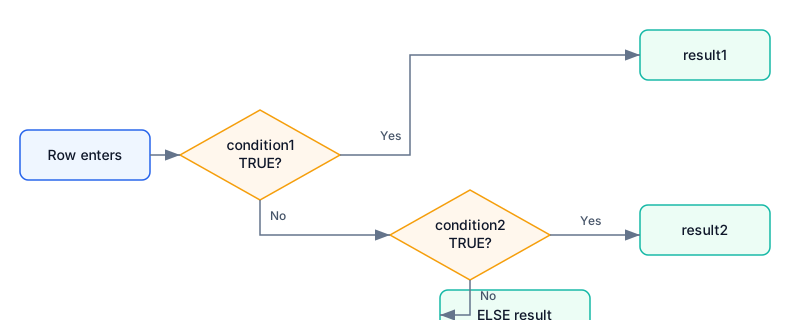
Visual Explanation
                 ┌────────────────────────┐
 row enters ───► │ WHEN condition1 TRUE?  │──Yes──► result1
                 └───────────┬────────────┘
                              │ No
                 ┌───────────▼────────────┐
                 │ WHEN condition2 TRUE?  │──Yes──► result2
                 └───────────┬────────────┘
                              │ No
                              ▼
                        ELSE result_default
flowchart TD
    A[Row enters CASE] --> B{condition1?}
    B -- true --> R1[Return result1]
    B -- false --> C{condition2?}
    C -- true --> R2[Return result2]
    C -- false --> D[Return ELSE value]
Engineering Notes
- CASE is an expression, not a statement. It returns a single
value and can be used anywhere a column, literal, or expression is
valid:
SELECT,WHERE,ORDER BY,GROUP BY,HAVING, inside aggregates, insideJOIN ... ON, and insideUPDATE ... SET. - Evaluation is short-circuiting and ordered. SQL checks
WHENclauses top to bottom and stops at the firstTRUE. Order your conditions from most specific to least specific — a common bug is writing a broad condition first that silently “steals” rows meant for a later, more specific branch. - All result expressions must share a compatible type. Mixing
'High'(text) with1(integer) across branches will either raise a type error or force an implicit cast, depending on dialect.
Production Applications
- Deriving
manager_status,is_active,account_tierstyle flag columns consumed directly by BI tools (Looker, Tableau, Power BI) without any transformation layer in between. - The exact pattern used in dbt staging models to normalize raw source values into clean, documented categories.
SQL
See 01_Basic_CASE_WHEN.sql for the runnable example against the shared schema.
Best Practices
- Always include
ELSE, even if it just re-states'Unknown'— an unhandledNULLin a downstreamGROUP BYor dashboard filter is a common source of “missing” rows that are actually silently bucketed asNULL. - Alias the
CASEexpression (AS manager_status) — an un-aliasedCASErenders ascaseor?column?depending on dialect, which is unreadable in any client tool.
Common Mistakes
| Mistake | Consequence |
|---|---|
Omitting ELSE |
Unmatched rows return NULL, not an error — easy to miss in QA |
Comparing NULL with = inside a searched CASE |
x = NULL is never TRUE in standard SQL; use x IS NULL |
Assuming WHEN order doesn’t matter |
It does — first match wins, always |
Edge Cases
WHEN manager_id = NULL THEN ...never matches, even for rows wheremanager_idactually isNULL, becauseNULL = NULLevaluates toNULL(unknown), notTRUE. UseIS NULLinstead.- An empty string
''is notNULLin most dialects — a condition written for one will not catch the other.
Dialect Differences
| Dialect | Notes |
|---|---|
| PostgreSQL / SQL Server / Oracle / MySQL | CASE ... WHEN ... END syntax is identical (ANSI SQL) |
| SQL Server | Also offers IIF(condition, true_val, false_val) as shorthand for a two-branch CASE |
| BigQuery | Identical CASE syntax; also supports IF(condition, true_val, false_val) |
| Oracle | Also offers DECODE(expr, val1, res1, val2, res2, default) — older, value-equality only, no ranges |
Performance Notes
CASE itself adds negligible overhead — it’s evaluated per row in
memory. Performance problems arise when a CASE expression wraps an
indexed column inside a WHERE clause, since that usually prevents
index usage. Keep CASE in the SELECT list for derived columns; keep
raw column comparisons in WHERE where possible.
Interview Questions
- What’s the difference between simple and searched
CASE? - What does
CASEreturn when noWHENmatches and there’s noELSE? - Does
CASEevaluate all branches or stop at the first match? - Why does
WHEN x = NULLnever match?
Answers
1. Simple CASE compares one expression against exact values only; searched CASE evaluates arbitrary boolean conditions (ranges, `IS NULL`, `AND`/`OR`). 2. `NULL`. 3. It stops at the first `TRUE` condition (short-circuit, top to bottom). 4. Because `NULL` represents "unknown," and any equality comparison against an unknown value is itself unknown (`NULL`), never `TRUE`. Use `IS NULL`.Summary
CASE WHEN is SQL’s inline conditional expression — evaluated top to
bottom, first match wins, always include ELSE. It’s the foundation
every later lesson in this module builds on.
Further Reading / Cross References
- Next:
02_Department_Categorization.md— CASE combined withGROUP BYand aggregates 03_Aggregations07_Window_Functions— CASE inside window functions, covered in06_Advanced_CASE_Patterns.md