SQL-Engineering-Handbook
SELECT
Definition
The SELECT statement retrieves data from one or more columns in a table. It is the starting point of virtually every SQL query — before you can filter, sort, or aggregate anything, you first have to tell SQL which columns you want to see.
Syntax
SELECT column_name
FROM table_name;
Multiple columns:
SELECT column_one, column_two
FROM table_name;
All columns:
SELECT *
FROM table_name;
Visual Explanation
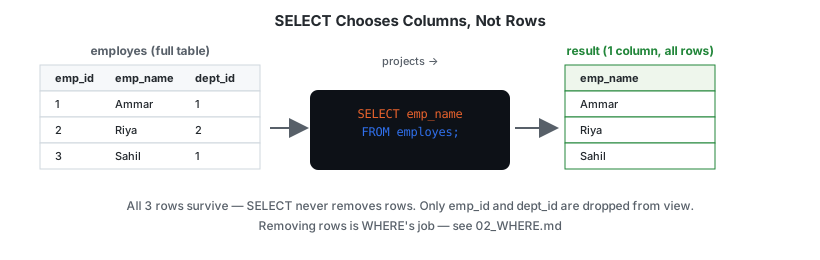
SELECT is a projection — it decides which columns survive into the output. It doesn’t touch which rows appear; that’s WHERE’s job (see 02_WHERE.md). This distinction — projection vs. selection — is easy to blur because SQL’s SELECT keyword actually performs projection, not “selection” in the relational-algebra sense.
flowchart LR
    A[FROM: table loaded] --> B[WHERE: rows filtered]
    B --> C[SELECT: columns projected]
    C --> D[ORDER BY / LIMIT]
    style C fill:#e8622c,color:#ffffff
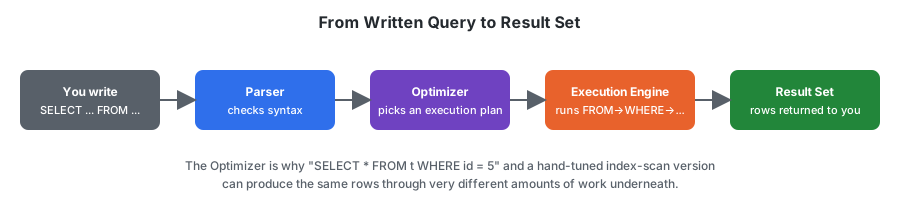
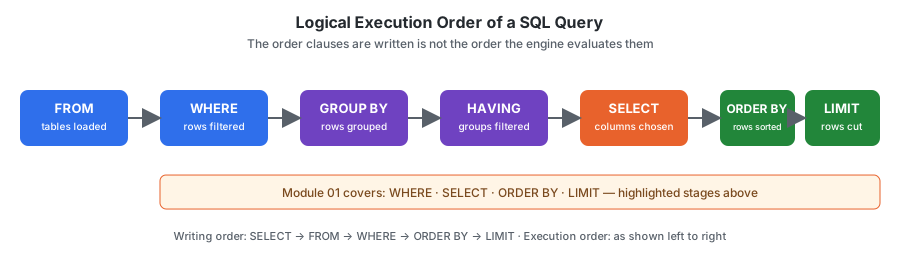
SELECT sits in the middle of logical execution order, not first — see Execution Order below and the full diagram in assets/diagrams/execution-order-flow.svg.
Dialect Differences
SELECT itself is identical across every major engine. What differs is how each engine treats unquoted identifiers (table/column names):
| Engine | Unquoted identifier case handling |
|---|---|
| MySQL | Preserves case as written; case-sensitivity of matching depends on the OS filesystem for table names |
| PostgreSQL | Folds unquoted identifiers to lowercase |
| SQL Server | Preserves case as written; matching is case-insensitive by default collation |
| Oracle | Folds unquoted identifiers to UPPERCASE |
This is why SELECT EMP_NAME FROM EMPLOYES; and select emp_name from employes; can both work in one engine and behave differently in another. Quoting an identifier ("emp_name", `emp_name`) preserves exact case everywhere — see 05_ALIAS.md for quoting syntax per engine.
Schema Used
employes
| Column | Description |
|---|---|
| emp_id | Employee ID |
| emp_name | Employee Name |
| dept_id | Department ID |
| manager_id | Reporting Manager |
Sample Data
| emp_id | emp_name | dept_id | manager_id |
|---|---|---|---|
| 1 | Ammar | 1 | 3 |
| 2 | Riya | 2 | 3 |
| 3 | Sahil | 1 | NULL |
| 4 | Priya | 3 | 2 |
| 5 | Arjun | 2 | 1 |
Examples
Example 1: Retrieve a single column
SELECT emp_name
FROM employes;
Output
| emp_name |
|---|
| Ammar |
| Riya |
| Sahil |
| Priya |
| Arjun |
Example 2: Retrieve multiple columns
SELECT emp_name, dept_id
FROM employes;
Example 3: Retrieve every column
SELECT *
FROM employes;
SELECT * is convenient for ad-hoc exploration, but it is discouraged in production code — see Common Mistakes.
Business Use Cases
- View employee names for a directory or org chart
- Retrieve customer information for a CRM export
- Pull a subset of order columns to power a dashboard widget
- Generate lightweight reports without exposing every column in a table
Execution Order
SELECT is written first, but it is not the first thing SQL evaluates. The logical execution order of a query is:
- FROM
- WHERE
- GROUP BY
- HAVING
- SELECT
- ORDER BY
- LIMIT
This matters because column aliases created in SELECT are not yet available to WHERE (see 05_ALIAS.md) — the engine hasn’t reached SELECT yet when it evaluates WHERE.
Common Mistakes
Mistake 1: Missing FROM clause
❌ Wrong
SELECT emp_name;
✅ Correct
SELECT emp_name
FROM employes;
Mistake 2: Using SELECT * in production code
SELECT * returns every column, including ones you don’t need. This increases network I/O, breaks if the table schema changes, and makes queries harder to reason about in code review.
❌ Avoid in production
SELECT *
FROM employes;
✅ Prefer
SELECT emp_id, emp_name
FROM employes;
SELECT * is acceptable for quick, one-off exploration of a table you don’t know yet.
Edge Cases
- Querying a table with zero rows —
SELECT * FROM employes;on an empty table returns a valid, empty result set (0 rows), not an error. Contrast with querying a table that doesn’t exist at all, which is an error (relation "x" does not exist/Table 'x' doesn't existdepending on engine). - Duplicate column names in output —
SELECT emp_name, emp_name FROM employes;is valid; the same column appears twice in the output, which is rarely useful but not blocked by the parser. This is one reasonSELECT *combined with aJOINon tables sharing a column name (e.g. both tables having anid) produces ambiguous, easy-to-misread output — see05_ALIAS.md.
Interview Tip
SELECT determines which columns appear in the final output — but it executes logically after FROM, WHERE, GROUP BY, and HAVING. Interviewers frequently test this by asking why you can’t reference a SELECT alias inside a WHERE clause in the same query. The answer: because WHERE runs before SELECT is evaluated.
Practice Questions
Easy
- Retrieve the name of every employee.
- Retrieve the employee ID and department ID for every employee.
- Retrieve every column for every employee.
Intermediate
- Retrieve employee name and manager ID, ordered logically for a report (you’ll need
ORDER BY— see03_ORDER_BY.md). - Explain, in your own words, why
SELECT *is discouraged in application code.
Advanced
- Without running it, predict the output column order for
SELECT dept_id, emp_name FROM employes;and explain why column order in the output always matches the order listed inSELECT.
Related Topics
- WHERE
- ORDER BY
- LIMIT
- ALIAS
Further Reading
GLOSSARY.md— definitions of “projection,” “logical execution order,” and other terms used aboveFAQ.md— recurring questions, includingSELECT *and case sensitivityINTERVIEW_PREP.md— consolidated interview question bank for this module