SQL-Engineering-Handbook
WHERE Clause
Definition
The WHERE clause is used to filter rows based on a specified condition.
It helps retrieve only the records that satisfy a given requirement before any grouping or aggregation occurs.
Syntax
SELECT column_name
FROM table_name
WHERE condition;
Visual Explanation
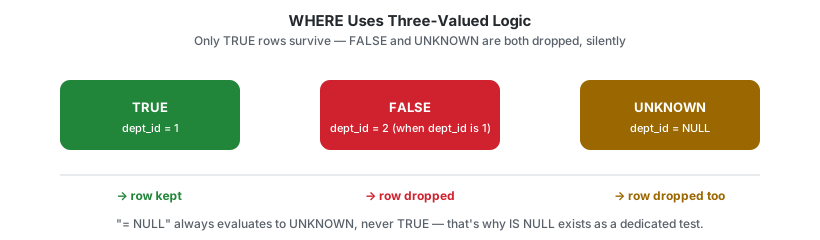
WHERE filters rows using a predicate — a condition that resolves to TRUE, FALSE, or UNKNOWN for each row. Only rows where the predicate is TRUE survive. NULL comparisons resolve to UNKNOWN, not FALSE, which is why = NULL silently matches nothing — see Common Mistakes below.
flowchart LR
    A[FROM: all rows loaded] --> B{WHERE: predicate per row}
    B -->|TRUE| C[row kept]
    B -->|FALSE or UNKNOWN| D[row dropped]
    style B fill:#2f6feb,color:#ffffff
Dialect Differences
Standard comparisons (=, <>, IS NULL, IS NOT NULL, AND/OR) behave identically across MySQL, PostgreSQL, SQL Server, and Oracle. Where engines diverge is null-safe equality — comparing two columns that might both be NULL and treating NULL = NULL as a match:
| Engine | Null-safe equality operator |
|---|---|
| MySQL | <=> (e.g. a <=> b) |
| PostgreSQL | IS NOT DISTINCT FROM (e.g. a IS NOT DISTINCT FROM b) |
| SQL Server | No dedicated operator — requires (a = b OR (a IS NULL AND b IS NULL)) |
| Oracle | DECODE(a, b, 1, 0) = 1 or the same OR-based pattern as SQL Server |
IS NOT DISTINCT FROM (PostgreSQL) is the closest to an ANSI-standard pattern, though not universally implemented.
Schema Used
employes
| Column | Description |
|---|---|
| emp_id | Employee ID |
| emp_name | Employee Name |
| dept_id | Department ID |
| manager_id | Reporting Manager |
Sample Data
| emp_id | emp_name | dept_id | manager_id |
|---|---|---|---|
| 1 | Ammar | 1 | 3 |
| 2 | Riya | 2 | 3 |
| 3 | Sahil | 1 | NULL |
| 4 | Priya | 3 | 2 |
| 5 | Arjun | 2 | 1 |
Examples
Example 1: Find employees from Data Analytics department
SELECT *
FROM employes
WHERE dept_id = 1;
Output
| emp_name |
|---|
| Ammar |
| Sahil |
Example 2: Find employees who have a manager
SELECT *
FROM employes
WHERE manager_id IS NOT NULL;
Example 3: Find top-level managers
SELECT *
FROM employes
WHERE manager_id IS NULL;
Output
| emp_name |
|---|
| Sahil |
Business Use Cases
- Find employees from a specific department
- Retrieve customers from a specific city
- Find completed orders
- Filter products above a specific price
- Generate department-specific reports
Execution Order
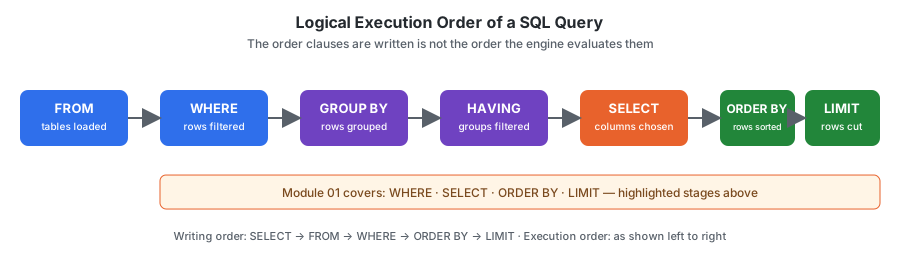
SQL processes queries in the following order:
- FROM
- WHERE
- GROUP BY
- HAVING
- SELECT
- ORDER BY
- LIMIT
Because WHERE runs before GROUP BY, it filters rows before aggregation occurs.
Common Mistakes
Wrong
SELECT *
FROM employes
WHERE manager_id = NULL;
= NULL never matches anything, even rows where manager_id genuinely is NULL — NULL is not a value you can compare with =, it represents the absence of a value.
Correct
SELECT *
FROM employes
WHERE manager_id IS NULL;
Wrong
SELECT dept_id, COUNT(*)
FROM employes
WHERE COUNT(*) > 1
GROUP BY dept_id;
WHERE cannot use aggregate functions because it executes before GROUP BY produces any groups to aggregate.
Correct
SELECT dept_id, COUNT(*)
FROM employes
GROUP BY dept_id
HAVING COUNT(*) > 1;
Edge Cases
NOT INwith aNULLin the list —WHERE dept_id NOT IN (1, NULL)returns zero rows, even for departments that are clearly not1. Once any value in aNOT INlist isNULL, the whole predicate evaluates toUNKNOWNfor every row. PreferNOT EXISTS(covered in the subqueries module) whenever the list comes from a subquery that might containNULL.- String comparisons and collation —
WHERE emp_name = 'ammar'may or may not match'Ammar'depending on the column’s collation setting, which is a database configuration choice, not a SQL-language rule. Don’t assume case sensitivity behavior transfers between environments.
Interview Tip
A very common SQL interview question:
WHERE vs HAVING
| WHERE | HAVING |
|---|---|
| Filters rows | Filters groups |
| Executes before GROUP BY | Executes after GROUP BY |
| Cannot use aggregate functions | Can use aggregate functions |
Remember:
WHERE → Rows
HAVING → Groups
Practice Questions
Easy
- Find employees from department 2.
- Find employees with a manager.
- Find employees without a manager.
Intermediate
- Find employees whose manager is Sahil. (Hint: first find Sahil’s
emp_id, then filtermanager_idagainst it — this can be done with a subquery.) - Find employees not working in department 1.
Advanced — Challenge (requires JOIN, covered in 04_Joins)
- Find employees working in departments located in Nagpur.
- Find employees whose department belongs to India.
Questions 6 and 7 need the
departmentstable (see README.md → Datasets) joined toemployes, which this module doesn’t cover yet. Attempt them after completing the joins module, then come back and revisit — it’s a useful way to confirm the concept actually stuck.
Related Topics
- SELECT
- GROUP BY
- HAVING
- INNER JOIN
- Subqueries
Further Reading
GLOSSARY.md— definitions of “predicate” and other terms used aboveFAQ.md— recurring questionsINTERVIEW_PREP.md— see “= NULLvsIS NULL” and “WHEREvsHAVING”