SQL-Engineering-Handbook
ORDER BY
Definition
The ORDER BY clause is used to sort query results in ascending (ASC) or descending (DESC) order.
By default, SQL sorts data in ascending order.
Why Use ORDER BY?
Without ORDER BY, SQL does not guarantee the order of returned rows.
Sorting is important for:
- Reports
- Dashboards
- Ranking employees
- Revenue analysis
- Top-N analysis
Syntax
SELECT column_name
FROM table_name
ORDER BY column_name;
Ascending Order:
SELECT *
FROM employes
ORDER BY emp_name ASC;
Descending Order:
SELECT *
FROM employes
ORDER BY emp_name DESC;
Schema Used
employes
| Column | Description |
|---|---|
| emp_id | Employee ID |
| emp_name | Employee Name |
| dept_id | Department ID |
| manager_id | Manager ID |
Visual Explanation
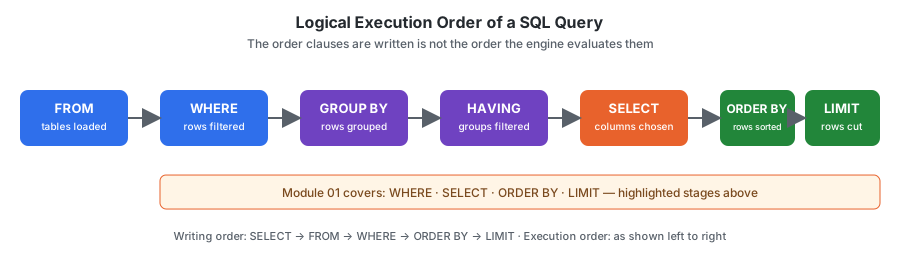
ORDER BY runs near the end of logical execution order — after SELECT has already chosen the output columns, and right before LIMIT cuts the result down.
flowchart LR
    A[SELECT: columns projected] --> B[ORDER BY: rows sorted]
    B --> C[LIMIT: rows cut]
    style B fill:#22863a,color:#ffffff
Dialect Differences
Where do NULLs sort?
This is the single most portability-breaking behavior in ORDER BY, and this module’s own dataset has NULL values in manager_id — sorting by manager_id will actually surface this difference, not just describe it hypothetically.
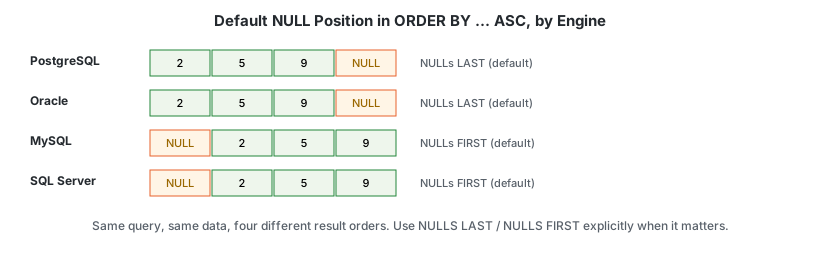
| Engine | Default position of NULL in ASC order |
|---|---|
| PostgreSQL | Last |
| Oracle | Last |
| MySQL | First |
| SQL Server | First |
Make it explicit instead of relying on the default:
-- PostgreSQL / Oracle — supported directly
SELECT *
FROM employes
ORDER BY manager_id ASC NULLS LAST;

-- MySQL / SQL Server — no NULLS LAST keyword; force it with a CASE
SELECT *
FROM employes
ORDER BY (manager_id IS NULL), manager_id ASC;
Sample Data
| emp_id | emp_name | dept_id |
|---|---|---|
| 1 | Ammar | 1 |
| 2 | Riya | 2 |
| 3 | Sahil | 1 |
| 4 | Priya | 3 |
| 5 | Arjun | 2 |
Example 1: Sort Employees Alphabetically
SELECT *
FROM employes
ORDER BY emp_name;
Output
Ammar
Arjun
Priya
Riya
Sahil
Example 2: Sort Employees by ID Descending
SELECT *
FROM employes
ORDER BY emp_id DESC;
Output
5 Arjun
4 Priya
3 Sahil
2 Riya
1 Ammar
Example 3: Sort by Department
SELECT *
FROM employes
ORDER BY dept_id;
Example 4: Multiple Column Sorting
SELECT *
FROM employes
ORDER BY dept_id, emp_name;
SQL first sorts by department and then alphabetically within each department.
Business Use Cases
HR Analytics
Show newest employees first.
ORDER BY joining_date DESC
Sales Dashboard
Show highest revenue first.
ORDER BY revenue DESC
Customer Analytics
Show top spending customers.
ORDER BY total_spent DESC
Management Reporting
Show departments by employee count.
ORDER BY employee_count DESC
Common Mistakes
Mistake 1
Assuming SQL automatically returns sorted data.
❌ Wrong Thinking
SELECT *
FROM employes;
Result order is not guaranteed.
✅ Correct
SELECT *
FROM employes
ORDER BY emp_name;
Mistake 2
Using LIMIT before ORDER BY.
❌ Wrong
SELECT *
FROM employes
LIMIT 3
ORDER BY emp_name;
✅ Correct
SELECT *
FROM employes
ORDER BY emp_name
LIMIT 3;
Edge Cases
- Sorting by a column not in
SELECT—SELECT emp_name FROM employes ORDER BY dept_id;is valid in most engines even thoughdept_idisn’t in the output, becauseORDER BYhas access to the full row, not just the projected columns. Some engines restrict this whenDISTINCTis also used, since deduplication happens before a column not in the output could be used to sort. - Sorting
NULLs — see Dialect Differences above; don’t assume a default without checking your engine if the sort order ofNULLs matters to the result.
Execution Order
SQL executes queries in this order:
- FROM
- WHERE
- GROUP BY
- HAVING
- SELECT
- ORDER BY
- LIMIT
Interview Tip
Difference Between ORDER BY ASC and DESC
ASC = Small → Large
ORDER BY emp_id ASC;
DESC = Large → Small
ORDER BY emp_id DESC;
Practice Questions
Easy
- Sort employees by name.
- Sort employees by department ID.
- Sort employees by employee ID descending.
Intermediate
- Sort employees by department and then employee name.
- Show departments alphabetically.
Advanced
- Show departments with employee counts sorted from highest to lowest.
- Show cities sorted alphabetically.
Related Topics
- SELECT
- WHERE
- LIMIT
- GROUP BY
- HAVING
Further Reading
GLOSSARY.md— “collation” and “deterministic” definitionsFAQ.md— “why does my query return rows in a different order every time?”INTERVIEW_PREP.md— see “DoesORDER BYputNULLs first or last?”