SQL-Engineering-Handbook
04 — Date Formatting
Introduction
A DATE or DATETIME value stored internally by MySQL has no inherent “look” — formatting only happens when that value is displayed to a human or exchanged with an external system as a string. This module covers converting dates to readable strings for reporting, and parsing strings back into proper date types for storage and calculation — a direction that is just as important and far more error-prone.
Concept Overview
Formatting functions serve two opposite purposes that are easy to conflate:
- Output formatting — converting an internal
DATE/DATETIMEvalue into a human-readable or system-required string (DATE_FORMAT()). - Input parsing — converting an external string (from a CSV upload, an API payload, a user form) into a proper
DATE/DATETIMEvalue (STR_TO_DATE(),CAST(),CONVERT()).
Confusing these two directions is one of the most common sources of subtle data-quality bugs in real pipelines.
Why This Exists
Dates are stored internally as a compact binary representation, not as text. Every time a date needs to appear on a dashboard, in an exported report, or in an API response, it must be explicitly formatted into a string — and every time a date arrives as text from an external source, it must be explicitly parsed before it can be compared, sorted, or calculated on correctly.
Business Context
A finance report exported to a business stakeholder needs 07/07/2026, not the raw ISO value 2026-07-07. A data pipeline ingesting a CSV of order dates written as 07-Jul-2026 cannot filter or join on that column as if it were a date until it has been explicitly parsed with STR_TO_DATE(). Skipping either step produces a report that looks wrong to a human, or a pipeline that silently treats dates as unsortable text.
Real Company Examples
- Financial reporting teams format dates as
MM/DD/YYYYfor US stakeholders andDD/MM/YYYYfor EU stakeholders from the same underlying data. - Data engineering teams use
STR_TO_DATE()to parse inconsistent date strings arriving from third-party vendor CSV exports before loading them into a warehouse. - API integration teams use
DATE_FORMAT()to emit ISO-8601 (%Y-%m-%dT%H:%i:%s) timestamps required by downstream REST consumers. - BI tools rely on correctly typed
DATEcolumns (not strings) to enable date-range filters and drill-downs — a column left as text after a bad import breaks these features entirely.
Where It Is Used
- Report exports and dashboard display labels
- Data ingestion / ETL pipelines parsing external date strings
- API request and response payloads
- Cross-system data exchange (CSV, JSON) where date format conventions differ
Functions Covered
| Function | Direction | Purpose |
|---|---|---|
DATE_FORMAT(date, format) |
Date → String | Render a date/datetime as a custom-formatted string |
STR_TO_DATE(string, format) |
String → Date | Parse a string into a DATE/DATETIME using a matching format mask |
CAST(expr AS type) |
Either direction | ANSI-standard type conversion, including string ↔ date |
CONVERT(expr, type) |
Either direction | MySQL-specific type conversion, functionally similar to CAST() |
Syntax Explanation
-- Output formatting (Date → String)
SELECT DATE_FORMAT(hire_date, '%M %d, %Y')  AS display_date   FROM employes;
-- Example result: 'July 07, 2026'

SELECT DATE_FORMAT(hire_date, '%Y-%m-%d')   AS iso_date       FROM employes;
-- Example result: '2026-07-07'

-- Input parsing (String → Date)
SELECT STR_TO_DATE('07-Jul-2026', '%d-%b-%Y') AS parsed_date;
-- Example result: 2026-07-07 (proper DATE type)

-- Type conversion
SELECT CAST('2026-07-07' AS DATE);
SELECT CONVERT('2026-07-07', DATE);
Common DATE_FORMAT() / STR_TO_DATE() Specifiers
| Specifier | Meaning | Example |
|---|---|---|
%Y |
4-digit year | 2026 |
%y |
2-digit year | 26 |
%m |
Month, zero-padded (01–12) | 07 |
%M |
Full month name | July |
%d |
Day of month, zero-padded | 07 |
%H |
Hour, 24-hour, zero-padded | 14 |
%i |
Minutes, zero-padded | 32 |
%s |
Seconds, zero-padded | 07 |
%W |
Full weekday name | Tuesday |
Visual Explanation
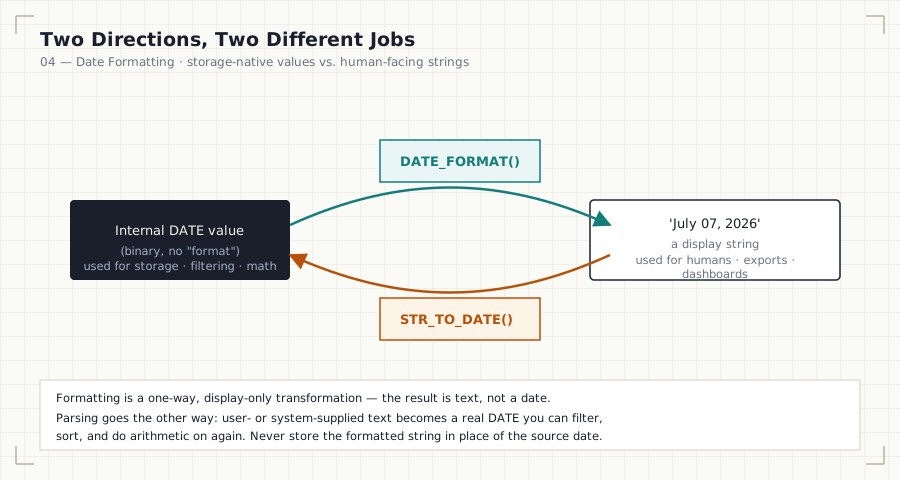
   Internal DATE value
   (binary, no "format")
          │
          │  DATE_FORMAT(date, mask)
          ▼
   'July 07, 2026'   ◄── for humans / exports / dashboards


   'July 07, 2026'
          │
          │  STR_TO_DATE(string, mask)
          ▼
   Internal DATE value   ◄── for storage / filtering / calculation
Step-by-Step Walkthrough
- Determine the direction of the conversion: are you presenting an existing date to a human (formatting), or turning incoming text into a usable date (parsing)?
- For formatting, choose
DATE_FORMAT()and build the exact mask the destination requires. - For parsing, choose
STR_TO_DATE()and supply a mask that exactly matches the incoming string’s layout — a mismatched mask either fails outright or, worse, silently parses incorrectly. - After parsing, store the result in a proper
DATE/DATETIMEcolumn — never leave parsed dates as text, or every future query on that column will be forced to re-parse it.
Production Considerations
- Never store dates as formatted strings. A column holding
'07/07/2026'as text cannot be sorted, range-filtered, or joined against a real date column without repeated, expensive parsing. Parse once at ingestion; store asDATE/DATETIME. - Validate incoming date strings before parsing in an ETL pipeline — inconsistent vendor formats (
MM/DD/YYYYvs.DD/MM/YYYYvs.DD-Mon-YYYY) are one of the most common sources of silent data corruption when a singleSTR_TO_DATE()mask is applied to a file containing more than one format. - Match the destination system’s expected format exactly when formatting for export — an off-by-one-character mask (
%yvs.%Y) produces a plausible-looking but wrong year.
Performance Notes
- Formatting a date for display in
SELECThas negligible cost. - Never format a column and then filter on the formatted string (
WHERE DATE_FORMAT(order_date, '%Y-%m') = '2024-07') — this disables index usage. Filter on the raw date range instead, and reserve formatting for the final display layer. STR_TO_DATE()applied to every row of a large import is a normal and necessary cost during ingestion — it should happen once, at load time, not repeatedly at query time.
Edge Cases
- Ambiguous formats:
'03/04/2026'is March 4th in the US convention and April 3rd in most of the rest of the world — the format mask must be verified against the actual source, not assumed. STR_TO_DATE()returningNULLsilently: a string that does not match the supplied format mask returnsNULLrather than raising a visible error by default — always validate row counts after a bulk parse to catch silently dropped values.- Two-digit years (
%y): MySQL’s interpretation of two-digit years (which century they map to) is a common source of off-by-a-century bugs; prefer four-digit years (%Y) whenever the source system provides them.
Common Mistakes
- Storing dates as pre-formatted text instead of a native
DATE/DATETIMEtype. - Filtering on a formatted string instead of the raw date column, silently disabling indexes.
- Using a
STR_TO_DATE()mask that doesn’t exactly match the source string’s layout, producing silentNULLs. - Assuming a single date format across an entire imported file when multiple vendors or regions contributed rows in different formats.
Interview Questions
-
“Why is it a bad idea to store a
hire_datecolumn as a formatted string like'07/07/2026'?” It prevents correct sorting, range filtering, and date arithmetic without repeated parsing; the column should be a nativeDATEtype, formatted only at display time. -
“You’re importing a CSV where the date column is
'07-Jul-2026'. How do you convert this into a usable date?”STR_TO_DATE('07-Jul-2026', '%d-%b-%Y'), verifying the mask matches the actual source format before applying it to the full dataset. -
“What happens if
STR_TO_DATE()receives a string that doesn’t match its format mask?” It returnsNULLrather than raising a visible error — a dangerous silent failure mode that must be checked for after any bulk import.
Summary
Formatting and parsing are inverse operations serving different audiences: DATE_FORMAT() prepares an internal date for human or external consumption; STR_TO_DATE()/CAST()/CONVERT() turn external text into a usable internal date. The core discipline is directional clarity — format only at the display boundary, parse only at the ingestion boundary, and never let a date live as text in between.
Practice Challenges
- Write a query that displays each employee’s hire date as
"07 July 2026"(day, full month name, year). - Write a query that parses the string
'2026-Jul-07 14:30:00'into a properDATETIMEvalue usingSTR_TO_DATE(). - Explain, using a concrete example, why filtering with
WHERE DATE_FORMAT(hire_date, '%Y') = '2024'is worse than a sargable range filter, even though both return the same rows.
Further Reading
- MySQL 8.0 Reference Manual — DATE_FORMAT()
- MySQL 8.0 Reference Manual — STR_TO_DATE()
- PostgreSQL Documentation — Data Type Formatting Functions
- Microsoft Learn — CAST and CONVERT (Transact-SQL)
Previous: ← 03 — Date Calculations Next: 05 — Business Date Analytics →