SQL-Engineering-Handbook
05 — Business Date Analytics
Introduction
This is the synthesis module. Everything you’ve built so far — retrieving “now” safely, extracting periods, calculating durations, and formatting for presentation — comes together here into the composite patterns that power real business dashboards: rolling windows, MTD/QTD/YTD reporting, fiscal calendars, tenure and SLA analytics, and the foundations of cohort analysis.
Concept Overview
Business date analytics is not a new set of functions — it’s a set of patterns built from the functions you already know, applied to the recurring questions every company asks: How are we trending? Who’s overdue? How long has this been going on?
Why This Exists
No stakeholder asks for DATEDIFF() output directly — they ask “how’s this quarter tracking against last quarter?” or “which customers are at risk of churn based on inactivity?” This module is where individual date functions become business answers.
Business Context
A single well-built “trailing 30 days” query becomes the foundation of an entire team’s daily operating rhythm — refreshed automatically every morning, always correct, never requiring manual date updates. The patterns in this file are the ones repeated, with minor variation, across nearly every analytics team in every industry.
Real Company Examples
- Retail dashboards showing MTD, QTD, and YTD revenue against the same period last year.
- SaaS churn dashboards showing subscriptions expiring in the next 30 days.
- Operations SLA boards showing shipments currently breaching or approaching a delivery deadline.
- Finance teams operating on a non-calendar fiscal year (e.g., starting in April), requiring custom fiscal-quarter logic layered on top of standard date functions.
- Product analytics teams building the first slice of a cohort retention grid — bucketing users by signup month, a direct precursor to the full cohort analysis techniques covered in a later module.
Where It Is Used
- Executive dashboards (MTD/QTD/YTD panels)
- Rolling trend charts (trailing 7/30/90-day metrics)
- HR systems (tenure, promotion eligibility, attrition timing)
- Operations (SLA compliance, delivery delay monitoring)
- Finance (fiscal period reporting, invoice aging)
- Product analytics (cohort bucketing foundations)
Functions Covered
This module composes functions from every prior file in the module:
CURRENT_DATE, DATE_ADD/DATE_SUB, DATEDIFF, TIMESTAMPDIFF, YEAR/MONTH/QUARTER, DATE_FORMAT, alongside CASE, JOIN, and CTEs from earlier modules in the handbook.
Syntax Explanation — Core Business Date Patterns
Trailing N-day window:
WHERE order_date >= CURRENT_DATE - INTERVAL 30 DAY
  AND order_date <  CURRENT_DATE + INTERVAL 1 DAY
Month-to-date (MTD):
WHERE order_date >= DATE_FORMAT(CURRENT_DATE, '%Y-%m-01')
  AND order_date <  CURRENT_DATE + INTERVAL 1 DAY
Year-to-date (YTD):
WHERE order_date >= DATE_FORMAT(CURRENT_DATE, '%Y-01-01')
  AND order_date <  CURRENT_DATE + INTERVAL 1 DAY
Quarter-to-date (QTD) requires computing the current quarter’s start month explicitly (shown in the walkthrough and SQL file).
Visual Explanation
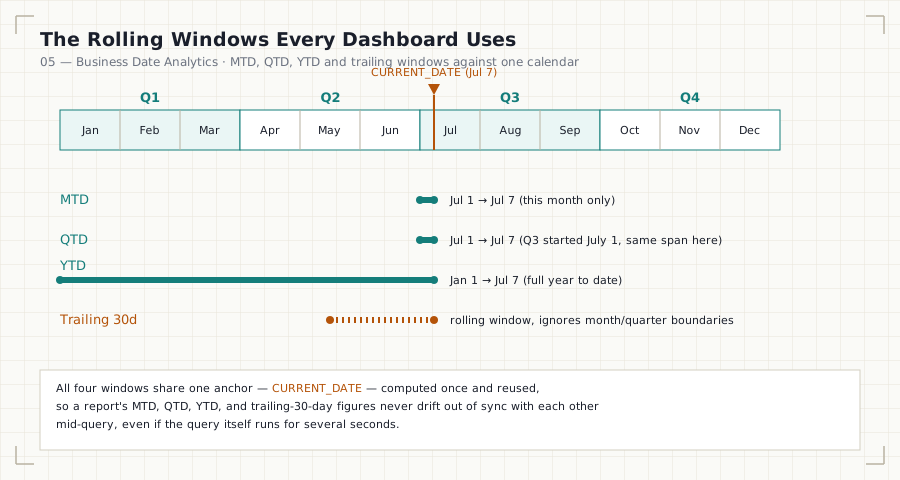
Jan  Feb  Mar  Apr  May  Jun  Jul  Aug  Sep  Oct  Nov  Dec
 └────Q1────┘  └────Q2────┘  └────Q3────┘  └────Q4────┘
                                    ▲
                              CURRENT_DATE (e.g., July 7)

MTD  : Jul 1  ─────────────────────► Jul 7
QTD  : Jul 1  ─────────────────────► Jul 7   (Q3 started July 1)
YTD  : Jan 1  ─────────────────────────────────────────────► Jul 7

Trailing 30 days:  ◄──────────── 30 days ────────────► Jul 7
Step-by-Step Walkthrough
- Identify the window type: rolling (trailing N days) or periodic (MTD/QTD/YTD, anchored to a calendar boundary).
- Compute the boundary once, typically in a CTE, so every downstream reference to “the window” is guaranteed consistent within the same query execution.
- Use half-open ranges (
>= start AND < end) for every boundary — this handles time-of-day correctly onDATETIMEcolumns and avoids off-by-one-day errors. - For fiscal periods, do not assume the fiscal year starts in January — compute the fiscal quarter explicitly relative to the company’s actual fiscal year start month.
- For tenure/SLA/duration metrics, reuse the
TIMESTAMPDIFF()discipline from Module 03 — pick the unit that matches the business question exactly.
Production Considerations
- Compute “today,” “start of month,” “start of quarter,” and “start of year” once, in a single CTE, at the top of any report with multiple date-window calculations — this guarantees internal consistency even if the query takes measurable time to execute.
- For fiscal-year companies, store the fiscal year start month as a configuration value, not a hard-coded constant scattered across multiple queries — a single source of truth prevents fiscal-quarter drift between reports.
- Rolling-window and periodic reports that run daily should be built as views or scheduled materializations when the underlying table is large, rather than recomputing full-table scans on every dashboard refresh.
Performance Notes
- All boundary values in this module should be computed on the “clean” side of a range comparison, never by wrapping the underlying column in a function — this preserves index usage on every one of these patterns.
- For very large fact tables, a date dimension table (one row per calendar day, with precomputed year/month/quarter/fiscal-quarter/is-weekend columns) is the standard production solution — it turns repeated date logic into a simple join instead of repeated function calls per query.
Edge Cases
- QTD/fiscal quarter boundaries computed with calendar-quarter logic (
QUARTER()) are wrong for any company whose fiscal year doesn’t start in January — always confirm the fiscal year start before reusing calendar-quarter logic. - MTD/YTD on the first day of the period — a well-built query returns exactly one day of data on the 1st of the month/year, not zero and not an error; this is a common off-by-one boundary bug to test explicitly.
- Leap years in age/tenure calculations — always prefer
TIMESTAMPDIFF(YEAR, ...)over manual day-count division for age or tenure in years. - Cohort bucketing granularity — bucketing by exact
signup_dateinstead ofDATE_FORMAT(signup_date, '%Y-%m-01')produces one cohort per day instead of one per month, making a cohort retention grid practically unusable.
Common Mistakes
- Recomputing
CURRENT_DATE-derived boundaries multiple times in the same query with slightly different logic, producing internally inconsistent results. - Assuming a calendar quarter equals a fiscal quarter.
- Using
BETWEENfor date ranges instead of half-open comparisons, causing edge-of-range inclusion errors onDATETIMEcolumns. - Bucketing cohorts by exact date instead of truncating to the month (or week), producing an unusable, overly granular retention grid.
- Building SLA/tenure logic ad hoc in every query instead of standardizing the pattern (and its unit choice) across the codebase.
Interview Questions
-
“How would you write a query for month-to-date revenue that is correct on any day of the month, including the 1st?” Filter with
order_date >= DATE_FORMAT(CURRENT_DATE, '%Y-%m-01') AND order_date < CURRENT_DATE + INTERVAL 1 DAY— this is correct even whenCURRENT_DATEitself is the first of the month. -
“A finance team’s fiscal year starts in April. How does this change your quarter calculation?” Calendar-quarter logic (
QUARTER()) cannot be used directly; the fiscal quarter must be computed by first shifting the month relative to the fiscal year start (e.g., April = fiscal month 1) before deriving the quarter. -
“How would you build the foundation of a cohort retention report?” Bucket users by the truncated signup period (e.g., signup month via
DATE_FORMAT(signup_date, '%Y-%m-01')), then join or aggregate subsequent activity against that cohort bucket — never bucket by exact signup date.
Summary
Business date analytics is where the individual functions from Modules 01–04 combine into the patterns that power real dashboards: rolling windows, MTD/QTD/YTD reporting, fiscal calendars, tenure and SLA measurement, and cohort bucketing foundations. The unifying engineering discipline across every pattern in this file is: compute boundaries once, use half-open ranges, respect the business’s actual fiscal calendar, and never let a “quick” ad hoc query replace a consistent, reusable pattern.
Practice Challenges
- Write a single query, using one CTE, that returns MTD, QTD, and YTD order counts as three separate columns, all computed from a consistently defined “today.”
- Given a fiscal year that starts in April, write a
CASEexpression that correctly labels eachorder_datewith its fiscal quarter (Q1–Q4). - Build a query that buckets customers by signup month and counts how many placed at least one order in each of their first three months — the foundational shape of a cohort retention report.
Further Reading
- MySQL 8.0 Reference Manual — Date and Time Functions
- PostgreSQL Documentation — date_trunc
- Microsoft Learn — Working with Fiscal Periods in Power BI / T-SQL
- Kimball Group — The Data Warehouse Toolkit, chapter on Date/Time Dimension design (foundational reading for production date-dimension tables)
Previous: ← 04 — Date Formatting Back to: Module 09 README