SQL-Engineering-Handbook
03 — Date Calculations
Introduction
Extraction tells you what part of a date you’re looking at. Calculation tells you how far apart two dates are, or where a date lands after moving forward or backward in time. This is the module where SQL starts answering questions like “how many days has this employee worked here?” and “what date is 90 days from now?” — the arithmetic backbone of tenure, aging, SLA, and rolling-window reporting.
Concept Overview
Date calculation functions fall into two families:
- Interval arithmetic — moving a date forward or backward by a specified amount (
DATE_ADD,DATE_SUB,ADDDATE,SUBDATE). - Differencing — measuring the gap between two dates or timestamps (
DATEDIFF,TIMESTAMPDIFF).
Both families depend on the INTERVAL keyword, which lets SQL reason in calendar units (days, months, years) rather than a fixed number of days — critical, since months and years don’t have a constant length.
Why This Exists
Business logic is rarely about an absolute date — it’s about a relationship between two dates. “90 days after hire,” “48 hours after order placement,” “the gap between signup and first purchase” are all calculation problems, not extraction problems. Getting this wrong — for example, treating a month as a fixed 30 days — produces subtly incorrect dates that drift further wrong the more they compound.
Business Context
An HR system computing a “1-year anniversary” date must add exactly one calendar year, correctly handling leap years — DATE_ADD(hire_date, INTERVAL 1 YEAR), not hire_date + 365. An SLA monitoring system measuring delivery time in hours, not whole days, must use TIMESTAMPDIFF(HOUR, ...) rather than DATEDIFF(), which truncates to whole calendar days and would hide same-day delays.
Real Company Examples
- E-commerce platforms compute delivery SLA breaches using
TIMESTAMPDIFF(HOUR, order_date, delivered_date)against a 48-hour threshold. - SaaS billing systems compute the next renewal date using
DATE_ADD(subscription_start, INTERVAL 1 MONTH), correctly rolling forward across month-end boundaries. - HR systems compute tenure in days, months, and years using
DATEDIFF()andTIMESTAMPDIFF()for different reporting granularities. - Finance teams compute invoice due dates using
DATE_ADD(invoice_date, INTERVAL 30 DAY)— the “net-30” payment term found in most B2B contracts.
Where It Is Used
- Tenure, age, and duration calculations
- Rolling window boundaries (last 7 / 30 / 90 days)
- Due date and expiration date computation
- SLA compliance measurement
- Cohort and retention window definitions
Functions Covered
| Function | Purpose |
|---|---|
DATE_ADD(date, INTERVAL n unit) |
Add a calendar-aware interval to a date |
DATE_SUB(date, INTERVAL n unit) |
Subtract a calendar-aware interval from a date |
ADDDATE(date, INTERVAL n unit) |
Alias for DATE_ADD() |
SUBDATE(date, INTERVAL n unit) |
Alias for DATE_SUB() |
DATEDIFF(date1, date2) |
Whole calendar days between two dates (date1 − date2) |
TIMESTAMPDIFF(unit, dt1, dt2) |
Difference between two datetimes in a specified unit (hour, day, month, year) |
Syntax Explanation
-- Add / subtract calendar-aware intervals
SELECT DATE_ADD(hire_date, INTERVAL 90 DAY)  AS probation_end   FROM employes;
SELECT DATE_SUB(hire_date, INTERVAL 1 MONTH) AS pre_hire_marker FROM employes;

-- Difference in whole days
SELECT DATEDIFF(CURRENT_DATE, hire_date) AS days_employed FROM employes;

-- Difference in a specific unit (hour/day/month/year)
SELECT TIMESTAMPDIFF(MONTH, hire_date, CURRENT_DATE) AS months_employed FROM employes;
INTERVAL accepts a numeric value and a unit keyword: DAY, WEEK, MONTH, QUARTER, YEAR, HOUR, MINUTE, SECOND. Using INTERVAL instead of raw integer addition (hire_date + 30) ensures MySQL applies calendar-correct arithmetic — a month added to January 31 correctly rolls to the last valid day of February, not an invalid or silently-adjusted date.
Visual Explanation
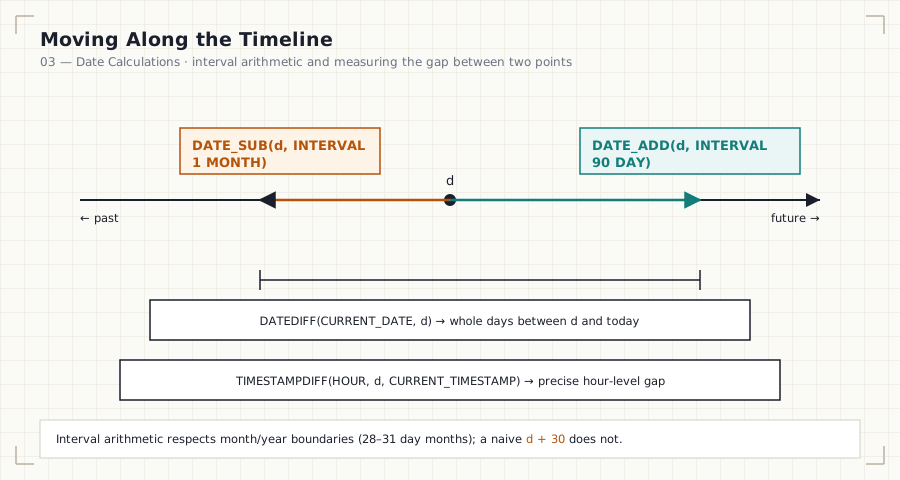
                    DATE_SUB(d, INTERVAL 1 MONTH)     DATE_ADD(d, INTERVAL 90 DAY)
                              │                                    │
                              ▼                                    ▼
   ◄─────────────────────────┼────────────── d ──────────────────┼─────────────────►
                          (past)                               (future)

   DATEDIFF(CURRENT_DATE, d)         →  whole days between d and today
   TIMESTAMPDIFF(HOUR, d, CURRENT_TIMESTAMP)  →  precise hour-level gap
Step-by-Step Walkthrough
- Identify whether the business question is “move a date” (interval arithmetic) or “measure a gap” (differencing).
- For interval arithmetic, choose
DATE_ADDorDATE_SUBand specify the correct calendar unit — never approximate months as 30 days or years as 365 days. - For differencing, decide the required precision. Whole days only? Use
DATEDIFF(). Hours, months, or years? UseTIMESTAMPDIFF()with the appropriate unit. - Watch the argument order —
DATEDIFF(date1, date2)computesdate1 − date2; reversing the arguments silently flips the sign, turning “days employed” into a negative number.
Production Considerations
DATEDIFF()operates on the date portion only — it silently discards time-of-day, which is dangerous for any SLA or duration metric measured onDATETIMEcolumns. UseTIMESTAMPDIFF()when time-of-day precision matters.- Never approximate calendar arithmetic with raw integer day addition.
hire_date + 365is wrong on leap years;DATE_ADD(hire_date, INTERVAL 1 YEAR)is correct in all cases. - When computing “N months from now” near month-end, be aware that MySQL clamps to the last valid day of the target month (e.g., January 31 + 1 month = February 28/29, not an error) — confirm this matches the business rule you intend.
Performance Notes
- Interval arithmetic and differencing functions themselves are cheap. The performance risk is the same as with extraction: wrapping an indexed column in
DATEDIFF()orDATE_ADD()inside aWHEREclause defeats index usage. - Prefer computing a boundary value once (e.g.,
CURRENT_DATE - INTERVAL 30 DAY) and comparing the raw column against that boundary, rather than transforming the column itself.
Edge Cases
- Month-end overflow:
DATE_ADD('2024-01-31', INTERVAL 1 MONTH)returns2024-02-29(a leap year), not an error and not2024-03-02. Confirm this clamping behavior matches your business rule. - Leap years: a naive
+ 365approximation drifts by one full day on every leap year, silently compounding errors in long-running reports. - Negative differences: reversing arguments to
DATEDIFF()orTIMESTAMPDIFF()produces a negative result instead of an error — always sanity-check argument order. - Time-of-day loss in
DATEDIFF(): two timestamps 23 hours apart but crossing a midnight boundary returnDATEDIFF() = 1, which can misrepresent an SLA that is actually still within a same-day window depending on how “days” is defined by the business.
Common Mistakes
- Using
hire_date + 30instead ofDATE_ADD(hire_date, INTERVAL 30 DAY). - Using
DATEDIFF()for hour-level SLA measurement instead ofTIMESTAMPDIFF(HOUR, ...). - Swapping the argument order in
DATEDIFF()/TIMESTAMPDIFF(), producing a negative result. - Assuming every month is 30 days or every year is 365 days when estimating future dates.
- Forgetting that
DATEDIFF()ignores time-of-day entirely.
Interview Questions
-
“How would you calculate an employee’s tenure in exact months, not days?”
TIMESTAMPDIFF(MONTH, hire_date, CURRENT_DATE)— it accounts for calendar month boundaries correctly, unlike dividingDATEDIFF()by 30. -
“What’s the difference between
DATEDIFF()andTIMESTAMPDIFF()?”DATEDIFF()always returns whole calendar days and ignores time-of-day;TIMESTAMPDIFF()lets you specify the unit (hour, day, month, year) and respects full datetime precision. -
“A report shows a negative number of days since signup. What’s the most likely cause?” The arguments to
DATEDIFF()are reversed — the earlier date is being subtracted from, rather than subtracting.
Summary
Date calculations are how SQL reasons about relationships between two points in time — moving a date with DATE_ADD/DATE_SUB, and measuring a gap with DATEDIFF/TIMESTAMPDIFF. The engineering discipline here is: always use calendar-aware INTERVAL arithmetic instead of fixed day-count approximations, choose the differencing function that matches the required precision, and double-check argument order.
Practice Challenges
- Write a query that computes each employee’s probation end date (90 days after hire) and their 1-year anniversary date (1 calendar year after hire) in the same result set.
- Write a query that computes tenure in whole days, whole months, and whole years for every employee, using the correct function for each grain.
- Explain why
DATEDIFF(hire_date, CURRENT_DATE)produces negative tenure values, and correct it.
Further Reading
- MySQL 8.0 Reference Manual — DATE_ADD / DATE_SUB
- MySQL 8.0 Reference Manual — TIMESTAMPDIFF
- PostgreSQL Documentation — Date/Time Operators
- Microsoft Learn — DATEDIFF (Transact-SQL)
Previous: ← 02 — Date Extraction Next: 04 — Date Formatting →