SQL-Engineering-Handbook
02 — Date Extraction
Introduction
Once you can reliably retrieve “now,” the next skill is breaking any date apart into its component pieces — year, month, quarter, week, weekday. Almost every recurring business report is fundamentally a GROUP BY on some extracted date component: revenue by month, headcount by year, orders by weekday. This file covers the extraction functions that make that possible.
Concept Overview
Extraction functions take a DATE or DATETIME value and return one structured piece of it — a year as an integer, a month name as a string, a weekday as either a number or a name. They are the building block of every time-bucketed report.
Why This Exists
Raw dates are too granular for most reporting. A retailer doesn’t want “revenue on 2024-03-17” as a standalone fact — they want “revenue in March 2024” compared against “revenue in February 2024.” Extraction functions convert a precise timestamp into the coarser business period that a report actually needs to group by.
Business Context
A sales dashboard grouping transactions by QUARTER(order_date) produces the quarterly revenue trend line an executive team reviews every board meeting. An HR system grouping hires by MONTHNAME(hire_date) reveals seasonal hiring patterns. A logistics team grouping deliveries by DAYNAME(delivery_date) might discover that Friday deliveries have a disproportionately high failure rate.
Real Company Examples
- Retail analytics teams group orders by
YEAR()andMONTH()to build the monthly revenue trend chart shown in nearly every executive dashboard. - Workforce planning teams use
QUARTER(hire_date)to align hiring cohorts with fiscal quarters. - Operations teams use
DAYNAME(delivery_date)to identify which weekdays have elevated delivery failure rates. - Marketing teams use
WEEK(campaign_date)to align campaign performance with ISO calendar weeks for cross-team reporting consistency.
Where It Is Used
GROUP BYclauses for period-bucketed aggregationWHEREfilters that isolate a specific year, month, or quarter- Feature engineering for time-based segmentation (e.g., “weekend orders” vs. “weekday orders”)
- Seasonality and trend analysis
Functions Covered
| Function | Returns | Example ('2026-07-07') |
|---|---|---|
YEAR(date) |
Four-digit year | 2026 |
MONTH(date) |
Month number (1–12) | 7 |
MONTHNAME(date) |
Full month name | 'July' |
DAY(date) |
Day of month (1–31) | 7 |
DAYNAME(date) |
Full weekday name | 'Tuesday' |
QUARTER(date) |
Quarter number (1–4) | 3 |
WEEK(date) |
Week number of the year | 27 (mode-dependent) |
WEEKDAY(date) |
Weekday index, 0 = Monday … 6 = Sunday |
1 |
DAYOFYEAR(date) |
Day number within the year (1–366) | 188 |
Syntax Explanation
SELECT
    YEAR(order_date)       AS order_year,
    QUARTER(order_date)    AS order_quarter,
    MONTHNAME(order_date)  AS order_month_name,
    DAYNAME(order_date)    AS order_weekday
FROM orders;
Each extraction function accepts a single date/datetime expression and returns a scalar. They can be applied directly to a column, to a computed expression, or to a literal date string.
Visual Explanation
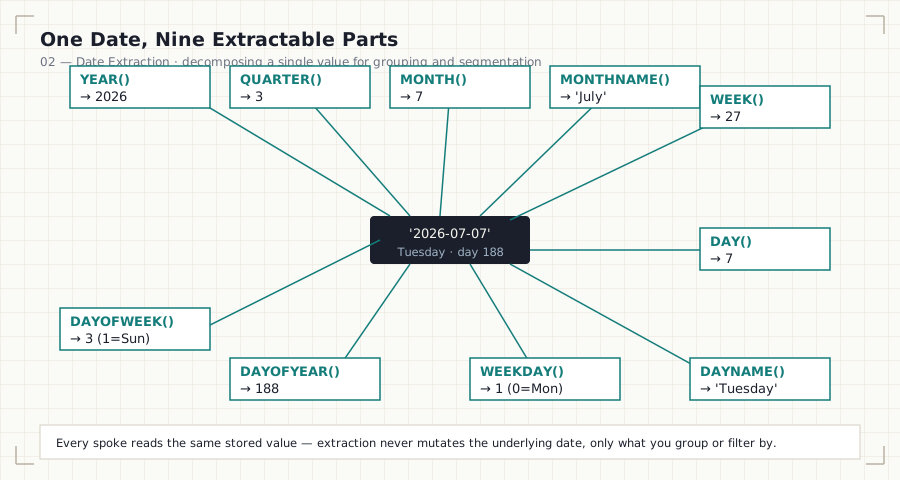
'2026-07-07'  (Tuesday, 188th day of the year)
      │
      ├── YEAR()        → 2026
      ├── QUARTER()     → 3
      ├── MONTH()       → 7
      ├── MONTHNAME()   → 'July'
      ├── WEEK()        → 27
      ├── DAY()         → 7
      ├── DAYNAME()     → 'Tuesday'
      ├── WEEKDAY()     → 1      (0 = Monday)
      └── DAYOFYEAR()   → 188
Step-by-Step Walkthrough
- Start from a raw
DATE/DATETIMEvalue in a column. - Decide what grain the report needs: yearly, quarterly, monthly, weekly, or by weekday.
- Apply the matching extraction function inside
SELECTfor display, and the identical expression insideGROUP BYfor aggregation. - When two extractions are needed together for correct grouping (e.g., “monthly trend across multiple years”), combine
YEAR()andMONTH()— grouping byMONTH()alone incorrectly merges January 2024 with January 2025.
Production Considerations
WEEK()in MySQL has multiple modes (0–7) that change whether weeks start on Sunday or Monday and how the first week of the year is defined. Always specify the mode explicitly (e.g.,WEEK(date, 3)for ISO-8601 weeks) rather than relying on the server default, which can differ across environments.- When grouping multi-year data by month, always group by both
YEAR()andMONTH()— grouping by month alone silently collapses different years together. MONTHNAME()andDAYNAME()return values in the server’s configured locale; do not assume they will always be in English in a multi-region deployment.
Performance Notes
- Extraction functions wrapped around an indexed column in a
WHEREclause (e.g.,WHERE YEAR(order_date) = 2024) disable index usage on that column, forcing a full table scan. Prefer a sargable range filter for filtering; reserve extraction functions forSELECTandGROUP BY, where this cost does not apply. - For very large fact tables queried repeatedly by period, consider a generated column or a date dimension table with precomputed year/month/quarter columns, rather than recomputing extraction on every query.
Edge Cases
WEEK()mode mismatches between environments (dev vs. prod) produce reports that “don’t add up” between teams using different default modes.DAYOFYEAR()returns 366 on leap years for December 31 — a naive comparison against a fixed 365-day year length will misclassify the last day of a leap year.QUARTER()always assumes a calendar quarter starting in January; a company with a non-January fiscal year needs an explicit fiscal-quarter calculation (covered in05_BUSINESS_DATE_ANALYTICS.md).
Common Mistakes
- Grouping multi-year data by
MONTH()alone, merging distinct years into the same bucket. - Filtering with
WHERE YEAR(col) = 2024in a large, frequently queried table, causing an avoidable full scan. - Assuming
WEEK()behaves identically to ISO-8601 week numbering without specifying the mode. - Using
QUARTER()when the business actually operates on a non-calendar fiscal year.
Interview Questions
-
“How would you build a monthly revenue trend across three years of data without merging different years into the same bucket?” Group by both
YEAR(order_date)andMONTH(order_date), notMONTH()alone. -
“Why might two teams get different weekly numbers from the same table?”
WEEK()mode differences — one team may be using a Sunday-start mode, the other an ISO-8601 Monday-start mode. -
“What’s wrong with
WHERE YEAR(order_date) = 2024on a 50-million-row orders table?” It disables index usage onorder_date, forcing a full table scan; a sargable range filter should be used instead.
Summary
Extraction functions convert precise dates into the business-meaningful periods that reports actually group by. The critical engineering judgments are: always pair YEAR() with sub-year extractions when spanning multiple years, be explicit about WEEK() mode, and never use extraction functions to filter an indexed column when a sargable range filter is available.
Practice Challenges
- Write a query that returns each employee’s hire year, hire quarter, and hire month name in three separate columns.
- Explain why
GROUP BY MONTH(order_date)alone is dangerous on a table containing multiple years of data, and rewrite theGROUP BYclause to fix it. - Write a sargable query to select all orders placed in Q1 2024 without wrapping the
order_datecolumn inQUARTER()orYEAR().
Further Reading
- MySQL 8.0 Reference Manual — Date and Time Functions
- MySQL 8.0 Reference Manual — WEEK() Modes
- PostgreSQL Documentation — EXTRACT and date_part
- Microsoft Learn — DATEPART (Transact-SQL)
Previous: ← 01 — Current Date Functions Next: 03 — Date Calculations →