SQL-Engineering-Handbook
01 — Current Date Functions
Introduction
Almost every recurring business report begins with the same implicit question: “as of right now, what does the data look like?” Before you can filter last month’s orders, calculate an employee’s tenure, or flag an overdue invoice, SQL needs a reliable way to answer one thing first — what is “now”?
This file covers the functions that answer that question, and — more importantly — the engineering judgment behind using them safely in production systems.
Concept Overview
SQL engines expose several functions that return the current date and/or time, evaluated by the database server, not the application, not the browser, and not the analyst’s laptop. Understanding which of these functions to use, and when they are evaluated during query execution, is the foundation for everything else in this module.
| Function | Returns | Type |
|---|---|---|
CURRENT_DATE / CURDATE() |
Today’s date | DATE |
CURRENT_TIME |
Current time of day | TIME |
CURRENT_TIMESTAMP / NOW() |
Current date and time | DATETIME |
SYSDATE() |
Current date and time at the moment the function executes, not the start of the statement | DATETIME |
Why This Exists
Applications constantly need a reference point for “now” to answer relative questions: Is this invoice overdue? Has this employee passed their probation period? Is this subscription still active? Hard-coding a date into a query makes it correct for exactly one day and wrong every day after. CURRENT_DATE and NOW() make queries self-updating — a report written today produces the correct answer next year without modification.
Business Context
Consider a payroll system that runs a nightly job to flag employees who have completed their 90-day probation. If the query hard-codes '2024-06-01' as “today,” the report is correct once and silently wrong forever after. Using CURDATE() makes the report correct on every single run, indefinitely, with zero maintenance.
Real Company Examples
- E-commerce platforms use
NOW()to timestamp every order at the moment of checkout. - SaaS billing systems use
CURRENT_DATEto determine which subscriptions are due for renewal today. - HR systems use
CURDATE()nightly to compute which employees crossed a tenure milestone (90 days, 1 year, 5 years). - Banking systems use
CURRENT_TIMESTAMPto record the exact moment a transaction was posted, which is later used for interest accrual and statement cutoffs.
Where It Is Used
- Row-level audit columns (
created_at,updated_at) - Relative-date filters (
WHERE order_date >= CURDATE() - INTERVAL 30 DAY) - Default column values (
DEFAULT CURRENT_TIMESTAMPin table definitions) - Session-consistent “as of” boundaries in multi-CTE reporting queries
Functions Covered
CURRENT_DATECURRENT_TIMECURRENT_TIMESTAMPNOW()SYSDATE()CURDATE()(MySQL-specific alias forCURRENT_DATE)
Syntax Explanation
SELECT CURRENT_DATE;        -- 2026-07-07
SELECT CURDATE();           -- 2026-07-07  (MySQL alias, identical result)
SELECT CURRENT_TIME;        -- 14:32:07
SELECT CURRENT_TIMESTAMP;   -- 2026-07-07 14:32:07
SELECT NOW();                -- 2026-07-07 14:32:07  (MySQL alias for CURRENT_TIMESTAMP)
SELECT SYSDATE();            -- 2026-07-07 14:32:09  (evaluated live, see below)
CURRENT_DATE, CURRENT_TIME, and CURRENT_TIMESTAMP are technically SQL keywords, not functions — they can be used with or without parentheses in MySQL (CURRENT_TIMESTAMP or CURRENT_TIMESTAMP()), but the parenthesis-free form is the ANSI SQL standard and is portable across PostgreSQL and SQL Server.
Visual Explanation
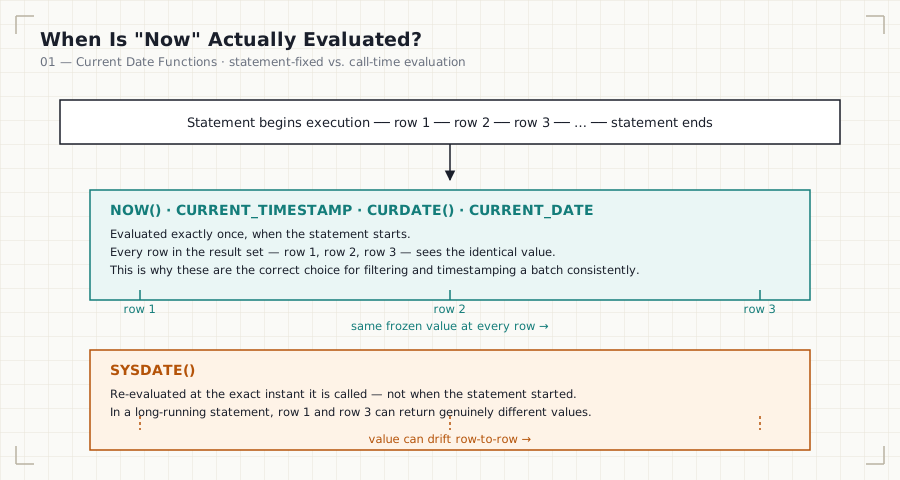
Statement starts execution
        │
        ▼
 NOW() / CURRENT_TIMESTAMP  ──►  frozen at statement start, same value
 CURDATE() / CURRENT_DATE   ──►  every row in the result set
        │
        ▼
 SYSDATE()  ──►  re-evaluated at the exact instant the function is called,
                  which can differ row-to-row in a long-running statement
Step-by-Step Walkthrough
- A query begins execution. MySQL fixes the value of
NOW()/CURRENT_TIMESTAMP/CURDATE()at the start of the statement. - Every reference to
NOW()within that same statement — even across multiple rows or subqueries — returns that same frozen value. SYSDATE(), by contrast, is not fixed at statement start. If called multiple times within a long-running statement, it can return a different value on each call.- This distinction rarely matters for a simple
SELECT, but it matters enormously for row-level default values, replication consistency, and any statement that both reads and writes based on “the current time.”
Production Considerations
- Prefer
NOW()/CURRENT_TIMESTAMPoverSYSDATE()in almost all production reporting and application logic — the frozen, statement-consistent behavior is predictable and safe for replication. - Reserve
SYSDATE()for niche cases where you deliberately want live re-evaluation (rare, and usually a sign the logic belongs in application code instead). - Table columns like
created_atshould default toCURRENT_TIMESTAMP, not be populated by the application layer, to avoid clock-skew bugs between app servers. - In distributed and multi-region systems, the database server’s clock — not each client’s local clock — is the source of truth. Confirm the database server’s timezone configuration before trusting
NOW()for cross-region reporting.
Performance Notes
CURRENT_DATEandNOW()are computed once per statement and are effectively free — they add no measurable overhead.- The performance risk isn’t the function itself, it’s how it’s used:
WHERE DATE(order_timestamp) = CURRENT_DATEwraps an indexed column in a function, disabling index usage. PreferWHERE order_timestamp >= CURRENT_DATE AND order_timestamp < CURRENT_DATE + INTERVAL 1 DAY.
Edge Cases
- Time zones:
NOW()returns time in the database server’s configured session time zone, which may not match the business’s reporting time zone. A transaction at23:50UTC may be “tomorrow” in another region’s local calendar. - Statement vs. call-time evaluation: mixing
NOW()andSYSDATE()in the same statement can produce inconsistent-looking results if not understood. - Midnight boundary queries: a report scheduled to run “at midnight” can straddle a date boundary depending on exact execution timing — always filter with
CURRENT_DATE, computed once, rather than re-deriving “today” per row.
Common Mistakes
- Hard-coding a literal date (
'2024-06-01') instead of usingCURRENT_DATE, producing a report that is correct only on the day it was written. - Using
SYSDATE()in a table’sDEFAULTclause or replicated statement, causing inconsistent values across replicas. - Wrapping a
DATETIMEcolumn inDATE()insideWHERE, silently disabling index usage. - Assuming
CURDATE()andNOW()are interchangeable — one returns aDATE, the other aDATETIME; comparing aDATEcolumn againstNOW()can produce unexpected type coercion.
Interview Questions
-
“What is the difference between
NOW()andSYSDATE()in MySQL?”NOW()is fixed at the start of the statement;SYSDATE()is re-evaluated at the exact moment it’s called, which can vary within a single long-running statement or across replication. -
“Why is
WHERE DATE(created_at) = CURDATE()considered an anti-pattern?” It wraps an indexed column in a function, forcing a full scan instead of an index seek. The sargable alternative uses a range comparison directly on the raw column. -
“How would you write a query that is correct every day without modification?” Use
CURRENT_DATE/CURDATE()for relative filtering instead of hard-coded literals.
Summary
CURRENT_DATE, NOW(), and their relatives give SQL a self-updating reference point for “now,” evaluated safely and consistently by the database server. The key engineering distinctions are: statement-time evaluation (NOW()) versus call-time evaluation (SYSDATE()), DATE versus DATETIME return types, and writing filters that remain sargable so indexes stay usable. Master these distinctions here — every later file in this module assumes it.
Practice Challenges
- Write a query that returns today’s date, the current timestamp, and the current time of day, each in its own labeled column.
- Write a sargable filter that selects all orders placed today from a
DATETIMEcolumn namedorder_timestamp, without wrapping the column in a function. - Explain, in your own words, why a table’s
created_atcolumn should default toCURRENT_TIMESTAMPrather than being set by application code.
Further Reading
- MySQL 8.0 Reference Manual — Date and Time Functions
- PostgreSQL Documentation — Current Date/Time
- Microsoft Learn — GETDATE and SYSDATETIME (Transact-SQL)
Next: 02 — Date Extraction →