SQL-Engineering-Handbook
01 · HR Analytics — Window Functions in People Data
Introduction
Every organization with more than a handful of employees eventually needs to answer questions that a simple SELECT * FROM employees cannot: Who are our top performers per department? Who is overdue for a promotion? How does compensation compare across peers?
These questions share a common shape — they require comparing a row (an employee) to a group (their department, their peer set, their manager’s reports) without losing the individual employee’s row-level detail. This is precisely the problem window functions were built to solve, and HR analytics is one of the clearest, lowest-friction domains for building intuition around them.
This chapter uses window functions to answer the kinds of questions HR business partners, People Analytics teams, and engineering leadership ask on a recurring basis.
Business Background
HR and People Analytics teams typically sit between raw HRIS (Human Resource Information System) data — think Workday, BambooHR, or an internal employees table — and the leadership decisions that depend on it: compensation reviews, promotion cycles, headcount planning, and attrition risk.
The raw schema is usually simple:
employees (emp_id, emp_name, dept_id, manager_id, salary, hire_date, ...)departments (dept_id, dept_name, ...)
The complexity isn’t in the schema — it’s in the comparisons leadership wants layered on top of it.
Typical KPIs
- Headcount per department
- Average / median salary per department
- Salary percentile of an individual relative to their department
- Tenure distribution
- Promotion eligibility rate
- Manager span of control (direct reports per manager)
- Pay equity gap (variance in salary for similar roles/tenure)
Typical Dashboards
- Department Leaderboard — ranks employees within each department by a performance or compensation metric.
- Promotion Readiness Board — flags employees who meet tenure and performance thresholds relative to peers.
- Compensation Bands Dashboard — shows where each employee sits within their department’s salary distribution.
- Org Health Dashboard — headcount, tenure, and manager span-of-control trends over time.
Business Problems
- “Show me the top-ranked employee in every department.”
- “Show me the top 2 employees in every department, for a shortlist review.”
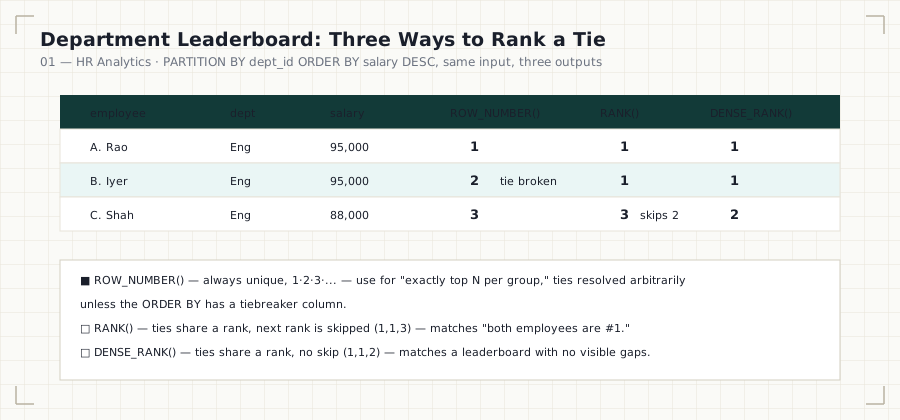
- “Build a department leaderboard, but I want to see the difference between strict ranking, tied ranking, and dense ranking so we don’t accidentally over- or under-count ties.”
- “Attach the department headcount to every employee row so a single flat export can drive the dashboard, without a separate
GROUP BYquery.” - “For every employee, show me who was hired immediately before and immediately after them — useful for onboarding cohort analysis.”
Why Window Functions Are Needed
A naive approach to “top employee per department” uses GROUP BY + MAX(), but this immediately breaks down once you need more than one row per group (e.g., “top 2 per department”) or when you need to retain other employee-level columns (name, hire date, manager) alongside the ranking. GROUP BY collapses rows; window functions annotate them. HR reporting almost always needs the annotated, row-level version because a dashboard or export ultimately lists individual employees, not just aggregated numbers.
Functions Used in This Chapter
| Function | Business Explanation |
|---|---|
ROW_NUMBER() |
Assigns a strict, gapless sequence — used for “exactly top N per department” shortlists where ties must still resolve to a single winner. |
RANK() |
Assigns the same rank to ties, then skips the next rank(s) — used when leadership explicitly wants tied employees to share a rank (e.g., “both employees are #1”). |
DENSE_RANK() |
Assigns the same rank to ties, without skipping — used for leaderboard displays where you don’t want gaps in the visible rank sequence. |
COUNT() OVER (PARTITION BY ...) |
Attaches a per-department headcount to every row without a separate aggregate query or extra join. |
LAG() / LEAD() |
Retrieves the previous/next employee in a defined order — used for onboarding cohort and sequencing analysis. |
SQL Concepts Reinforced
PARTITION BYto scope a window to a single department, rather than the entire company.- The behavioral difference between
ROW_NUMBER(),RANK(), andDENSE_RANK()when ties exist — and why choosing the wrong one silently produces the wrong headcount in a “top N” shortlist. - Filtering on a window function’s output requires wrapping it in a CTE or subquery, since window functions cannot appear in a
WHEREclause. - Using
COUNT() OVER (PARTITION BY ...)as a lightweight alternative to aGROUP BY+ join when you only need a per-group count attached to existing rows. - Ordering considerations for
LAG()/LEAD()— the output is only meaningful if theORDER BYinside the window reflects a business-meaningful sequence (e.g.,hire_date, not an arbitraryemp_id).
Performance Notes
PARTITION BY dept_nameon a largeemployeestable benefits from an index on(dept_id)or(dept_id, salary)depending on the ranking column — this lets the engine avoid a full sort per partition.- Ranking window functions require the engine to sort each partition; on very large tables, prefer partitioning on a narrower, indexed key (
dept_id) rather than a joined text column (dept_name) wherever the ranking column allows it. COUNT() OVER (PARTITION BY ...)is cheaper than a correlated subquery for the same result, because it computes the count in a single pass rather than once per row.- When only the top N per group is needed, filter with a CTE immediately — do not carry all ranked rows further into the query unnecessarily.
Common Mistakes
- Using
RANK()when the business actually wants exactly N rows per group — ties can silently return more than N employees. - Partitioning by
dept_name(a joined, denormalized column) instead ofdept_idwhen both are available, increasing sort cost unnecessarily. - Forgetting that
ROW_NUMBER()breaks ties arbitrarily unless theORDER BYclause fully disambiguates them (e.g., two employees with identicalmanager_idwill be ordered non-deterministically without a tiebreaker column). - Trying to filter directly on a window function in the same
SELECT’sWHEREclause — this is not valid SQL and requires a CTE or subquery. - Using
LAG()/LEAD()without an explicit, business-meaningfulORDER BY, producing a “previous employee” that has no real-world meaning.
Interview Questions
- “Write a query to find the top 2 highest paid employees in each department.” — Expect
ROW_NUMBER()inside a CTE, partitioned by department, ordered by salary descending, filtered to<= 2. - “What’s the difference between
RANK()andDENSE_RANK(), and when would you use one over the other in a business report?” — Expect a clear explanation of rank-skipping behavior and a scenario (e.g., leaderboard display vs. strict competition ranking). - “How would you find each employee’s salary compared to the department average, without a separate aggregate query?” — Expect
AVG(salary) OVER (PARTITION BY dept_id). - “How would you identify the two employees hired closest together, company-wide?” — Expect
LAG()/LEAD()ordered byhire_date, followed by a computed date difference. - “Why can’t you filter directly on
ROW_NUMBER()in aWHEREclause?” — Expect an explanation of SQL’s logical query processing order (window functions evaluate afterWHERE, so they must be wrapped in a CTE/subquery to be filtered).
Summary
HR analytics is the clearest entry point into window functions because the comparisons leadership asks for — “top performer per department,” “how does this employee compare to peers,” “who’s next to whom in the hiring timeline” — map almost one-to-one onto ROW_NUMBER(), RANK(), DENSE_RANK(), aggregate window functions, and LAG()/LEAD(). Mastering this chapter builds the exact mental model you’ll reuse — with different business language — in every domain that follows.
Further Practice
- Extend the leaderboard query to break ties using a secondary
ORDER BYcolumn (e.g.,hire_date ASCas a tiebreaker). - Add a query that computes each employee’s salary percentile within their department using
NTILE(4). - Add a query that flags employees whose salary is more than one standard deviation below their department average — a common pay-equity screening pattern.
Next: 01_HR_ANALYTICS.sql — the fully engineered SQL chapter for this domain.
Module: README · Next chapter: 02_SALES_ANALYTICS.md