SQL-Engineering-Handbook
03 — RIGHT JOIN
Keep every row from the right table; fill in
NULLwhere the left table has no match.
Difficulty: Beginner · Estimated time: 20–30 min · Prerequisites: 02_LEFT_JOIN.md
📑 Contents
- Learning Objectives
- Concept Overview
- Business Context
- Syntax
- Execution Flow
- Engineering Notes
- Vendor Notes
- Edge Cases
- Common Mistakes
- Best Practices
- Interview Questions
- Practice Challenges
- Further Reading
Learning Objectives
- Explain RIGHT JOIN as the mirror image of LEFT JOIN, and rewrite any RIGHT JOIN as an equivalent LEFT JOIN with table order swapped.
- Justify, with a concrete example, why most style guides discourage RIGHT JOIN in new code even though it’s fully standard SQL.
- Prove — not just assert — that an unmatched right-side row is preserved, by writing a query whose result demonstrates the preservation rather than merely returning columns that look the same either way.
Concept Overview
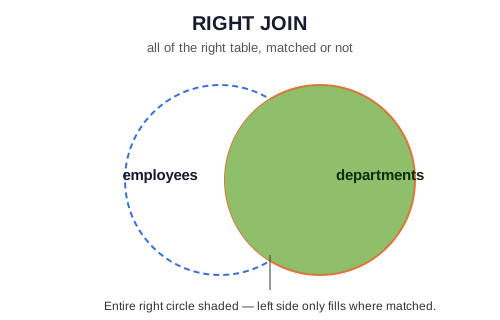
RIGHT JOIN (RIGHT OUTER JOIN) is LEFT JOIN with the preserved side flipped: every row from the right table appears in the result, matched or not, with NULL filling any column pulled from the left table for unmatched rows.
RIGHT JOIN adds no new capability to SQL — anything expressible with A RIGHT JOIN B is identically expressible as B LEFT JOIN A. It exists for readability in cases where the “table I care about preserving” happens to already be second in a query you’re extending, not because it does anything LEFT JOIN can’t.
Business Context
Where companies use it: genuinely, rarely, by deliberate choice. It shows up most often when a query is being incrementally built — someone has a working multi-table LEFT JOIN chain and needs to add “preserve this other table too” without restructuring the whole FROM clause. It’s also common to encounter in legacy or generated SQL (ORM output, older reporting tools) rather than hand-written queries.
Why most style guides avoid it: a codebase mixing LEFT and RIGHT JOIN forces every reader to track two different mental models for “which side is preserved.” Standardizing on LEFT JOIN only, and reordering tables in the FROM clause instead, means “the preserved table is always the one on the left” is a rule with zero exceptions — which is worth far more than the four characters saved by writing RIGHT instead of reordering.
Syntax
SELECT
    e.emp_name,
    d.dept_name
FROM employees e
RIGHT JOIN departments d
    ON e.dept_id = d.dept_id;
Here departments (right table) is fully preserved — every department appears, even one with zero employees. This is the exact same result set as:
SELECT
    e.emp_name,
    d.dept_name
FROM departments d
LEFT JOIN employees e
    ON e.dept_id = d.dept_id;
Execution Flow
FROM employees e             (left — only matched rows survive)
    │
    ▼
RIGHT JOIN departments d ON e.dept_id = d.dept_id   ← unmatched RIGHT rows kept,
    │                                                   left-side columns become NULL
    ▼
SELECT e.emp_name, d.dept_name
Step-by-Step Walkthrough — Proving Preservation
The original version of this file’s query returned only emp_name, dept_name — which cannot actually distinguish “a department with one employee” from “a department with none,” since both produce exactly one visible row. That’s a documentation bug on its own terms: it asserts a behavior without a query that proves it. Here’s a query that does:
SELECT
    d.dept_name,
    e.emp_name,
    COUNT(*) OVER (PARTITION BY d.dept_id) AS matching_rows_for_this_dept
FROM employees e
RIGHT JOIN departments d
    ON e.dept_id = d.dept_id
ORDER BY d.dept_name;
Run against the seed data, Legal (dept_id = 60, zero employees) appears as a single row with emp_name = NULL and matching_rows_for_this_dept = 1 — proof that RIGHT JOIN produced a row for it despite no match, rather than the row simply not existing in the output at all.
Engineering Notes
The ON-vs-WHERE placement trap from 02_LEFT_JOIN.md applies identically here, mirrored: filtering the left table’s columns in WHERE (instead of ON) silently drops unmatched right rows, degrading the RIGHT JOIN to an INNER JOIN. Same rule, opposite side.
Vendor Notes
- ANSI SQL / PostgreSQL / SQL Server / Oracle:
RIGHT JOINis fully standard and behaves identically across these. - MySQL: supported identically — no deviation. (MySQL’s real outer-join limitation is
FULL OUTER JOIN, covered in04_FULL_OUTER_JOIN.md, notRIGHT JOIN.)
Edge Cases
Identical NULL, duplicate-row, and cardinality behavior to LEFT JOIN, mirrored to the opposite side. See 02_LEFT_JOIN.md for the full treatment — repeating it here would just be the same rules with “left” and “right” swapped.
Common Mistakes
❌ Writing a RIGHT JOIN whose SELECT list can’t actually prove which rows were preserved — this is precisely the bug in this file’s original query, and it’s worth internalizing as a general documentation/code-review habit: if a query’s claimed behavior depends on rows you can’t distinguish in the output, the query (or the accompanying comment) is incomplete.
❌ Mixing LEFT and RIGHT JOIN in the same multi-table query without a strong reason — readable in isolation, genuinely hard to reason about once a third or fourth table is chained on. See 07_MULTI_TABLE_JOINS.md.
Best Practices
- Default to LEFT JOIN with reordered tables rather than RIGHT JOIN, unless you’re modifying an existing query where reordering would create a larger, riskier diff.
- If you do use RIGHT JOIN, add a comment stating which table is being preserved — readers scan for
LEFTout of habit and can miss aRIGHTmid-query. - When proving a join’s behavior (in documentation, tests, or code review), select or count something that can only exist if the “preserved” behavior actually happened — not just columns that happen to look identical either way.
Interview Questions
-
“Rewrite this RIGHT JOIN as a LEFT JOIN without changing the result.” — swap the
FROMandJOINtable order; this is asked specifically to confirm the candidate understands RIGHT JOIN isn’t a distinct concept, just a mirrored one. -
“Why do most SQL style guides recommend avoiding RIGHT JOIN?” — readability/consistency, not correctness; see Business Context.
-
“Find all departments with zero employees, using RIGHT JOIN.”
SELECT d.dept_name
FROM employees e
RIGHT JOIN departments d ON e.dept_id = d.dept_id
WHERE e.emp_id IS NULL;
Summary
RIGHT JOIN preserves the right table exactly as LEFT JOIN preserves the left — it’s a readability choice, not a distinct capability, and any RIGHT JOIN can be rewritten as a LEFT JOIN with the tables swapped. Most production style guides standardize on LEFT JOIN only for consistency; know RIGHT JOIN well enough to read it in legacy code, but default to LEFT JOIN in anything you write.
Practice Challenges
- Find every department with zero employees, using RIGHT JOIN — then rewrite the identical query using LEFT JOIN instead, and confirm both return the same rows.
- Using
COUNT(e.emp_id)(notCOUNT(*)) alongsideGROUP BY d.dept_name, produce active headcount per department including departments with zero employees — explain whyCOUNT(e.emp_id)returns0here instead ofNULLor an error for Legal. - Find every location with zero departments assigned to it, if any exist in the current seed data — if none do, explain what you’d need to add to
schema/00_schema_setup.sqlto test this case, and why the module’s authors left the data that way.
Further Reading
02_LEFT_JOIN.md— the direct mirror of this file.04_FULL_OUTER_JOIN.md— LEFT and RIGHT, combined.