SQL-Engineering-Handbook
02 — LEFT JOIN
Keep every row from the left table; fill in
NULLwhere the right table has no match.
Difficulty: Beginner · Estimated time: 25–35 min · Prerequisites: 01_INNER_JOIN.md
📑 Contents
- Learning Objectives
- Concept Overview
- Business Context
- Syntax
- Execution Flow
- Engineering Notes
- Vendor Notes
- Edge Cases
- Common Mistakes
- Best Practices
- Interview Questions
- Practice Challenges
- Further Reading
Learning Objectives
- Explain precisely what “preserved” means for the left table in a LEFT JOIN, including what happens in every column that comes from the right table when there’s no match.
- Use the
LEFT JOIN ... WHERE right.key IS NULLpattern to find orphaned or missing records — one of the highest-value idioms in this entire module. - Correctly place a filter on the right table’s columns in the
ONclause vs. theWHEREclause, and explain why the two are not interchangeable for LEFT JOIN (unlike for INNER JOIN).
Concept Overview
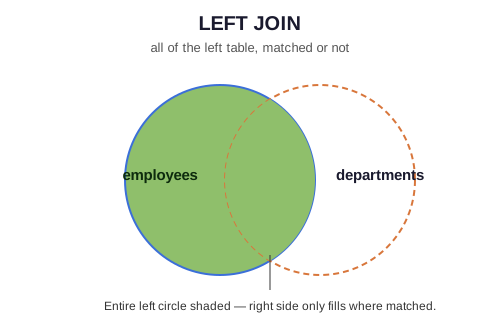
LEFT JOIN (equivalently LEFT OUTER JOIN — the OUTER keyword is optional and rarely written) starts from INNER JOIN’s behavior and adds one rule: every row from the left table appears in the result at least once, even if no matching row exists on the right. When there’s no match, every column pulled from the right table is filled with NULL.
This single behavioral difference from INNER JOIN — preserving unmatched left rows instead of discarding them — is what makes LEFT JOIN the workhorse of data-quality auditing, reporting completeness checks, and any “show me everything, including gaps” business question.
Business Context
Where companies use it:
- Data quality / completeness audits — “which employees have no department assigned,” “which orders have no payment recorded.”
- Reporting that must not silently drop entities — a monthly sales dashboard should show every product, including ones with zero sales that month, not quietly omit them.
- Building “left-anchored” combined views — e.g., every customer with their most recent order, whether or not they’ve ever ordered.
Syntax
SELECT
    e.emp_name,
    d.dept_name
FROM employees e
LEFT JOIN departments d
    ON e.dept_id = d.dept_id;
employees is the left table (declared first, in the FROM clause) and is fully preserved. departments is the right table — rows only appear where matched.
⚠️ Table order matters for LEFT JOIN, unlike INNER JOIN. FROM employees e LEFT JOIN departments d and FROM departments d LEFT JOIN employees e are different queries that answer different questions (“every employee, department or not” vs. “every department, employees or not”).
Execution Flow
FROM employees e                                    (10 rows, the anchor)
    │
    ▼
LEFT JOIN departments d ON e.dept_id = d.dept_id     ← unmatched LEFT rows are KEPT,
    │                                                   right-side columns become NULL
    ▼
SELECT e.emp_name, d.dept_name
Step-by-Step Walkthrough
Against the seed schema: Farhan Ali (dept_id = NULL) has no match — under INNER JOIN he’d vanish; under LEFT JOIN he appears once, with dept_name = NULL. Result: 10 rows (all employees), where INNER JOIN produced 9.
Engineering Notes
The ON vs. WHERE placement trap is the single most important thing to understand about outer joins. Compare:
-- (A) Filter in ON: still returns every employee — the filter only affects
--     WHICH department rows are allowed to match, not whether the
--     employee row survives.
SELECT e.emp_name, d.dept_name
FROM employees e
LEFT JOIN departments d
    ON e.dept_id = d.dept_id AND d.dept_name = 'Engineering';

-- (B) Filter in WHERE: silently degrades to an INNER JOIN — any employee
--     whose department didn't match becomes NULL, and NULL != 'Engineering'
--     is not TRUE, so WHERE removes that row entirely.
SELECT e.emp_name, d.dept_name
FROM employees e
LEFT JOIN departments d
    ON e.dept_id = d.dept_id
WHERE d.dept_name = 'Engineering';
Query (A) returns all 10 employees, with dept_name populated only for Engineering staff and NULL for everyone else. Query (B) returns only the 4 Engineering employees — functionally an INNER JOIN wearing a LEFT JOIN’s syntax. Neither is “wrong” in isolation, but confusing the two is the #1 LEFT JOIN bug in production code, because it produces no error — just a quietly incorrect row count.
Vendor Notes
- ANSI SQL / PostgreSQL / MySQL / SQL Server / Oracle:
LEFT JOINandLEFT OUTER JOINare fully standard and behave identically across all four. - Oracle legacy syntax: Oracle historically supported
WHERE table1.col = table2.col(+)as a non-ANSI outer join notation. It still works but is deprecated in every modern Oracle style guide — never write it in new code, and treat it as a red flag when auditing legacy Oracle SQL.
Edge Cases
NULL behavior: every column from the right table becomes NULL for an unmatched left row — including columns that are NOT NULL in the table’s own schema. departments.dept_name is declared NOT NULL, but in the LEFT JOIN result for Farhan Ali, dept_name reads NULL — this is a result-set NULL, not a violation of the table’s constraint.
Duplicate rows: identical to INNER JOIN — if the right table has multiple matching rows, the left row is repeated once per match. LEFT JOIN’s “preserve unmatched rows” guarantee doesn’t protect against fan-out on the matched side.
Cardinality: a LEFT JOIN’s minimum row count equals the left table’s row count (every left row appears at least once); its row count only grows from there if the right side has duplicate join-key values.
Common Mistakes
❌ Filtering the right table in WHERE and expecting outer rows to survive — covered exhaustively above. This is worth repeating because it’s genuinely the most common LEFT JOIN bug in real codebases.
❌ Using LEFT JOIN + WHERE right.key IS NULL but forgetting to pick a column that’s actually only NULL when unmatched:
-- ❌ dept_name could theoretically be NULL for a matched row too
-- (if the schema allowed it) — always check IS NULL on the join key itself
SELECT e.emp_name
FROM employees e
LEFT JOIN departments d ON e.dept_id = d.dept_id
WHERE d.dept_name IS NULL;

-- ✅ Check the join key, not an arbitrary selected column
SELECT e.emp_name
FROM employees e
LEFT JOIN departments d ON e.dept_id = d.dept_id
WHERE d.dept_id IS NULL;
Best Practices
- Reach for LEFT JOIN specifically when the business question is “show me everything, including gaps” — if you find yourself immediately filtering out the
NULLrows afterward, ask whether you actually wanted an INNER JOIN. - The
LEFT JOIN ... WHERE right.key IS NULLpattern is the standard, portable way to find “left rows with no match” — prefer it overNOT IN (SELECT ...), which has a well-known NULL trap (see07_MULTI_TABLE_JOINS.mdfor the anti-join comparison). - Put filters on the right table’s columns in the
ONclause when you want to preserve every left row; put them inWHEREonly when you’re deliberately willing to drop unmatched left rows too.
Interview Questions
- “Write a query to find all employees who don’t belong to any department.”
SELECT e.emp_name FROM employees e LEFT JOIN departments d ON e.dept_id = d.dept_id WHERE d.dept_id IS NULL; -
“What’s the difference between putting a right-table filter in
ONversusWHEREfor a LEFT JOIN?” — see Engineering Notes above; this is asked constantly because it’s where junior-to-mid-level SQL understanding is most reliably tested. - “If table A has 100 rows and you LEFT JOIN it to table B, what’s the minimum possible row count in the result?” — 100. LEFT JOIN never produces fewer rows than the left table, regardless of how table B is structured.
Summary
LEFT JOIN preserves every row from the left table, filling unmatched right-side columns with NULL. Its most valuable real-world use isn’t “show related data” — INNER JOIN does that fine — it’s the LEFT JOIN ... WHERE key IS NULL pattern for finding exactly what’s missing. The single detail worth over-learning here is that filter placement (ON vs WHERE) changes the query’s meaning, not just its performance.
Practice Challenges
- Find every department with zero employees currently assigned (this uses LEFT JOIN with tables in the opposite order from the examples above — think carefully about which table needs to be “left”).
- Using the
Q3self-join query from01_INNER_JOIN.sqlas a starting point, rewrite it as a LEFT JOIN so that employees with no manager (manager_id IS NULL) still appear in the result withmanager_name = NULL. - Write a query showing every location, and for each, the count of departments assigned to it — including a location with zero departments (check the seed data for whether one currently exists, and if not, why the current data can’t demonstrate this case).
Further Reading
03_RIGHT_JOIN.md— the mirror image of this file.07_MULTI_TABLE_JOINS.md— anti-joins (LEFT JOIN ... IS NULLvs.NOT EXISTSvs.NOT IN) compared head-to-head.- PostgreSQL docs: Outer Joins