SQL-Engineering-Handbook
01 — INNER JOIN
Return only the rows that have a match on both sides of the join condition.
Difficulty: Beginner · Estimated time: 25–35 min · Prerequisites: 01_Fundamentals, 02_Aggregations
📑 Contents
- Learning Objectives
- Concept Overview
- Business Context
- Syntax
- Execution Flow
- Join Algorithms
- Index Considerations
- Vendor Notes
- Edge Cases
- Common Mistakes
- Best Practices
- Interview Questions
- Practice Challenges
- Further Reading
Learning Objectives
By the end of this file you should be able to:
- Explain what INNER JOIN keeps and what it discards, in terms of matched vs. unmatched rows.
- Predict, before running a query, whether a row count will shrink, stay the same, or grow after an INNER JOIN.
- Recognize the three physical algorithms a database engine can choose to execute an inner join, and why the choice matters for performance.
- Identify when an apparently correct INNER JOIN is silently dropping rows you actually wanted.
Concept Overview
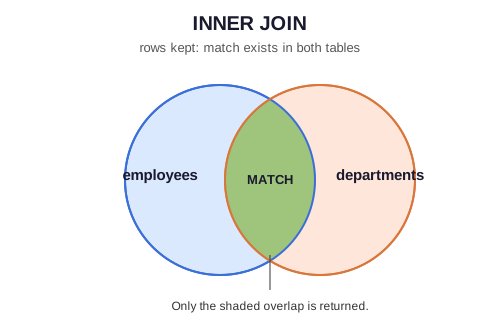
INNER JOIN is the default, most restrictive join type: a row survives only if a matching row exists on both sides of the join condition. If employees.dept_id = 50 (Marketing) has no matching row in departments — or vice versa, a department with no employees — neither side’s row appears in the result at all.
This is why INNER JOIN is sometimes introduced as “the intersection” — but that framing undersells what’s actually happening. A join isn’t a set operation on two static piles of rows; it’s a row-by-row evaluation of a boolean predicate (the ON clause) across the Cartesian product of both tables, keeping only the pairs where that predicate is TRUE. Every other join type in this module is a variation on that same idea — they just decide what to do with the pairs that evaluate to FALSE or NULL.
Business Context
Where companies use it: any report, dashboard, or transactional query where an “orphan” record is meaningless or noisy — you don’t want a sales report showing a product_id that doesn’t exist in the product catalog, and you don’t want a payroll report including a department reference that doesn’t resolve to a real department.
Where it’s the wrong choice: any query whose purpose is auditing for orphans or gaps — for that, you want LEFT JOIN ... WHERE right.key IS NULL (see 02_LEFT_JOIN.md), because INNER JOIN will silently hide exactly the rows you’re trying to find.
Syntax
SELECT
    e.emp_name,
    d.dept_name
FROM employees e
INNER JOIN departments d
    ON e.dept_id = d.dept_id;
Syntax Breakdown
| Clause | Purpose |
|---|---|
FROM employees e |
Declares the “driving” table and its alias. Which table is written first has no effect on the result of an INNER JOIN (unlike LEFT/RIGHT) — the optimizer is free to pick either side as the driving table internally. |
INNER JOIN departments d |
Declares the second table. INNER is optional — bare JOIN means INNER JOIN in every major dialect — but write it explicitly. It signals intent to the next reader and distinguishes it at a glance from LEFT/RIGHT in a long file. |
ON e.dept_id = d.dept_id |
The join predicate. Can be any boolean expression, not just equality (e.hire_date > d.founded_date is valid), but equality joins on indexed keys are the overwhelming majority of production SQL and the only kind that benefit from a hash or merge join (see below). |
ON vs USING: when both sides share the exact same column name, USING (dept_id) is a legal, shorter alternative to ON e.dept_id = d.dept_id. This module uses ON throughout because most production schemas don’t have identical column names across tables (a departments.id vs employees.dept_id naming convention, for instance, makes USING impossible) — ON is the pattern that generalizes.
Execution Flow
SQL is declarative — you don’t tell the engine how to join, only what the result should contain. The logical processing order (not necessarily the physical order the engine executes internally) is:
FROM employees e
    │
    ▼
INNER JOIN departments d ON e.dept_id = d.dept_id   ← rows without a match are discarded HERE
    │
    ▼
[WHERE, GROUP BY, HAVING — not used in this file]
    │
    ▼
SELECT e.emp_name, d.dept_name
Step-by-Step Walkthrough
Using the seed data from schema/00_schema_setup.sql:
| emp_name | dept_id | matches departments.dept_id? | kept? |
|---|---|---|---|
| Sahil Verma | 10 | ✅ Engineering | ✅ |
| Ammar Khan | 10 | ✅ Engineering | ✅ |
| Farhan Ali | NULL |
❌ NULL never equals anything, including another NULL |
❌ dropped |
| (department Legal, dept_id 60) | — | no employee has dept_id = 60 |
❌ dropped from the other side |
Ten employees exist; Farhan Ali (unassigned) is dropped, so the result has 9 rows. Legal (no employees) contributes 0 rows. This is exactly why “just eyeball the row count” is a real interview technique — see Interview Questions.
Join Algorithms
The query above is a request, not an execution plan. The engine’s optimizer picks one of three physical strategies based on table size, index availability, and data distribution:
| Algorithm | How it works | Best when | Complexity |
|---|---|---|---|
| Nested Loop Join | For each row in the outer (driving) table, scan the inner table for matches. | One side is small, or the inner table has an index on the join key (index nested loop). | O(n·m) unindexed; O(n·log m) indexed |
| Hash Join | Build an in-memory hash table on the smaller side’s join key, then probe it once per row of the larger side. | Large, unsorted tables with an equality predicate and no useful index. | O(n + m) |
| Merge Join | Both inputs are sorted (or already ordered via an index) on the join key, then walked in lockstep like a zipper. | Both sides are already sorted or indexed on the join column — common when joining on primary/foreign keys with a B-tree index. | O(n + m) after sort, O(n log n + m log m) if a sort is required first |
For the employees ⋈ departments query above, on ten and six rows respectively, the optimizer will almost certainly pick a nested loop — the tables are trivially small and the cost-based optimizer won’t bother building a hash table. At production scale (millions of rows), the choice between hash and merge join is frequently the difference between a query that finishes in milliseconds and one that times out. See 08_JOIN_PERFORMANCE.md for how to read EXPLAIN output and confirm which one your engine actually chose.
Index Considerations
e.dept_id and d.dept_id are the join predicate — d.dept_id is the primary key of departments (indexed automatically), and schema/00_schema_setup.sql explicitly creates idx_employees_dept_id on the foreign-key side. This is not optional in production. An INNER JOIN on an unindexed foreign key forces a nested loop with a full table scan on the inner side for every outer row — on real data volumes this is the single most common cause of a “slow join” support ticket.
Vendor Notes
- ANSI SQL: the syntax above is standard ANSI/ISO SQL and portable across every major RDBMS without modification.
- MySQL / PostgreSQL / SQL Server / Oracle:
INNER JOINbehaves identically across all four for equality joins. There is no vendor-specific deviation to call out here — this is one of the few areas of SQL with true universal agreement.
Edge Cases
NULL behavior: NULL = NULL evaluates to NULL (neither true nor false), not TRUE. This is why Farhan Ali (dept_id = NULL) never joins to anything — including, hypothetically, another row that also has a NULL value in the joined column. If you need to match NULL to NULL, you need IS NOT DISTINCT FROM (Postgres) or an explicit COALESCE/CASE, not =.
Duplicate rows: if departments had two rows with dept_id = 10 (a data quality bug), the employee query above would return each Engineering employee twice — once per matching department row. INNER JOIN doesn’t deduplicate; it produces the full Cartesian pairing of every matching row on each side. This is the most common cause of “my report suddenly has double the rows it should” bugs, and it’s a data integrity problem, not a SQL problem — the fix is a unique constraint on departments.dept_id, not a DISTINCT band-aid on the query.
Cardinality:
- One-to-many (this example): each department row can match many employee rows → row count is driven by the “many” side.
- One-to-one (e.g.,
employees ⋈ employee_payroll_detailsonemp_id): row count is unchanged from either input, assuming referential integrity holds. - Many-to-many (not present in this schema — e.g.,
employees ⋈ skillsvia a bridge table): row count can explode combinatorially; always sanity-check row counts against expectations after a many-to-many join.
Common Mistakes
❌ Missing the join condition entirely:
SELECT *
FROM employees
JOIN departments;
This is a syntax error in standard SQL (JOIN requires an ON/USING) — but the conceptual mistake it represents, writing , (comma join / implicit cross join) instead, is worse because it’s syntactically valid and silently produces a full Cartesian product:
-- ❌ Silently wrong: no join condition at all — this is a CROSS JOIN in disguise
SELECT *
FROM employees, departments;
✅ Correct:
SELECT *
FROM employees e
JOIN departments d
    ON e.dept_id = d.dept_id;
❌ Using INNER JOIN when the intent is actually “show me everything, matched or not”: the most common real-world join bug isn’t a syntax error — it’s using INNER JOIN where LEFT JOIN was needed, which silently drops legitimate rows (unassigned employees, out-of-stock products, cancelled-but-still-relevant orders) with no error and no warning.
Best Practices
- Always alias every table, even in a two-table join —
e.dept_id, never a baredept_id, once more than one table is in scope. - Write
INNER JOINexplicitly rather than relying on bareJOIN— it costs four characters and removes any ambiguity for the next reader. - Before writing the query, decide out loud (or in a comment) which side you expect to lose rows from, if any. If the honest answer is “neither, I expect every row to match,” INNER JOIN is correct. If the honest answer is “I’m not sure,” that uncertainty is itself the signal to check with
LEFT JOIN ... WHERE key IS NULLfirst. - Never use implicit comma-joins (
FROM a, b WHERE a.id = b.id) — the explicitJOIN ... ONsyntax is unambiguous, keeps join logic separate from filter logic, and prevents forgetting a predicate.
Interview Questions
-
“If
employeeshas 10,000 rows anddepartmentshas 20, what’s the minimum and maximum possible row count from an INNER JOIN ondept_id?” Minimum: 0 (if nodept_idvalues match at all). Maximum: unbounded upward ifdepartments.dept_idisn’t unique — but assuming it’s a proper primary key, the maximum is 10,000 (every employee matches exactly one department). -
“Why would an INNER JOIN return more rows than either input table?” Because at least one side has duplicate values in the join column — the join produces the Cartesian product of matching groups, not a 1:1 pairing.
-
“You run an INNER JOIN and get fewer rows than you expected. What are the first two things you check?” (1) Whether the “missing” rows have
NULLin the join column on either side —NULLnever matches. (2) Whether the join column values actually line up in type and format (e.g., aVARCHAR '10'vs anINT 10, or trailing whitespace) — silent type coercion or a formatting mismatch is a frequent cause of “rows that should match but don’t.”
Summary
INNER JOIN keeps only rows with a match on both sides — it’s the narrowest, most common join, and the right default whenever an unmatched row genuinely represents bad or irrelevant data rather than a case you need to surface. The engine is free to execute it via nested loop, hash, or merge join depending on data size and indexing; understanding which one is chosen (08_JOIN_PERFORMANCE.md) is what separates “I can write a join” from “I can write a join that scales.”
Practice Challenges
- Show each employee’s name alongside their department name and the city their department is located in (you’ll need a second join — preview of
07_MULTI_TABLE_JOINS.md). - Count how many employees are in each department, showing only departments with at least one employee (no
LEFT JOINallowed — INNER JOIN should make the “at least one” filtering automatic. Explain why it’s automatic.). - Write a query that would return zero rows, using only the
employeesanddepartmentstables and anINNER JOIN, without usingWHERE. (Hint: think about what a bad join predicate looks like.)
Further Reading
02_LEFT_JOIN.md— the join you reach for when unmatched rows are the point, not the problem.08_JOIN_PERFORMANCE.md— readingEXPLAINoutput to confirm which join algorithm actually ran.- PostgreSQL docs: Joined Tables