SQL-Engineering-Handbook
07 — Query Optimization with Indexes
Introduction
Files 01-06 covered what indexes are and how to design them. This file covers how the query optimizer actually decides whether to use one — selectivity, statistics, histograms, predicate pushdown, and the hints available when the optimizer gets it wrong.
Learning Objectives
- Define selectivity and cardinality, and explain their relationship to index usefulness
- Explain how table/index statistics inform the optimizer’s cost model
- Explain what predicate pushdown is and why it matters
- Use optimizer hints responsibly, understanding their risk
Business Motivation
Two columns, both indexed: status (3 possible values, roughly even
distribution) and order_id (unique per row). A query filtering on
status = 'completed' and one filtering on order_id = 12345 have
indexes available for both — but the optimizer will use one and ignore
the other, and understanding why is the difference between predicting
production query performance and being surprised by it.
Why This Exists
An index’s existence doesn’t guarantee it’s fast — its usefulness depends entirely on how well it narrows the result set for a given query. This is what selectivity and cardinality measure, and it’s the core input to the optimizer’s cost-based decision.
Production Use Cases
- Deciding whether to index a status/category/boolean column at all.
- Diagnosing a query that “should” use an index but doesn’t.
- Investigating a query that used an index and got slower, not faster (stale statistics).
Architecture Discussion
Cardinality: the number of distinct values in a column.
Selectivity: cardinality relative to row count — selectivity =
distinct_values / total_rows. A selectivity close to 1 means almost
every row is unique (great for indexing); close to 0 means few distinct
values relative to row count (poor for indexing in isolation).
customer_id on a 10M-row orders table: ~2M distinct customers
  selectivity ≈ 2,000,000 / 10,000,000 = 0.2   -- reasonably selective

status on the same table: 3 distinct values
  selectivity ≈ 3 / 10,000,000 ≈ 0.0000003     -- very poor selectivity
Production Use Cases (continued)
- Predicate pushdown: filtering as early and as close to the storage layer as possible, rather than pulling all rows up to the application or a later query stage before filtering. An index seek is the most extreme form of predicate pushdown — the filter is applied by the storage engine before rows are even materialized.
Syntax
-- View the optimizer's estimated statistics for a table
SHOW TABLE STATUS LIKE 'orders';

-- Force a statistics refresh after major data changes
ANALYZE TABLE orders;

-- Inspect selectivity of a specific column via cardinality estimate
SHOW INDEX FROM orders WHERE Column_name = 'status';
Syntax Breakdown
SHOW TABLE STATUSsurfacesRows(an estimate, not exact for InnoDB) — used by the optimizer as a baseline for scan cost.ANALYZE TABLErecomputes index cardinality estimates — essential after bulk loads, large deletes, or any operation that shifts data distribution significantly.SHOW INDEX’sCardinalitycolumn is the engine’s current estimate of distinct values for that index — directly feeds selectivity calculations.
Visual Explanation
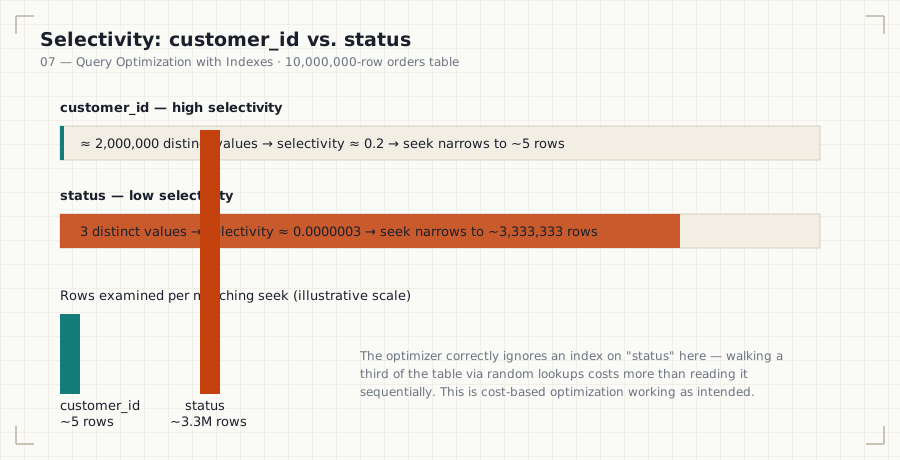
High selectivity column (customer_id):
  Index seek narrows 10,000,000 rows → ~5 rows.  Clear win.

Low selectivity column (status, 3 values):
  Index seek narrows 10,000,000 rows → ~3,333,333 rows.
  Optimizer correctly prefers a full scan — reading a third of the
  table via random index lookups costs MORE than reading it
  sequentially.
ASCII Diagram
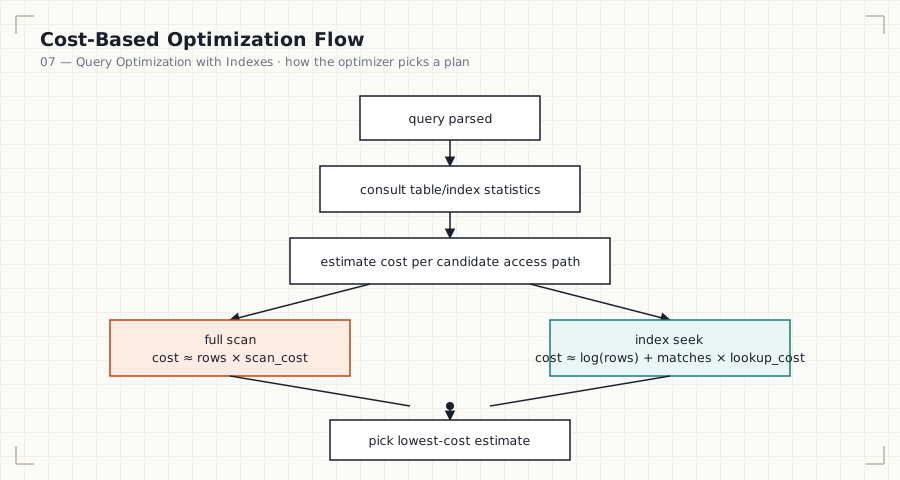
Mermaid version (renders inline on GitHub without loading the SVG)
```mermaid flowchart TD A[Query parsed] --> B[Consult table/index statistics] B --> C[Estimate cost per candidate access path] C --> D[Full scancost ≈ rows × scan_cost] C --> E[Index seek
cost ≈ log rows + matches × lookup_cost] D --> F[Pick lowest-cost estimate] E --> F ```
                Optimizer cost comparison
                ┌─────────────────────────┐
                │ cost(full scan)          │
                │   ≈ rows × scan_cost     │
                ├─────────────────────────┤
                │ cost(index seek)         │
                │   ≈ log(rows) + matches  │
                │       × lookup_cost      │
                └─────────────────────────┘
                  optimizer picks the lower estimate
Execution Flow
- Optimizer consults table/index statistics (row counts, cardinality, histograms where available) for every candidate access path.
- It estimates the number of matching rows (selectivity × total rows) for each candidate.
- It computes an estimated cost per path using engine-specific cost constants (I/O cost, CPU cost).
- It selects the lowest estimated cost — this is the query plan.
- Predicate pushdown is applied wherever possible within the chosen plan, filtering as early as the storage layer allows.
Engineering Notes
Statistics are estimates, sampled periodically, not recalculated on
every query. After a large bulk load, delete, or significant data skew
change, stale statistics can cause the optimizer to pick a badly wrong
plan — this is one of the most common causes of “this query used to be
fast” production incidents, and ANALYZE TABLE / VACUUM ANALYZE is
frequently the fix.
Performance Notes
- Histograms (MySQL 8.0+, PostgreSQL, SQL Server, Oracle all support them) improve on plain cardinality by capturing value distribution, not just distinct count — critical for skewed columns where most rows share a few common values but a long tail of rare ones exists.
- A column that’s low-selectivity overall can still be highly selective for specific, rare values — histograms let the optimizer exploit that where simple cardinality estimates cannot.
Storage Considerations
Histograms and extended statistics add metadata storage, but it is negligible compared to the index/table storage itself — there’s little reason not to maintain them on any actively queried column.
Optimizer Notes
Optimizer hints (FORCE INDEX, USE INDEX, IGNORE INDEX in
MySQL; pg_hint_plan extension in PostgreSQL) let you override the
optimizer’s choice. They are an escape hatch, not a design tool — a hint
that’s correct today can become actively harmful as data grows and the
genuinely optimal plan changes, because a hint doesn’t adapt the way the
cost-based optimizer does.
ANSI SQL Notes
Optimizer behavior, statistics, and hints are entirely implementation-specific; the ANSI standard defines none of this.
MySQL Notes
ANALYZE TABLErefreshes cardinality statistics.FORCE INDEX (idx_name)andIGNORE INDEX (idx_name)are available directly in query syntax for testing/overriding optimizer choices.
PostgreSQL Notes
ANALYZE(often paired withVACUUM ANALYZE) refreshes planner statistics, including histograms viadefault_statistics_target.- No built-in hint syntax in core PostgreSQL — the project has
historically discouraged them in favor of trusting/fixing the
cost-based optimizer;
pg_hint_planis a well-known third-party extension for cases where hints are still needed.
SQL Server Notes
UPDATE STATISTICSrefreshes the optimizer’s statistics.- Query hints (
OPTION (FORCESEEK), etc.) and plan guides are available for advanced override cases.
Oracle Notes
DBMS_STATS.GATHER_TABLE_STATSrefreshes statistics, including histograms.- Oracle has one of the most mature optimizer hint systems
(
/*+ INDEX(...) */syntax) among major RDBMSs.
Edge Cases
- A column can have good overall selectivity but poor selectivity for the specific value in a given query (e.g., a “default” or “unknown” category value that dominates the distribution) — histograms exist specifically to catch this case.
- Multi-column correlation (e.g.,
cityandzip_codecorrelate heavily) can mislead cost estimates that assume column independence — extended statistics (PostgreSQL, MySQL 8.0+) exist to address this.
Best Practices
- Run
ANALYZE/UPDATE STATISTICSafter any bulk data operation. - Treat optimizer hints as a temporary, monitored fix, not a permanent design choice — revisit them periodically.
Anti-patterns
- Hinting a query once and never revisiting the hint as data grows.
- Assuming a column’s selectivity from intuition instead of checking
SHOW INDEX/pg_stats.
Common Mistakes
- Forgetting to
ANALYZEafter a large data load and being surprised by a sudden plan regression. - Indexing a column purely because it appears in a
WHEREclause, without checking its selectivity first.
Interview Questions
- Define selectivity and explain why a boolean column is usually a poor indexing candidate on its own.
- Why can stale statistics cause a previously fast query to suddenly become slow, with no code or data schema changes?
- What is predicate pushdown, and how does an index seek relate to it?
- When would you reach for an optimizer hint, and what’s the risk of leaving one in place indefinitely?
Summary
The optimizer’s index-vs-scan decision is a cost estimate built from selectivity, cardinality, and (where available) histograms — not a fixed rule. Low-selectivity columns are poor indexing candidates in isolation; stale statistics are a common, often-overlooked cause of sudden plan regressions; and optimizer hints are a monitored escape hatch, not a permanent substitute for good index design and fresh statistics.
Practice
See 12_PRACTICE_PROBLEMS.md, Advanced section, Problems 6–8.