SQL-Engineering-Handbook
06 — Indexing Strategies
Introduction
Every prior file covered a specific index type. This file covers strategy: how many indexes a table should have, how that answer changes between transactional and analytical systems, and when adding an index is the wrong move.
Learning Objectives
- Explain the read/write trade-off every index makes
- Contrast indexing strategy for OLTP vs. OLAP/warehouse workloads
- Apply indexing principles to star schema fact and dimension tables
- Identify when NOT to add an index
Business Motivation
An OLTP order-processing table (thousands of writes per minute) and an OLAP nightly-batch reporting table (millions of rows, read-only during business hours) have opposite indexing priorities. Applying the same “index everything queried” rule to both is a common, costly mistake — the OLTP table’s write throughput can collapse under index maintenance overhead, while the OLAP table can safely carry far more indexes since writes are rare and batched.
Why This Exists
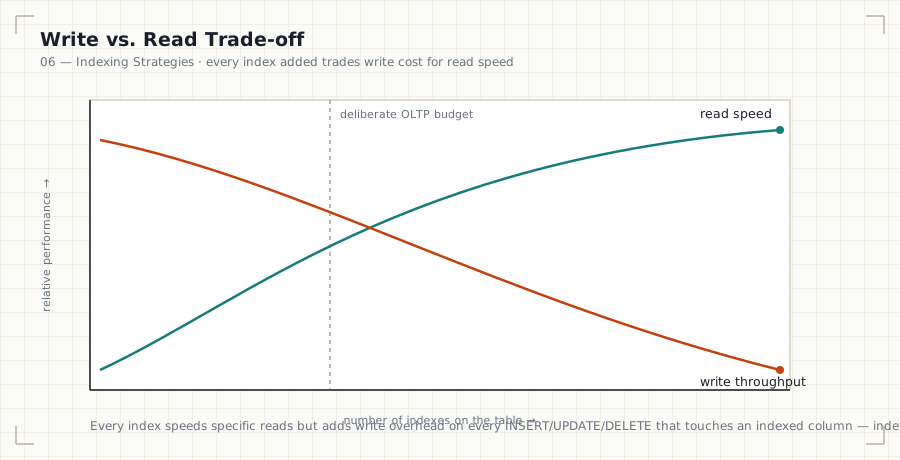
Every index added to a table is additional work on every INSERT,
UPDATE, and DELETE that touches an indexed column. The question isn’t
“would this index help some query” — nearly any index helps some query —
it’s “does this query’s importance justify the write cost this index
adds, forever, on this specific table.”
Production Use Cases
- OLTP:
orders,payments,sessions— high write frequency, indexes kept minimal and purpose-built. - OLAP/warehouse:
fact_sales,dim_customer— write-light (batch loaded), read-heavy, indexes and even redundant covering indexes are comparatively cheap to maintain.
Architecture Discussion — When Indexes Help
- High-selectivity
WHERE/JOINcolumns on large tables. - Columns driving frequent
ORDER BY/LIMITpagination. - Foreign key columns (File 04).
Architecture Discussion — When Indexes Hurt
- Write amplification: every indexed column adds an index-page write to every insert/update/delete — five indexes means five extra structures to maintain per write, not one.
- Insert performance: high-frequency insert tables (event logs, sessions) suffer disproportionately from excess indexing.
- Storage overhead: each index is a full additional structure sized by its columns × row count.
- Optimizer confusion: too many overlapping indexes can occasionally lead the optimizer to a worse plan choice due to increased plan-space complexity and imperfect statistics.
Production Use Cases (continued) — OLTP vs. OLAP Design
OLTP (Online Transaction Processing):
- Prioritize write throughput; index only columns backing real, frequent queries and constraints.
- Favor narrow, purpose-built composite indexes over broad ones.
OLAP / Warehouse:
- Prioritize query flexibility and read speed; writes happen in controlled batch windows, so index maintenance cost is amortized and less operationally painful.
- Star schema convention: fact tables (e.g.,
fact_sales) are typically indexed on foreign keys to dimension tables plus the date key; dimension tables (e.g.,dim_customer,dim_product) are typically indexed on their surrogate key (primary) and commonly filtered natural-key columns.
Syntax
-- OLTP: minimal, purpose-built
CREATE INDEX idx_orders_customer_id ON orders (customer_id);

-- OLAP/star schema: fact table indexed on all dimension FKs + date key
CREATE INDEX idx_fact_sales_customer ON fact_sales (customer_key);
CREATE INDEX idx_fact_sales_product  ON fact_sales (product_key);
CREATE INDEX idx_fact_sales_date     ON fact_sales (date_key);
Syntax Breakdown
- The OLTP example intentionally has one index for one clearly justified access pattern.
- The star-schema example intentionally indexes every foreign key on the fact table — in warehouse contexts, ad hoc analytical joins across any dimension are expected, and batch-load write patterns tolerate the added maintenance cost.
Visual Explanation
OLTP table (orders): writes constantly, indexes MINIMAL
  [PK] [FK: customer_id] [maybe 1 more purpose-built index]

OLAP fact table (fact_sales): writes in nightly batch, indexes LIBERAL
  [PK] [FK: customer_key] [FK: product_key] [FK: date_key]
  [maybe covering indexes for known report queries too]
ASCII Diagram — Star Schema
                dim_customer
                     │
dim_product ──── fact_sales ──── dim_date
                     │
                dim_store

fact_sales columns:  customer_key, product_key, date_key, store_key,
                      quantity, revenue
Indexes: one per foreign key (surrogate key columns), enabling fast
joins from the fact table out to any dimension independently.
Execution Flow
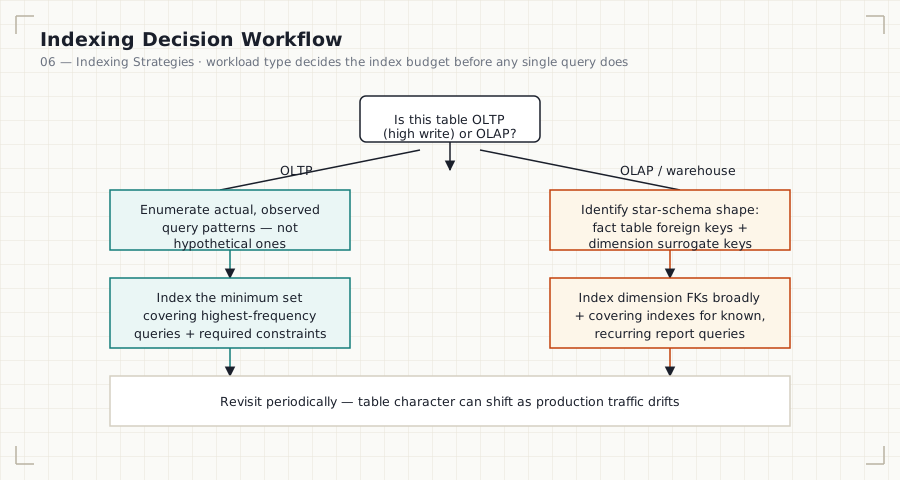
Mermaid version (renders inline on GitHub without loading the SVG)
```mermaid flowchart TD A[Is this table OLTPhigh write or OLAP?] -->|OLTP| B[Enumerate actual,
observed query patterns] A -->|OLAP / warehouse| C[Identify star-schema shape:
fact FKs + dimension keys] B --> D[Index the minimum set
covering highest-frequency
queries + required constraints] C --> E[Index dimension FKs broadly
+ covering indexes for known,
recurring report queries] D --> F[Revisit periodically —
table character can shift] E --> F ```
- Identify the workload type for the table (OLTP vs. OLAP) — this determines the acceptable index budget before looking at any specific query.
- Enumerate actual, observed query patterns (not hypothetical ones).
- For OLTP: index the minimum set that covers the highest-frequency, highest-cost queries and required constraints.
- For OLAP: index dimension foreign keys broadly, and add covering indexes for known recurring report queries.
Engineering Notes
“Index everything you might query” is OLAP-appropriate thinking applied incorrectly to an OLTP table. The single most common indexing mistake in production transactional systems is over-indexing a hot write table because a reporting query occasionally runs against it — that query usually belongs on a read replica or a warehouse copy, not driving the primary table’s index design.
Performance Notes
- On a write-heavy OLTP table, benchmark index additions against actual write throughput, not just the target read query’s speedup.
- On an OLAP table, the real cost ceiling is usually load-window duration, not per-index overhead — budget accordingly.
Storage Considerations
Warehouse fact tables are typically large; broad indexing has a real storage cost. This is usually an acceptable trade against query flexibility for analytics, but should still be a deliberate budget decision, not unlimited.
Optimizer Notes
Statistics matter more, not less, in OLAP systems — after every batch
load, ANALYZE should run before reports depend on fresh data, since
the optimizer’s row estimates directly drive plan quality on large
aggregate queries.
ANSI SQL Notes
Indexing strategy is entirely outside the ANSI standard’s scope — the standard has no concept of workload type.
MySQL Notes
- InnoDB’s clustered primary key structure means OLTP tables benefit disproportionately from a well-chosen primary key aligned to the dominant write/read pattern (often an auto-increment ID).
PostgreSQL Notes
pg_stat_user_indexeslets you directly observe index usage counts in production — critical for identifying unused indexes to drop on write-heavy tables.
SQL Server Notes
- SQL Server’s
sys.dm_db_index_usage_statsserves the same unused-index-detection purpose.
Oracle Notes
- Oracle’s
v$object_usage(with index monitoring enabled) provides equivalent visibility into whether an index is actually being used.
Edge Cases
- A table can shift character over its lifetime (a table that starts OLTP-only later gets heavy reporting traffic) — indexing strategy should be revisited periodically, not set once at table creation.
- Partitioned tables change the indexing calculus further — a partition-local index can be far cheaper to maintain than a full-table index (covered conceptually; partitioning itself is out of this module’s scope).
Best Practices
- Periodically audit index usage in production (
pg_stat_user_indexes, MySQL Performance Schema, SQL Server DMVs) and drop unused indexes. - Treat every new index as a deliberate cost/benefit decision, backed by an actual query, not a hypothetical one.
Anti-patterns
- Copying an OLAP indexing strategy onto an OLTP table because “more indexes can’t hurt.”
- Never revisiting index usage after initial schema design — production query patterns drift.
Common Mistakes
- Adding an index for a one-off report query on a hot OLTP table without considering a read replica instead.
- Assuming index storage cost is negligible on very large warehouse fact tables.
Interview Questions
- Why does the “right number of indexes” differ between an OLTP orders table and an OLAP fact table?
- Describe the indexing strategy you’d apply to a star schema fact table versus its dimension tables.
- How would you identify and safely remove an unused index in production?
- A reporting query is slowing down a high-write OLTP table. What are your options beyond adding an index?
Summary
Every index trades write cost for read speed — the right amount of indexing depends entirely on workload type. OLTP tables should carry the minimum index set that supports real, frequent queries and constraints; OLAP/warehouse tables, especially star-schema fact tables, can typically support broader indexing since writes are batched and read flexibility is the priority. Auditing actual index usage in production, not assumption, should drive ongoing decisions.
Practice
See 12_PRACTICE_PROBLEMS.md, Advanced section, Problems 3–5.