SQL-Engineering-Handbook
01 — Index Fundamentals
Introduction
Before touching a single index type, you need a mental model of what a database does when it executes a query without help — and why that behavior becomes unacceptable at scale. This file builds that model: full table scans, what an index actually is, index scans, the seek-vs-scan distinction, and how the query optimizer decides between them.
Learning Objectives
By the end of this file, you will be able to:
- Explain why a full table scan is O(n) and why that matters at production row counts
- Define an index as a separate, ordered data structure — not a property of the table itself
- Distinguish an index seek from an index scan
- Explain, at a high level, what cost-based optimization means and why the optimizer sometimes ignores an available index
- Describe the difference between logical row order and physical storage order
Business Motivation
An e-commerce platform with 40 million orders runs this query on every customer service call:
SELECT * FROM orders WHERE customer_id = 88291;
Without an index, the database has no way to know where rows belonging to
customer 88291 live. It must read every one of the 40 million rows,
check each one, and discard the ones that don’t match. On spinning disk or
even network-attached SSD, that’s not a 2ms query — it’s a multi-second
query, run concurrently by every support agent, every hour, every day.
Indexing isn’t an optimization you add later. It’s the difference between a query that scales and one that takes an outage down with it.
Why This Exists
Relational databases store rows in heap or clustered files with no
guaranteed useful order for an arbitrary WHERE clause. A table ordered by
order_id is useless for a query filtering on customer_id unless a
second, purpose-built structure exists that is ordered by customer_id.
That second structure is an index. It trades additional storage and write
cost for dramatically faster reads on the columns it covers.
Production Use Cases
- Order lookup by customer (Amazon-style order history pages)
- Login by email (any authentication system — must resolve in single-digit milliseconds)
- Time-range reporting (
WHERE created_at BETWEEN ...on dashboards) - Foreign key joins (resolving
orders.customer_id → customers.idat join time)
Architecture Discussion
A table’s rows live in a heap (or, in MySQL’s InnoDB, a table structured as a clustered index on the primary key — covered in File 02). An index is a separate structure, stored alongside the table, that maps column values to row locations. Conceptually:
Table (heap, no useful order for customer_id):
  row 1: order_id=101, customer_id=88291, ...
  row 2: order_id=102, customer_id=4471,  ...
  row 3: order_id=103, customer_id=88291, ...
  ...

Index on customer_id (ordered):
  4471   -> row 2
  88291  -> row 1, row 3
  ...
The index is sorted; the table underneath it is not. That sort order is what turns “check every row” into “binary search to the right spot.”
Syntax
-- Create a basic index
CREATE INDEX idx_orders_customer_id
    ON orders (customer_id);

-- Drop it
DROP INDEX idx_orders_customer_id ON orders;   -- MySQL syntax

-- Inspect existing indexes on a table
SHOW INDEX FROM orders;                        -- MySQL
Syntax Breakdown
CREATE INDEX <name> ON <table> (<column>)— the name is your identifier for later maintenance (DROP,ALTER); pick a convention and hold to it (this handbook usesidx_<table>_<column(s)>).- MySQL’s
DROP INDEXrequires the table name because index names are scoped per-table, not global (unlike PostgreSQL, where index names are schema-global — see the PostgreSQL Notes below).
Visual Explanation
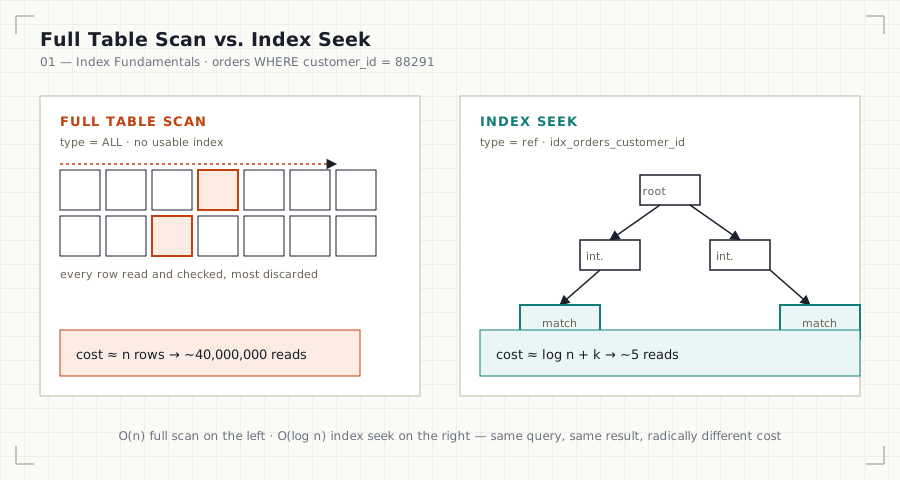
Full table scan (no index) — every row is read:
[row1][row2][row3][row4][row5][row6][row7][row8] ... [row40,000,000]
  ✗     ✗     ✓     ✗     ✗     ✓     ✗     ✗            ✗
        every single row is checked, most are discarded
Index seek (with an index on the filtered column) — the engine jumps directly to matching entries:
Index (sorted):        Table:
[4471  -> row2]
[12003 -> row9]
[88291 -> row1]  ─────► row1  ✓
[88291 -> row3]  ─────► row3  ✓
[91002 -> row5]
ASCII Diagram
                     WHERE customer_id = 88291
                              │
                 ┌────────────┴────────────┐
                 │   Does an index exist    │
                 │   on customer_id?        │
                 └────────────┬────────────┘
                    NO ┌───────┴───────┐ YES
                       ▼               ▼
              FULL TABLE SCAN     INDEX SEEK
              read all rows       jump to matching
              O(n)                entries, O(log n)
Execution Flow
- Parser validates the SQL and builds a parse tree.
- Optimizer evaluates available access paths (full scan vs. any usable index) and estimates the cost of each.
- Optimizer picks the lowest-cost path — this is why it’s called cost-based optimization: the choice is a cost comparison, not a rule (“always use an index if one exists” is false; see Edge Cases).
- Execution engine runs the chosen plan and streams rows back.
Engineering Notes
An index does not make a query fast by existing — it makes it fast when the optimizer chooses it, and the optimizer only chooses it when its cost estimate says it’s cheaper than the alternative. This is the most common conceptual gap for engineers new to indexing: they add an index, see no improvement, and assume indexes “don’t work” — when in fact the optimizer correctly rejected it. File 07 covers why.
Performance Notes
- Full table scans are O(n) in row count — cost grows linearly with table size, which is exactly why they’re tolerable in development (1,000 rows) and catastrophic in production (40,000,000 rows).
- Index seeks are roughly O(log n) for locating the starting point, plus the cost of reading the matching rows — this is why indexes matter most on large, selective filters, and matter far less on small tables or low-selectivity columns (more in File 07).
Storage Considerations
Every index is additional data written to disk. A table with five indexes
on it is not five times the write cost of zero indexes, but every INSERT
and UPDATE that touches an indexed column must update that index too.
Indexes are a read/write trade-off, not a free performance upgrade —
covered in depth in File 06.
Optimizer Notes
The optimizer’s decision is based on estimated cost, derived from
table and index statistics (row counts, value distribution). Statistics
can go stale after large data changes, causing the optimizer to make a
now-wrong decision — this is why ANALYZE TABLE (MySQL/PostgreSQL) exists
and matters operationally, not just academically.
ANSI SQL Notes
Indexes are not part of the ANSI SQL standard. Standard SQL defines what a query returns, not how the engine retrieves it — index creation syntax is entirely vendor-specific, which is why every example in this module calls out per-engine behavior explicitly.
MySQL Notes
- InnoDB (MySQL’s default engine) stores every table as a clustered index on the primary key — there is no true heap table in InnoDB. This is covered fully in File 02.
SHOW INDEX FROM <table>andEXPLAINare your primary inspection tools.
PostgreSQL Notes
- PostgreSQL tables are heap-organized by default (not clustered on the
primary key, unlike InnoDB) — index entries point to a physical
(page, offset)location called a TID. - Index names are unique per-schema, not per-table —
DROP INDEX
idx_name
alone is valid (no table name required).
SQL Server Notes
- SQL Server distinguishes clustered (table physically ordered by the index key — a table can have at most one) from non-clustered indexes, similar in spirit to MySQL’s InnoDB model.
Oracle Notes
- Oracle tables are heap-organized by default, similar to PostgreSQL, though Oracle also supports Index-Organized Tables (IOTs) as an explicit alternative.
Edge Cases
- Small tables: the optimizer frequently ignores an available index on a table with a few hundred rows because a full scan is already cheap — this is correct behavior, not a bug.
- Low-selectivity columns: an index on a boolean
is_activecolumn rarely helps, because roughly half the table matches either value — the index seek ends up reading nearly as many rows as a scan would, plus the overhead of the index lookup itself.
Best Practices
- Index columns that appear in
WHERE,JOIN ON, andORDER BYclauses on large, frequently queried tables. - Validate every new index with
EXPLAIN— never assume it’s being used. - Keep index count deliberate; every unused index is pure write overhead (File 06).
Anti-patterns
- Indexing every column “just in case.”
- Assuming an index helps without confirming via
EXPLAIN. - Indexing low-selectivity columns in isolation (they’re often only useful as part of a composite index — File 03).
Common Mistakes
- Confusing “an index exists” with “the index is being used.”
- Forgetting that indexes must be maintained — an index on a column that’s updated constantly can slow writes more than it speeds reads.
Interview Questions
- What is the time complexity of a full table scan versus an index seek, and why does that distinction matter more as tables grow?
- Why might the query optimizer ignore an available index? Give two concrete scenarios.
- Is an index part of the table’s logical schema or its physical storage? Justify your answer.
- A junior engineer adds an index and sees no query speedup. What are three possible explanations?
Summary
A full table scan reads every row and is O(n). An index is a separate, ordered structure that lets the engine jump to matching rows instead of reading everything. Whether the optimizer uses an available index is a cost decision, not a guarantee — small tables and low-selectivity filters are the two most common cases where a full scan wins despite an index existing. Everything in the rest of this module builds on this seek-vs-scan, cost-based foundation.
Practice
See 12_PRACTICE_PROBLEMS.md, Beginner section, Problems 1–4.
Further Reading
See resources/documentation.md for the official MySQL, PostgreSQL, SQL Server, and Oracle indexing documentation.