SQL-Engineering-Handbook
06 — Data Validation Checks
Introduction
Everything so far has cleaned data that’s already known to be dirty. This chapter shifts focus: writing queries whose entire purpose is to find problems proactively — before a report is built, before a pipeline loads data downstream, before a stakeholder notices something is wrong.
Concept Overview
Data validation queries check for structural and logical correctness: missing required fields, foreign keys pointing to nothing, dates that don’t make sense, numeric values outside a valid business range. Unlike the cleaning techniques in earlier chapters, validation queries typically don’t fix anything — they flag, count, and report, so a human or an automated gate can decide what happens next.
Why This Exists
Bad data is far cheaper to catch before it loads into a warehouse or reaches a dashboard than after. A validation layer at the point of ingestion (or as a scheduled check against existing tables) turns “we found out three weeks later that Q2 numbers were wrong” into “the pipeline flagged 12 invalid rows this morning, before anyone saw a bad report.”
Business Context
An order with a customer_id that doesn’t exist in the customers table. An employee record with a hire date in the future. A product with a negative price. A patient record with an age of 214. None of these are hypothetical edge cases — they are the normal output of systems without strict validation, migrations between schemas, and manual data entry.
Real Company Examples
- E-commerce: validating that every
order.customer_idhas a matching row incustomersbefore the nightly revenue report runs. - Banking: validating that transaction dates fall within the current statement period and aren’t in the future.
- Manufacturing: validating that
quantity_producedis never negative and thatdefect_countnever exceedsquantity_produced.
Business Problems Solved
Validation checks catch referential integrity gaps (orphaned foreign keys), logical impossibilities (negative quantities, future birth dates), and completeness gaps (required fields left blank) before they silently corrupt downstream calculations.
Visual Explanation
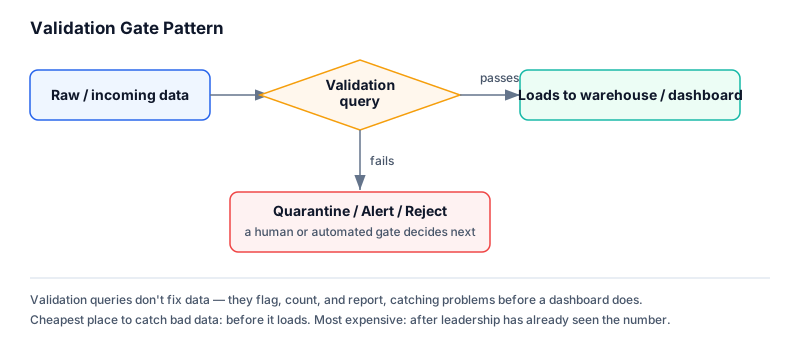
Validation Gate Pattern
──────────────────────────
Raw / Incoming Data
        │
        ▼
 ┌─────────────────┐
 │ Validation Query │──── fails? ──► Quarantine / Alert / Reject
 └─────────────────┘
        │
      passes
        │
        ▼
  Trusted Layer (safe for reporting)
Syntax
-- Missing required field
WHERE required_column IS NULL

-- Orphaned foreign key
SELECT c.*
FROM child_table c
LEFT JOIN parent_table p ON c.parent_id = p.id
WHERE c.parent_id IS NOT NULL AND p.id IS NULL;

-- Invalid date range
WHERE event_date > CURRENT_DATE
   OR event_date < '1900-01-01'

-- Negative value that should never be negative
WHERE quantity < 0

-- Impossible age
WHERE age < 0 OR age > 120
Detailed Explanation
The orphaned foreign key pattern (LEFT JOIN ... WHERE parent.id IS NULL) is one of the most useful validation patterns in this chapter: it finds every child row whose foreign key points to a parent that doesn’t exist, which an INNER JOIN-based query would simply hide by excluding those rows entirely. This is the same NULL behavior from Chapter 01, now used deliberately as a detection tool rather than treated as a bug.
Range validation (age < 0 OR age > 120, event_date > CURRENT_DATE) encodes business rules directly into SQL, and should be revisited periodically — business rules change (a “impossible age” threshold might differ for a life insurance company vs. a pediatric clinic), so hardcoded thresholds should be documented, not just embedded silently.
Production Workflow
- Define validation rules explicitly with the business (what counts as “invalid” is a business decision, not a purely technical one)
- Write one validation query per rule, each returning the offending rows, not just a boolean pass/fail
- Run validation as a gate before data reaches a trusted/reporting layer — quarantine or flag failures rather than silently proceeding
- Track validation failure rates over time as a data quality metric, not just a one-time check
Engineering Considerations
- Validation queries should be idempotent and safe to run repeatedly against production without side effects
- A validation failure doesn’t always mean “delete the row” — sometimes it means “flag for review” while still allowing downstream processes to proceed for the rest of the batch
- Validation logic duplicated across many ad hoc reports is a sign it belongs in a shared, scheduled data quality check instead
Performance Notes
Orphaned foreign key checks via LEFT JOIN ... WHERE ... IS NULL scale better on properly indexed foreign key columns than NOT IN subqueries, and unlike NOT IN, they aren’t vulnerable to unexpectedly returning zero rows if the subquery contains NULLs.
Common Mistakes
- Using
NOT IN (SELECT parent_id FROM parent_table)for orphan detection — silently breaks (returns zero rows) if anyparent_idin the subquery is NULL - Writing range validations without confirming the business-approved thresholds first
- Treating a validation failure as automatically requiring deletion, rather than considering quarantine or flagging as options
- Running validation only once at initial build time and never re-running it as new data arrives
Edge Cases
- A “future date” check needs to account for time zones consistently — a transaction timestamped in UTC might appear to be “in the future” for a user in a different time zone if compared naively
- Range boundaries need explicit decisions about inclusivity (
age > 120vs.age >= 120) — document the choice, since it’s easy to be off by one at the boundary
Best Practices
- Prefer
LEFT JOIN ... WHERE parent.id IS NULLoverNOT INfor orphan/referential checks - Return offending rows from validation queries, not just counts — someone will need to investigate them
- Centralize validation logic in a scheduled or pipeline-integrated location rather than duplicating it across reports
Interview Questions
- How would you find orphaned foreign key records, and why is
NOT INrisky for this compared toLEFT JOIN? - What’s the difference between a validation query and a cleaning query?
- How would you validate that no order in a table has a negative quantity or price?
- Why might a validation failure warrant flagging a row rather than deleting it?
Summary
Validation queries exist to catch bad data before it does damage, not after. The orphaned foreign key pattern (LEFT JOIN ... WHERE ... IS NULL) and simple range checks (negative values, impossible dates or ages) cover the majority of real-world validation needs, and should run as a gate ahead of any trusted reporting layer, not as an afterthought.
Practice Challenges
- Write a query to find every order whose
customer_iddoes not exist in thecustomerstable. - Write a query to find every employee record with a
hire_datein the future. - Write a query to find every product with a negative price or a price of exactly zero (assuming zero is also invalid for this business).
- Explain why
NOT INis risky for finding orphaned foreign keys, with a concrete example involving a NULL value in the subquery.