SQL-Engineering-Handbook
04 — Data Cleaning Techniques
Introduction
Standardizing individual values is only part of the job — production data also accumulates duplicate rows, blank-but-not-NULL fields, and inconsistent representations of “no value.” This chapter covers detecting and resolving those problems at the row level.
Concept Overview
- Blank vs. NULL vs. whitespace-only — three distinct states that are easy to conflate but require different detection logic
- Duplicate detection — finding rows that represent the same real-world entity, whether via exact duplication or fuzzy near-duplication
- Duplicate removal — safely eliminating redundant rows while keeping the correct “canonical” version
Why This Exists
Duplicate rows inflate counts, distort averages, and cause incorrect joins (a “one row per customer” assumption silently becomes “two or three rows per customer” after a bad import). Blank and whitespace-only values masquerade as “filled in” fields when checked only with IS NOT NULL, leading to false confidence in data completeness.
Business Context
A customer signs up twice because a form was submitted twice due to a network retry. A nightly ETL job reruns after a partial failure and inserts the same day’s orders again. A required “company name” field technically isn’t NULL — it’s just a single space character, entered accidentally.
Real Company Examples
- E-commerce: duplicate order rows from webhook retries inflate daily revenue reports until deduplicated by a natural key (customer + timestamp + amount).
- CRM systems: duplicate lead records from the same person filling out a form on two different landing pages.
- Data warehousing: duplicate fact table rows from a botched incremental load, caught by row-count validation between source and target.
Business Problems Solved
Correct duplicate handling prevents inflated revenue, customer count, and engagement metrics. Correct blank/NULL/whitespace detection prevents “100% complete” data quality reports that are actually hiding meaningfully empty fields.
Visual Explanation
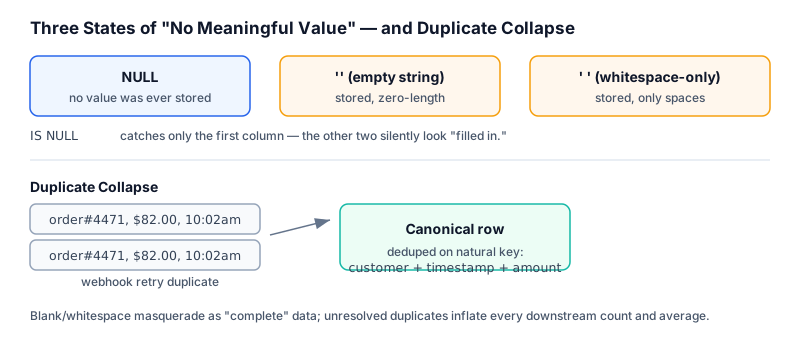
Three states of "no meaningful value":

NULL             →  no value was ever stored
''  (empty)      →  a value was stored, and it's zero-length
'   ' (whitespace) → a value was stored, and it's only spaces

IS NULL          catches only the first
= ''             catches only the second
TRIM(col) = ''   catches the second AND third together
Duplicate detection pattern:

customer_id | order_date | amount        <- these three columns
     101    | 2026-01-05 |  49.99            together define
     101    | 2026-01-05 |  49.99            "the same order"
     102    | 2026-01-06 |  19.99            in this business

GROUP BY customer_id, order_date, amount
HAVING COUNT(*) > 1     -->  flags the duplicate pair
Syntax
-- Blank / whitespace-only detection
WHERE column IS NULL
WHERE column = ''
WHERE TRIM(column) = ''

-- Finding duplicates by natural key
SELECT key_col1, key_col2, COUNT(*)
FROM table_name
GROUP BY key_col1, key_col2
HAVING COUNT(*) > 1;

-- Removing duplicates, keeping the lowest id per group (MySQL 8+)
DELETE t1 FROM table_name t1
INNER JOIN table_name t2
  ON t1.key_col = t2.key_col AND t1.id > t2.id;

-- Removing duplicates using ROW_NUMBER() (MySQL 8+/PostgreSQL)
WITH ranked AS (
  SELECT *, ROW_NUMBER() OVER (PARTITION BY key_col ORDER BY id) AS rn
  FROM table_name
)
DELETE FROM table_name WHERE id IN (SELECT id FROM ranked WHERE rn > 1);
Detailed Explanation
Detecting duplicates requires first defining what “duplicate” means in business terms — an exact duplicate of every column is rare; more commonly, a natural key (customer + date + amount, or email address alone) defines uniqueness, and rows matching on that key but differing elsewhere (a timestamp, a row ID) are still duplicates for business purposes.
The GROUP BY ... HAVING COUNT(*) > 1 pattern identifies duplicate groups but doesn’t remove anything by itself — it’s a detection query, meant to run before any deletion, so a human or an automated process can confirm the duplicates are safe to remove. Removal itself typically uses ROW_NUMBER() to rank rows within each duplicate group (commonly by a timestamp or ID to decide which copy is “the original”) and deletes everything except rank 1.
Blank and whitespace-only values require TRIM(column) = '' specifically — checking column = '' alone misses whitespace-only entries, and IS NULL alone misses both.
Production Workflow
- Run detection queries (
GROUP BY ... HAVING COUNT(*) > 1) before any deletion — never delete blind - Confirm the natural key that defines “duplicate” with the business stakeholder, not just technical intuition
- Decide the “keep” rule (earliest row, latest row, most complete row) explicitly
- Remove duplicates using
ROW_NUMBER()or a self-join, ideally inside a transaction with a rollback plan - Add a uniqueness constraint or upstream idempotency check so the duplicate doesn’t recur
Engineering Considerations
- Deleting duplicates without a defined “keep” rule risks losing the more complete or more recent record
- Duplicate removal should generally happen upstream (at ingestion/ETL), with downstream queries treating it as already handled — repeatedly deduplicating in every report query is fragile and slow
- Always test duplicate-removal
DELETEstatements as aSELECTfirst to preview exactly which rows would be removed
Performance Notes
GROUP BY across a large table for duplicate detection can be expensive without a supporting index on the natural key columns. For very large fact tables, consider partitioning the detection query by date range rather than scanning the entire table at once.
Common Mistakes
- Deleting duplicates without deciding which copy to keep, resulting in arbitrary (and non-reproducible) survivorship
- Checking only
IS NULLor only= ''and missing whitespace-only values - Running a
DELETEdirectly without first previewing the affected rows viaSELECT - Defining “duplicate” as every column matching exactly, when the real business duplicate only matches on a subset of columns
Edge Cases
- Two genuinely different real-world events (two separate $49.99 purchases by the same customer on the same day) can look identical to a naive natural-key duplicate check — the key must be chosen carefully to avoid false positives
- NULLs inside the natural key columns complicate
GROUP BY-based duplicate detection, since most engines group all NULLs together, potentially treating unrelated NULL-keyed rows as “duplicates”
Best Practices
- Always preview deletions with a
SELECTbefore running the equivalentDELETE - Define and document the natural key used for duplicate detection per table
- Prefer fixing duplication at the source (idempotent inserts, unique constraints) over repeated cleanup queries
Interview Questions
- How would you find duplicate rows based on a subset of columns rather than the entire row?
- Write a query to remove duplicate rows while keeping only the earliest one per group.
- What’s the difference between NULL, an empty string, and a whitespace-only string, and how do you check for each?
- Why is
GROUP BY ... HAVING COUNT(*) > 1considered a detection query rather than a cleanup query?
Summary
Row-level data cleaning centers on two problems: rows that shouldn’t be counted twice, and fields that look “filled in” but aren’t meaningfully so. Duplicate detection requires an explicit, business-defined natural key and a clear “keep” rule before any deletion; blank detection requires checking NULL, empty string, and whitespace-only as three separate conditions.
Practice Challenges
- Write a detection query to find duplicate customer emails in the
customerstable. - Write a query to find rows where
customer_nameis technically not NULL but is empty or whitespace-only. - Using
ROW_NUMBER(), write a query that identifies which row to keep and which to remove for each duplicate email group, keeping the lowestcustomer_id. - Explain, in business terms, why deleting duplicates before confirming the natural key with a stakeholder is risky.