SQL-Engineering-Handbook
02 — NULL Handling Functions
Introduction
Knowing that NULL exists is only half the job — production SQL needs to actively replace, compare, or guard against NULLs so reports and calculations stay correct. This chapter covers the three core functions every analytics engineer reaches for: COALESCE(), IFNULL(), and NULLIF().
Concept Overview
COALESCE(expr1, expr2, ..., exprN)— returns the first non-NULL expression in the list. ANSI SQL standard, works across all major engines, accepts any number of arguments.IFNULL(expr1, expr2)— MySQL-specific, exactly two arguments, returnsexpr1if not NULL, otherwiseexpr2. (SQL Server usesISNULL(); PostgreSQL doesn’t haveIFNULLat all — useCOALESCEthere.)NULLIF(expr1, expr2)— returns NULL ifexpr1 = expr2, otherwise returnsexpr1. Used to deliberately convert a specific value into NULL — most commonly to avoid divide-by-zero errors.
Why This Exists
Raw NULLs are correct for storage but often wrong for display and calculation. A report showing a blank cell instead of "No Manager" is confusing to a business user. A division that crashes on a zero denominator breaks a whole report. These functions exist to translate NULL (or a specific problem value) into something safe and readable at the point of use, without altering the underlying stored data.
Business Context
A dashboard needs to show "Unassigned" instead of a blank manager column. A margin calculation needs to skip stores with zero revenue instead of throwing a divide-by-zero error. A commission report needs to distinguish “discount code was never entered” from “discount code was entered as literally the string NONE.”
Real Company Examples
- Retail reporting:
COALESCE(discount_amount, 0)ensures a report’s “total discounts given” sums correctly instead of a NULL discount silently vanishing from context. - Finance:
NULLIF(denominator, 0)inside a margin calculation prevents an entire report from failing when one row has zero revenue. - Support ticketing:
COALESCE(resolved_at, 'Still Open')-style logic (with type-appropriate casting) drives “open vs. resolved” ticket dashboards.
Business Problems Solved
These functions let you produce business-readable output without changing stored data, safely perform arithmetic on columns that may contain NULL or zero, and build defensive queries that don’t break when upstream data quality is imperfect.
Visual Explanation
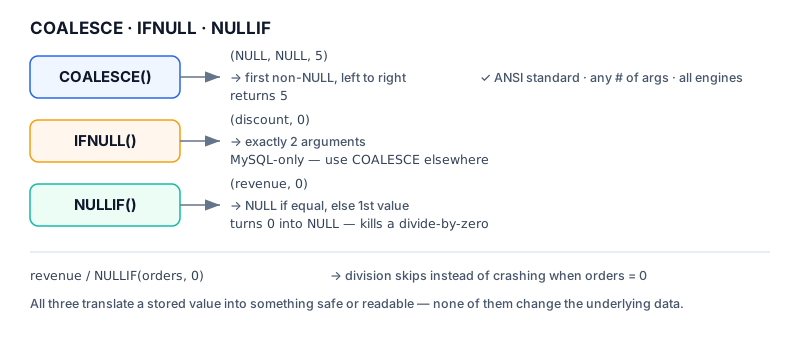
COALESCE(a, b, c)
──────────────────
a = NULL, b = NULL, c = 5   →  returns 5   (first non-null, left to right)
a = 3,    b = NULL, c = 5   →  returns 3   (stops at first non-null)

NULLIF(a, b)
──────────────────
a = 10, b = 0    →  returns 10   (not equal, returns a)
a = 0,  b = 0    →  returns NULL (equal, converted to NULL)
Syntax
-- COALESCE: ANSI standard, N arguments, portable across engines
COALESCE(column_name, 'default_value')
COALESCE(col_a, col_b, col_c, 'fallback')

-- IFNULL: MySQL-specific, exactly 2 arguments
IFNULL(column_name, 'default_value')

-- NULLIF: converts a matching value into NULL
NULLIF(denominator, 0)
Detailed Explanation
COALESCE vs. IFNULL — functionally, for a two-argument case, they behave identically in MySQL. The real difference is portability and flexibility: COALESCE is part of the SQL standard, works in PostgreSQL, SQL Server (as a synonym behavior), Oracle, Snowflake, and BigQuery, and accepts an arbitrary chain of fallbacks (COALESCE(preferred_email, backup_email, 'no-email-on-file')). IFNULL only exists in MySQL and is capped at two arguments. Default to COALESCE unless you have a specific reason not to.
NULLIF is not a NULL-replacement function — it’s the reverse: it takes two ordinary values and produces a NULL when they match. Its most common real use is inside a division: revenue / NULLIF(units_sold, 0). If units_sold is 0, the expression becomes revenue / NULL, which evaluates to NULL instead of raising a divide-by-zero error — and NULL is usually the correct business answer for “margin per unit when zero units were sold.”
A common mistake (and one worth flagging explicitly) is using NULLIF to compare two unrelated columns expecting some kind of “difference” logic — for example NULLIF(dept_id, manager_id). This does not compute a meaningful difference; it only returns NULL in the coincidental case where a department ID numerically equals a manager ID, which has no business meaning. NULLIF should only compare a value against a specific, meaningful sentinel (like 0, '', or 'N/A').
Production Workflow
- Identify where NULL needs to become a business-readable default (COALESCE)
- Identify where a specific “problem” value (usually 0) needs to become NULL to avoid a calculation error (NULLIF)
- Combine them where needed:
COALESCE(revenue / NULLIF(units, 0), 0)produces 0 instead of NULL for zero-unit rows if the report requires numeric-only output - Never use these functions to mask a data quality problem that should instead be fixed upstream — they are for presentation and calculation safety, not a substitute for cleaning the source data
Engineering Considerations
- COALESCE evaluates arguments left to right and short-circuits at the first non-NULL — in engines where an argument is an expensive subquery, order matters for performance
- The return type of COALESCE is determined by type precedence across all arguments — mixing incompatible types (e.g., a string fallback for a numeric column) can cause implicit casting or errors depending on the engine
- IFNULL’s two-argument limit means chained fallbacks require nesting:
IFNULL(IFNULL(a, b), c)— COALESCE avoids this ugliness entirely
Performance Notes
Wrapping a WHERE-clause column in COALESCE or IFNULL (e.g., WHERE COALESCE(status, 'unknown') = 'unknown') typically prevents index usage on that column, because the engine must evaluate the function per row before it can compare. When performance matters, prefer WHERE status IS NULL OR status = 'unknown' over wrapping the column in a function.
Common Mistakes
- Using COALESCE with a fallback value that has business meaning conflicting with a real possible value (e.g., falling back to
0for a column where0is also a legitimate recorded value — this makes “missing” and “zero” indistinguishable downstream) - Using NULLIF to compare two unrelated columns expecting meaningful output, rather than comparing a column against a specific known sentinel
- Forgetting that IFNULL is not portable outside MySQL
Edge Cases
COALESCE()with all-NULL arguments returns NULL — there is no ultimate fallback unless you supply a literal as the last argumentNULLIF(NULL, 0)returns NULL (NULL is never equal to anything, including in this comparison) — NULLIF does not “clean” existing NULLs, only converts matching non-NULL values- Type mismatches inside COALESCE (e.g., mixing DATE and VARCHAR) can raise errors in strict engines even if only one branch would ever actually execute
Best Practices
- Default to COALESCE for portability, reserve IFNULL only when you specifically know you’re staying on MySQL
- Use NULLIF specifically for divide-by-zero protection or converting known placeholder values (like empty string) into true NULL
- Choose fallback values that cannot be confused with real data — prefer explicit labels like
'Unknown'over0when zero has business meaning
Interview Questions
- What is the difference between COALESCE and IFNULL, and when would you choose one over the other?
- How would you use NULLIF to prevent a divide-by-zero error in a margin calculation?
- What does
COALESCE(a, b, c)return if all three arguments are NULL? - Why might wrapping a column in COALESCE inside a WHERE clause hurt query performance?
Summary
COALESCE and IFNULL replace NULL with a meaningful fallback for display or calculation; NULLIF does the opposite, converting a specific matching value into NULL, most commonly to guard against divide-by-zero. Used correctly, these three functions make queries resilient to missing data without altering the underlying stored records.
Practice Challenges
- Write a query that shows each employee’s manager name, or
'No Manager'if none is assigned, using COALESCE. - Write a query that safely calculates
salary / NULLIF(years_experience, 0)for a hypotheticalyears_experiencecolumn, explaining what happens when experience is zero. - Explain why
NULLIF(dept_id, manager_id)is not a meaningful business calculation, and rewrite the intent as a proper CASE expression instead. - Rewrite a chain of nested
IFNULL(IFNULL(a, b), c)calls using a single COALESCE call.